Private AI Deployment Pitfall Guide: How Panel AI Makes Dify a One-Click Rollout

How Panel AI reduces private Dify deployment from 60 minutes of ops work to a 5-minute zero-knowledge task.
The article makes the case for private AI deployment driven by data security, model autonomy, and cost control. Using Dify as an example, it breaks down the complexity of manually coordinating 8 containers — Nginx, Redis, a vector database, and more — plus firewall and security group configuration, taking 30–60 minutes with high difficulty. By contrast, Panel AI's app marketplace automates all networking setup, compresses deployment to ~5 minutes, and supports multi-user container isolation and one-click horizontal scaling. The verdict: manual deployment is great for learning; teams focused on results should use a mature platform.
Why Enterprises Are Going Private with AI Deployment
Public cloud AI services are convenient, but for enterprises they come with three fundamental drawbacks: sensitive data leaving the internal network, dependence on third-party model providers, and unpredictable long-term costs. When conversation logs, knowledge bases, and business data all have to be uploaded to external servers, many organizations simply cannot accept the compliance and security risks.
This is exactly where private deployment delivers value — your data, your models, your costs, all under your control. Once deployed on your own servers, all conversations, knowledge bases, and model calls stay within your internal network. You can connect local LLMs even without internet access. More importantly, it supports concurrent use by all staff with full data isolation — each employee and team gets their own independent container and data that never interferes with anyone else's.
Fighting Through Private Deployment Locally: 8 Containers and All the Pitfalls
The core message from this Bilibili creator is blunt: ordinary teams should not try to self-host a private AI stack from scratch on bare metal. Using Dify as an example, he walks through the full manual deployment pipeline — and the pitfalls are far more numerous than you'd expect.
Dify alone requires eight containers working in concert: Nginx for reverse proxying, an API service for handling requests, a Worker for task execution, a Sandbox for isolated code execution, an external proxy, Redis for caching, a relational database, and a vector database. To get this whole stack running, manual deployment involves pulling the repository, configuring environment variables, starting services, waiting for containers to become ready, and configuring ports — among other steps.
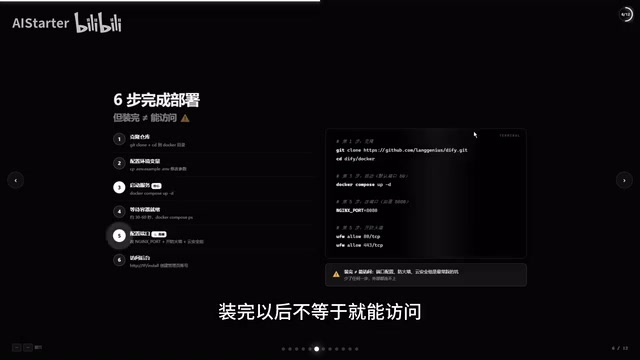
The real difficulty lies in the details. Pulling the repo first requires solving network access issues, and any slip in environment variables or repository configuration will throw errors. Even after installation, the service isn't immediately accessible — you still need to manually configure ports, open firewall rules, and set up security groups on your cloud provider. As the creator puts it, miss any single step and nothing connects from the outside. For anyone without solid ops experience, this process takes 30 to 60 minutes, earns a three-star difficulty rating, and the debugging alone is enough to make most people give up.
The division of labor across these eight containers reflects a classic microservices architecture. Nginx serves as the unified entry point for traffic distribution and SSL termination. Redis acts as an in-memory caching layer to speed up frequent reads. The vector database (Dify defaults to Weaviate or Qdrant) handles storing and retrieving text embedding vectors from the knowledge base — the foundational layer for RAG (Retrieval-Augmented Generation) capabilities. The Sandbox provides an isolated execution environment for code-execution tools, preventing malicious code from affecting the host machine. These components are orchestrated together via Docker Compose and communicate over an internal network. Because there are so many components with complex interdependencies, if any container starts in the wrong order or has an incorrect port mapping, the entire service can fail — which is the root cause of the high debugging cost in manual deployments.
Panel AI: Turning Private Deployment from a Specialist Task into Something Anyone Can Do
Panel AI is positioned as an AI infrastructure platform whose core value is lowering the barrier to private deployment. The creator emphasizes this isn't a sponsored plug — the platform genuinely solves the most time-consuming parts of manual deployment: port configuration, firewall rules, and security groups are all handled automatically.
The actual demo workflow is remarkably simple: open the backend app marketplace, find Dify in the full app list, click Install, select a deployment node, confirm — and the system automatically downloads and deploys everything. Once the task completes, find Dify under "Installed," click to launch it, then open the frontend via the debug link to verify access. The whole process takes about 5 minutes and requires zero prior knowledge.
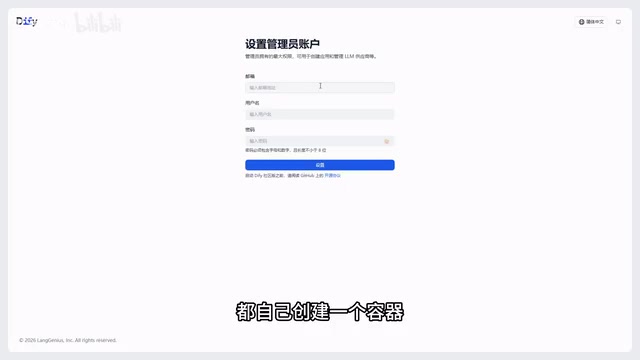
Multi-account isolation is another standout feature. Once a project is installed, all users who log into the Panel AI frontend can see Dify in the ecosystem marketplace and create their own instance with a single click. Each person gets an independent container with independent data — knowledge bases and conversations never collide. After deployment, local LLMs and local AI agents can both be connected directly within the platform.
Security groups are virtual firewall mechanisms provided by cloud vendors (such as Alibaba Cloud, Tencent Cloud, and AWS) that control which IP addresses and ports can communicate with your cloud server. OS-level firewalls (like Linux's iptables/firewalld) filter traffic at the operating system layer, while port mapping determines how services inside containers are exposed to the outside world. These three are the most error-prone "three checkpoints" in manual deployment — even if the application itself is running, a single misconfiguration means external users get no access at all. For people without an ops background, these concepts alone require a real learning investment, and debugging when something goes wrong is time-consuming. This is precisely the cut-in point where platform-style tools create genuine value.
Elastic Scaling: No More Full Outages Because One Server Hit Its Limit
The weakest link in traditional private deployment is single-point failure — one server buckles under load and the entire service grinds to a halt. Panel AI leads with horizontal scaling capability as the fix.
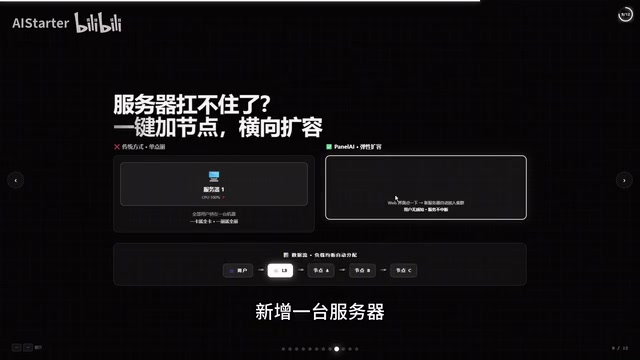
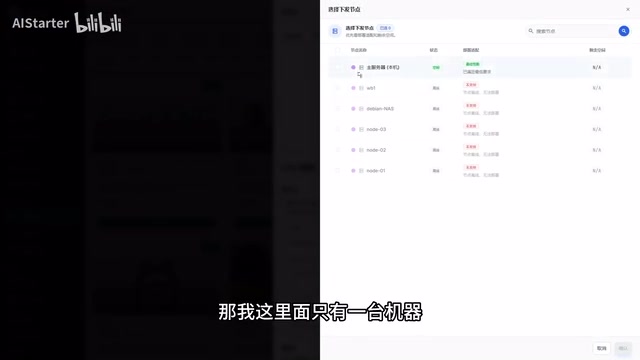
When a node can't keep up, users simply click "Add a new server" in the UI. The new node joins the cluster automatically, invisibly to end users, with no service interruption — traffic is automatically redistributed via load balancing. Beyond Dify, the platform can manage other AI applications in a unified way, effectively making one Panel AI platform the automated management layer for N AI applications.
Horizontal scaling (Scale Out) and vertical scaling (Scale Up) represent two approaches to overcoming server performance bottlenecks. Vertical scaling means adding more CPU or RAM to a single machine — it's capped by hardware specs and typically requires downtime. Horizontal scaling means adding more server nodes and distributing requests across them through a load balancer, offering theoretically higher ceilings and the ability to scale without interrupting service. For AI applications, model inference and vector search are both compute-intensive tasks that can quickly make a single node the bottleneck under high concurrency. Panel AI's claimed one-click node addition essentially automates cluster registration, service discovery, and load balancer configuration — eliminating the complexity of manually setting up orchestration tools like Kubernetes or Docker Swarm.
Manual vs. Platform: How to Actually Choose
Both approaches have their target audience. Here's a side-by-side comparison:
Manual Deployment (Local / Native)
- Time: 30 to 60 minutes
- Difficulty: ★★★
- Port configuration, firewall rules, scaling: all manual
- Best for: ops engineers, developers who want to learn, people who enjoy tinkering
Panel AI One-Click Deployment
- Time: ~5 minutes
- Difficulty: Zero prerequisite knowledge required
- Port configuration and firewall rules automated; one-click horizontal scaling supported
- Best for: individuals, teams, and enterprises that want AI deployed fast and efficiently
The creator's recommendation is clear: if you want to learn the technology and enjoy the challenge, manual deployment is great practice. But for the majority of use cases where the goal is to "get AI into the organization" as quickly as possible to improve productivity, using a mature platform is simply the better investment.
Conclusion: Private Deployment Is the Optimal Path to Embracing AI
Whether you're an individual, a team, or an enterprise — if data security and cost control matter to you, private deployment is a direction worth taking seriously. The core logic of this piece can be distilled into three sentences: own your data, run your own models, control your own costs.
One important caveat: this article is primarily based on a single creator's demo and perspective. Panel AI's automation capabilities and scaling performance should be validated through your own testing against your actual business scale. For teams with solid technical foundations, it's worth going through the manual Dify eight-container deployment first to truly understand the architecture — then decide whether bringing in a platform tool is the right move to reduce long-term operational overhead.
Related articles

Chain of Thought Isn't Just for AI: How Humans Can Use CoT to Improve Thinking Quality
Chain of Thought isn't just a prompt trick for large models. Starting from a Hacker News discussion, this article analyzes why CoT works for human thinking too, breaks down actionable ways to transfer it, and highlights the key differences between human CoT and machine CoT.
Cloudflare Teams Up with OpenAI: Closi…
Cloudflare Teams Up with OpenAI: Closing the Loop from Vulnerability Discovery to Defense with AI
Cloudflare uses OpenAI Daybreak to investigate security vulnerabilities and generate reviewable remediation plans, while developers use Codex to boost coding efficiency and quality.

Orca Multi-Agent Orchestration in Practice: A Guide to Parallel Collaboration with Claude and Codex
Orca is Stable AI's free open-source agent workbench supporting 34 agents like Claude Code and Codex in parallel. Learn its Git worktree isolation, multi-model orchestration, and mobile management.