Punchcutter: Generate Real Font Families from a Sentence or Handwriting
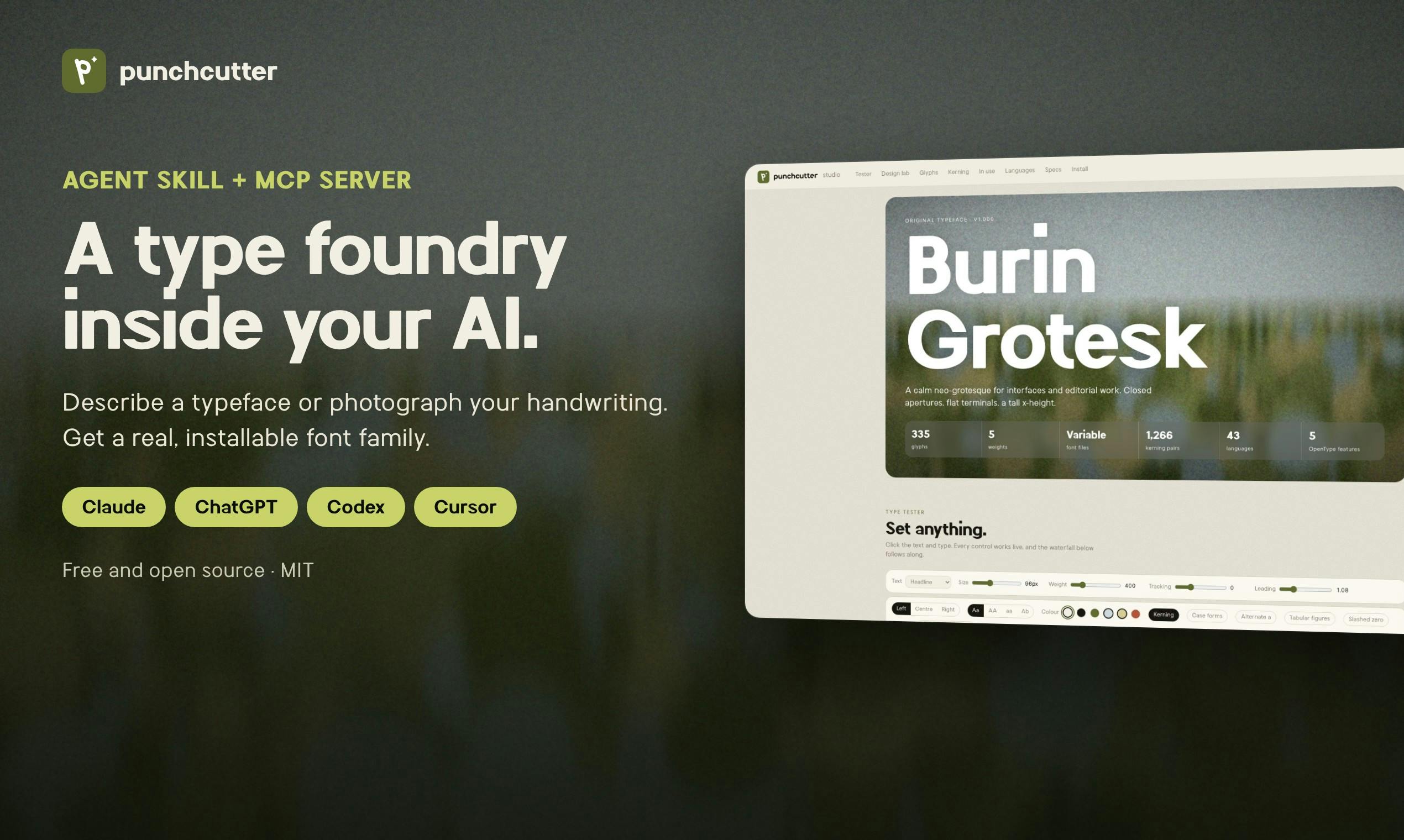
Open-source tool Punchcutter generates complete font families from a sentence or handwriting photo and integrates with mainstream AI platforms as an MCP server.
Punchcutter is an open-source font generation tool gaining attention on Product Hunt. It drives font design with natural language descriptions or handwriting samples—just input a sentence or photograph your handwriting to generate a complete font family including TTF, OTF, variable fonts, and web fonts, plus a visual Studio app. It works as an Agent Skill and MCP server compatible with Claude, ChatGPT, Codex, and Cursor, embedding font generation into everyday AI workflows. Its open-source nature makes the generation logic reviewable and modifiable. The article notes that quality, copyright, and character set coverage still need practical verification; its value lies more in providing a low-cost starting point for prototyping and personal projects than in replacing professional font designers.
Font design has long been a high-barrier professional field requiring years of training and expensive software. But Punchcutter, an open-source tool on Product Hunt, is breaking down that barrier: just input a sentence, or snap a photo of your handwriting, and it generates a complete font family—including TTF, OTF, variable fonts, and web fonts—with a built-in Studio app.
From a Sentence or a Photo to a Complete Font Family
Punchcutter's core idea is "driving font generation with natural language or handwriting samples." Its tagline is refreshingly direct: "Turn a sentence or your handwriting into a real font family." That means you don't need to master Bézier curves, kerning, or OpenType features—just describe the style you want, such as "an elegant serif typeface for fashion magazine headlines," and the system understands and generates a usable set of font files.
What's more distinctive is the handwriting path. After users photograph their handwriting sample, Punchcutter converts it into a stylistically consistent font family rather than a simple scan of individual characters. For designers, brands, or educators who want to preserve personal handwriting characteristics, this is a highly appealing capability.
In terms of output formats, Punchcutter covers the full chain of the modern font workflow: TTF and OTF for traditional desktop publishing, variable fonts for continuous weight adjustment in responsive design, and web fonts that serve web projects directly. This "generate once, output many formats" design avoids the hassle of repeated exporting and conversion in traditional font production.
Kerning and OpenType features are two core concepts in professional typography. Kerning refers to the fine-tuning of spacing between specific character pairs (such as "AV" or "To"), which determines whether text layout looks visually even and comfortable; if you rely only on monospacing or default spacing, awkward gaps often appear in headlines and body text. OpenType features include ligatures, alternate glyphs, small caps, fractional typesetting, and more, used to give fonts more refined typographic effects in different contexts. Both must be explicitly defined as tables in the font file, and they are key indicators that distinguish "characters that can be displayed" from "fonts usable for production typesetting."
Variable Fonts are a font format in the OpenType specification that compresses multiple variants of the same font family—such as weight, width, or slant—into a single file, controlled through continuously varying "axis" parameters. Compared with the traditional approach of providing a separate TTF/OTF for each weight, variable fonts significantly reduce file size and support smooth weight adjustment in responsive typography. Web fonts usually refer to WOFF/WOFF2 formats, compression-optimized for web loading. Punchcutter outputting all these formats means the generated results can go directly into desktop publishing, front-end development, and modern design systems without additional format conversion.
Cross-Platform Agent Skill and MCP Server
Punchcutter is not an isolated desktop application but an "Agent Skill" and MCP server aimed at AI agents. It is compatible with mainstream AI platforms such as Claude, ChatGPT, Codex, and Cursor.
This means users can invoke font generation capabilities directly within the AI chat interfaces they are familiar with. For example, describe font requirements in Claude, and Punchcutter as an MCP server receives the instructions and returns font files; when writing front-end code in Cursor, you can instantly generate matching fonts. This integration frees font design from specialized software and embeds it into everyday AI workflows.
MCP (Model Context Protocol) is a standard that has emerged in the AI tool ecosystem in recent years, used to let AI models safely call external tools and data. Punchcutter choosing to provide its service as an MCP server shows that it targets "AI-native" design workflows rather than the AI plugin model of traditional software.
Agent Skill usually refers to packaging a capability in a structured description (such as tool definitions, call parameters, and execution logic) so that AI agents can invoke it autonomously during conversation. Unlike ordinary plugins, Skills emphasize being "understandable and orchestrateable by agents," letting the model decide when to use them and what parameters to pass based on user intent. Punchcutter provides both an MCP server and an Agent Skill as integration forms—the former for clients that support the MCP protocol, the latter for the broader AI platform ecosystem. This dual-form design lowers the adaptation cost across different AI tools and explains why it can be compatible with platforms such as Claude, ChatGPT, Codex, and Cursor at the same time.
Open Source and the Studio App: Lowering the Barrier to Font Creation
Punchcutter is completely free and open source, with its code hosted on GitHub. Open source means font designers can review the generation logic, modify the algorithm, or even build their own font tools on top of it. For the typography community, this openness helps promote transparency and reproducibility in generative font technology.
The accompanying Studio app provides a visual interface so that users who are not comfortable with the command line can also get started. Although the Product Hunt page does not detail the specific functional boundaries of Studio, judging from its positioning as a "built-in Studio app," it likely includes features such as font preview, parameter adjustment, and export management.
Interestingly, Punchcutter received 70 upvotes on Product Hunt, ranking 16th, with 4 comments. This data shows it has attracted early attention but is still at a relatively niche stage. Font generation is a vertical field, and gaining this kind of initial traction reflects the growing demand for AI-assisted design tools.
The Boundaries and Possibilities of Generative Fonts
Punchcutter represents an emerging category of tools: using generative AI to handle creative work that traditionally relies on manual craftsmanship. Its value lies not in replacing professional font designers but in providing a low-cost starting point for prototyping, personal projects, and rapid brand exploration.
Of course, issues such as the quality of generated fonts, copyright ownership, and character set coverage still need to be verified through actual use. A "real font family" must handle hundreds of glyphs, complex kerning rules, and multilingual support—these details determine whether a font can truly be used in production environments. Punchcutter's open-source nature allows the community to jointly test and improve these aspects.
For practitioners in AI programming and design, Punchcutter offers an interesting sample: how to package complex processes in a professional field into skills that AI agents can invoke while maintaining compatibility with professional output formats. This "AI skill + professional format output" model may appear in more creative tool domains.
Character set coverage is an important dimension for evaluating whether a generated font can enter production environments. A font aimed at the Latin alphabet usually needs to cover hundreds of glyphs, including basic Latin, extended Latin, punctuation, numerals, and symbols; if it involves CJK character sets such as Chinese, Japanese, and Korean, the number of glyphs rises to thousands or even tens of thousands. In addition, different languages have different requirements for diacritics, ligature rules, and writing direction. Generative tools often show only a small number of letters in demo scenarios, but a truly usable font family must ensure complete character set coverage, consistent glyph style, and proper handling of spacing and alignment in multilingual typesetting.
One-line Summary
Open-source tool Punchcutter generates complete font families from a sentence or handwriting photo and integrates with mainstream AI platforms as an MCP server.
Paragraph Summary
Punchcutter is an open-source font generation tool that has gained attention on Product Hunt, with a core idea of driving font design through natural language descriptions or handwriting samples. Users only need to input a sentence or photograph their handwriting to generate a complete font family including TTF, OTF, variable fonts, and web fonts, along with a visual Studio app. It is not isolated software but is compatible with AI platforms such as Claude, ChatGPT, Codex, and Cursor in the form of an Agent Skill and MCP server, embedding font generation into everyday AI workflows. Its open-source nature makes the generation logic reviewable and modifiable, helping promote transparency in generative font technology. The article also notes that the quality, copyright ownership, and character set coverage of generated fonts still need practical verification, and that its value lies more in providing a low-cost starting point for prototyping and personal projects rather than replacing professional font designers.
Related articles
From 0 to 1: Vibe Coding an AI Knowledge Base — A Practical Retrospective and Tech Stack Breakdown
A retrospective on building the AI knowledge base OilBook from scratch with Vibe Coding: Next.js+Neon stack, Oil Dev Skill workflow, Stripe paywall security, interview-style writing, AI-flavor control, and Vercel deployment.
GLM-5.4 Hands-On: Native Vision Meets a New Vibe Coding Workflow
Hands-on with Zhipu GLM-5.4: native vision tested across a 3D product demo, pure-code video generation, and remote-control Vibe Coding, compared with GPT-6.2 and Gemini Neon.

AI and Humans Claim to Prove the Riemann Hypothesis: Machine-Verified, Yet Nobody Can Understand It
Anthropic mathematician and AI Claude claim to prove the Riemann Hypothesis with 17 million lines of Lean code, machine-verified but unreadable by humans. This article analyzes the event, the zero proportion record from 41.6% to 67.2%, and the gap between machine verification and human understanding.