Python Crash Course for Beginners: A Full Breakdown of the 9.6-Douban-Rated Automation Masterpiece

The 9.6-Douban-rated *Python Crash Course* is a practical beginner's book centered on automating real office tasks.
This article introduces *Python Crash Course — Automate the Boring Stuff*, a beginner's Python book focused on office automation. Rated 9.6 on Douban, it takes a pragmatic approach: rather than starting with computer science fundamentals, it organizes content around automating real work. Its three core advantages are beginner-friendliness, practicality, and a do-first-explain-later approach. The book has 18 chapters in two parts—Chapters 1-6 cover programming basics, while Chapters 7-18 cover automation practice, including regular expressions, file management, web scraping, Excel/PDF/Word processing, CSV and JSON, task scheduling, email and SMS, image processing, and GUI automation. It is aimed at admin, operations, data processing, testing, DevOps, and product staff, as well as developers who need to handle batch tasks. The companion PDF and source code can be obtained by commenting.
In today's sea of Python learning resources, the fact that an introductory book focused on office automation has earned a 9.6 rating on Douban is itself a signal: it hits the most genuine pain point of a large number of non-professional developers—not building wheels, but using code to eliminate repetitive work.
What Problem Does This Book Actually Solve?
Python's ecosystem spans backend development, web scraping, data analysis, artificial intelligence, and many other directions, but Python Crash Course — Automate the Boring Stuff chose a more pragmatic route: organizing content around automating real work.
It doesn't start with computer science fundamentals and complex syntax systems. Instead, it dives directly into concrete scenarios—how to use Python to automatically process Excel, batch-organize files and folders, automatically send emails, scrape web data, and handle PDFs and CSVs. The author's design logic is clear: let you do it first, then explain why.
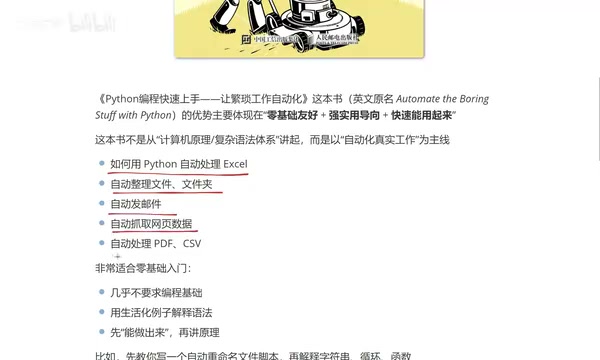
This "results-first" arrangement lowers the psychological barrier to entry for readers without a programming background. You don't need to understand what object-oriented means before you can write a script that automatically renames files.
Office Automation refers to using program scripts to replace manual completion of repetitive, clearly rule-based office tasks. In the Python context, it usually doesn't involve deploying servers or building products; instead, it focuses on the "glue" parts of personal workflows: connecting data scattered across Excel, PDFs, emails, and web pages so the entire process can run automatically. Common automation tasks include batch-renaming files, merging spreadsheets according to rules, sending scheduled report emails, and scraping structured data from web pages. Such scripts are characterized by short development cycles and immediate returns—often just a few dozen lines of code can save hours of manual work each day, making them especially suitable for non-technical professionals as their first stop in learning programming.
Breakdown of Three Core Advantages
Beginner-Friendly: Almost No Programming Background Required
The book uses everyday examples to explain complex syntax, avoiding the circular "using jargon to explain jargon" found in traditional textbooks. For people in administrative, operations, and data processing roles, this means they can obtain usable tools first without understanding the underlying mechanisms.
Practicality-Oriented: Every Knowledge Point Corresponds to a Real Task
The book's automation modules cover a wide range: file management, automatic email sending, web scraping, Excel processing, PDF processing, and more. These are not toy projects, but scenarios that repeatedly appear in daily work.
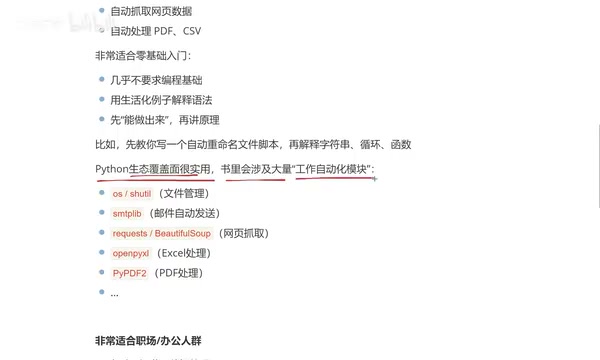
Do First, Explain Later: Reverse-Engineer Principles from Results
For example, it first teaches you to write a script that automatically generates files, then explains strings, loops, and functions. This arrangement gives abstract concepts concrete anchors.
Book Structure: 18 Chapters in Two Major Sections
The book has 18 chapters in total, divided into two major parts, with a fairly clear structure.
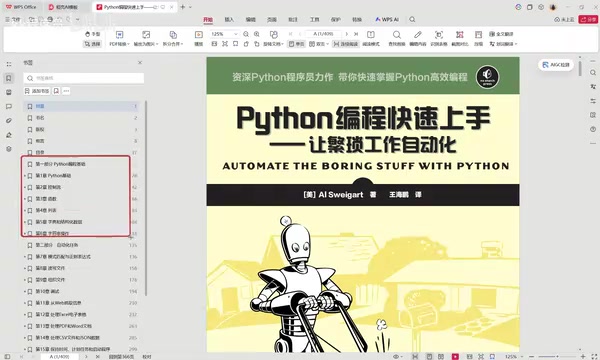
Part One: Python Programming Basics (Chapters 1-6)
Covers variables and expressions, data structures, basic syntax, control flow, functions, lists, dictionaries and structured data, string operations, and more. According to a Bilibili creator's explanation, once you have a solid grasp of this part, your Python programming fundamentals are basically set.
Regular Expression is a miniature language for describing text-matching patterns. It uses specific symbols to represent character classes, repetition counts, and positional relationships. For example, \d{4}-\d{2}-\d{2} can match strings shaped like dates, and ^第.*章 can match lines starting with "第" and ending with "章". In office automation, the value of regular expressions lies in extracting useful information from unstructured text: filtering error lines from a pile of logs, extracting numbers from filenames, and locating target data in web page source code. Python supports regular expressions through the built-in re module, with commonly used functions including re.search (find the first match), re.findall (return all matches), and re.sub (replace). Although the syntax looks obscure at first, mastering a dozen common metacharacters is enough to handle the vast majority of text cleaning and extraction scenarios.
Part Two: Automation Task Practice (Chapters 7-18)
This is the main event of the book, covering:
- Regular Expressions and File Reading/Writing: foundational capabilities for text pattern matching and file operations
- File Management Automation: batch operations such as copying, moving, and deleting
- Debugging Techniques: essential skills for keeping scripts running stably
- Web Scraping: operating browsers and automating the download of web data. The Bilibili creator particularly emphasized the importance of this part, because it is the channel connecting Python to the external data world
- Excel/PDF/Word Processing: the most frequent needs in office scenarios
- CSV and JSON Processing: reading, writing, and converting structured data
- Time and Task Scheduling: letting scripts execute automatically on schedule
- Email and SMS Automation: batch notifications and message pushing
- Image Processing and GUI Automation: controlling the keyboard and mouse to achieve interface-level automation
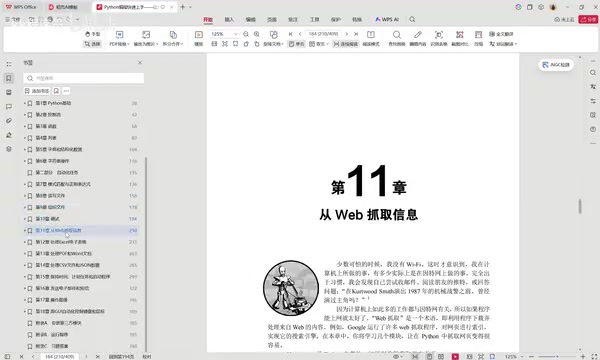
Web Scraping refers to automatically obtaining web page content through programs and extracting data from it. Compared with manual copy-paste, scraping can collect information in batches, on schedule, and in structured form. Implementing scraping in Python usually involves two steps: first use requests or urllib to request the web page and obtain the HTML source code, then use BeautifulSoup, lxml, or regular expressions to parse out the target fields; for dynamic pages requiring login, clicks, or pagination, browser automation tools such as Selenium are needed to simulate real user operations. Python Crash Course places web scraping in a key position in the automation section because it is the crucial channel connecting programs to the external data world—whether monitoring product prices, aggregating industry news, or scraping form data, scraping capability upgrades scripts from "only able to process local files" to tools that "can actively obtain information." It should be noted that when scraping, you should comply with the target website's robots protocol and relevant laws and regulations, and avoid high-frequency requests that put pressure on servers.
Task Scheduling refers to letting scripts run automatically at specified times or according to specified cycles without manual triggering. There are two common implementation approaches: at the operating system level, Windows uses "Task Scheduler," while macOS and Linux use cron or launchd; register the script and it will execute on schedule. At the Python level, you can use the built-in sched module or the third-party library schedule, arranging tasks inside the script with syntax such as schedule.every().day.at("09:00").do(job). The significance of task scheduling is turning "write a script once" into "a continuously running automated service"—for example, automatically summarizing yesterday's data and sending an email every morning, or backing up folders on a weekly schedule. The book dedicates a separate chapter to time and task scheduling precisely because automation is only truly complete once scheduling is added, and only then can people fully escape repetitive labor.
Who Should Read It
Judging from the book's content design, the target reader profile is clear:
- People in roles such as administration, operations, data processing, testing, DevOps, and product
- Developers who need to handle batch tasks—the Bilibili creator works in frontend and is also reading this book, because small Python scripts are most suitable for many batch-processing tools
- Any ordinary office worker who wants to improve work efficiency
One detail worth noting: the book's companion PDF and source code are already prepared, and can be obtained by leaving a comment in the comments section. For readers who want to flip through it first before deciding whether to study it in depth, this lowers the cost of trial and error.
Why It Is Worth Paying Attention To
There are many Python introductory books on the market, but this book's differentiated positioning is very clear—it does not try to train you into an engineer, but to make you someone who can use code to solve real problems. The 9.6 Douban rating reflects, to some extent, the precision of this positioning.
If your daily work involves a large number of repetitive file processing, data organization, and email sending tasks, what this book provides is not theory, but a toolkit you can learn and use immediately.
Related articles

JobRunner MCP Server: AI Agents Can Now Fix Failed Java Jobs
JobRunner launches an open-source MCP server enabling AI agents to view cluster status, diagnose failures, and recover Java jobs—incident response from any cloud coding environment or existing agent.

MLAI Digital Launches 9 Security Agents: MCP Server Safeguards the Full Lifecycle of Agentic AI
MLAI Digital launches Security MCP Server with nine built-in specialized security agents covering vulnerability discovery, attack simulation, prompt injection detection, API and infrastructure assessment, and accelerated remediation—embedding security validation across the full Agentic AI lifecycle from development to production.

Running Isaac Lab on H100 GPUs: Exploring Better Approaches
Exploring optimization methods for running Isaac Lab on NVIDIA H100 GPUs, including MIG configuration, mixed precision, TensorRT acceleration, and community experience to improve robotics simulation and reinforcement learning efficiency.