Python in Practice: Build an MCP Server from Scratch to Give LLMs Real-Time Web Data

Build a custom MCP server with FastMCP so AI agents can scrape real-time web pages for accurate, cited answers.
This tutorial walks through building an MCP server from scratch, enabling AI agents like Claude Code to break past training data cutoffs by actively scraping fully rendered web pages. The core stack is FastMCP plus the Oxylabs rendering API, following a describe→generate→review→refine workflow. Key details covered include: how docstrings directly determine whether an agent calls a tool; why you must never print to stdout in STDIO transport mode; and why Claude Desktop config requires UV's absolute path. The article also compares STDIO vs. Streamable HTTP transports and offers two ready-to-use alternatives for developers who don't want to write custom code.
One of the biggest limitations of large language models is that they only know about the world up to their training cutoff. Ask one a question that requires real-time information — like what changed in the latest release of an open-source project — and it will either hallucinate an answer or admit it doesn't know. This tutorial, demonstrated by Arnaz from Oxylabs, centers on building a custom MCP server that lets AI agents actively scrape fully rendered web pages and deliver reliable, citation-backed answers grounded in real content.
What Is MCP: The "USB-C Port" for AI
MCP stands for Model Context Protocol — an open standard that defines how AI agents connect to external tools, data sources, and services. The author offers a fitting analogy: think of it as a USB-C port for AI — a standardized connection that works regardless of which agent or tool sits on either end.
Understanding the system requires distinguishing three roles: the Host is the running AI client (e.g., Claude Code, Cursor, VS Code Copilot); the MCP Server is a process that exposes one or more tools; and a Tool is the actual capability — in this tutorial, a function that fetches a fully rendered web page.
The key value is universality. MCP isn't tied to any single product. Claude Code, Claude Desktop, Cursor, GitHub Copilot in VS Code, and OpenAI's agents all support it. Build an MCP server once, and it can be reused across all compatible clients.
MCP was released and open-sourced by Anthropic in November 2024. The motivation was to solve the "M×N problem" of AI tool integration: without a unified standard, connecting M AI clients to N external services requires writing M×N custom integration codebases. MCP reduces this to M+N — each client implements the MCP protocol once, each service exposes an MCP interface once, and the two sides interoperate automatically. The protocol is built on JSON-RPC 2.0 and supports three primitives: Tool calls, Resource reads, and Prompt templates. Servers and clients can communicate either via local process standard input/output (STDIO) or over HTTP for remote calls.
Environment Setup and Project Structure
You'll need two things before getting started: Node.js (to run Claude Code) and Claude Code itself — Anthropic's agent-style coding tool that runs in the terminal, understands your project, and writes, edits, and runs code on your behalf.
The setup is fairly standard: create a project folder in VS Code and open a terminal, create and activate a Python virtual environment, then install three core packages:
- FastMCP: the framework for building MCP servers
- requests: for making HTTP calls to the Oxylabs API
- python-dotenv: for loading credentials from a
.envfile
Next, create a .env file in the project root with three variables: your Anthropic API key, and your Oxylabs username and password. Storing credentials here has two benefits — it keeps the project safer to share and prevents them from being accidentally committed to version control.
Generating the Server Core Logic with Claude Code
Since Claude Code is already set up, let it write the server code. The workflow breaks down into four steps: describe → generate → review → refine. You describe what you need in natural language, Claude Code reads the request, plans an implementation, and writes the code to a file.
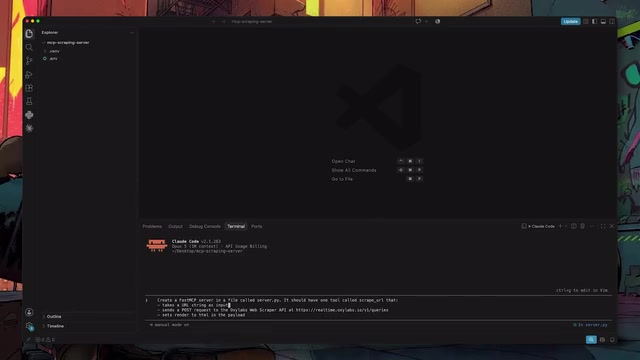
Don't run the code immediately after generation — read through server.py first. Reviewing isn't just about security; it's the best way to understand the structure of an MCP server. At the top are import statements, followed by FastMCP initializing the server, with the core being a function decorated with @mcp.tool.
This decorator corresponds to one of the three things an MCP server can expose: Tools are functions agents call to perform actions, Resources are read-only data agents can access, and Prompts are reusable instruction templates. For this use case, we only need a single web scraping tool.
Docstrings Matter More Than You Think
The docstring on the scrape_url function may look minor, but it's critical. Every time Claude decides whether to invoke a tool, it reads that tool's docstring. If it's too weak or missing entirely, the tool will never be called — even if it runs perfectly.
A strong docstring should clearly tell the agent: what this tool does and when to use it. If Claude generates a description that's too thin, this is often the one place worth polishing manually before moving on.
Also check the request body being sent to the Oxylabs API: source should be set to universal, url should be passed in correctly, and render should be set to html. The render parameter tells Oxylabs to run the page through a real browser before scraping — without it, JavaScript-heavy pages will return empty content.
Verifying Independently with MCP Inspector
Before connecting to any client, verify the server can run on its own. MCP Inspector is a browser-based debugging tool that connects to any MCP server and lets you invoke its tools manually.
After running the corresponding command in your terminal, Inspector will open automatically in the browser. To connect, enter the command that starts your server — in this case, python server.py. Once connected, you'll see the list of tools your server exposes.
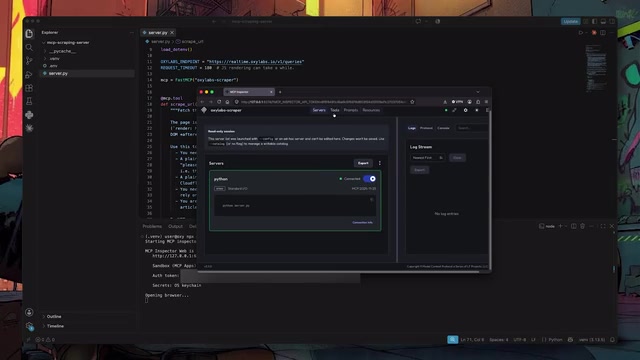
Select scrape_url, enter a real public URL (the tutorial uses the FastMCP documentation page), and run it. If everything works, it returns the rendered HTML of that page.
One security note: if you're installing MCP Inspector fresh, make sure the version is 0.14.1 or higher — older versions have a known security vulnerability that has since been patched.
MCP Inspector is essentially a developer-facing debugging proxy: it starts a lightweight local web UI, connects to your specified MCP server via STDIO or HTTP, and lets you manually construct tool call requests in the browser and inspect raw responses. This mirrors the logic of unit testing — before wiring your server into a real AI client, use a controlled test environment to confirm each tool's input/output behavior is as expected. Inspector displays the full JSON-RPC request and response payloads, making it far more efficient to catch parameter formatting issues or authentication problems than repeatedly triggering Claude.
Connecting to Claude Code and Claude Desktop
Once verified, register the server with Claude Code using the registration command — it registers the server as scraping-mcp and tells Claude Code how to start it. Then launch Claude Code in your project folder and ask it something that obviously requires real-time data — like checking FastMCP's changelog and what changed in the latest version.
Claude Code will plan its own approach, search for the right URL, and when it needs actual page content, it will automatically call scrape_url through the MCP server. No manual prompting required — the agent made the decision itself. This is exactly how MCP works in a real agent workflow: register the tool once, invoke it precisely when needed.
The same server works with Claude Desktop too — you just need to modify a single config file. First, get the absolute path to the UV executable on your machine — run which uv on macOS or Linux, where uv on Windows, and copy the output.

The config file must use exact absolute paths — relative paths will cause the server to fail to load. Then open claude_desktop_config.json via Claude Desktop's Settings → Developer → Edit Config, add a new entry under mcpServers, use UV's absolute path for the command, point the arguments to server.py, and fill in your Oxylabs credentials in the env block.
After saving, you must fully quit Claude Desktop (not just close the window): right-click the system tray icon and select Quit on Windows, or press Command+Q on macOS. After restarting, seeing the plus icon in the chat interface confirms the server loaded correctly.
A Common Pitfall: Never Print to Standard Output
The server built in this tutorial uses STDIO transport — it runs as a local process and communicates with the client through standard input and output. The communication between Claude Desktop and the server is JSON-RPC, so never use print() to write to standard output in your code — it will corrupt the data stream and break the connection. For debugging, use a log file or write to standard error (stderr) instead.
Local vs. Remote: Choosing a Transport Method
STDIO is ideal for running locally and is the best choice for Claude Desktop and Claude Code invoking a local server. But if you want to deploy your MCP server remotely, share it with a team, or run it in the cloud, consider switching to Streamable HTTP: the server listens on a URL, and any compatible client can connect over the network.
The author specifically notes that Streamable HTTP is the officially recommended remote transport, as the older SSE transport is being phased out.
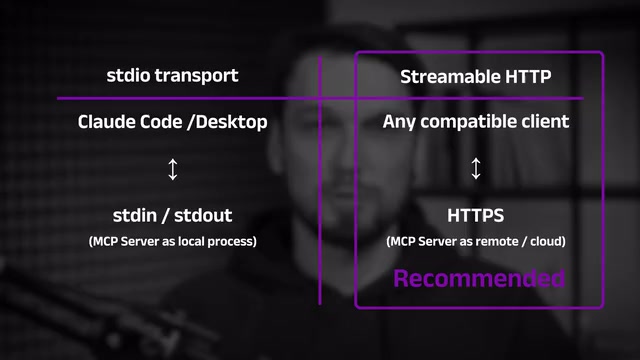
Streamable HTTP is a new transport method introduced in the 2025 revision of the MCP specification, replacing the earlier SSE (Server-Sent Events) approach. The problem with SSE is that it's a one-way push protocol — when MCP needs bidirectional communication, it had to maintain two separate connections, adding implementation complexity and state management overhead. Streamable HTTP instead achieves bidirectional interaction over a single HTTP connection via streaming responses, making it compatible with standard reverse proxies and load balancing infrastructure while being easier to scale horizontally. If your MCP server needs to be shared across multiple users or automated pipelines, Streamable HTTP is currently the only remote transport option being actively maintained by the official specification.
Don't Want to Write Code? Three Paths for Three Scenarios
The tutorial wraps up with a reminder: if your goal is specifically web scraping, you may not need to build from scratch at all. The author lays out three clear paths:
- Build a custom tool (what this tutorial does): best for those who want to understand how it works and need full control over the implementation.
- Official Oxylabs MCP Server: plug into Claude Desktop or Claude Code with a single config block — no Python files, no FastMCP, no custom code. Ideal for users who want real-time data in their agents right now without needing a custom implementation.
- Agent Skills: a completely different format — lightweight Markdown instruction files that agents load only when truly needed. Unlike the MCP tool architecture, which consumes context window space, Skills avoid that overhead entirely. Best for those who frequently do scraping in Claude Code and want to keep context lean. The Oxylabs Agent Skills repo on GitHub covers web scraping APIs, proxies, and headless browser capabilities.
Summary
The value of this tutorial goes beyond just "getting a scraping tool to run" — it thoroughly explains the complete MCP workflow: from protocol concepts and framework selection to the hidden importance of docstrings, independent debugging, multi-client integration, and the trade-offs between transport methods. For developers who want to give their AI agents real-time web access, this is a directly reusable practical path.
Related articles

Code Your Way to Video: A Deep Dive into the web-video-produce Open Source Project
web-video-produce is a Code-to-Video open source project using React and Remotion to turn video production into coding — auto-generating voiceovers, subtitles, timelines, Canvas charts, Three.js 3D, 14 Chinese TTS voices, and automated audio QC.

LightOn OCR-3 Launches on OpenDocRouter: A New Benchmark for Open-Source OCR Value
LightOn OCR-3 is now on OpenDocRouter at $0.28/1M input tokens, ~$3.19/1K pages. ParseBench shows it on the open-weight OCR Pareto frontier — 45% cheaper than Gemini 3.8 flash low at similar performance.

How LegalOn Cut Codex Costs in Half: Model Tiering and Budget Management in Practice
LegalOn cut daily Codex costs ~65% by routing tasks to tiered models (Astra, Sol, Luna) and managing budgets strategically — without slowing development.