Python Web Scraping in Practice: 18 Case Studies to Take You from Zero to Beginner

Bilibili's 18-case Python scraping tutorial explains requests, UA spoofing, encoding, and compliance red lines via novel scraping.
This article introduces a beginner-oriented Bilibili Python web scraping tutorial using novel scraping as its entry scenario, connecting HTTP requests, User-Agent spoofing, and encoding handling. It covers the essence of scraping, application directions, the simplest requests-based workflow, browser packet capture for locating URLs, and compliance red lines like the robots protocol. Suitable for complete beginners, though advanced anti-scraping requires further study.
Web scraping is an important tool for obtaining public data, and it's also the most accessible hands-on direction for Python beginners. A Python web scraping tutorial series on Bilibili covering 18 practical cases uses scraping novel websites as its entry point, threading core knowledge points like HTTP requests, User-Agent spoofing, and encoding handling into a complete learning path.
What Web Scraping Can Actually Do
A web scraper is essentially a program that automatically retrieves webpage content, simulating human browsing behavior to extract needed data from the internet. The tutorial uses a very relatable scenario to introduce the concept: many novels on Qidian are charged per chapter, and a multi-million-word series can cost quite a bit, whereas a scraper can help you extract publicly available chapter content. Of course, the tutorial also clearly warns—don't target official paid websites, as these sites have strong anti-scraping technology and scraping paid content constitutes copyright infringement.
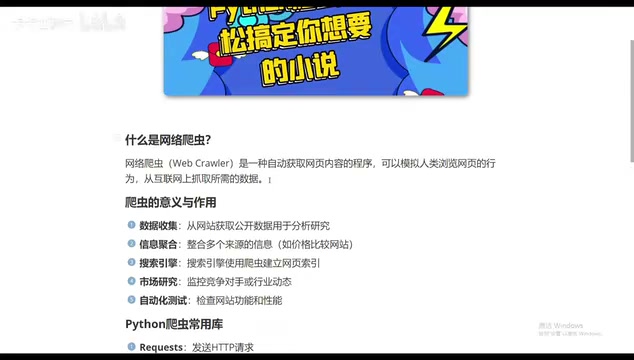
Scraping applications go far beyond novels. The tutorial lists several typical directions:
- Data Collection and Academic Research: Obtaining public data from websites for analysis
- Information Aggregation: Integrating information from multiple sources—price comparison websites are a classic example
- Search Engine Indexing: Search engines rely on scrapers to build webpage index databases
- Market Research and Competitor Monitoring: Tracking competitors or industry trends
- Automated Testing: Checking website functionality and performance
These scenarios demonstrate that web scraping is a general-purpose skill that can be transferred to many fields once the fundamental principles are mastered.
Getting Started Only Requires the requests Library
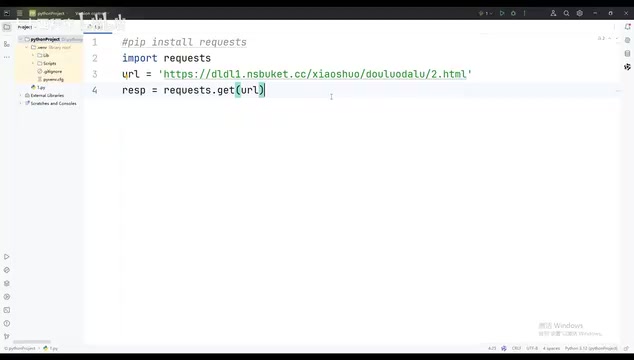
The entry barrier for Python web scraping is lower than many people imagine. The simplest workflow demonstrated in the tutorial only requires the requests module. After installing it via pip, you can get your first scraper running in three steps:
- Use
requests.get(url)to send a request to the target website - Assign the returned data to a variable
- Output the content as a string via
print
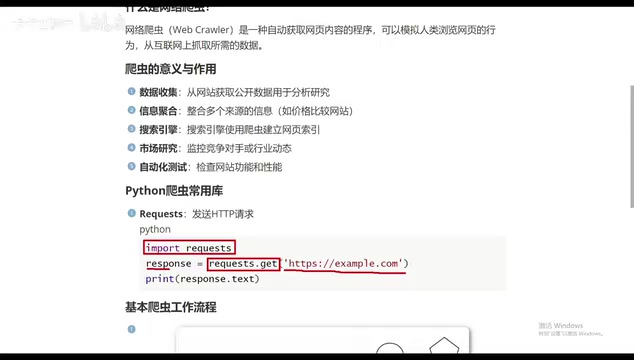
The workflow of a scraper can be summarized as: send HTTP request to get webpage content → parse data to extract needed information → store data → follow links to continue scraping. Throughout this process, understanding the request-response model between browser and server is key. The tutorial uses an intuitive analogy: your computer is the client, and websites like Taobao, JD.com, and Qidian are servers. Entering a URL means initiating a request to the server, and after the server returns webpage content, the scraper extracts the part of data you actually need from the HTML.
Hands-On Demo: Three Key Steps to Scrape a Novel Website
The tutorial uses scraping a publicly available novel as an example, fully demonstrating the process from browser packet capture to code implementation.
Step 1: Find the Correct Request Method and URL
Open the target novel website in your browser, right-click and select "Inspect," switch to the Network panel, refresh the page, and examine the first request. Confirm two things: what the request URL is, and whether the request method is GET or POST. In the tutorial, this website uses the GET method, so the code also uses requests.get.
The "Network panel packet capture" here deserves elaboration. Packet capture refers to observing the complete process of each network request and response in the browser developer tools. After opening Chrome or Edge developer tools (F12 or right-click "Inspect"), switch to the Network tab and refresh the page. All requests the browser sends to the server (HTML documents, images, JS, CSS, Ajax interfaces, etc.) will be listed in chronological order. Click any record to see the request URL, request method (GET/POST), and request headers (including User-Agent, Cookie, etc.) in Headers; see the server's response in Response or Preview. Scraper development typically cares about the request where "the data actually lives"—it could be the main document or an XHR interface returning JSON. Mastering filtering by type (Fetch/XHR, Doc) and searching keywords can greatly improve locating efficiency.
Step 2: Disguise Request Headers
Directly using requests to request a website often fails to get the desired content, because the server determines whether the request comes from a real browser or an automated program. The solution is to add headers, passing the browser's User-Agent information as a dictionary into the request.
User-Agent is essentially an identity marker for data packet capture, telling the server "I am a normal browser." This step is the primary reason many beginners' scrapers fail—the code doesn't error, but the returned content is wrong or rejected.
User-Agent (abbreviated UA) is a field in HTTP request headers, formatted like "Mozilla/5.0 (Windows NT 10.0; Win64; x64) AppleWebKit/537.36 ...", used to tell the server information about the browser engine, operating system, and version initiating the request. Servers use it to distinguish normal browsers from script programs, and many websites directly reject requests with missing or obviously abnormal UAs. The fastest way to get your browser's UA is to copy the User-Agent value from any request in the Network panel. Besides UA, common request headers include Referer (source page), Cookie (login state), Accept-Language, etc.; when encountering stricter anti-scraping measures, these fields often need to be constructed together to make requests look consistent with real browsers.
Step 3: Handle Chinese Encoding
After a successful request, the printed content may be garbled. The solution in the tutorial is to set the encoding to UTF-8 before outputting. After adding this line, Chinese content displays normally. Once these three steps work, a basic novel scraper is complete.
The root cause of garbled text is inconsistency between "encoding" and "decoding." Webpage content is encoded into a byte stream on the server side using some character set (commonly UTF-8 or GBK). What requests receives is raw bytes—if decoded using the wrong character set, Chinese text displays as garbled. requests can usually automatically infer encoding from the Content-Type in response headers, but inference isn't always accurate, especially for some older domestic websites. In this case, you can manually specify the response encoding, for example using response.encoding = 'utf-8', or use response.content.decode('gbk') for explicit decoding before printing or writing to a file. To determine which encoding to use, check the <meta charset=...> tag in the webpage source code, or observe the charset parameter in the response headers.
Red Lines You Must Know When Writing Scrapers
The tutorial specifically emphasizes the legal and ethical boundaries of scraping at the end—this part is no less important than the technology itself:
- Respect the robots protocol: Follow the scraping rules specified by websites
- Control request frequency: Set delays to avoid overburdening servers
- Only scrape public data: Scraping non-public data without authorization may violate the law
- Set up proxies reasonably: Use compliant request methods, don't maliciously bypass anti-scraping mechanisms
The tutorial uses a slightly joking phrase "enjoy three years of state-sponsored meals" to remind about the consequences of illegal scraping. Although the expression is light, the signal is clear: the stronger your technical ability, the more you need to know where the boundaries are.
The robots protocol (robots.txt) is a plain text file in a website's root directory used to tell scrapers which paths are allowed and which are prohibited, for example "Disallow: /admin/". It's an industry convention rather than a legal mandate, but mainstream search engines comply with it, and individual scrapers following it is also basic industry etiquette. Related to this are the "Data Security Law," "Personal Information Protection Law," and provisions in the "Criminal Law" regarding "the crime of illegally obtaining computer information system data": the boundary between public data and personal information, whether scraping is authorized, and whether it affects the target website's normal operation are all key to determining compliance. Additionally, scraping paid, login-required, or privacy-related content—even if technically feasible—carries far higher legal risk than scraping public pages.
Who Should Learn This
This 18-case tutorial has a very clear positioning—aimed at complete beginners. Starting from the most basic library installation, it gradually transitions to real website scraping practice, with each knowledge point accompanied by corresponding browser-side operations. For beginners who want to do practical projects with Python but don't know where to start, scraping is an entry point with quick feedback and strong sense of achievement. Note that the tutorial covers entry-level content; scenarios like complex anti-scraping mechanisms, dynamically rendered pages, and large-scale distributed scraping still require further learning.
If you've already mastered basic Python syntax and want a hands-on project, starting with scraping is a good choice. The key is to get your first case running—the road ahead will only get wider.
One-line Summary
Bilibili's 18-case Python scraping tutorial, using novel scraping to thoroughly explain requests, UA spoofing, encoding handling, and compliance red lines.
Paragraph Summary
This article introduces a beginner-oriented Bilibili Python web scraping tutorial that uses scraping novel websites as its entry scenario, connecting three core knowledge points: HTTP requests, User-Agent spoofing, and encoding handling. The article first explains that scraping is essentially simulating browsers to automatically extract webpage data, with applications covering academic research, information aggregation, search engine indexing, competitor monitoring, and automated testing. It then demonstrates the simplest entry workflow: installing the requests library, sending GET requests, setting headers to spoof UA, handling Chinese garbled text, and provides specific methods for locating URLs and request methods via browser packet capture. Finally, it emphasizes compliance red lines including the robots protocol, request frequency control, and only scraping public data, noting that the tutorial suits complete beginners but complex anti-scraping and distributed scraping require advanced learning.
Related articles

How Big Can Stars Really Get? The Physical Limits of the Largest Stars
Red supergiants are the largest stars by volume, with radii up to 2,000 times the Sun, engulfing the inner solar system. But there is no precise upper limit on stellar size—models predict up to 15,000 solar radii. The most massive blue stars are far smaller than red supergiants—biggest and heaviest are two different things.

Apple HomeView Smart Display Full Feature Breakdown: Wall-Mount or Desktop, $299
Apple launches HomeView, a $299 smart display with wall-mount and desktop options, 12MP camera for facial recognition, smart home control, music playback, and recipe step-by-step cooking. Full breakdown of watch faces, apps, privacy, and cooking integration.

Where Did the Promised New Studio Go? Craft Computing Answers After Five Years
Craft Computing's host responds to viewer questions: the new studio promised five years ago was shelved as construction costs soared from $30,000 to $75,000, and was replaced by a 168-square-foot garage conversion.