Querying Databases with Natural Language: A Practical Analysis of Cursor and the MCP Protocol

MCP lets Cursor access databases indirectly through tool calls, enabling safer, more controllable natural language queries.
Through a YouTube demo, this article breaks down the underlying mechanics of Cursor querying databases with natural language. The core lies in MCP: Cursor acts as an MCP client and calls tool functions exposed by a local Python MCP server, which executes SQL and returns results via STDIO. The server controls access scope by exposing only three tools, forming a clear security boundary that lets business users get insights in natural language while developers handle SQL and security review.
When SQL Meets Natural Language
Have you ever imagined simply asking your database a question in plain English instead of writing line after line of SQL? For example, asking "What were last month's shipment volumes by region?" and then watching the tool automatically pull real data from your company's private database?
This isn't science fiction. A short YouTube demo showcased exactly this workflow: a user poses a business question in Cursor, Cursor doesn't connect directly to the database, but instead calls a tool, and ultimately returns four rows of data that match the expected SQL query results exactly. The key enabler behind all of this is MCP (Model Context Protocol).
This article breaks down the underlying mechanics of this process to help you understand why this approach is safer and more extensible than traditional database querying.
How Does Cursor Get Database Data "Remotely"?
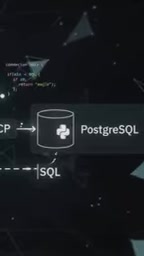
Cursor itself has no idea how to connect to a database server, nor does it know how to "speak" the language a database understands. What it does is remarkably simple: call a tool.
This tool is essentially a function within a Python program running on your local machine. When Cursor initiates the call, the function sends a SQL query to the database server, which returns the results—four rows in the demo—back to the Python program, which then passes the data back to Cursor's chat window.
So Cursor doesn't need a built-in database driver, doesn't need to know IP addresses or ports, and certainly doesn't need to handle authentication details. It only needs to know "there's a tool that can fetch data for me." This division of labor pushes complexity and security boundaries to the MCP server side.

The MCP Protocol: Shared Rules Are the Key
MCP stands for Model Context Protocol. It's a shared set of rules that defines how a model requests another program to run a specific function, and how that program sends results back.
In this architecture, the role division is crystal clear:
- Cursor is the MCP client: It's only responsible for issuing tool call requests and never touches the database directly.
- The Python program is the MCP server: It exposes tools, executes concrete logic, and communicates with the database.
The elegance of this design lies in the value of the abstraction layer. Any client that supports the MCP protocol can reuse the same set of servers without rewriting connection logic for each database or data source. The protocol itself becomes a universal interface between models and the outside world.
MCP was open-sourced by Anthropic in November 2024, using JSON-RPC 2.0 as its underlying message format. Its design goal is not to be tied to any single model vendor, but to become an open standard that allows different LLM clients to connect to external data sources and tools in a unified way. The protocol defines three core capabilities: resources (readable context data), tools (callable functions), and prompts (reusable prompt templates). Around MCP, the community has already produced a large number of ready-made servers covering common systems like filesystems, GitHub, Slack, and Postgres, which developers can reuse directly without writing connection logic from scratch. This is precisely the source of the "universal interface" value mentioned in the original article—once the protocol is unified, the ecosystem can scale horizontally.
How STDIO Eliminates Port and Server Configuration
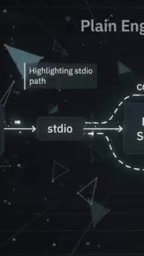
When you ask a question in Cursor, Cursor automatically looks up registered tools and starts the corresponding MCP server process. The entire process requires no manual running of a standalone server program, and no connecting to any port or URL.
The core mechanism enabling this is STDIO (Standard Input and Standard Output). Cursor and the MCP server process share these two streams:
- Cursor writes tool requests to the program's standard input;
- The program writes tool execution results back to standard output.
Because these two streams are shared, communication becomes simple read/write operations, eliminating the hassle of network configuration. Cursor manages the lifecycle of this server process—as long as the tool is still needed, the process stays running; once done, no manual cleanup is required.
STDIO is the most fundamental form of inter-process communication (IPC). Every process automatically gets three standard streams at startup: standard input (stdin, file descriptor 0), standard output (stdout, file descriptor 1), and standard error (stderr, file descriptor 2). A parent process can connect them to a child process via pipes, exchanging data without going through the network stack. MCP's stdio transport leverages exactly this: after the client starts the server child process, both sides exchange JSON-RPC messages through stdin/stdout, while stderr is typically reserved for log output to avoid polluting protocol messages. Compared to HTTP or SSE transports, stdio has lower latency and requires no open ports, making it naturally suited for local tool scenarios—but its limitation is that it can't be used across machines; remote access still requires switching to a network-based transport.
Tool Exposure Is the Gatekeeper of Security Boundaries
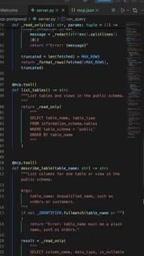
The video used three tools to demonstrate database access:
- list_tables: List which tables exist in the database;
- describe_table: View the column structure of a specific table;
- run_query: Execute a SQL statement.
These three tools constitute the entirety of the MCP server's means to control model access permissions. If a tool isn't provided, the model cannot obtain unexpected information through this MCP server. In other words, what the model can see and what it can operate on is entirely determined by the set of tools the MCP server exposes.
This is far safer than simply handing the model a database connection string. You can restrict query scope, filter sensitive tables, or even perform SQL review on run_query—all without the model being aware. It just calls tools and accepts the results they return.
Having LLMs directly generate and execute SQL has long faced an inherent risk: the model may be induced by prompt injection attacks in user input to generate dangerous statements like DROP TABLE, UPDATE, or cross-table privilege escalation queries. MCP's tool-based design provides structural mitigation. Since the model can only call registered tools, developers can add whitelist validation, read-only connections, row limits, timeout controls, SQL parsing review, and other protective measures inside run_query—all completely invisible to the model. Going further, common queries can be encapsulated as parameterized dedicated tools (such as get_monthly_shipment_by_region), so the model doesn't even need to generate SQL, fundamentally eliminating the injection surface. This "capability is permission" approach is a key security difference between MCP and raw database connections.
The Practical Value of Natural Language Database Querying
From the demo, Cursor returned four rows of data consistent with the expected SQL query results, demonstrating that this pipeline is reliable. But what's more valuable is the trend it reveals: business users can directly obtain data insights using natural language, without depending on the data team to write SQL.
Of course, this doesn't mean SQL will disappear. The run_query tool in the MCP server is still executing SQL—it's just that the person writing SQL shifts from the business user to the tool developer or data engineer. They encapsulate common query patterns into tools, and business users trigger them with natural language. This is a new division of labor that balances efficiency and controllability.
For teams looking to quickly build an internal data Q&A system, the MCP + Cursor combination offers a low-barrier path: you only need a Python program, a few tool functions, and an MCP-compatible client. The protocol handles the rest.
One-line Summary
MCP lets Cursor access databases indirectly through tool calls, enabling natural language queries that are safer and more controllable.
Paragraph Summary
Through a YouTube demo, this article breaks down the underlying mechanics of Cursor querying databases with natural language. The core lies in MCP (Model Context Protocol): Cursor acts as an MCP client and doesn't connect to the database directly, but instead calls tool functions exposed by a Python MCP server running locally, which executes SQL and returns results. Communication is handled via STDIO (standard input/output) with no port configuration or standalone services needed, and Cursor manages the process lifecycle automatically. The MCP server controls the model's access scope by exposing only three tools—list_tables, describe_table, and run_query—and unprovided tools cannot be called, forming a clear security boundary. This division of labor lets business users obtain data insights with natural language while delegating SQL writing and security review to tool developers, balancing efficiency and controllability.
Related articles

ChatGPT Space Launches: Team Collaboration and New Pages Features Explained
ChatGPT Space is OpenAI's new team collaboration feature with Pages, real-time collaboration, and Slack/Google Drive sync. We break down its privacy design, multi-platform integration, and the full workflow from conversation to document.

Migrating Apache Spark UDFs to GPU Acceleration with AI Agents
NVIDIA developer blog explains how AI Agents rewrite Apache Spark UDFs for GPU acceleration, covering migration criteria, agent rewriting and verification workflows, plus pitfalls like result consistency and CPU-GPU transfer overhead.

Zed Editor v0.40.4-rc2 Released: Usage Credits Now Available Without Upgrading
Zed editor releases v0.40.4-rc2, allowing users to use usage credits for AI features without upgrading to a paid plan, lowering the trial barrier.