Quick RSS: A Privacy-First Desktop RSS Reader That Says Goodbye to Algorithmic Recommendations

Quick RSS is a privacy-first desktop RSS reader that stores data locally and ditches algorithmic feeds.
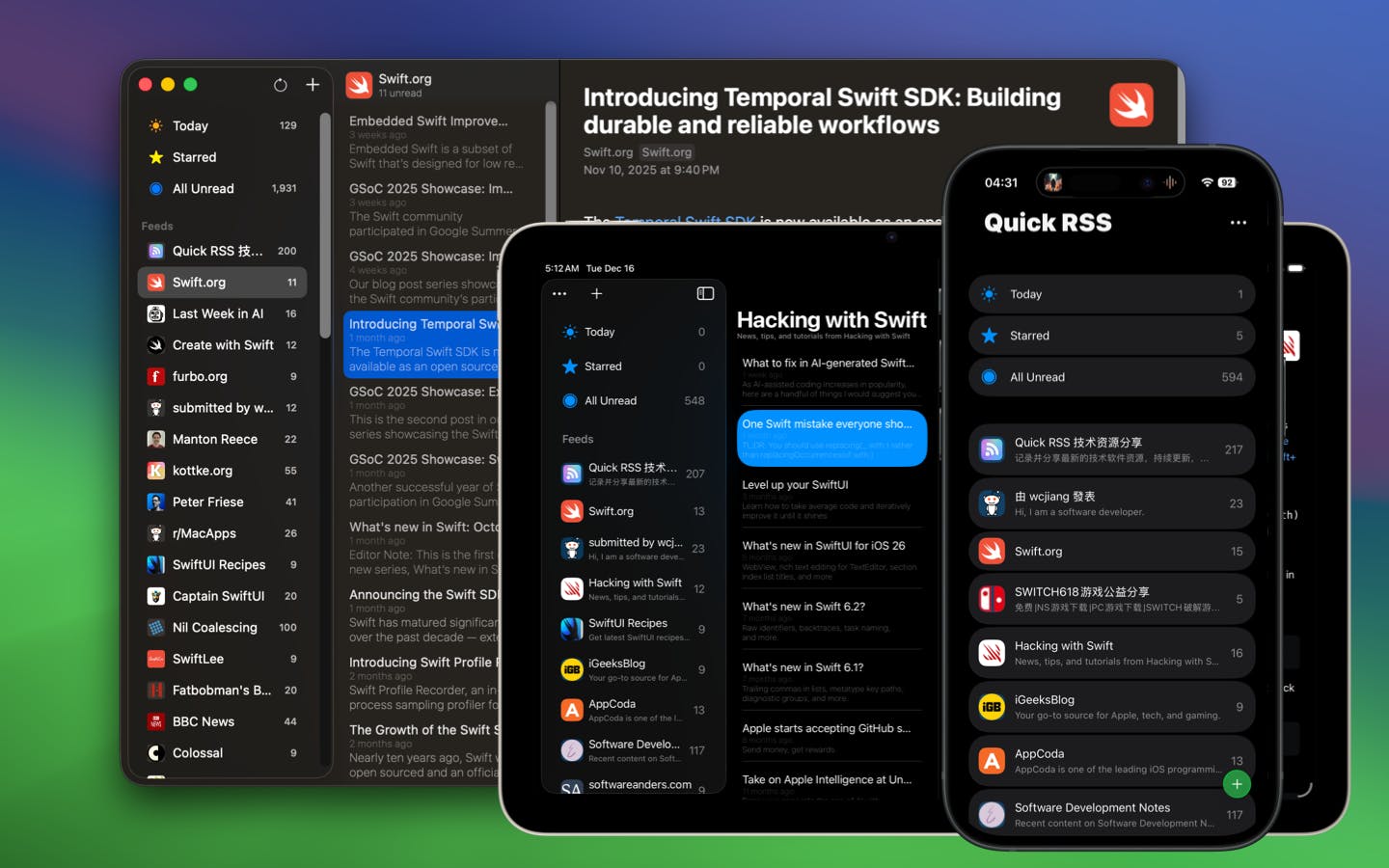
Quick RSS is a desktop RSS reader built with privacy and simplicity at its core. Unlike cloud-based services, it stores all data locally, ensuring reading habits remain private. Targeting users tired of algorithmic recommendations, it offers a clean, focused reading environment for deep content consumption without tracking or ads.
In an era where algorithmic recommendations dominate information distribution, more and more people are starting to miss the days when they could control their own information sources. Quick RSS, recently launched on Product Hunt, is precisely such a back-to-basics desktop RSS reader, featuring three core attributes: "private, simple, and intuitive."
Why RSS Readers Are Gaining Renewed Attention
As social media and content platforms push increasingly aggressive recommendation algorithms, the content users see is increasingly determined by platforms rather than personal choice. Filter bubbles, hijacked attention, and excessive privacy tracking have become pain points for many deep readers. The concept of "Filter Bubble" was coined by internet activist Eli Pariser in 2011, referring to how algorithms continuously reinforce users' existing preferences based on their behavioral history, trapping them in a "cocoon" of homogenized information and making it difficult to encounter diverse perspectives. With mainstream platforms now widely adopting collaborative filtering and deep learning recommendation models, this effect is far more pronounced than it was a decade ago.
RSS (Really Simple Syndication), a technology born over twenty years ago, offers an alternative: users can independently subscribe to blogs, news sites, and information sources they're interested in, consuming content in chronological order rather than algorithmic ranking. No recommendations, no ad insertions, no endless information streams—everything is under user control. It's worth noting that RSS's development hasn't been smooth sailing. It went through multiple version iterations including RSS 0.9, RSS 1.0, and RSS 2.0, with the IETF-standardized Atom protocol emerging as a competing solution along the way. The shutdown of Google Reader in 2013 was once seen as RSS's "death signal," but this decentralized content distribution protocol proved remarkably resilient, actually spawning a wave of more focused independent RSS tools.
Quick RSS's positioning captures this trend precisely. Built by developer Kenny Wang, it explicitly positions "privacy" as its core selling point, aiming to help users rebuild a clean, controllable reading environment in an age of information overload.
Core Features of Quick RSS
Privacy First: Local Data Storage, No Cloud
Unlike many cloud-syncing RSS services, Quick RSS as a desktop application puts "privacy" front and center. Users' subscription lists, reading history, and other data don't need to be uploaded to third-party servers, minimizing the risk of personal reading preferences being collected and tracked.
For users concerned about data sovereignty, this localized approach has natural appeal—what you subscribe to and what you read is known only to you. "Data Sovereignty" has evolved in recent years from a niche topic in tech circles to a global issue. The EU's GDPR (General Data Protection Regulation), China's Personal Information Protection Law, and similar regulations have been enacted successively, establishing users' control over their own data at the legal level. Against this backdrop, the Local-first software design philosophy is experiencing a renaissance, with its core proposition being: user data should be stored on users' own devices by default, with cloud sync as an optional feature rather than a mandatory prerequisite. Quick RSS's design philosophy is a productized practice of this movement.
Simple and Intuitive: Lowering the RSS Barrier to Entry
The official description emphasizes being "easy-to-use, private, and intuitive," focusing on lowering the barrier to entry. RSS readers have long been criticized for complex configuration and outdated interfaces, and Quick RSS clearly aims to improve on this front, allowing news enthusiasts and blog readers to get started easily without steep learning curves to manage their favorite information sources. In fact, RSS's usability problem has persisted for years—users need to understand concepts like "subscription feeds" and "Feed URLs," and must manually find and add websites' RSS addresses, which isn't friendly for non-technical users. In recent years, some emerging RSS tools have begun addressing this pain point through automatic Feed discovery, one-click subscriptions, and visual categorization.
Focused on Desktop Deep Reading Scenarios
As a desktop application, Quick RSS targets users who want to efficiently consume information in a focused environment. Compared to the fragmented reading experience on mobile devices, constantly interrupted by notifications, desktop is better suited for processing large volumes of subscribed content and engaging in deep reading. This aligns with the rising "Digital Minimalism" movement—advocated by Georgetown University professor Cal Newport, which promotes consciously reducing digital distractions and focusing attention on truly valuable information consumption. Desktop readers naturally fit this scenario: users actively open the application, process information in a concentrated session, then close it, rather than being constantly pulled back into information streams by push notifications as on mobile.
Quick RSS vs. Mainstream RSS Tools
Based on Product Hunt data, Quick RSS has currently received 5 votes, ranking #18, categorized under "Productivity" and "News." This is a relatively early-stage result, with no large-scale discussion yet formed.
The RSS reader market itself is highly competitive, with mature cloud services like Feedly and Inoreader, as well as well-regarded native clients like NetNewsWire and Reeder. Feedly has over 14 million users and offers AI-driven content priority sorting; Inoreader is known for its powerful filtering rules and automation capabilities; while the open-source, free NetNewsWire represents the local-first philosophy in the macOS/iOS ecosystem, maintained by veteran developer Brent Simmons. For Quick RSS to stand out, the "privacy" selling point alone may not be enough—it will need continuous refinement in sync capabilities, content organization, and cross-platform experience.
The Value and Real-World Challenges of Privacy Reading Tools
To its credit, Quick RSS represents a healthy product trend—user demand for information autonomy and privacy protection is on the rise. In the era of large models, the value of personal data is repeatedly emphasized, and more people are starting to pay attention to their digital footprint. Especially during the training of large language models like ChatGPT, public internet content has been scraped and utilized at massive scale, making many users realize that every reading record and every click they leave on platforms could become part of training data, further reinforcing the demand for privacy protection tools.
However, purely local privacy-first solutions also face real-world challenges: How to provide multi-device sync while protecting privacy? How to help users efficiently filter massive amounts of information without algorithmic assistance? These are long-term challenges that RSS products need to solve. The industry has already developed some compromise approaches, such as implementing cloud sync through end-to-end encryption (ensuring service providers cannot read user data), or running lightweight AI models locally to assist with content classification and priority sorting, improving reading efficiency without exposing data.
Summary: A Noteworthy New Privacy Reading Option
Quick RSS is a desktop RSS reader with a clear philosophy, centering on privacy and simplicity, attempting to provide a quiet reading space for users tired of algorithmic recommendations. While still in its early stages with product maturity and ecosystem yet to be observed, the direction it represents—"users controlling their information"—is undoubtedly worth continued attention.
For those who want to escape the bombardment of information streams and regain control over their reading experience, Quick RSS is worth a try.
Related articles

Chain of Thought Isn't Just for AI: How Humans Can Use CoT to Improve Thinking Quality
Chain of Thought isn't just a prompt trick for large models. Starting from a Hacker News discussion, this article analyzes why CoT works for human thinking too, breaks down actionable ways to transfer it, and highlights the key differences between human CoT and machine CoT.
Cloudflare Teams Up with OpenAI: Closi…
Cloudflare Teams Up with OpenAI: Closing the Loop from Vulnerability Discovery to Defense with AI
Cloudflare uses OpenAI Daybreak to investigate security vulnerabilities and generate reviewable remediation plans, while developers use Codex to boost coding efficiency and quality.

Orca Multi-Agent Orchestration in Practice: A Guide to Parallel Collaboration with Claude and Codex
Orca is Stable AI's free open-source agent workbench supporting 34 agents like Claude Code and Codex in parallel. Learn its Git worktree isolation, multi-model orchestration, and mobile management.