Qwen 3.8 Beats Opus at Coding—But Can Your Mac Run It?

Free open-source Qwen 3.8 nears paid models at coding; 32GB Mac is the starting point for smooth running.
The article covers the open-source model Qwen 3.8, released under Apache 2 and beating paid Opus 4.6 at coding at 18GB compressed, which set the Mac community abuzz. The author stresses that macOS lets AI use only about three-quarters of memory, so a 24GB machine has ~17.8GB usable, crashes on the 4-bit model, and must fall back to 3-bit. 32GB is the sweet spot: ~24GB for AI, smooth full 4-bit, and just $200 more on a new Mac mini. Speeds run ~15 tokens/sec on M4 Pro to ~33 on M5 Max, with MLX format adding ~40%. It also covers one-click setups like Ollama and LM Studio, recommending a 32GB Mac mini for most users.
Why Is a Free Model Getting Mac Users So Excited?
A recently released open-source model called Qwen 3.8 has caused quite a stir in the tech community. According to analysis by a YouTube tech channel, this model beats the paid Opus 4.6 on hardcore coding tests—and it's only 18GB in size, with 8 million downloads last month. More importantly, you don't need a data center: a $1,300 Mac mini can run it smoothly.
But here's the catch: most Mac configuration guides out there ignore one key number—your Mac doesn't hand all its memory over to AI. One tester found in real-world testing on a 24GB MacBook Pro that the system only allows AI to use about 17.8GB, roughly three-quarters of total memory. Remember that number, because it determines everything that follows.
Why Did an August Release Suddenly Blow Up?
Alibaba released Qwen 3.8 in August under the Apache 2 license, meaning anyone can download, modify, or even commercialize it. This week, three posts about it shot to the front page of Hacker News, with the hottest one racking up nearly 3,000 votes.
That post was about an AI called Astra that manually edited the weights of a small Qwen model, boosting its math score from about 8% to 48%. But the next day, a well-known researcher pointed out the post was misleading, since Astra also wrote and ran code at the same time.
What really set the community ablaze was Simon Willison's test on his own laptop. His assessment has been widely quoted: the model "feels close to last year's leading paid models." He gave the model the raw numbers from a tiny game network and asked which game it had learned—it got three out of four right without any tool assistance. It wasn't fast, though; one answer took 46 minutes of thinking time.
The third post came from a project called Memdor, which assembled five copies of the model into a coding team. On ten hardcore coding problems, the team averaged 9.8, while Fable 5 averaged just 8 on single queries. Ten problems is a small sample, and the author admits the models may have seen these problems before. But a free model catching up to frontier models is genuinely new. Each run cost just 39 cents on a cloud host.
What Is Model Quantization (4-bit/3-bit Precision)?
The "4-bit," "3-bit," and "8-bit" mentioned throughout the original article refer to model quantization. Deep learning model weights are typically stored as 16-bit floats (FP16/BF16) by default, so a 56-billion-parameter model needs about 112GB of VRAM. Quantization compresses each weight into fewer bits: 8-bit needs about 56GB, 4-bit about 28GB, and 3-bit about 21GB. The cost of compression is lower numerical precision—the model's output may become less accurate and more prone to repetition or logical errors. Qwen 3.8's full 56GB version is presumably a higher-precision version; compressed to 4-bit it's about 18GB (the figure from the original article, which may correspond to a different parameter count or compression scheme), while 3-bit and 2-bit versions shrink further with obvious quality loss. This is why the article stresses that a 24GB Mac can only run the 3-bit version—it "works," but loses the quality you were after.
What the Apache 2.0 License Means
Apache 2.0 is a permissive open-source license that allows anyone to use, modify, and distribute the software for free, including for commercial purposes, without requiring derivative works to be open-sourced as well (unlike GPL). It requires retaining copyright notices and the license text, and provides a patent grant. For Qwen 3.8, this means companies can integrate it into products and developers can fine-tune it and release closed-source versions—a major reason for the community excitement: the model isn't just free, there are no legal obstacles to commercial use either.
Is It Really Better Than Paid Models?
In Alibaba's own tests, Qwen 3.8 beat Opus 4.6 on three benchmarks, with the biggest gap on fixing real code: 61.7 vs. 53.4. But Opus still leads on hard science, terminal tasks, and the toughest exams. So it's an excellent coding assistant, not an all-around genius. Bear in mind these are Alibaba's own numbers, not independent tests. And Opus 4.6 is no longer Anthropic's latest model, so the gap to today's strongest models is even wider.
Qwen 3.8 can also read about 260,000 tokens in one go—the text of several novels. In my view, the coding advantage is what really matters, since writing and fixing code is the main reason most people would run it at home.
Should You Cancel Your $20 Subscription?
I'd wait. Paid apps can still search the web, remember your preferences, and respond instantly, whereas this model needs to "think" for a while first. Still, something this close to paid models running free at home is the real story.
How Much Memory Does Your Mac Actually Need?
The full model is 56GB, compressed to about 18GB at 4-bit precision—the version most people should run. But as noted earlier, your Mac reserves some memory for the system and apps. The rule is simple: multiply your memory by three-quarters; the model must fit in that space, with a little headroom left for conversation.
Once a real conversation loads, the 4-bit model needs 19.6GB, exceeding the usable limit of a 24GB Mac—the tester's Mac crashed three times. Forum advice suggested raising the limit with a terminal command; he tried it, and the crashes got worse.
Real-World Performance Across Mac Tiers
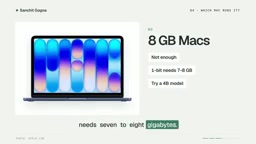
8GB Mac: Out of the question. Even the most extreme compressed version needs 7–8GB.
16GB: Experimental at best. One tester got 7 tokens per second on the 2-bit version; the 4-bit version wouldn't run at all.
24GB: Usable, but only with the 3-bit version, at about 12.5 tokens per second. Twelve tokens per second is roughly your reading speed—usable, but 3-bit precision loses the quality you were after.
32GB: The sweet spot. AI gets about 24GB, the full 4-bit model fits, and there's room for long conversations. On a new Mac mini, upgrading to 32GB costs just $200 more. Watch out for laptops—Apple's new M6 MacBook Pro starts at only 16GB, so you have to add memory at order time. Save that $200 and you'll get a configuration prone to crashing.
64GB: Can run the sharper 8-bit version. An M5 Pro Mac mini gets you there for under $3,000.
128GB: A maxed-out Mac Studio, for instance, can run the full 56GB model with no compression at all.
If I were buying today, I'd pick a 32GB Mac mini and stop there, since most people won't notice much difference beyond 4-bit.
Unified Memory Architecture and MLX
The key to running large models on a Mac is Apple's Unified Memory Architecture. In a traditional PC, the CPU and GPU have separate memory, and a model must fit in VRAM to use GPU acceleration; Apple's M-series chips let the CPU, GPU, and Neural Engine share a single memory pool, so an 18GB model can reside directly in system memory and be accessed by the GPU—no discrete graphics card needed. The trade-off is that this memory is shared with the operating system and all apps—which is precisely the root of the article's point that "the system only allows AI to use about three-quarters of memory."
MLX is Apple's open-source machine learning framework built specifically for its own chips, deeply optimized for unified memory and able to schedule GPU and CPU collaboration more efficiently. The article notes that switching to MLX format on an M5 Pro made a test about 40% faster, because MLX reduces memory-copy overhead and better exploits Apple's GPU architecture. By contrast, tools like Ollama may use llama.cpp's Metal backend underneath—slightly less efficient but more broadly compatible.
How Fast Is It in Practice?
Speed depends on the chip. An M4 Pro Mac mini gets about 15 tokens per second; an M5 Max laptop about 33. The app matters too—on an M5 Pro, switching to Apple's own MLX format made one test about 40% faster, speed you'd otherwise be throwing away.
In my view, about 15 tokens per second is the threshold where chatting starts to feel comfortable, so any 32GB Mac with a Pro chip or better will do.

There's one place where the experience feels slower than the numbers suggest: it's a thinking model, and it may reason for over a minute before the answer begins. There's also a trick called speculative decoding, where a small assistant guesses words ahead of time—about 5x faster on one test on an M4 Max, though that was a number-dense prompt that's easy to guess, so gains in ordinary chat will be smaller. But check Llama's page: a draft version of the model built specifically for Mac appeared just days ago, which should make everyday chat noticeably smoother.
Token Speed and Speculative Decoding
"Tokens per second" is the standard metric for LLM inference speed. A token roughly corresponds to a piece of an English word or one Chinese character; 15 tokens per second is about 900 words per minute, close to human reading speed—hence the article treats it as the comfort threshold for chatting. Below 10 tokens per second, the wait becomes noticeable.
Speculative decoding is an acceleration technique: a smaller, faster "draft model" quickly guesses several upcoming tokens, and the large model then verifies those guesses in parallel in one pass. If the guesses are right, you save the time the large model would spend generating token by token; if wrong, it falls back and redoes them. So it pays off most on "easy-to-guess" text (number-dense, fixed-format content)—the article notes about 5x speedup on one test on an M4 Max—while open-ended chat is much harder for the draft model to guess correctly, so gains are far smaller. The "draft version" appearing on Llama's page is exactly the small companion model for Qwen 3.8 that enables speculative decoding.
How Do You Get Started?
The easiest way is Llama. Install the free app, open a terminal, type one command, and it downloads the 18GB model and starts chatting. The first download takes a while, since 18GB is several HD movies' worth. After that, startup takes seconds, even offline. Everything runs on your Mac, what you type never leaves the device, and there's no monthly fee.
If you prefer clicking to typing, use LM Studio, which is what Simon did. First increase the context window—the default 8,000 failed for him. On a 24GB Mac, choose the 3-bit download rather than the default version, or you'll hit those crashes.
Once it's running, feed it your code or long documents, since that's where it shines—and where paid apps start charging you extra.
Final Advice
If you remember one thing: 32GB is the starting point for making this model genuinely usable. If you already own a 24GB Mac, don't panic—the 3-bit version is still a capable assistant, just a little less sharp.
As for that free model that beats Opus at coding—can your Mac run it? 32GB can, for $200 more than the entry-level configuration.
Related articles

AI Coding Enters the Team Collaboration Era: Interpreting Three Major Moves from Meta, GitHub, and Mistral
Meta acquires Conductor, GitHub Copilot Fusion becomes available, Mistral opens Large 4 weights—three moves show AI coding shifting from code generation to organizing development workflows. This article explains task orchestration, model collaboration, and cost control for developers.

Building a RAG Assistant with Dify: A Practical Guide to Knowledge Bases, Workflows, and Agent Nodes
How should knowledge bases, workflows, and Agent nodes connect in a Dify RAG assistant? We break down the division of labor and wiring logic for a shippable app.
 Tech Frontiers
The AI Industry Doesn't Lack Marketing—It Lacks Good Products
AI faces market selloffs and public skepticism—is marketing really the problem? This analysis of market signals and product experience argues the core困境 is incomplete products and a gap between promises and experience; the only way to change perceptions is to ship better products.