Qwen-Image-2.1 Open-Source Hands-On: 7B Parameters Rivaling Closed-Source Image Models

Alibaba's Qwen-Image-2.1 achieves near top-tier image generation quality at just 7B parameters, deployable locally via ComfyUI.
Alibaba's open-source Qwen-Image-2.1 model delivers impressive image generation quality with only 7B parameters, excelling in character consistency, detail reproduction, and generation speed — reportedly on par with some top closed-source models. It natively supports multi-image reference editing (up to ~10 images) and transparent image output, making it ideal for e-commerce and character consistency workflows. The model runs locally on consumer GPUs via ComfyUI, with GGUF quantization options from Q4 to Q8 to suit different VRAM sizes. A community jailbroken version with the refusal layer removed appeared within a day of release, offering fewer content restrictions — though users bear full responsibility for compliance and ethical risks.
Alibaba's Tongyi Qianwen team has officially released Qwen-Image-2.1, an open-source image generation model whose visual generation component runs on just 7B parameters — yet delivers output quality that rivals some of the top closed-source image models, particularly in character depiction and detail preservation. Perhaps even more noteworthy: within a day of the weights being released, the community had already produced a "jailbroken" version with the refusal layer removed, enabling far fewer restrictions on generation and editing. This article summarizes the model's core capabilities and deployment essentials, based on a hands-on local deployment test by Bilibili creator 零度解说.
Core Highlights of Qwen-Image-2.1
According to 零度解说's walkthrough, the most impressive thing about Qwen-Image-2.1 is how much quality it squeezes out of such a compact parameter count. The visual generation module is just 7B parameters, and Alibaba claims its output is comparable to certain top-tier closed-source image models. In real-world tests, generating three consecutive portraits from the same prompt produced consistently high-quality results, with almost no visible artifacts or telltale "AI look."
Another standout feature is native multi-image reference editing. The official version supports up to approximately 10 reference images, while the jailbroken version's multi-image workflow allows even more. This multi-reference capability enables much more precise reproduction of characters, products, and fine details — making it highly practical for e-commerce imagery and character consistency workflows.
The model also natively supports transparent image generation and editing. This means you can produce stickers or cutouts with an alpha channel already included, skipping the extra masking steps and significantly streamlining real-world workflows.
Official vs. Jailbroken Version
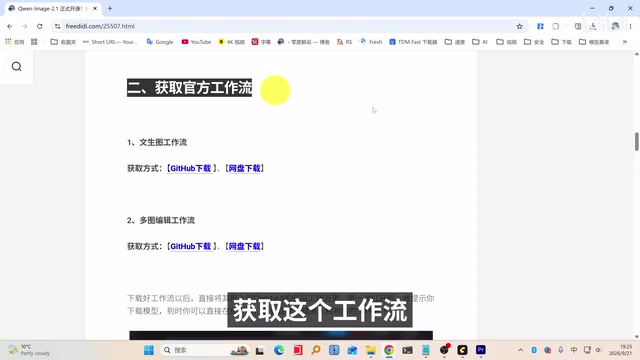
It's worth distinguishing between the official release and the community jailbroken build. The official version can be loaded and run in ComfyUI immediately after the weights are published — generation is fast, and character images are detailed and natural. The jailbroken version removes the model's refusal layer, making it significantly less restrictive and more open in what it will generate and edit.
A word of caution: the jailbroken version is a community modification. Removing the safety layer means generated content is no longer subject to the original constraints, and users assume full responsibility for compliance and ethical risks. In his demo of the jailbroken version, 零度解说 mentioned that the outputs "can't really be shown directly" — which speaks to the content boundary issues that come with this kind of build.
The so-called "Refusal Layer" refers to a content filtering mechanism embedded during training via RLHF (Reinforcement Learning from Human Feedback) or safety fine-tuning. When a user's input touches on certain sensitive topics, the model refuses to comply and returns a safety message rather than generating content. Jailbroken versions typically work by either fine-tuning the original weights a second time, or directly modifying the output layer's biases to disable this filtering mechanism. This is fundamentally different from the "jailbreak prompts" common in large language models — those bypass restrictions at inference time, while weight-level modifications permanently remove the constraints, making them more thorough and much harder to patch via updates. The open-source nature of these models means anyone can download the weights and make such modifications, which is one of the most fundamental differences between open-source and closed-source models when it comes to safety controls.
Key Steps for Local Deployment
This model runs natively in ComfyUI and can be used directly on consumer-grade GPUs — which is its biggest advantage over purely cloud-based closed-source models. Based on the hands-on walkthrough, deployment involves a few key stages.
Environment Setup
First, install the latest version of ComfyUI, as only newer versions support this model. When installing the desktop version, select Windows. When creating an instance, choose based on your hardware: NVIDIA GPUs use the corresponding option, AMD GPUs select the second option, and if you have no discrete GPU you can only run on CPU (which will be noticeably slower).
Loading Workflows and Models
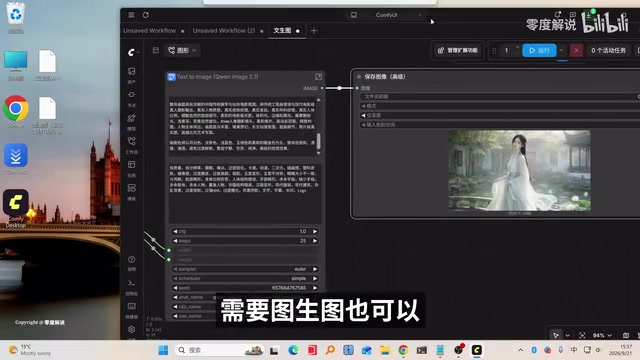
Drag your downloaded workflow (such as a text-to-image workflow) into ComfyUI. If it prompts you that model files are missing, you can click directly to download the missing text encoders, Diffusion model, and VAE files. Once everything is downloaded, use the shortcut key to refresh nodes and you're ready to generate.
Choosing a Quantization Level
The jailbroken model offers multiple GGUF quantization versions — Q4, Q5, Q6, and Q8 — which you can choose based on your available VRAM. If VRAM is tight, go with a lower quantization like Q4; if you prioritize quality, choose Q8. Text encoders are also available in both INT8 quantized and BF16 full-precision versions.
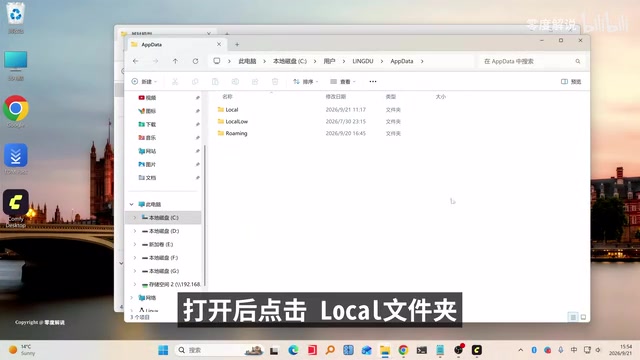
Downloaded model files need to go into the corresponding ComfyUI directories: Diffusion models go into the diffusion_models folder, text encoders into text_encoders, and VAE files into the vae folder. If you're using a GGUF quantized model, you'll also need to install the GGUF loader extension via the command line in the custom_nodes directory.
GGUF (GPT-Generated Unified Format) is a model weight storage format popularized by the llama.cpp project, designed for efficient inference on consumer hardware. The numbers in Q4, Q5, Q6, and Q8 represent the number of bits used to store each weight parameter (quantization precision) — original full-precision models are typically BF16 (16-bit) or FP32 (32-bit). With Q4, each parameter is stored using only 4 bits, compressing the model to roughly one-quarter of its original size and dramatically reducing VRAM requirements, though at the cost of some precision. Q8 is close to full-precision quality and is the better choice when VRAM is plentiful. The BF16 version of the text encoder preserves full precision, while the INT8 version is an 8-bit integer quantization compromise. For consumer GPUs with around 8GB of VRAM, Q4 or Q5 is typically a practical starting point for running Qwen-Image-2.1 smoothly.
ComfyUI is currently the most widely used open-source image generation workflow framework, organizing the generation pipeline using a Node Graph approach — users connect functional nodes like "model loader," "text encoder," "sampler," and "VAE decoder" to build complete image generation pipelines without writing any code. Its support for new model architectures typically updates faster than other frontends; models like Wan2.1, Flux, and SD3 all received native ComfyUI support shortly after release. Compared to WebUI-style tools, ComfyUI has a steeper learning curve, but workflows can be shared directly as JSON files, which dramatically lowers the cost of reproducing complex pipelines — and is a key reason the multi-image reference editing workflow described in this article can spread so quickly.
Test Results and User Experience
In text-to-image testing, changing the default 1:1 ratio to 16:9, entering a prompt, and hitting run yielded near-instant results. Character images were detailed and natural, with both photorealistic and traditional Chinese art styles performing consistently well. Image-to-image generation also works — just drag in the img2img workflow and upload a reference image.
The multi-image reference editing feature in the jailbroken workflow allows uploading more images than the default two. If you need to add more, you can right-click to add "image overlay" nodes one at a time. This flexible multi-image input significantly expands the creative possibilities for character consistency and product reproduction use cases.
Summary
Qwen-Image-2.1 delivers high-quality image generation with a lightweight 7B parameter footprint, and combines native transparent image support, multi-image reference editing, and the ability to run locally on consumer-grade GPUs — making it genuinely accessible for everyday creators and developers alike. Being free and open-source lowers the barrier to entry even further. That said, the jailbroken version carries content compliance risks and should be used with caution. For anyone looking to build a controllable, locally-running image generation pipeline, this is an open-source option well worth trying.
Related articles

Chain of Thought Isn't Just for AI: How Humans Can Use CoT to Improve Thinking Quality
Chain of Thought isn't just a prompt trick for large models. Starting from a Hacker News discussion, this article analyzes why CoT works for human thinking too, breaks down actionable ways to transfer it, and highlights the key differences between human CoT and machine CoT.
Cloudflare Teams Up with OpenAI: Closi…
Cloudflare Teams Up with OpenAI: Closing the Loop from Vulnerability Discovery to Defense with AI
Cloudflare uses OpenAI Daybreak to investigate security vulnerabilities and generate reviewable remediation plans, while developers use Codex to boost coding efficiency and quality.

Orca Multi-Agent Orchestration in Practice: A Guide to Parallel Collaboration with Claude and Codex
Orca is Stable AI's free open-source agent workbench supporting 34 agents like Claude Code and Codex in parallel. Learn its Git worktree isolation, multi-model orchestration, and mobile management.