Qwen3 27B vs DeepSeek V4 Flash Local Benchmark: A Head-to-Head Coding Comparison

Qwen3 27B edges out DeepSeek V4 Flash in local agentic coding tests across three front-end tasks.
A Bilibili creator ran Qwen3 27B and DeepSeek V4 Flash locally on a Mac Studio, testing both models on three increasingly difficult front-end coding tasks: a weather dashboard, a tower defense game, and an Excel-like spreadsheet. Using a Python Agent Harness with detailed prompts, Qwen3 27B won the weather dashboard round, tied on tower defense, and clearly outperformed DeepSeek on the hardest spreadsheet task — delivering functional results even without thinking mode enabled.
A Purely Local Model Showdown
As open-source large language models iterate at an ever-accelerating pace, many developers are asking a practical question: can the latest generation of open-source models actually handle real coding tasks on local hardware? This hands-on test comes from a Chinese Bilibili content creator who downloaded both Qwen3 27B and DeepSeekAd V4 Flash (version 0731) onto his Mac Studio and ran a side-by-side comparison using a unified testing workflow.
DeepSeek V4 Flash is a high-efficiency inference model from DeepSeek, built on a MoE (Mixture of Experts) architecture. The core idea behind MoE is that while the model has a massive total parameter count, only a subset of "expert" sub-networks are activated during each inference pass. This preserves the capabilities of a large model while dramatically reducing actual computational cost. The Flash variant is further optimized for inference speed, making it well-suited for applications that demand fast responses. However, the MoE architecture also introduces coordination challenges — different experts may "miss" certain details on complex tasks, something that showed up in the tests below.
To the tester's credit, this isn't one of those "run a benchmark score and call it a day" evaluations. He set up a reasonably rigorous experimental environment: a Python-based Agent Harness drives the models, allowing them to invoke tools as needed and complete full runs before results are assessed. An Agent Harness is a testing framework designed to drive LLMs through complex tasks autonomously. In this Agentic Coding paradigm, the model doesn't just generate code in a single shot — it acts like an "agent" that can think step by step, call external tools (file read/write, terminal command execution, browser preview, etc.), and decide its next action based on tool outputs. This simulates a real developer's workflow — write code → run → read errors → fix bugs → run again — placing higher demands on the model's planning ability, error correction, and context management. Each test prompt was written as a standalone Markdown file with clearly specified output requirements.
He made a particularly important observation: if you give a vague instruction like "build me a weather dashboard," both models will interpret it in their own way, producing wildly different results with very low comparability. So he deliberately made the prompts highly specific — a key prerequisite for making this test relatively reliable.
Three Coding Tasks of Increasing Difficulty
The evaluation revolves around three real-world front-end development tasks of escalating difficulty, all with one constraint: "everything must fit into a single standalone HTML file, with no external JS files or third-party libraries." This constraint may sound simple, but it's actually a litmus test for engineering capability. In real front-end development, developers typically rely on frameworks like React or Vue and various npm ecosystem libraries to organize code. Stripping away these tools forces the model to implement everything from scratch using vanilla HTML + CSS + JavaScript — including DOM manipulation, event handling, state management, and Canvas bindung. This tests not only the model's mastery of low-level Web APIs but also whether it can maintain clean code structure without modular tooling, avoiding global variable conflicts and scope pollution. For logic-heavy tasks like a tower defense game or an Excel-like spreadsheet, the single-file constraint amplifies any architectural design flaws.
The three tasks were:
- Easy: Connect to a free weather API and build a single-page weather dashboard
- Medium: A playable tower defense game
- Hard: An Excel-like spreadsheet that supports clicking cells to input values, running formulas, and reporting errors for invalid formulas (e.g., division by zero)
Weather Dashboard: Qwen3 27B Edges Ahead
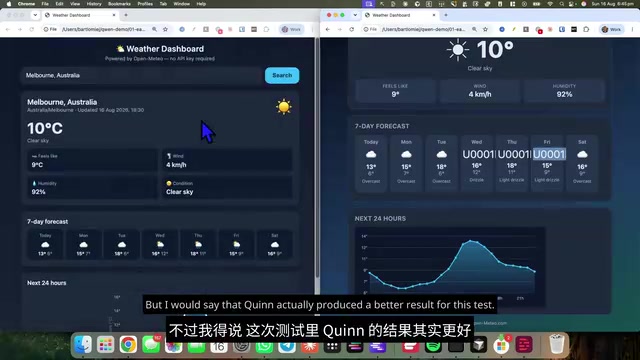
Both models largely completed the first task. The dashboard included city search, current temperature, a seven-day forecast, and a 24-hour weather outlook. However, differences emerged in the details — the DeepSeek version failed to render some forecast icons properly, and the two versions showed different "feels like" temperatures (9°C vs. 11°C), likely due to different approaches to parsing the API response data.
The tester preferred Qwen's version: it allowed selection between different cities named Melbourne, thoughtfully displayed latitude and longitude coordinates, and felt more polished overall. The chart layout was also more spacious, with information not crammed together. Qwen took this round.
Tower Defense Game: A Draw
Tower defense was an interesting medium-difficulty task. The tester shared an observation from experience: smaller models are more prone to "missing things" in tasks like these — generating a canvas that you can't drag elements onto, or placing an archer that never shoots. Larger-parameter models like DeepSeek tend to think through the details more thoroughly.
In practice, both versions ran successfully, and both met the prompt's gameplay requirements — towers could be placed, upgraded three times, and sold at 70% of their cost. Qwen's version ran correctly but had noticeable UI issues: the Gold, Lives, and Wave status boxes plus the pause button overlapped with the canvas, leaving no whitespace where there should have been.
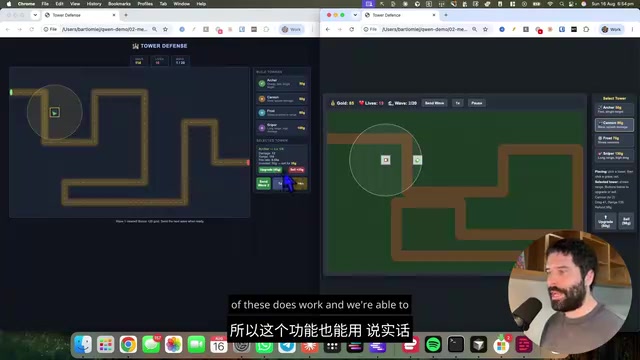
DeepSeek's layout was more appealing, making good use of the center page area without stray whitespace, and the canvas even featured drawn road lines for a cleaner visual feel. Upgrade and sell functionality performed equally on both sides, though DeepSeek's interface prompts were clearer. The tester called this round a draw, with the only slight edge going to DeepSeek for its canvas with road markings.
The Excel-Like Spreadsheet: Where the Real Gap Emerged
The third task — the Excel-like spreadsheet — was the most telling part of this evaluation, as both models struggled here.
Round 1: Thinking Mode Off, Iterating Through Follow-Up Questions
The first round was run with the reasoning (thinking) feature disabled. The tester adopted an approach that mirrors real user behavior: instead of diving into the code and telling the model "fix this line," he only described symptoms — "I can't click on this cell," "I can't input values" — and iterated three rounds within the same conversation.
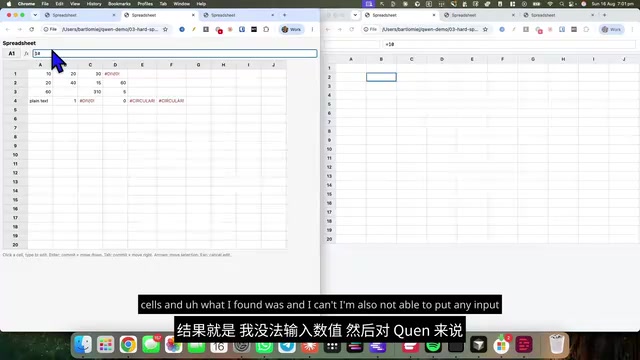
Qwen's first version failed outright — cells couldn't even be selected. Later, having Claude read the code revealed the root cause: Qwen had placed an invisible overlay across the entire Canvas. The backend logic was actually correct, but a blocking element on top intercepted all clicks. This is a classic front-end bug — in HTML, elements stack according to DOM order and the CSS z-index property. If a transparent div or Canvas element sits above interactive elements, it intercepts mouse click events even though nothing is visually obstructed. These bugs are particularly insidious to debug because everything looks normal visually; they can only be identified by inspecting element stacking order layer by layer in browser developer tools or by using CSS properties like pointer-events: none. The fact that the model generated this type of bug suggests its reasoning about element layering in complex DOM structures still has room for improvement.
After several iterations, Qwen gradually became able to select cells, input values, and even execute formulas like =A1+B1. While still imperfect, it was clearly converging toward a usable state.
DeepSeek wasn't as fortunate. Its problems leaned toward code-level detail omissions — a missing semicolon at the end of a line, a missing character, or flat-out generating an empty function (the function shell existed but contained no body), which crashed the application. After three rounds of follow-up, DeepSeek still couldn't deliver a version that allowed value input.
The tester's assessment was fair: neither output was truly production-ready — neither could pass muster for deployment or personal use. Qwen was simply "less incomplete."
Round 2: Thinking Mode On + Low Reasoning Effort
For the final round, the tester cleared the conversation, started a fresh session, enabled thinking mode for both models, set reasoning effort to low, and let each model do a single-shot run with no follow-up questions.
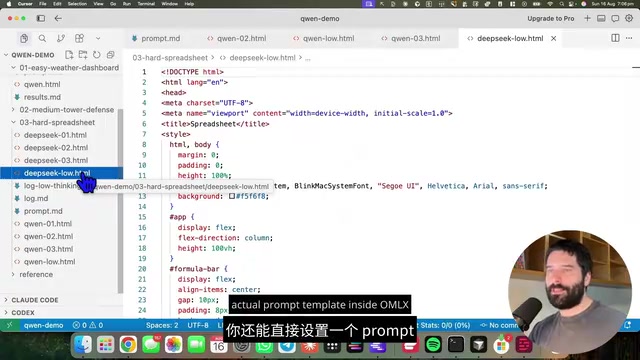
Thinking mode (also known as Chain-of-Thought) is a key technique for improving LLM reasoning capabilities in recent years. When enabled, the model outputs an "internal thinking process" before generating the final answer, breaking complex problems into sub-steps for sequential reasoning. New-generation models like Qwen3 and DeepSeek both support this feature. Reasoning Effort is a parameter that controls thinking depth, typically offered in levels like low, medium, and high. At low, the model reduces thinking steps and internal deliberation length in exchange for faster response times; at high, it performs more thorough step-by-step reasoning but takes longer. The tester chose low both to test baseline performance at minimum reasoning overhead and to better reflect real user expectations for response speed in local deployment scenarios.
The results were interesting. Qwen finally delivered a quite impressive result: cells were clickable, values could be overwritten, =A1+B1 worked, and even =AVERAGE(A1:B1) executed correctly. It occasionally got stuck in a cell, but pressing Escape cleared the formula, and the overall experience was usable.
DeepSeek with reasoning enabled still couldn't select cells. It did one thing better than Qwen — the table's left and top edges hugged the page border, resembling Google Sheets' look, while Qwen's table didn't truly snap to the edges. But on the hard metric of "does it actually work," Qwen won this round.
Takeaway: Qwen3 27B's Local Coding Ability Deserves Attention
Across all three tasks, the tester's core conclusion was: for Agentic Coding tasks running in a local terminal, Qwen3 27B can already go toe-to-toe with DeepSeek V4 Flash, and in some scenarios it's even stronger. This was especially evident on the hardest spreadsheet task — even without thinking and reasoning enabled, Qwen delivered usable results, while DeepSeek couldn't produce anything truly functional despite multiple rounds of follow-up.
However, the tester honestly added two caveats:
- The test used 8-bit quantized versions; whether 4-bit quantization would introduce more errors remains uncertain. Quantization is a technique that compresses model weights from high-precision floating point (e.g., FP16/BF16) to lower-precision integers, aiming to dramatically reduce memory usage and computational overhead so large-parameter models can run on consumer hardware. 8-bit quantization is generally considered an optimal balance between precision loss and performance gain — model output quality stays close to original weights while memory usage is roughly halved. By contrast, 4-bit quantization can compress memory further but is more prone to introducing "quantization errors," causing logical jumps or syntax errors in complex reasoning and long code generation tasks.
- A valuable hypothesis worth exploring separately: Qwen may be better at "just building the thing," while DeepSeek might have an edge in "project planning." This direction deserves its own dedicated comparison test.
For developers interested in locally deploying open-source models, the value of this test isn't in declaring an absolute winner — it's in using real coding tasks with concrete constraints to demonstrate what the latest generation of open-source models can achieve on consumer-grade hardware. Qwen3 27B's performance genuinely adds a reliable new option to the local AI coding toolkit.
Related articles

Chain of Thought Isn't Just for AI: How Humans Can Use CoT to Improve Thinking Quality
Chain of Thought isn't just a prompt trick for large models. Starting from a Hacker News discussion, this article analyzes why CoT works for human thinking too, breaks down actionable ways to transfer it, and highlights the key differences between human CoT and machine CoT.
Cloudflare Teams Up with OpenAI: Closi…
Cloudflare Teams Up with OpenAI: Closing the Loop from Vulnerability Discovery to Defense with AI
Cloudflare uses OpenAI Daybreak to investigate security vulnerabilities and generate reviewable remediation plans, while developers use Codex to boost coding efficiency and quality.

Orca Multi-Agent Orchestration in Practice: A Guide to Parallel Collaboration with Claude and Codex
Orca is Stable AI's free open-source agent workbench supporting 34 agents like Claude Code and Codex in parallel. Learn its Git worktree isolation, multi-model orchestration, and mobile management.