Qwen3.8-Flash-Next Uncensored Model Local Deployment Guide: Running LLMs on an 8GB GPU

Deploy the uncensored Qwen3.8-Flash-Next LLM locally with 262K context and multimodal support on an 8GB GPU.
Based on a Bilibili tutorial, this article covers deploying Qwen3.8-Flash-Next — a Qwen-derived local LLM claiming no content filtering, 262K context, and multimodal image recognition. Using the Strata inference engine with MTP acceleration, it runs on as little as 8GB VRAM. On an RTX 4080S, inference hits ~60 tokens/s. Deployment involves downloading the engine, model files, and RT files, then configuring local paths. The article also cautions readers to verify the model's origins, quantization tradeoffs, and content risks independently.
Why This Model Is Worth Attention
A Bilibili creator known as "Chaoge" recently shared a local deployment tutorial featuring a model derived from the Qwen series called Qwen3.8-Flash-Next — referred to in the video as an "uncensored" large language model. Its three main selling points are: no content filtering, an exceptionally long context window (262K tokens), and relatively modest hardware requirements — the official description claims it can run on as little as 8GB of VRAM with the smallest quantized version.
According to the creator, the model quickly accumulated tens of thousands of downloads after launch, with multiple quantized variants available to accommodate different VRAM configurations. Its key technical highlight is the use of the Strata inference engine combined with MTP (Multi-Token Prediction) acceleration, enabling reasonably fast inference even on consumer-grade GPUs.
It's worth noting that the content of this article is based on a single source (the Bilibili creator's demonstration). The model's actual capabilities and naming accuracy await further independent verification.
Quantization is one of the core techniques in local LLM deployment. The weights of a raw model are typically stored as 32-bit or 16-bit floating-point numbers. Quantization drastically reduces model size and VRAM usage by compressing these weights into lower-precision integer formats (such as 8-bit, 4-bit, or lower). IQ3_S is a non-uniform 3-bit integer quantization scheme that incurs greater precision loss compared to standard Q4 quantization, but delivers a smaller footprint and lower VRAM requirements. While quantization inevitably introduces some accuracy degradation, modern quantization algorithms (such as the k-quant series used in the GGUF format) can maintain performance close to the original model on most tasks. The 262K token context window means the model can process roughly 200,000 Chinese characters in a single conversation — well-suited for long document analysis, codebase Q&A, and similar tasks — though the KV cache will consume significant VRAM and system RAM as context grows.
MTP (Multi-Token Prediction) is an inference acceleration technique. The core idea is to have the model predict multiple subsequent tokens in a single forward pass, rather than generating one token at a time as in traditional autoregressive decoding. This significantly improves inference throughput, especially on consumer-grade GPUs. MTP typically requires a companion "draft head" model file (the RT files mentioned in the tutorial) to work: the main model handles verification while the draft head rapidly generates candidate sequences, together completing a Speculative Decoding pipeline. This explains why the RT files must be separately downloaded and copied into the correct directory to actually enable acceleration — without this step, the model still runs, but noticeably slower than advertised.
Benchmarks: Speed and Multimodal Capability
The creator's test environment consisted of an RTX 4080S with 16GB VRAM, a 12-core CPU, and 64GB of system RAM. On this setup, running the largest quantized model (approximately 83GB, IQ3_S quantization), the measured inference speed approached 60 tokens/second, reaching 63 tokens/s in some scenarios.
Multimodal image recognition was a key focus of the testing. The creator uploaded a photo containing pencils and asked the model to count them. The model returned an answer of "34 pencils," explaining the count layer by layer — correctly identifying the arrangement. The inference speed during this test was approximately 55 tokens/s.
For coding ability, the creator asked the model to fix two bugs in a Snake HTML game — "the snake doesn't die when hitting a wall" and "the snake can't eat food." The model successfully resolved both issues, and the game functioned correctly after replacing the code.
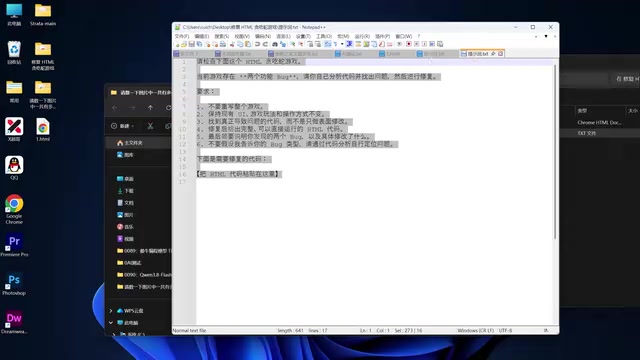
However, in a test to generate an interactive "neon cycling" HTML page, the model produced a page where the interactive controls were unresponsive. The creator suggested this may have been due to the prompt not explicitly requesting "dynamic effects," and that different models interpret instructions differently. The result highlights the model's limitations in understanding complex interactive requirements.
Complete Local Deployment Walkthrough
The full deployment process breaks down into several key steps: downloading the inference engine and model files, and correctly configuring the paths.
Step 1: Download the Strata Project and Model Files
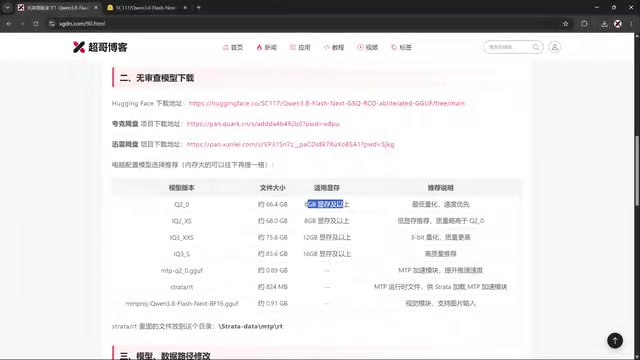
The creator provided three download channels: HuggingFace, Quark cloud storage, and Thunder cloud storage. Users in mainland China experiencing slow HuggingFace access can use the cloud storage options. Files to download include: the Strata inference engine project archive, the main model file (available in multiple quantized versions including IQ3_S), the MTP acceleration files, and the multimodal recognition files.
For choosing a quantized version, the creator provided a reference table: the smallest version requires approximately 6–8GB of VRAM, while the largest IQ3_S version is around 83GB, suited for users with ample VRAM and system RAM. The main model file is split into two parts (approximately 26GB + 51GB).
Step 2: Create Folders and Modify Paths
Given the large size of the model files, the creator recommends storing them on a non-system drive with sufficient space (e.g., drive D). Two folders need to be created: one for the model files (models) and one for temporary runtime files automatically generated during model execution (approximately 7–8GB).
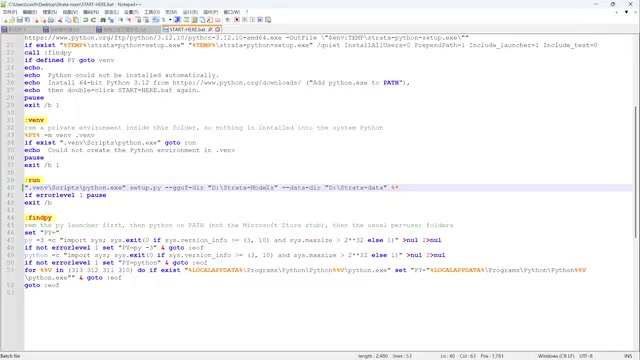
Next, open the startup script (start_here.bat) with a text editor and modify the configuration around line 40, adding two path entries: one to specify the local model directory (to prevent the program from downloading files automatically), and one to specify the runtime file storage path. The creator emphasizes that folder names should match those in the tutorial exactly — otherwise you'll need to update the corresponding configuration yourself.
Step 3: Launch and Configure Parameters
Double-click the startup script. The program will first detect your system environment, then enter an interactive configuration process:
- Model selection: Enter the number corresponding to your downloaded quantized version
- Context length: Default option is 3
- KV cache precision: Option 1 is recommended (higher precision, minimal overhead increase)
- Multimodal: Enter
yif you downloaded the multimodal files and need image recognition - Refusal control: Enter
yto reduce model refusals
Step 4: Replace RT Files to Enable MTP Acceleration
After the first run, the program generates a new .bat startup file. At this point, copy the four downloaded RT files into the automatically generated MTP directory to actually enable MTP acceleration.
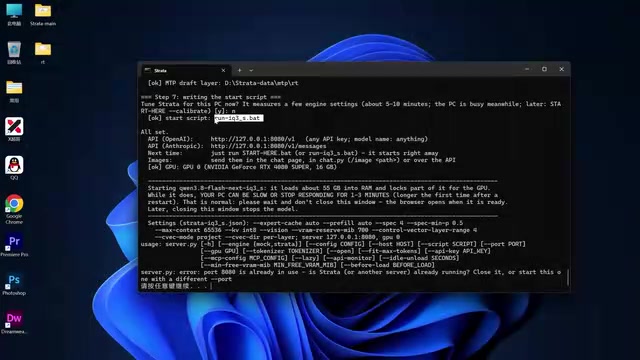
If you encounter a port conflict (the creator's port 8080 was occupied, preventing the page from loading), change the port number in the generated startup file to an available port such as 8085. Once configured, use the generated .bat file to launch — not the original start_here.bat.
Usage Notes
The command-line terminal window must remain open while the model is running — closing it will immediately shut down both the chat interface and the model. If you accidentally close it or restart your computer, you'll need to run the startup file again.
In the creator's final connection test, the initial token speed was around 30 tokens/s, though they attributed this to screen recording overhead or short response length. Under normal conditions, the speed should fall in the 60–70 tokens/s range.
A Balanced Look at "Uncensored" Models
Locally-deployed models marketed as "uncensored" have been circulating widely in the community recently. Their appeal primarily lies in running locally, requiring no API, and keeping all data on-device. That said, a few points deserve careful consideration: the actual relationship between the model's name and official versions, precision loss from quantization, and the content risks that come with removing safety filters.
From a technical standpoint, MTP acceleration and quantization are genuinely helping bring large models to consumer hardware, enabling more people to experience long-context and multimodal capabilities on personal computers — a trend worth acknowledging. However, this tutorial comes from a single demonstration source; the specific performance figures and model provenance should be independently verified before deployment.
Regarding model lineage, the claim of being "derived from the Qwen series" warrants caution. The Qwen (Tongyi Qianwen) series is open-sourced by Alibaba, and the original models include built-in content filtering mechanisms. Community-derived "uncensored" versions typically remove these restrictions through continued fine-tuning or direct modification of model weights — operations that may simultaneously affect the model's alignment in other dimensions. Furthermore, the "Flash" and "Next" suffixes in the model name are not standard naming conventions from the official Qwen version series. Combined with the fact that the video comes from a single creator, users are advised to verify the model card on HuggingFace before deployment — specifically the source description, training data, and license information — to assess actual credibility and compliance.
Related articles

Felix Rieseberg Personal Homepage
Felix Rieseberg's personal homepage sparks attention on Hacker News. This article covers the Slack engineer's technical background, the rise and fall of nativefier, and the value of a developer homepage as a tech calling card.

@ai-sdk/vue 3.0.306 Patch Release Syncs with [email protected] Update
@ai-sdk/vue 3.0.306 released, synced with [email protected]. A routine patch release for the Vercel AI SDK ecosystem with no public API changes; the Vue adapter layer stays version-aligned with the core package.

Gemini 4 Argon API Launches: The Era of Million-Token Output Begins
Google launches Gemini 4 Argon with sparse MoE architecture, up to 1M output tokens, and a 68.90% Vals Index score, available across API, AI Studio, and the Gemini app.