QwenCoder Local Deployment Review: Can It Replace Paid AI Coding Assistants?

Local QwenCoder 80B handles simple coding tasks well but falls short of paid cloud models on complex ones.
A developer with 20 years of experience deployed QwenCoder 80B locally on consumer hardware (RTX 4060) using LM Studio and a LAN-based distributed architecture to test its coding capabilities. Results show the model performs well on simple programming tasks with impressive response speed, but fails on complex tasks (like generating an HTML visualization of six sorting algorithms), getting stuck in loops caused by context window degradation—falling short of paid cloud models like Gemini 3.1 and Qwen 3.5.
Introduction: Why Test a Local Coding Model?
As AI coding tools become increasingly popular, paid models like Claude, Gemini, and GPT are powerful but their ongoing subscription fees and token costs put pressure on many developers. Nick, a programmer with 20 years of development experience, recently conducted an in-depth test of QwenCoder to answer a key question: To what extent can a locally deployed, specialized coding model replace paid AI coding assistants?
He had previously tested the Qwen 3.5 general-purpose model, which performed well overall but was mediocre at coding tasks—after all, programming wasn't its primary design goal. QwenCoder, on the other hand, is a model specifically designed for code generation. Official benchmarks show its performance is comparable to Claude Sonnet 4.5, while being smaller and capable of running locally on consumer-grade hardware.
To understand the difference between QwenCoder and general-purpose Qwen models, you need to grasp the core logic of "specialized fine-tuning" in AI models. General-purpose models use diverse internet text during pre-training, with code being only a portion; specialized coding models typically undergo continued pre-training and instruction fine-tuning on top of a general foundation, using large-scale, high-quality code datasets. Training data sources include GitHub open-source code, competitive programming solutions, technical documentation, code review records, and more. Specialized coding models are also optimized for code-specific evaluation metrics such as HumanEval (function-level code generation), MBPP (basic programming problems), and SWE-bench (real GitHub issue fixes). This specialized training makes the model significantly better than general-purpose models at understanding code semantics, handling multi-file contexts, and generating language-compliant code—but at the cost of degraded performance on non-coding tasks.
Hardware Configuration and Deployment Setup
Test Hardware Specs
The test was conducted on a Linux desktop machine with the following core configuration:
- CPU: AMD Ryzen 7
- RAM: 128GB
- GPU: GeForce RTX 4060 (VRAM capacity is the key factor)
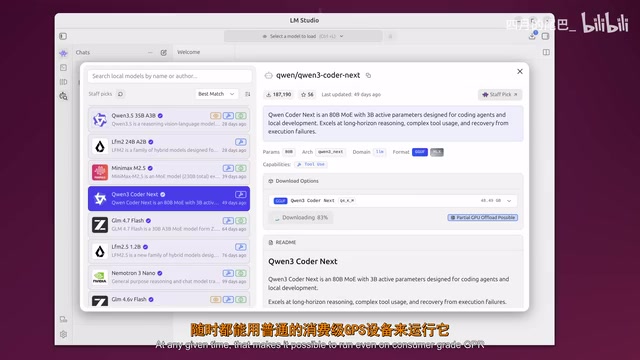
The reason QwenCoder's 80B parameter version (approximately 50GB in size) can run on a consumer-grade GPU is its Mixture of Experts (MoE) architecture. Unlike traditional dense models that activate all parameters during inference, MoE architecture introduces a "routing mechanism"—the model consists of multiple "expert" sub-networks, and during each inference pass, the router selects only a few experts (typically 2-8) to process the current input. This means an 80-billion parameter MoE model may only activate approximately 20 billion parameters per inference pass, dramatically reducing VRAM usage. The MoE architecture was first proposed by Google in 2017 and has since been widely adopted by Mistral's Mixtral series, Alibaba's Qwen series, and others, representing a technical approach of "achieving larger model capacity with fewer computational resources." Additionally, the GGUF quantization format supported by the underlying inference engine llama.cpp (e.g., Q4_K_M) further compresses model size several times by reducing weight precision from 32-bit floating point to 4-bit integers, typically with only about 1-5% performance loss—another key enabling technology for local deployment of large models.
LM Studio Deployment and Network Architecture
Nick used LM Studio as the local model runtime tool (another popular choice is Ollama). Both are currently the most mainstream local large model runtime frameworks, but with slightly different positioning: Ollama leans more toward command-line and developer toolchains, supports Docker deployment, has an API interface fully compatible with the OpenAI specification, and is suitable for integration into automation scripts and CI/CD pipelines; LM Studio provides a graphical interface, a built-in model download marketplace (directly connected to Hugging Face), and supports one-click local API server startup, making it more friendly for non-technical users. Both rely on llama.cpp as the underlying inference engine.
Even more cleverly, Nick adopted a distributed workflow:
- The model runs on the Linux desktop machine
- It's exposed to the local network via LM Studio's built-in API service
- He uses his MacBook daily, connecting to the model over the network
- In the Zed editor, he configures LLM providers with the LAN address and port
The technical implementation of this architecture relies on the OpenAI-compatible API specification—the HTTP interfaces exposed by tools like LM Studio and Ollama are fully consistent with the OpenAI API format, meaning any AI client that supports custom API endpoints (Zed, Continue.dev, Cursor, etc.) can seamlessly switch to local models without code modifications. From a security perspective, LAN deployment means code and data never leave the local network, which is particularly important for developers working with trade secrets or sensitive code. From a cost perspective, the electricity consumption of an RTX 4060 machine (approximately 120W at full load) is far lower than equivalent cloud API call fees. This architecture can be further extended: through zero-trust networking tools like Tailscale, you can even securely access your home AI server from external networks.

QwenCoder Practical Coding Ability Tests
Simple Tasks: Passed with Ease
First came a basic Python function writing test, used to verify that the multi-machine collaborative setup was working properly. QwenCoder's response speed was impressive—considering the model is approximately 50GB, the generation speed was quite fast, fully meeting the interactive needs of daily development.
Complex Tasks: Falling Short
Next came the real challenge—asking the model to generate an HTML file that visualizes six sorting algorithms. This is the same problem Nick had previously used to test Gemini 3.1 and Qwen 3.5.
The results?
- Gemini 3.1 (paid cloud): Successfully completed
- Qwen 3.5 400B (cloud, large version): Successfully completed
- QwenCoder 80B (local): Failed
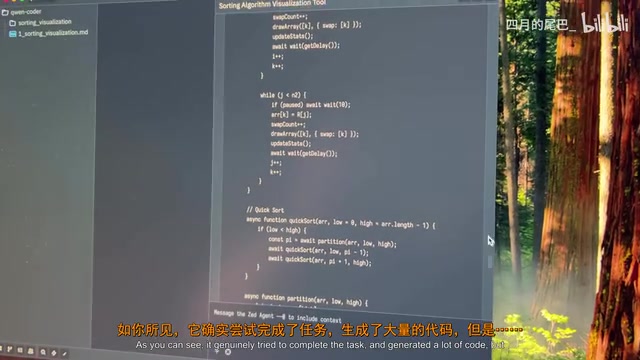
During the lengthy generation process, the model repeatedly discovered its own errors and attempted rewrites, ultimately falling into a loop. This phenomenon is known in the industry as "context window degradation"—when generated content exceeds the model's effective processing length, the model's "memory" of earlier generated content becomes blurry, leading to logical inconsistencies between earlier and later sections, which in turn triggers repeated corrections. While it did generate a large amount of code, demonstrating clear "effort"
Related articles
 Product Reviews
The Programmer's Desk Setup Guide: Building a Workspace That Feels Like Home
Discover how programmers build productive, comfortable workspaces. From multi-monitor setups to ergonomic design, explore the desk philosophy that drives focus and flow.
 Product Reviews
Qoder vs Cursor Real-World Comparison: Which $20/Month AI IDE Is Better?
Hands-on comparison of Qoder vs Cursor AI IDEs: Agent autonomy, human interaction count, and architecture decisions. Qoder needed only 2 interactions vs Cursor's 8.
 Product Reviews
Cursor Cloud Agent Demo: Eliminating Bottlenecks Across the Entire Software Development Lifecycle
Deep analysis of Cursor's Cloud Agent demo showing how cloud VMs, automated test artifacts, and a full-chain control plane systematically eliminate human bottlenecks across the software development lifecycle.