Rambox Workspace Overhaul: Unified Search and Command Center Go Live

Rambox launches a major workspace-centric redesign focused on reducing friction and clicks.
Rambox launched a major workspace-centric redesign on Product Hunt, earning 65 upvotes, 7 comments, and a 13th-place finish for the day. It introduces Unified Search, Quick View, Command Center, and focus tools, plus improved tabs and context persistence, aiming to reduce friction and clicks. The article argues Rambox's differentiation lies in turning workspaces into an active context-switching mechanism, ideal for users juggling multiple clients, projects, or roles.
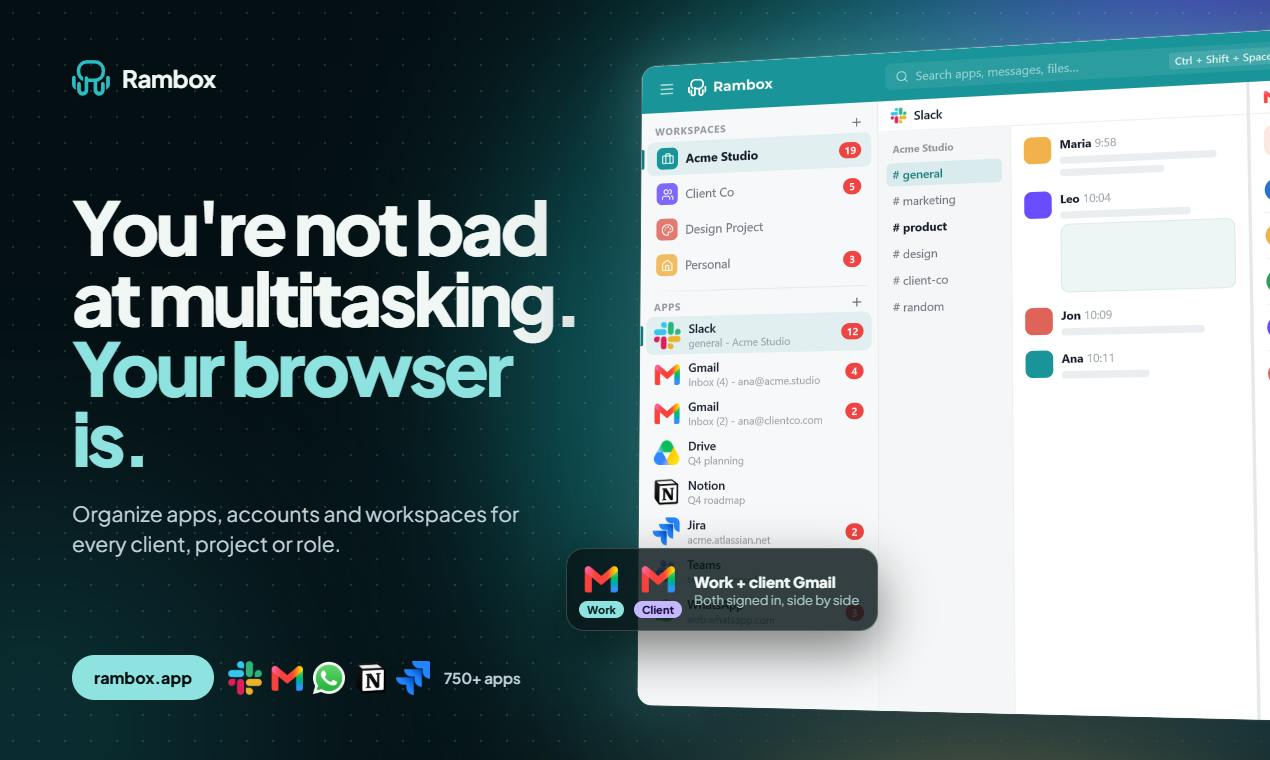
The Product Thinking Behind the Overhaul
Rambox has launched a major workspace-centric redesign on Product Hunt, with the official keywords being "reduce friction" and "reduce clicks." With 65 upvotes, 7 comments, and a 13th-place finish for the day, this multi-app aggregation tool is clearly trying to address a long-standing user complaint: when you have Slack, Gmail, Notion, and Trello all open at once, switching costs quietly eat away at your attention.
Rather than piling on more integrations, this redesign focuses on navigation structure. The new interface reorganizes the entry points for workspaces, tasks, and context, and the official announcement says the onboarding experience has also been redesigned to help new users more easily understand what problem Rambox actually solves. For a feature-dense tool, that kind of restraint matters more than adding capabilities.
Product Hunt's ranking and voting mechanics: Product Hunt is a platform for launching and discovering tech products, displaying new products ranked daily by upvote count. With 65 upvotes and a 13th-place finish for the day, this is a mid-to-upper-tier result — top-ranked products typically receive hundreds or even thousands of votes, so this scale suggests Rambox has reached its core user base but hasn't yet broken into the mainstream. The comment-to-upvote ratio (7:65) is also worth noting: for productivity tools, discussion tends to concentrate among actual users rather than general tech enthusiasts.
Breaking Down the New Features: From Search to Command Center
Unified Search
Unified Search is one of the core features of this update. It consolidates cross-app search into a single location, so users don't need to switch to a specific app before searching. For users who treat Rambox as a "workbench" rather than a "browser tab manager," the value of this change lies in reducing cognitive switching — you only need to remember one search box.
Quick View and Command Center
Quick View addresses the "just take a glance" scenario: preview content without opening the full app window, then decide whether to go deeper. Command Center is more of a keyboard-driven action hub, and combined with the improved tab management and context persistence in this version, it lets workspaces restore to their previous state after switching tasks instead of requiring users to rebuild their environment each time.
Context persistence: In multi-app aggregation tools, this concept refers to the system's ability to remember each workspace's tab composition, scroll positions, unread states, and even input drafts after the user switches workspaces or tasks, then automatically restore them upon return. Without this capability, users need to reopen a set of app tabs every time they switch projects — itself an implicit cost. Context persistence combined with focus tools effectively upgrades a workspace from a "static grouping" to a "saveable work state," which is a key differentiator between Rambox and the browser multi-tab approach.
Focus Tools and Context Persistence
The "new focus tools" mentioned in the official announcement complement context persistence: the former helps users block distractions within a specific workspace, while the latter ensures context isn't lost when switching back. Together, these two capabilities target the same type of user — someone who frequently switches between multiple clients, projects, or roles.
The Competitive Logic of Multi-App Aggregation Tools
Rambox occupies a somewhat delicate position: on one side are browser-native multi-tab and PWA support, and on the other are competing aggregation tools like Station and Shift, plus each app's own desktop client. Its differentiation has always been built on the concept of "workspaces," and this redesign transforms workspaces from passive groupings into an active context-switching mechanism.
According to the Maker information on Product Hunt, [REDACTED] and Ramiro Saenz participated in this launch. The product is categorized under Productivity and also tagged with Google Cloud Run, suggesting corresponding adjustments at the deployment and cloud services level. The ratio of comments (7) to upvotes (65) indicates that discussion is concentrated among core users and hasn't yet achieved broad reach — which isn't unusual for vertical productivity tools.
The boundary between PWA (Progressive Web Apps) and desktop clients: Browser support for PWAs allows apps like Slack and Notion to run in near-native windows, which to some extent weakens Rambox's irreplaceability. But PWA solutions typically lack cross-app unified search, workspace-level context persistence, and focus modes — these upper-layer workflow capabilities are the core moat of aggregation tools. Competitors like Station and Shift are also competing for the same user base, with differences often coming down to integration count, performance overhead, and workspace model flexibility.
Who Should Re-evaluate Rambox
If your current workflow is "a bunch of browser tabs plus several desktop clients," Rambox's redesign is worth trying again — focus on whether Unified Search and Command Center actually reduce the number of clicks. If you're already using a similar aggregation tool, the combination of context persistence and focus tools is the most worthwhile part to compare — it determines whether you need to rebuild your work environment after switching tasks.
For team users, whether workspace configurations can be synced and shared is also worth paying attention to. The official announcement emphasized simplifying setup and understanding, but didn't elaborate on multi-device collaboration details in the materials, so this part needs to be verified through actual use.
What the Google Cloud Run tag means: Google Cloud Run is a fully managed containerized runtime environment provided by Google, suited for deploying stateless, on-demand scaling services. Rambox including this tag on Product Hunt may mean its backend services or some cloud sync capabilities run on Cloud Run. For users, this indirectly relates to the stability and scalability of features like multi-device sync and team configuration sharing, but specific implementation details should be confirmed through official documentation.
One-line Summary
Rambox launches a major workspace-centric redesign focused on reducing friction and clicks.
Paragraph Summary
Rambox launched a major workspace-centric redesign on Product Hunt, with official keywords being "reduce friction" and "reduce clicks," earning 65 upvotes, 7 comments, and a 13th-place finish for the day. Rather than piling on integrations, this update restructured navigation and introduced Unified Search, Quick View, Command Center, and focus tools, plus improved tabs and context persistence so workspaces can restore their state after switching tasks. The article argues that Rambox's differentiation lies in turning workspaces from passive groupings into an active context-switching mechanism, making it worth re-evaluating for users who frequently switch between multiple clients, projects, or roles — though team collaboration and multi-device sync details remain to be verified.
Related articles

Chain of Thought Isn't Just for AI: How Humans Can Use CoT to Improve Thinking Quality
Chain of Thought isn't just a prompt trick for large models. Starting from a Hacker News discussion, this article analyzes why CoT works for human thinking too, breaks down actionable ways to transfer it, and highlights the key differences between human CoT and machine CoT.
Cloudflare Teams Up with OpenAI: Closi…
Cloudflare Teams Up with OpenAI: Closing the Loop from Vulnerability Discovery to Defense with AI
Cloudflare uses OpenAI Daybreak to investigate security vulnerabilities and generate reviewable remediation plans, while developers use Codex to boost coding efficiency and quality.

Orca Multi-Agent Orchestration in Practice: A Guide to Parallel Collaboration with Claude and Codex
Orca is Stable AI's free open-source agent workbench supporting 34 agents like Claude Code and Codex in parallel. Learn its Git worktree isolation, multi-model orchestration, and mobile management.