Rasa Mantle in Practice: Adding an AI Agent to a VS Code Extension

A developer builds a local conversational agent for a VS Code notes extension with Rasa Mantle, sharing lessons on tool calling, memory, and LLM selection.
A developer integrated Rasa's new Mantle agent engine into the NoteVs VS Code extension to build a fully local conversational agent that answers note queries and sets reminders from a chat panel. The article reviews hands-on work with three core capabilities: tools as typed Python functions with skill-controlled visibility, declarative memory for session state, and running models on Groq (not officially listed) via LiteLLM. It also documents real issues—multi-window project mix-ups, a session-start skill swallowing the first message, and Groq free-tier rate limits—with fixes like explicit parameter passing, overriding the startup skill, and pinning model versions. The conclusion: Mantle greatly simplifies agent logic, but success depends on model selection and provider limits.
Developers often use VS Code to take notes on their projects. As the number of notes grows, finding and acting on them becomes a burden. One developer brought Rasa's newly launched agent engine, Rasa Mantle, into NoteVs—a note-taking extension he built himself—to create a conversational agent. Now he can ask questions directly in a chat panel right next to his code, such as "What did I flag in the auth module?" or "Remind me to work on the refactoring notes tomorrow."
This project is more than a feature demo—it's a deep hands-on exercise with Mantle's three core capabilities: tool calling, memory, and the LLM layer, including running on Groq, a platform not officially listed. Below is a summary of his experience, including which designs worked and where things went wrong.
Architecture Overview: A Lightweight, Local-First Integration
The entire system runs locally. The VS Code extension holds the note data and exposes a lightweight HTTP endpoint on localhost:37492. The agent is a local Rasa server whose tools call that endpoint over HTTP. The extension's chat panel communicates with the agent through Rasa's REST channel.
The project structure is clear: agent.yml defines the persona and global rules, skills/*/skill.md holds the skills, tools/notevs_tools.py contains 10 tools, memory.yml manages project memory, and integrations.yml configures the LLM and channels.
Interestingly, the author had previously implemented the same functionality with the classic CALM framework, which required 5 files and about 590 lines of YAML. The Mantle version is only about 210 lines, most of which are natural-language instructions. This simplicity stems from Mantle's abstraction of agent logic.
Rasa CALM (Conversational AI with Language Models) is an earlier conversational agent framework from Rasa. Its core idea is to describe conversation logic with YAML flows and custom actions; developers must explicitly define every conversation step, branch, and slot-filling rule. Compared with Mantle's approach of abstracting skills, tools, and memory into natural-language declarations, CALM is closer to traditional state-machine-style conversation design, and thus typically requires more configuration files and boilerplate to achieve the same functionality. The line-count comparison in this article (590 vs. 210) reflects the difference in declaration density between the two paradigms: CALM writes a great deal of logic into configuration, while Mantle delegates decisions to the model, constrained by tools.
The REST channel is the HTTP interface that a Rasa server exposes to the outside world, allowing any client to send user messages and receive agent replies via the /webhooks/rest/webhook endpoint. In the NoteVs scenario, the VS Code chat panel does not call Python tools directly; instead, it POSTs user input to the local Rasa server, which drives the LLM through skill selection and tool calls before returning a text response. This design decouples the frontend from agent logic: the extension only needs to implement a simple message send/receive loop, while all the agent's complexity is contained within the Rasa service.
Tool Calling: Typed Functions and Skill Constraints
Tools as Typed Python Functions
In Mantle, tools are async functions with decorators. Type hints and descriptions are the only basis the LLM has for understanding what a tool does. For example, the search_notes tool declares its description via the @tool decorator and returns a ToolResult. All tools are thin wrappers around the same helper function, which sends POST requests to the extension endpoint.
A key design decision was to make failures readable rather than throw exceptions. When an HTTP request fails, the tool returns a ToolResult containing an error code; when the LLM sees notevs_extension_unreachable, the skill instructs it to reply "NoteVs doesn't seem to be running." Users never see a stack trace.
LiteLLM is a Python library that unifies the APIs of multiple LLM providers, abstracting requests and responses from OpenAI, Anthropic, Groq, Mistral, and others into a consistent interface. When Rasa encounters a provider that isn't in its official mapping table, it falls back to LiteLLM for routing, so as long as LiteLLM supports a provider, in theory you can use it directly in Rasa via provider: <name>. This also explains why the author could integrate Groq without modifying Rasa's source code: after specifying the provider name in the configuration layer, requests are actually converted by LiteLLM into Groq's API format. For developers who want to experiment quickly on emerging inference platforms, this fallback mechanism lowers the cost of adaptation—but it also means that the available model list and the degree of tool-calling support depend on the LiteLLM version and the provider's compatibility.
Pass Parameters Explicitly, Avoid Environment Dependencies
The most serious bug the author encountered arose in multi-window scenarios. When multiple VS Code windows are open, each window's agent reads the same project. Because the extension's HTTP server uses a fixed port, only one window can occupy that port, so all tool calls are answered by that window. The author found the agent listing notes from a completely unrelated project.
The fix was to have the helper function explicitly pass the project folder path as a parameter on every call, sourced from the environment variable each window sets for its own agent. If a value must be correct, pass it as a parameter—don't rely on the tool's runtime environment.
Skills Control Tool Visibility
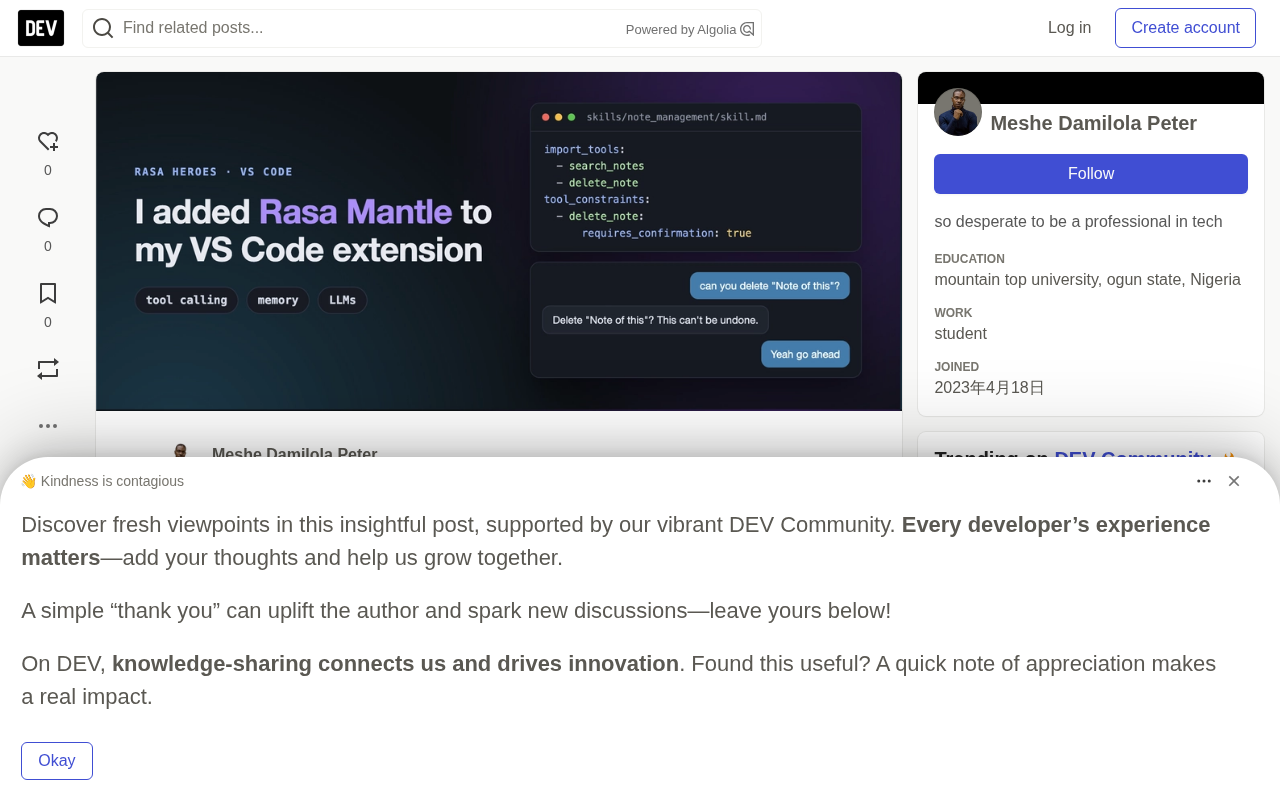
Skills are skill.md files whose front matter lists the available tools and whose body contains natural-language instructions. Each skill imports only the tools it needs, so the model doesn't have to choose from all 10. For example, the "note management" skill imports tools for creating, saving, and deleting notes, and sets tool_constraints requiring user confirmation for deletion.
These constraints are enforced by the framework: no matter what the model decides, delete, remind, and export operations must wait for user confirmation. Read-only tools have no constraints, so "find my bug notes and show the latest one" can chain the search and fetch tools in a single turn.
Overriding the Session-Start Skill
Another problem the author ran into was that the first message of every conversation got swallowed. Mantle's built-in session-start skill greets the user and ends the turn, so "Hey, can you list my notes?" got only a greeting and no tool calls. He overrode that behavior with a skill that does nothing, after which the first message went straight to the correct skill and tools.
Memory: Declarative State Management
Mantle's memory is a set of values that skills track during a conversation. Each entry must first be declared in memory.yml, and tools write to it via context.memory.set(...). The LLM can only write to entries marked llm_settable, so it can't forge critical values like verification results. Values shared between skills live in the project-level memory.yml, and instructions can branch on those values.
The author used memory only lightly: project memory has just one field, folder_path, which records the absolute path of the VS Code workspace the current conversation belongs to. The tool copies the folder path into memory so that in rasa inspect you can see which project a conversation belongs to. Project fields lock once set, making them suitable for values that don't change during a session.
The author plans to make more use of memory: remembering the note currently under discussion so that "delete that one" two turns later doesn't require another search, and using memory as a skill precondition—for example, only starting an export after an integration is connected.
rasa inspect is a debugging tool provided by Rasa for examining the agent's internal state turn by turn, including skill activation, LLM requests and responses, tool-call inputs and return values, and memory reads and writes. In normal rasa run mode, the inspector should not be enabled, because it tries to bind the same port the REST channel has just taken, causing an EADDRINUSE error. The author used rasa inspect --debug to track down issues like multi-window project mix-ups and the swallowed first message. For LLM-based agents, traditional logs are often insufficient to reconstruct the model's decision chain, so turn-by-turn tracing becomes a key means of diagnosing tool-call failures and incorrect skill activation, and the primary window for assessing whether memory values are written as expected.
The LLM Layer: Running on Groq and Model Selection
The model is set in integrations.yml. Rasa's officially named providers include OpenAI and Anthropic, but the author wanted to take advantage of Groq's speed. Groq is not on the official list.
By reading the provider mapping in the Rasa package (rasa/shared/providers/mappings.py), the author discovered that unnamed providers go through LiteLLM, which supports Groq. So all that's needed is to specify provider: groq and the model name in the config.
The selection process was not smooth:
openai/gpt-oss-120btwice failed Mantle's strict tool schema validation—once by calling a nonexistent tool and once by trying to activate a disallowed skill ID—both ending the request with a 400 error.llama-3.3-70b-versatilesupports tool calling according to Groq's docs, but the author's account didn't actually have access.- Qwen was the first model to correctly complete the full "activate → search notes → return results" flow. But it has thinking mode enabled by default, and the reasoning content leaks into chat replies, not always inside
<think>tags. Settingreasoning_effort: noneturns off thinking mode. A month later, Groq replacedqwen3.6-27bwithqwen3.8-27b, and the author had to re-pin the version.
Lesson learned: an agent whose core task is tool calling needs a model that is genuinely good at tool calling. If a turn breaks on schema errors, speed is meaningless. Also, make the provider swappable: through LiteLLM, the author added a small script that rewrites the llm: config block at startup based on the LLM_PROVIDER environment variable. Now switching to Groq, OpenAI, or Anthropic is a single setting, and extension users can choose it in settings.
Free-Tier Limits
The author ran on a free Groq API key. The screenshots show the cost: he asked the agent to delete a note, the note disappeared after confirmation, but when he followed up with "Did you delete it?" there was no answer—just the panel's fallback message. Groq rate-limited the request, and the output channel showed retry-after: 9.
The delete succeeded; only the LLM's next reply failed. On a free key, a few consecutive messages can hit the limit, causing the agent to miss replies or lag. The author believes the same limitation explains why the first screenshot needed a "Are you done?" prompt to return the list.
This is a limitation of the free tier, not a problem with Mantle. A paid Groq key or switching to OpenAI/Anthropic would eliminate it. NoteVs itself doesn't require an LLM: notes, annotations, and search all work from the sidebar, and the agent is just an optional layer.
A Configuration Pitfall
After setting inspector.enabled: true in integrations.yml, rasa run printed "Rasa server is up and running" and then crashed with EADDRINUSE. The inspector is meant for the standalone rasa inspect command. Under rasa run, it tries to bind the same port the REST channel just took. The author keeps it off in the run configuration and uses rasa inspect --debug when he needs to trace LLM and tool calls turn by turn—which is also how he found most of the bugs above.
Hands-On Experience and Outlook
This project is part of the Rasa Heroes community program. The author encourages developers using Mantle—especially those trying providers beyond OpenAI or Anthropic—to share their experiences. Everything is currently based on a pre-release version (rasa-pro==3.19.0.dev5); pin your versions and expect changes.
For developers considering adding an AI agent to existing tools, Mantle offers a clear path: define skills in natural language, expose tools as typed functions, manage state with declarative memory, and choose models flexibly through LiteLLM. The challenges lie in model selection and platform limits, but the architectural simplicity significantly reduces maintenance costs.
Related articles

Chain of Thought Isn't Just for AI: How Humans Can Use CoT to Improve Thinking Quality
Chain of Thought isn't just a prompt trick for large models. Starting from a Hacker News discussion, this article analyzes why CoT works for human thinking too, breaks down actionable ways to transfer it, and highlights the key differences between human CoT and machine CoT.
Cloudflare Teams Up with OpenAI: Closi…
Cloudflare Teams Up with OpenAI: Closing the Loop from Vulnerability Discovery to Defense with AI
Cloudflare uses OpenAI Daybreak to investigate security vulnerabilities and generate reviewable remediation plans, while developers use Codex to boost coding efficiency and quality.

Orca Multi-Agent Orchestration in Practice: A Guide to Parallel Collaboration with Claude and Codex
Orca is Stable AI's free open-source agent workbench supporting 34 agents like Claude Code and Codex in parallel. Learn its Git worktree isolation, multi-model orchestration, and mobile management.