REA AI Agent Review: A Local Reverse Engineering Tool That Clones Any Website UI in Seconds

REA is an open-source reverse engineering tool that clones any website or app UI locally in seconds via AI agents.
REA (Reverse Engineering Agent) is an open-source tool with over 11,000 GitHub stars that lets AI agents analyze compiled desktop apps, Android APKs, and live web pages without needing source code, outputting readable text and JSON for local models. It features five modules, a three-phase workflow, and supports both terminal commands and MCP integration with Cursor, Claude Code, Windsurf, and Anti-gravity. A hands-on test cloned Stripe's pricing page in seconds using Anti-gravity Agent, adding animated toggles, pricing cards, and grouped FAQs — all free and fully local. Users should be mindful of copyright and compliance risks.
Manually rebuilding a web interface can take hours — but the open-source tool REA (Reverse Engineering Agent) claims it can clone any website or application UI in seconds, with everything running locally and no data leaving your machine. Already boasting over 11,000 GitHub stars, this tool bridges binary reverse engineering with AI coding workflows. This article is based on a hands-on video from the "Build with AI" YouTube series, breaking down REA's core capabilities and walking through a real-world Stripe pricing page clone.
What Problem Does REA Actually Solve
REA is designed to give standard coding agents direct access to the internal structure of any application — without needing the original source code. Its core value lies in allowing AI agents to work directly with executables and turn closed-source logic into readable structure.
For developers, this unlocks two key scenarios: reverse-analyzing compiled desktop and mobile apps, and capturing the interface structure of live web pages in real time. The tool outputs clean text files and lightweight JSON for local AI models to consume — no need to wrestle with raw assembly code. Every function comes with documented evidence, making it easy to verify whether data flows match the actual execution commands.
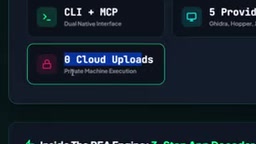
Privacy is a central selling point. All decompilation and analysis runs on your local processor — private binaries, secret tokens, and inspected codebases never get uploaded to the cloud. The latest version 4.1 also brings notable speed improvements, making local agents run more smoothly across operating systems.
Two Interaction Modes and Five Core Modules
REA supports two interaction paths: manual operation via standard terminal commands, or automated use through the Model Context Protocol (MCP) with an AI agent. In short, you can type commands yourself or let an agent handle everything.
The tool currently ships with five built-in provider capabilities, covering mainstream reverse engineering engines and mobile packaging frameworks:
- Binary Rendering Engine: Decompiles desktop applications, converting raw instructions into human-readable code.
- Mobile App Module: Unpacks Android APKs, reconstructs the full UI and underlying logic, and exposes network URLs and API endpoints.
- Live Chrome Session Module: Captures web page elements, CSS styles, and dynamic triggers in real time.
- Compressed Archive Module: Automatically extracts media assets and graphic files from software packages.
- Database Connection Scanner: Exposes an application's internal database connections to inspect content indexes and local query methods.

The Three-Phase Workflow
REA's analysis pipeline runs in three steps. The first is code ingestion — compiled applications (archives or mobile bundles) are fed directly in, and the parser locates all internal routines and extracts raw functional operations. The second is path organization — the call relationships between isolated code blocks are mapped into a coherent component communication graph, providing accurate context for the local model. The third is clean code generation — structural discoveries are translated into functional files ready to drop into a codebase, along with structured technical summaries and JSON prompt files.
MCP (Model Context Protocol) is an open standard protocol released by Anthropic in late 2024, designed to give AI models a unified way to access external tools and data sources. Think of it as a "universal plug" between AI agents and various tools: developers expose capabilities according to the protocol, and MCP-compatible agents (such as Claude Code and Cursor) can automatically discover and invoke them — no need to write custom adapter logic for each tool. Once REA is integrated via MCP, an agent can call reverse-engineering capabilities like built-in functions, without manually typing terminal commands. This is the technical foundation that allows the Anti-gravity Agent in the demo to fully manage the entire cloning workflow.
Decompilation is the process of converting machine code or bytecode back into a human-readable high-level language — as opposed to disassembly, which only recovers the assembly layer. For desktop applications, the underlying reverse-engineering engines REA calls (similar to tools like Ghidra or Binary Ninja) attempt to reconstruct function signatures, variable names, and control flow structures. It's worth noting that decompiled output is not the original source code — variable names are often obfuscated or represented with placeholders like var_1 or sub_4012A0, and readability varies. REA's value is in taking this "noisy" output and structurally processing it to extract function call relationships and API endpoints that are useful for AI agents, abstracting away assembly-level details so that downstream code generation tasks can operate at a higher level of abstraction.
Real-World Test: Cloning the Stripe Pricing Page
The video's author ran a full demonstration using Google's Anti-gravity Agent. Installation requires just a single npx command, letting the agent automatically run rea setup and configure the MCP integration — no manual wrangling required.
Next, Chrome is launched on the default port 9222 with the target page open — in this case, the Stripe pricing page. The instructions given to the agent read like directions to a senior frontend architect: connect to the local Chrome browser, use REA's web browser agent tool to inspect the page's layout and CSS structure, then reconstruct it — with three additional features:
- An animated toggle switch between monthly and annual billing;
- A three-column pricing card layout with the Pro tier highlighted and labeled "Recommended";
- A collapsible FAQ section.

The agent ultimately generated a single index.html file in the outputs folder. In the final result, the annual billing toggle works correctly and dynamically updates prices, the Pro Growth plan is labeled "Most Popular," and the FAQ section is organized into collapsible groups by category — pricing, payments, security, and more. Compared to the original Stripe FAQ, which lacks categorization and dynamic visuals, the rebuilt version is actually richer. The entire process was completed for free using Anti-gravity Agent.

How REA Differs from Similar Tools
According to the video's comparison, REA's differentiation lies in spanning two domains: it can handle raw desktop binaries and parse live web structures, while most competing tools focus on a single platform. It's also one of the few tools with native agent integration support for major coding environments — Cursor, Claude Code, Windsurf, and Anti-gravity.
The video mentions that other community projects (such as Pantage AI) lean more toward enterprise network penetration testing, while REA focuses on the application layer — extracting UI layouts and backend code mechanisms. The two don't really overlap.
Value and Caveats Worth Noting
REA's appeal centers on three strengths: local-first execution, agent integration, and cross-platform reverse engineering. For privacy-conscious teams, frontend developers who need rapid UI prototyping, and engineers who want to understand the internals of closed-source applications, it offers a low-barrier path.
That said, a clear-eyed view is warranted: the video is primarily a tool showcase, and lacks stress testing of cloning accuracy limits, performance on complex applications (as opposed to a static pricing page), or in-depth discussion of the copyright and compliance risks that may come with reverse-engineering third-party applications. Capabilities like "clone any UI in seconds" bring real efficiency gains, but users need to draw their own lines around legal and ethical boundaries. Readers who want to get started can refer to the prompts, examples, and future feature roadmap in the project README.
Reverse engineering occupies a legal gray zone that varies significantly across jurisdictions. In the United States, Section 1201 of the DMCA generally prohibits circumventing technical protection measures, but preserves exemptions for reverse engineering done for interoperability purposes. The EU Software Directive similarly allows limited decompilation for interoperability. However, the specific scenario of "cloning a competitor's UI" touches on multiple dimensions — copyright (interface design elements), terms of service (many websites explicitly prohibit automated scraping), and trade secret protections — and cannot be simply dismissed with a blanket "reverse engineering is legal" conclusion. Before using REA to analyze a third-party application, engineers are advised to review the target's terms of service and applicable local regulations, and to limit the tool's capabilities to compliant use cases such as auditing your own code, compatibility research, or educational purposes.
Related articles

Chain of Thought Isn't Just for AI: How Humans Can Use CoT to Improve Thinking Quality
Chain of Thought isn't just a prompt trick for large models. Starting from a Hacker News discussion, this article analyzes why CoT works for human thinking too, breaks down actionable ways to transfer it, and highlights the key differences between human CoT and machine CoT.
Cloudflare Teams Up with OpenAI: Closi…
Cloudflare Teams Up with OpenAI: Closing the Loop from Vulnerability Discovery to Defense with AI
Cloudflare uses OpenAI Daybreak to investigate security vulnerabilities and generate reviewable remediation plans, while developers use Codex to boost coding efficiency and quality.

Orca Multi-Agent Orchestration in Practice: A Guide to Parallel Collaboration with Claude and Codex
Orca is Stable AI's free open-source agent workbench supporting 34 agents like Claude Code and Codex in parallel. Learn its Git worktree isolation, multi-model orchestration, and mobile management.