REA Goes Viral on GitHub: Using AI Agents to Reverse Engineer Finished Software

REA uses MCP to let agents reverse engineer finished programs, with answers backed by evidence — no need when source code is complete.
The article explains how the open-source tool REA redefines reverse engineering: when source code isn't available, it connects to agents like Claude Code, Codex, and Cursor via MCP, retrieving raw instructions, decompiled code, and call relationships from finished programs so the agent can explain rules in natural language or even rebuild features. Using Windows Calculator's percent rule as an example, it explains the three hurdles of manual reverse engineering and emphasizes that REA's key difference from just asking an AI is evidence — conclusions come with addresses, file line numbers, and stated limitations. There's only one criterion: use REA when conclusions depend on the finished product; use ordinary code tools when source is complete. Three kinds of finished products map to different toolchains, and the dino game and DX-Ball cases show how the evidence chain corrects guesses and decompiler omissions, ending with five common pitfalls for beginners.
When the Percent Sign Meets the Calculator: Reverse Engineering Redefined by AI
Windows Calculator hides a strange rule: enter 200+10% and the result is 220; but switch to 200×10% and the result is 20. The same percent sign, with a different operator in front, changes the algorithm entirely — a rule that isn't written anywhere in the UI, and that you can only know directly if you have the source code.
Without source code, if you want to build something that behaves the same way, you have to work backwards from the finished program installed on your computer. In the past, that meant reading machine instructions, tracing them one by one, and forcing yourself to grind through assembly. Now, an open-source tool called REA changes the game: you just tell a coding agent "use REA to look at Calculator and figure out why 200 plus 10% equals 220," and it goes to inspect the program itself on your machine, retrieves the relevant instructions and call relationships, and then the agent explains the rule in plain language — and can even write you a matching implementation based on that rule.
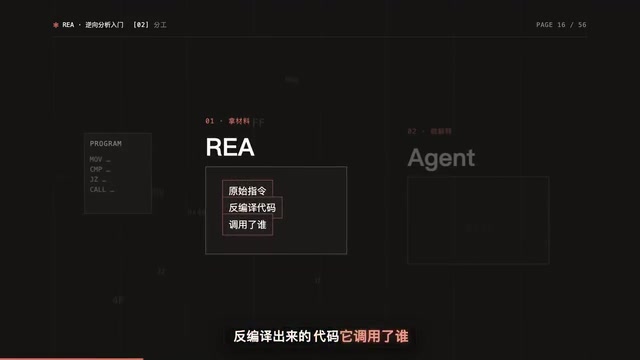
What Part of the Work REA Does for You
First, let's be clear about the term: when you don't have source code and you look directly at the program itself to understand how a piece of software works, that's called reverse engineering. Its purpose is very practical — to understand a feature well enough to explain it, modify it, or rebuild it yourself. The hard part is precisely that "working backwards" step.
Doing it by hand means clearing at least three hurdles. First, you see the program comparing two IDs, and both branches jump to the same place; you have to figure out which button each ID corresponds to, and only then do you learn that one is multiply and the other is divide. Second, there are several function calls inside, and all you see is a string of addresses — which one does the division, which one was passed straight through, all have to be traced one by one. Third, only by piecing all of this together do you arrive at the rule: if the preceding operator is plus, 10% means take 10% of the first number — 200 times 10 divided by 100 equals 20, and 200 plus 20 is 220; if the preceding operator is multiply or divide, 10% simply becomes 0.1, and 200 times 0.1 is still 20. The same button follows different rules depending on the operator before it.
What you have to read across these three hurdles is assembly — machine instructions rendered into a form humans can barely read. For someone who has never touched it, none of the three hurdles is easy. With REA, the division of labor changes: REA is responsible for retrieving the materials, including the raw instructions of the handler function, the decompiled code, and what it calls; the agent is responsible for explaining which branch is taken, what is being computed, and how to rebuild it. You're left with just one job — ask a specific question.
According to the Bilibili video's creator, REA connects to agents via MCP. MCP can be thought of as a universal socket through which agents call external tools. So Claude Code, Codex, Cursor, and any other agent that supports local MCP can connect; and you don't even need an agent — running it directly in the terminal uses the same analysis pipeline.
MCP (Model Context Protocol) is an open protocol launched by Anthropic at the end of 2024, intended to define a unified calling interface between large models and external tools and data sources. You can think of it as USB-C: as long as a tool implements an MCP service, any agent that supports the protocol can discover and invoke its capabilities in the same way, with no need to write a separate adapter layer for each model. MCP services usually exist as local processes or remote services, communicating over standard input/output or HTTP, and exposing a number of "tools" and "resources" to the outside. In REA's case, the MCP service encapsulates low-level capabilities such as disassembly, decompilation, and reading program files; what the agent sees is just a set of callable tool names and parameter descriptions, and how to actually parse the binary is handled by the service side. This also explains why different agents like Claude Code, Codex, and Cursor can all connect to the same REA — the protocol layer unifies the interface, and client differences are abstracted away.
How It Differs from Just Asking an AI: Evidence
You might ask, how is this different from just asking an agent directly? The difference is evidence.
If you ask a model directly how the calculator's percent sign works, it has no materials from the program on hand — it can only answer from impression, and you have no way to check whether the answer is right. Every conclusion REA returns comes with support: which address's instruction, which file and which line, and what limitations this analysis has. Its instructions to the agent are strict — what was observed, what was inferred, and what is still unknown must be stated separately, and conclusions drawn only from reading files cannot be described as if the program actually ran that way.
For you, the benefit is that if the answer is wrong, you can trace it back through the evidence — no need to choose between believing and not believing.
When to Use REA: There's Only One Criterion
Here's a criterion: is the conclusion you want to draw based on a finished product that has already been shipped, or on complete source code you have on hand?
If it's complete source code, use ordinary code tools. REA's own documentation says this clearly — don't use it in that case. If it's a finished product — an installer, a compiled program, a packaged app, a running webpage — that's when REA comes in. One sentence sums it up: complete source code means code tools; conclusions that depend on the finished product mean REA.
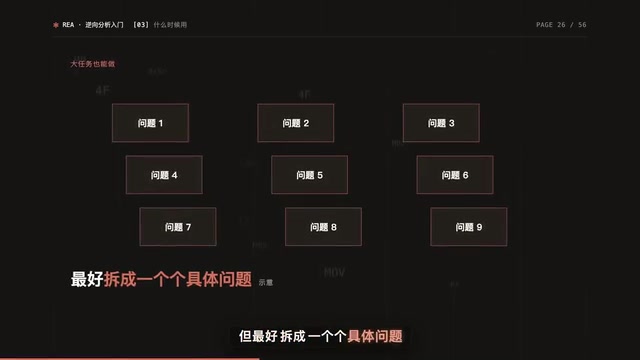
How you ask matters too. The official recommendation is to start from a specific button, file, or behavior. Large tasks are also possible — for example, rebuilding a website, or recovering the gameplay from an old game's program — but it's best to break them into specific questions.
Three Kinds of Finished Products, Three Sets of Tools
Finished products come in several kinds, and the tools REA uses differ accordingly. Remembering three categories is enough.
First, compiled native programs, such as exe files and dynamic libraries. For in-depth analysis, connect an analysis engine — Hopper, Ghidra, or IDA, any one of them; which one you can use depends on your system and the file you want to analyze.
Second, many desktop apps are actually web technology wrapped in a shell called Electron — Notion's desktop version is one such app. REA reads the files directly, with no need to launch it or install an analysis engine.
Third, webpages: connect a Chromium-based browser and you can view the page structure, the scripts currently running, and network requests.
One more distinction to make: file-only analysis does not run the program; to observe runtime behavior, it will actually run or operate the target with your own account's permissions.
Electron is a desktop application framework developed by GitHub. Its core idea is to bundle the Chromium rendering engine and the Node.js runtime into an executable, letting developers write UI and logic in HTML, CSS, and JavaScript and then distribute native installers for Windows, macOS, and Linux. On disk, such an app is usually a directory containing an app.asar archive plus several dynamic libraries, with source code often stored compressed or as bytecode. Its process model is split into a main process (responsible for window management and system calls) and renderer processes (responsible for pages), which pass messages via IPC (inter-process communication), while preload scripts act as a controlled bridge in between. Precisely because a feature often spans these three layers, reverse engineering can't just look at page code — you have to follow the message channel into the main process, which is why the article says Electron analysis has its own difficulties.
Two Counterintuitive Cases: How the Evidence Chain Works
Why the Dino Runs Faster and Faster
In Chrome's offline dino game, the dinosaur runs faster and faster as you go. REA examined a web port transplanted from Chromium; it retrieved the script actually running on the page, and the rule became clear immediately: starting speed is 6, each update without hitting an obstacle adds one-thousandth, and it keeps adding as long as speed is below 13.
The interesting part is the verification that follows. Calling the original game's update function directly in a controlled browser environment, after 1000 updates the speed is 7, after 4000 it's 10, and after 10000 it's 13.001. Why is it a little over 13? Because it checks first and then adds — on the last check it hadn't reached 13 yet, so the addition pushed it slightly over. Details like this can't be guessed; you have to read the code that's actually running and then actually run it to verify.
The Instruction the Decompiler Missed
Something similar happens on the native side, and it's hidden even deeper. An open-source project is rewriting the 1996 Windows game DX-Ball in C, and one step requires figuring out how the sound of a brick being hit is panned left or right based on position. The pseudo-code from the decompiler showed that this function had no inputs and only called a type conversion — looking at just that layer, you'd think it computed nothing.
But REA also returned the raw instructions in the same result: the instructions clearly read in an integer and performed several floating-point operations. That mismatch is what told the agent it had to keep digging. It followed the callers to find what the input was, read several constants from the program file by address, and finally wrote a very short C function. That function passed two checks: one comparing 3205 sets of inputs against the original program, with all return values matching; and another compiling it with the compiler of that era, where the function's 63 bytes were exactly identical to the original program.
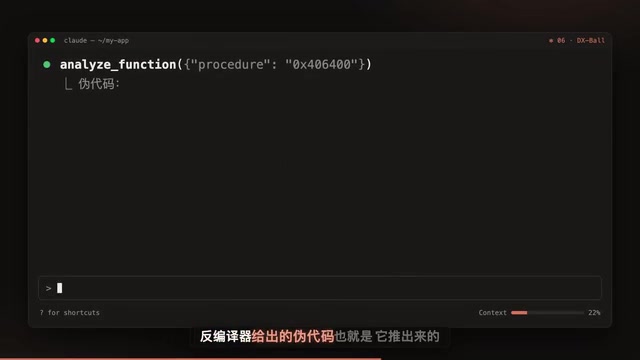
The takeaway from this case: pseudo-code is inferred by the decompiler and may miss things; only with raw instructions as a backstop can you find where it missed.
Electron apps pose different difficulties. A feature often spans the page, preload scripts, and the background main process, connected by inter-process messages. For example, when Notion copies text, the clipboard-writing method called from the page is just a wrapper; the real write happens on the main process side. REA first marks the entry file, line, and column in the compressed code for you, and then the agent unwraps it layer by layer.
The division of labor between decompilers and disassemblers deserves a separate explanation. A disassembler (such as the disassembly view in IDA or Ghidra) translates machine code into assembly mnemonics instruction by instruction, maintaining a near one-to-one correspondence with little information loss, at the cost of readability; a decompiler then performs control-flow and data-flow analysis on top of this, attempting to reconstruct high-level code (pseudo-code) close to C, greatly improving readability at the cost of possible inference errors — for example, optimizing away floating-point operations with no side effects, identifying parameters passed implicitly through registers as having no inputs, or folding inlined functions. The DX-Ball example in the article is exactly a case where the decompiler lost the integer read and floating-point operations, while the raw instructions remained intact. The common practice is "pseudo-code for logic, assembly for details," cross-validating the two; trusting only pseudo-code easily leads to wrong conclusions, and looking only at assembly is too inefficient.
The Five Pitfalls Beginners Fall Into Most
Pitfall 1: Thinking nothing leaves your machine because the tool runs locally
REA does analyze on your own computer, but the analysis results are handed to the agent, and the model provider behind the agent has its own data policy. That layer depends on which provider you use. Before analyzing internal company programs, think this layer through.
Pitfall 2: Thinking installing the skill is enough to use it
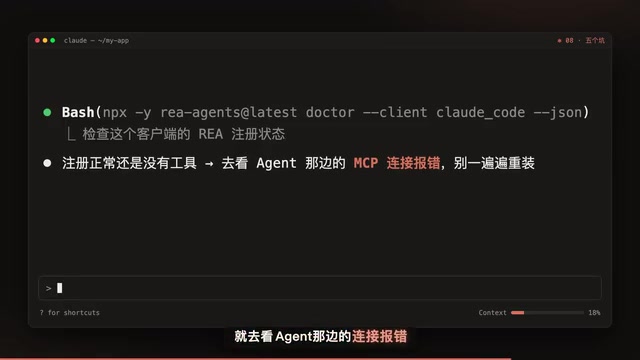
REA's skill is just an investigation manual for the agent; the MCP service that actually does the work has to be connected via the official setup. The setup first lists the configuration it wants to change and backs up the old configuration, and only acts after you agree. After installing, restart the agent; if you still can't see the tools, use the official diagnostic command to check registration status — if registration is fine but tools still don't appear, check the agent-side connection error rather than reinstalling over and over.
Pitfall 3: Thinking you need to install IDA or Ghidra right away
REA only needs an analysis engine for in-depth analysis of native programs. Static inspection of JavaScript and .NET doesn't need one.
Pitfall 4: Calling it done once you get an answer
Both the dino and DX-Ball cases mentioned earlier were compared against the original program's results, and Calculator happens to have publicly available Microsoft source code that can be used to check the answer. The same applies when you use it yourself: have the agent give file and line numbers, then make a small prediction to verify. The official onboarding exercise is designed exactly this way — a small note app with only six files and an export button. First ask where the exported file is written and what columns it has; the answer is a CSV table in the Downloads folder with two columns: number and title. Then have it predict what happens when the title itself contains commas and quotes, and then actually run the formatting function to see if the prediction is correct. After that step, you'll have your own judgment about its answers.
Pitfall 5: Only updating the command-line tool when versions change quickly
REA updates quickly and fixes frequently; when you hit a problem, update first. One thing is easy to miss: the agent registers a fixed version, so updating the command-line tool alone isn't enough — you need to rerun the setup and restart the agent for the new version to take effect.
One Last Point That Isn't a Pitfall, But Must Be Said
REA is for legitimate research, analysis, and reconstruction. What authorization is needed and which laws must be followed are the user's own responsibility.
Back to the opening question: why does 200 plus 10% equal 220? Now you know — the preceding operator is plus, so the percent sign takes a percentage of the first number. Going forward, you'll also know how to ask questions like this, how to get answers back with evidence, and how to verify them yourself. Follow the installation instructions to prepare the required version of Node.js, run the setup once, then pick a piece of software you use every day and a button whose behavior you've always been curious about, and ask your agent a question.
Related articles

Hermes Agent Beginner's Guide: Hands-On with a Self-Evolving AI Agent
A beginner's guide to Hermes Agent, the open-source self-evolving AI agent that gained 41.7K GitHub stars in two months—covering Harness Engineering, the learning loop, three-layer memory, WSL installation, and hands-on configuration.

AI Agent in Action: Building a Smart Office Assistant with WorkBuddy
A practical case study shows how Tencent WorkBuddy batch-converts and archives files, compares chat LLMs with AI Agents, and analyzes WorkBuddy's credit system, use cases, and positioning for office automation selection.

From Single-GPU Bottlenecks to Hundreds of Billions of Parameters: 6 Key Questions in Large Model Distributed Parallelism
Based on a Bilibili tutorial, this article organizes core knowledge of large model distributed parallelism: starting from decoder-only architecture's token-by-token generation and the essence of X times W computation, it analyzes six key questions including data parallelism, tensor parallelism, and pipeline parallelism under single-GPU bottlenecks. Suitable for learners in private deployment and model training scenarios to build systematic understanding.