Rebooting Dot to Restore Your AI Assistant: An Overlooked Maintenance Trick

A Reddit user found that rebooting Dot restores AI assistant performance, revealing that AI products need soft maintenance.
Starting from a Reddit user's case of rebooting Dot to restore performance, the article speculates that 24/7 AI systems, like computers left on for extended periods, suffer performance degradation from memory leaks, cache buildup, or hung processes, and that rebooting is a low-cost troubleshooting method. The author further points out that AI assistants commonly experience "soft failures," and users encountering anomalies should first try basic maintenance operations like restarting the app, clearing the cache, and checking for updates. Finally, it emphasizes that such solutions mostly originate from user communities rather than official documentation, and that community experience sharing has important supplementary value amid rapid AI product iteration.
Does Your AI Assistant Also Get "Lazy"?
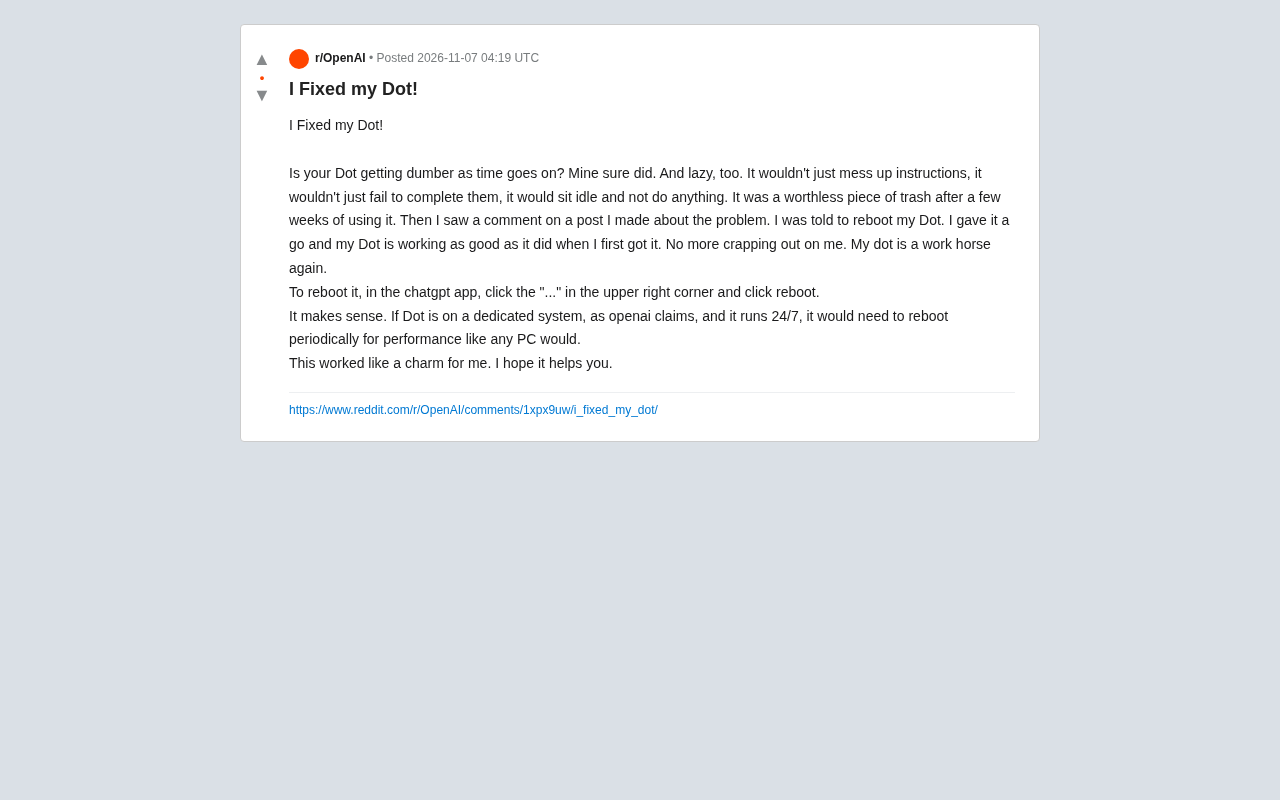
Recently, a Reddit user shared their experience: after a few weeks of use, their Dot started making frequent errors, responding sluggishly, and even outright "refusing" to execute any commands. That was until they saw a comment suggesting—reboot Dot. After trying it, Dot's performance returned to its out-of-the-box state.
According to the user, the reboot process is very simple: tap the "..." menu in the upper right corner of the ChatGPT app and select "reboot." This seemingly simple action solved a problem that had been troubling them for a long time.
Why Does Rebooting Work? A Reasonable Speculation
The user offered a logical explanation: if Dot truly runs on a dedicated system as OpenAI claims and operates 24/7 without interruption, then it's just like any computer left on for extended periods—it needs periodic reboots to maintain performance.
This analogy isn't far-fetched. Long-running software systems inevitably develop issues like memory leaks, cache buildup, or hung processes, and rebooting often clears out this "digital debris," returning the system to a clean state. While there's currently no official documentation explicitly stating that Dot needs periodic reboots, this experience at least provides users with a low-cost troubleshooting option.
Memory Leaks
A memory leak occurs when a program dynamically allocates memory during execution but fails to properly release it after use, preventing the system from reclaiming that memory. For software running continuously without interruption, even extremely small leaks can exhaust available memory after accumulating over days or weeks, manifesting as slower responses, lag, or even crashes. Rebooting works essentially by terminating processes to forcibly reclaim all occupied memory space, allowing the system to reallocate resources from scratch.
Zombie Processes and the Underlying Logic of Rebooting
A zombie process refers to a child process that has ended but whose parent process hasn't read its exit status, causing the process table entry to remain occupied long-term; the more common "hang" is when a thread stops responding due to deadlock, infinite waiting, or abnormal blocking. For services like AI assistants that require continuous inference computation, a stuck inference thread directly results in "not executing any commands." Rebooting terminates all current processes and reloads the program, making it the most direct way to bypass such unrecoverable states without needing to locate the specific fault point.
Not Just Dot: The "Soft Maintenance" of AI Products
Dot's case reveals a broader issue: as AI assistants become more deeply integrated into daily work and life, users' expectations for the stability of these products are also rising. But AI systems are not flawless—they too face performance degradation, abnormal responses, and other "soft failures."
For ordinary users, when encountering abnormal AI assistant behavior, rather than just complaining that it's "gotten dumber," it's worth trying some basic maintenance operations first—restarting the app, clearing the cache, checking for updates. These seemingly simple steps often resolve most temporary issues.
Cache Accumulation and Cache Invalidation
AI applications typically cache model weights, conversation context, user preferences, and other data locally or on edge nodes to reduce latency. But more cache isn't always better: expired or conflicting cache entries can lead to stale responses or even logical errors—for example, the assistant repeating old answers or ignoring the latest instructions. Clearing the cache or rebooting forces the system to re-fetch the latest data, which is also the most common step in "soft maintenance" besides rebooting. Understanding cache mechanisms helps users judge when to clear the cache rather than simply waiting for an official fix.
The Value of User Communities: The Power of Experience Sharing
It's worth noting that this solution didn't come from official support channels but from a comment in the user community. In an era of rapid AI product iteration, official documentation often lags behind the discovery of issues in actual use. Experience sharing among users has become an important supplementary source of product maintenance knowledge.
This also reminds us that when using new AI tools, paying attention to community discussions may yield unexpected solutions.
Summary
The issue of Dot "getting lazy" may be an isolated case, but it provides a practical troubleshooting approach: when an AI assistant performs below expectations, rebooting may be the most direct and effective first step. As AI products grow increasingly complex, similar "folk wisdom" may increasingly fill the gaps in official support.
One-line Summary
A Reddit user discovered that rebooting Dot restores AI assistant performance, revealing that AI products need soft maintenance.
Paragraph Summary
Starting from a Reddit user's case of rebooting Dot to restore performance, the article speculates that 24/7 AI systems, like computers left on for extended periods, suffer performance degradation from memory leaks, cache buildup, or hung processes, and that rebooting is a low-cost troubleshooting method. The author further points out that AI assistants commonly experience "soft failures," and users encountering anomalies should first try basic maintenance operations like restarting the app, clearing the cache, and checking for updates. Finally, it emphasizes that such solutions mostly originate from user communities rather than official documentation, and that community experience sharing has important supplementary value amid rapid AI product iteration.
Related articles
 Tech Frontiers
Gemini Omni 1.2 Flash: AI Video Moves Toward Draft-Style Editing
Google's Gemini Omni 1.2 Flash update enables conversational, draft-style editing of the same video—swap scenes while keeping products, adjust lighting while keeping characters. Clips up to 15s, 720p costs 30% less than the previous Flash—ideal for e-commerce ads, previs, and short-asset production.

Codex Tutorial: One-Command Install and Run Your First Task
Codex tutorial: one-command install and run your first task. Covers the four Codex forms, sandbox and approval guardrails, AGENTS.md and MCP configs, cloud network policy, and the iron rule of human review—everything you need to get started with this autonomous coding agent.
 Tech Frontiers
Localix: An Open-Source Agentic Development Environment with Multi-Model and Local AI Integration
Localix is an MIT open-source Agentic Development Environment (ADE) supporting seamless Claude Code plugin loading, multi-model cloud and local execution, Mini Apps extensions, and agent context management—an open AI collaboration workbench for developers.