Remuda: An Ollama GUI Client That Puts Modelfile Editing Side-by-Side with Chat

Remuda puts a Modelfile editor next to your chat window for faster, more reliable local LLM debugging.
Remuda is an open-source Ollama GUI client whose core innovation is placing the Modelfile editor side-by-side with the chat window, letting developers instantly validate changes to system prompts or sampling parameters without switching tools. Its standout feature is a Compare mode that runs two configurations against the same prompt with a fixed random seed, eliminating sampling noise and making results truly reliable. It also offers Modelfile diff history, a field-by-field tool call playground, streaming output, multimodal input, and conversation history — functioning as both a debugging workbench and a full daily client. The project is client-only, MIT-licensed, and supports macOS and Linux.
Running large language models (LLMs) locally has become a daily routine for a growing number of developers and AI enthusiasts, and Ollama is undoubtedly one of the most popular tools in this space. But when you actually start debugging model behavior, a recurring pain point emerges: you tweak a system prompt or adjust a sampling parameter, get a different response, and have absolutely no idea whether the change came from your edit or just from sampling randomness.
A developer shared on Reddit an open-source tool they built to solve exactly this problem — Remuda, an Ollama GUI client that places the Modelfile editor right next to the chat window.

Why a Tool Like This Is Needed
The author described a debugging loop that will resonate with many people: edit the Modelfile in one editor, run ollama create, reload, start a new conversation — and by the time all that's done, you've already forgotten what the previous response looked like. This fragmented workflow isn't just inefficient; it makes "controlled experiments" nearly impossible.
"I'd often try one prompt and give up."
This captures the real frustration of debugging local models. When the feedback loop stretches out and context keeps getting interrupted, patience and judgment deteriorate fast. Remuda's core design philosophy is to compress that loop to an absolute minimum: save the Modelfile, and the tool automatically rebuilds and reloads the model — your next message immediately uses the new configuration. There's no longer a gap between editing and validating.
Modelfile is Ollama's proprietary configuration format, with syntax inspired by Dockerfile, used to define the complete behavior of a custom model. It can specify the base model (FROM), system prompt (SYSTEM), sampling parameters (PARAMETER, such as temperature, top_p, num_ctx), message templates (TEMPLATE), and tool-calling capabilities. After every Modelfile change, you must run ollama create <model_name> -f Modelfile for it to take effect — a step that locally rebuilds the model configuration layer. It's precisely this "edit → CLI rebuild → reload" flow that creates the disjointed debugging experience the author describes. Remuda automates the rebuild step and hides it behind a simple save action, aligning the iteration speed of Modelfile editing with the familiar save experience of a regular code editor.
Core Features at a Glance
Side-by-Side Editing with Instant Effect
Remuda's most intuitive innovation is its layout — the Modelfile editor sits right beside the chat window. Edit, save, done — changes take effect immediately with no tool switching or manual CLI commands required. For users who need to frequently fine-tune system prompts and parameters, this "what you edit is what you get" experience is a step-change in productivity.
Compare: The Antidote to Sampling Noise
The feature the author uses most is Compare: run two different configurations against the same prompt with a fixed seed. This way, any differences you observe genuinely come from your changes, not from random variance introduced by temperature.
This is a thoughtfully professional design detail. Anyone who has done prompt engineering or model parameter tuning knows that controlling variables is the prerequisite for drawing reliable conclusions. A fixed seed plus a dual-configuration comparison essentially brings the rigor of scientific experimentation into everyday debugging.
Random seed is the key mechanism for controlling the determinism of language model outputs. When an LLM generates each token, it samples from a probability distribution — parameters like temperature, top_p, and top_k shape that distribution, while the random seed determines the initial state of the pseudo-random number generator used in the sampling process. Given the same seed, the same model, and the same prompt, the output will be completely identical every time. This means: when you fix the seed and compare two configurations, 100% of the output difference comes from the configuration itself (such as differences in system prompt wording or parameter values), not from sampling randomness creating "illusory differences." In Ollama's API, you can enable this by passing a fixed integer via the options.seed field. For prompt engineering and parameter tuning, this is the dividing line between "feels about the same" and "quantifiably comparable."
Full Debugging and History Tracking
Beyond those core capabilities, Remuda offers a suite of practical, real-world-focused features:
- Modelfile history and diff comparison: clearly view the specific changes between each iteration
- Per-chat parameter overrides: once a temporary parameter is validated, you can "commit" it back into the configuration
- Tool call playground: validate each
tool_callfield by field — especially useful for developing function calling applications
A Complete Experience as an Everyday Client
Remuda isn't just a debugging tool — the author uses it as their everyday chat client as well. It supports all the commonly needed features:
- Saved conversation history
- Streaming output with cancel support
- Vision (multimodal) input
- Folded reasoning display
- Per-layer progress display during model pulls
These features cover the vast majority of local LLM use cases, meaning users don't have to switch back and forth between a "debugging tool" and a "daily client."
Privacy, Architecture, and Availability
Remuda takes a client-only architectural approach, communicating directly with a locally running Ollama instance at 127.0.0.1. This means:
- No additional server component — data never leaves your machine
- Privacy is guaranteed by design
- Simple to deploy — all you need is an existing Ollama instance
The project is released under the MIT open-source license, with source code hosted on GitHub. Currently supported platforms include:
- macOS 12+ (Apple Silicon)
- x86-64 Linux (available as both
.debandAppImageformats)
Observations and Takeaways
Remuda's emergence reflects a broader shift in the local LLM ecosystem — from "getting it to run" toward "making it usable, tunable, and reproducible." Early on, people were satisfied simply having a model running locally; now the focus has shifted to workflow efficiency and experimental reliability.
Fixed-seed comparison, Modelfile diff history, field-by-field tool call validation — these features may seem like small details, but they precisely target the real pain points of model debugging. They embody a product philosophy of "engineers building tools for engineers": not chasing a flashy interface, but instead perfecting the steps that have the biggest impact on efficiency.
For developers who regularly need to debug system prompts or optimize local model behavior, Remuda is worth trying. It functions both as an efficient debugging workbench and as a fully capable everyday chat client. As a newly released open-source project, its maturity and community ecosystem still need time to develop — but its approach to solving the problem is clear and pragmatic.
Related articles

DeepSeek Harness: A Beginner's Installation and Testing Guide
A DeepSeek Harness tutorial for test engineers: set up Node.js, launch with one NPX command, configure official and third-party models, and explore web search, file I/O, and trace-view agent observability.
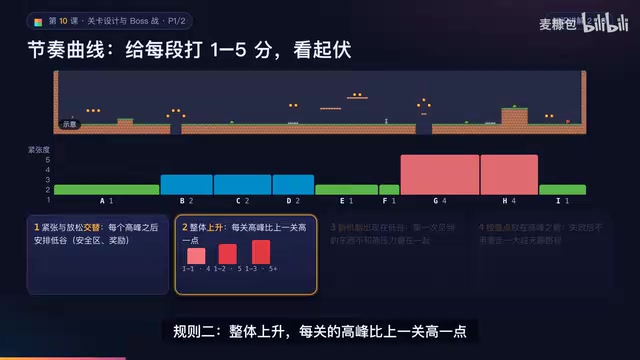
AI Game Development in Practice: Designing Levels with the Four-Step Method and Pacing Curves
AI game development lesson 10: design levels with the four-step method (teach, practice, combine, test) and a 1-5 pacing curve, plus sightline guidance and safety zones—implement Animatable Body 2D moving platforms and generate ASCII sketches for 1-2 Underground Cavern and 1-3 Guard Hall.

AI Game Development in Practice: Two-Phase Boss State Machines and Death Heatmap Tuning
AI game development lesson 10: implement a two-phase Boss with a state machine, guarantee fairness with color signals and a 0.4-second warning floor, locate difficulty cliffs with a death heatmap, and apply lightest-to-heaviest fixes one at a time, with an acceptance checklist and common pitfalls.