Replicate the $400/Year 'Dedao Brain' With Obsidian + AI Agents — For Free
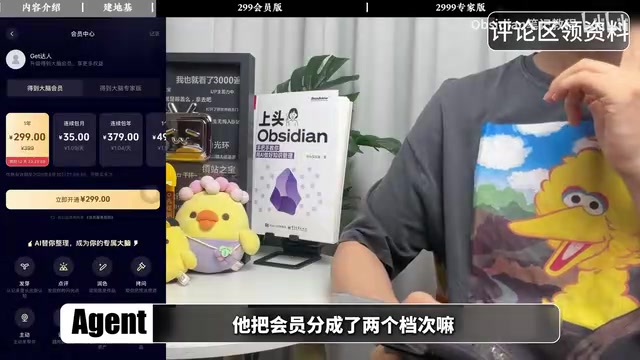
Build a ¥2,999 AI knowledge brain for free using Obsidian and reusable AI agent skills.
A Bilibili creator deconstructs Dedao Brain Expert Edition (¥2,999/year) to reveal its core logic: an AI brain is simply a knowledge base + AI + predefined skills. Using Obsidian as a local memory foundation and execution-class AI tools like Claude Code, he replicates every paid feature — Germinate, Comment, Challenge, Style Coach, fact-checking, formatting — as reusable prompt-based skills. The self-built system keeps data local, allows free model choice, and integrates seamlessly with third-party tools.
In an era of rapidly proliferating AI tools, a pressing question faces knowledge workers: are those paid "AI brain" products that cost hundreds of dollars a year really worth it? One Bilibili creator has a clear answer — he used the free note-taking app Obsidian paired with AI agents to almost completely replicate the core features and workflows of Dedao Brain Expert Edition (¥2,999/year).
The real value of his video isn't the money saved. It's the way it deconstructs the underlying logic of AI knowledge management products: at their core, these "AI brains" are nothing more than a knowledge base + AI + a set of predefined skills. Once you understand that, you'll realize that every flashy feature button in a paid product can be replaced by a prompt-based skill you write yourself.
Why Build Your Own Instead of Buying Off the Shelf
The creator's core argument isn't about price — it's about data ownership and freedom. A system built on Obsidian keeps all your raw data local. No platform lock-in. You're free to choose any model: Claude, ChatGPT, DeepSeek — whatever fits the task at hand.
Even more important is extensibility. This self-built system can integrate with your existing toolchain — WeChat Reading, calendar apps, Notion, reminders, and even local Word, Excel, and audio files all connect seamlessly. Any workflow you've successfully run once can be saved as a reusable skill, unconstrained by the feature boundaries of any given app.
As the creator puts it: "No matter how well-designed a piece of software is, it will never fit you better than something you build for yourself." This captures the biggest opportunity AI gives ordinary people today — the freedom to build your own personalized software.
Step One: Turn Obsidian Into Your Memory Foundation
The most fundamental capability of Dedao Brain is consolidating all your notes into one place so that AI can access them as memory. Obsidian is perfectly suited for this role. The key question is: how does information get in?
- Web content: Use the Obsidian Web Clipper plugin to extract text from web pages; with upgrades, it can even pull transcripts from YouTube videos;
- Reading notes: An official WeChat Reading skill lets an AI agent pull your reading highlights directly into Obsidian;
- Audio content: A third-party Obsidian plugin for Sonic Note handles automatic transcription;
- Other documents: Calendar events, reminders, Word files, Excel sheets, Tencent Docs, and Feishu content can all be funneled in.
Once information is gathered, the real processing work begins.
What is Obsidian? Obsidian is a local-first, Markdown-based note-taking app built around bidirectional linking. All data is stored as plain text on your device — no cloud dependency. Its bidirectional linking lets notes reference each other, forming a knowledge graph that surfaces hidden connections between concepts. Compared to cloud-based tools like Notion or Evernote, Obsidian has an exceptionally rich plugin ecosystem (1,500+ community plugins), making it possible to pipe in data from virtually any external source. This open architecture makes it the ideal "knowledge foundation" for AI agents: they can read and write local Markdown files directly, with no proprietary API calls or extra fees required.
Replicating the ¥299 Membership Tier: Six Core Features Deconstructed
Dedao Brain's base membership (¥299/year) centers on six capabilities: Germinate, Comment, Polish, Challenge, Proactive, and Memory Vault. The creator points out that whether you're using Dedao Brain or a self-built system, the operating logic is identical — connect a knowledge base to an AI, then apply different skills to process information. The only difference is "one uses buttons, the other uses a chat box" — there's no fundamental distinction.

Here's how each feature translates into a skill:
- Germinate: Have AI read that day's new notes, extract core ideas, then search old notes for related themes and cross-domain associations. The result is a daily digest — new insights grown from existing notes.
- Comment: Have AI evaluate a note's expression, actionability, and logic. You can customize the prompt dimensions based on whatever you want to improve.
- Challenge: Have AI check for logical gaps, equivocation, and overcommitment. It simulates counterarguments and suggests more defensible phrasing.
- Polish: Have AI rewrite rough content to match the style conventions of your target publishing platform.
- Memory Vault: Most AI agents (like Codex and Workbody) include memory features built in — usually just a toggle in the personalization settings. No extra setup needed.
- Proactive: Use scheduled automation to have AI run your agents daily or weekly, prompting you to review and organize your knowledge.
For connecting execution-class AI tools to Obsidian, the creator mentions three options: Claude Code, Codex, and Workbody. Installation and repository connection steps were covered in a separate dedicated video.
What are "execution-class AI" tools? Claude Code, Codex, and Workbody are all "agentic AI" or "execution-class AI" tools. The key difference from conversational AI: they don't just generate text — they can actively operate the file system, call external tools, and run tasks on a schedule. Claude Code is Anthropic's command-line AI coding assistant, capable of reading and writing local files directly. Codex is OpenAI's code execution environment. Workbody is an automation agent platform designed specifically for knowledge workers. Once connected to an Obsidian vault, these tools function like a locally-resident "assistant" — processing note content on a schedule according to pre-written skills (essentially structured prompt templates), without requiring the user to manually trigger each step.
Going Further with the ¥2,999 Expert Tier: Writing an "Expert Team" as Skills
The Expert Edition costs ¥2,700 more than the base membership. The core addition is a suite of "expert team" roles — which, again, are just well-crafted skills. Here's the breakdown:
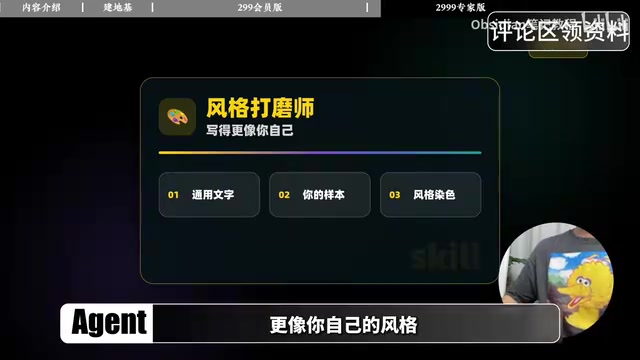
- Style Coach: The creator's approach is practical — gather all your existing output (scripts, weekly reports) into one folder, send it to AI as a style sample, and have the AI imitate your voice rather than some generic one. This method has been refined through repeated testing.
- Topic Discovery: Have AI read the past month's notes and journal entries, cross-reference trends, and generate topic ideas suited for video, WeChat articles, or Xiaohongshu posts.
- Material Research: Starting from a topic, search local notes and authoritative primary sources for relevant cases, then mix and match combinations.
- Organization: Three skills handle information filtering, summarization, and categorization.
- Article Drafting: Specify a platform and output format (Douyin script / WeChat article), feed in existing output as reference, and have AI draft in your personal style.
- Fact-Checking: Have AI audit content for inaccuracies and provide suggested corrections.
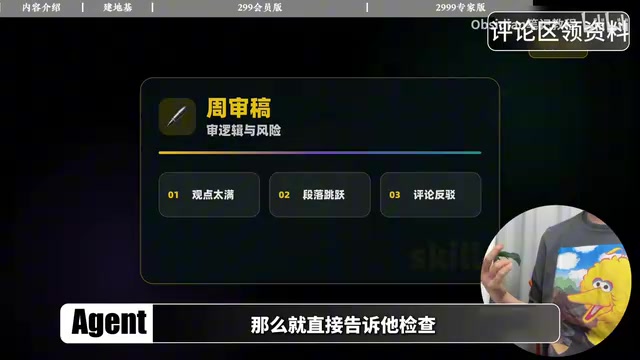
- Proofreading: Check logical structure, tone, and risk — does the argument overreach? Are there paragraph-level jumps? Could comment sections misread this?
Formatting is equally tractable: most internet content is rendered as HTML, and WeChat article formatting is essentially rendering an HTML page. Xiaohongshu graphics can be generated in HTML at the correct dimensions and then converted to images. The creator says his WeChat article formatting is now fully handled by AI — a skill can even upload drafts, cover images, titles, and summaries directly to the backend, completing the entire workflow in one shot.
Who Should Build Their Own System? The Trade-offs
The creator is candid: not everyone should build their own system. Off-the-shelf software is ready to use out of the box, with nothing but buttons to click. The learning curve is the only real downside of a self-built system — you'll need at minimum a basic grasp of Obsidian, the setup and configuration of execution-class AI tools, and how to write skills.
But for users who've hit the wall with closed platforms — data that can't be exported, workflows that can't integrate with other tools — a self-built system solves exactly that problem.
The creator's core insight is worth keeping: the measure of a good knowledge management system isn't whether you bought it or built it — it's whether information can be stored, and whether an AI assistant helps you make sense of it. Hit those two marks, and you'll dramatically reduce the cognitive load of knowledge work.
For readers who want to get started: the video mentions that simplified prompt templates for all the skills will be published in the corresponding WeChat article, ready to copy and paste, then gradually refined to suit your own use case — building, step by step, a truly personal "brain."
What exactly is a "skill"? In the context of AI agents, a skill is a structured, reusable prompt template that has been tested and refined — typically including a clear role definition, input format requirements, processing logic, and output format specifications. A well-written skill is essentially the standard operating procedure (SOP) for a mental task, hardened into something code-like: given the expected input, the output quality stays consistent. The fundamental difference between a skill and a one-off prompt is reusability: skills are tested through multiple iterations and called repeatedly like functions; one-off prompts are improvised, and results are unpredictable. For users without a programming background, the most practical path is to start from an existing skill template and gradually adjust parameters to fit your needs — the lowest-friction way to get started.
Related articles
Boox Palma 3 Launches with Stylus Support and Redesigned Look
Boox Palma 3 launches with stylus support and a sleek new design. The pocket-sized e-ink reader gains new capabilities but comes at a higher price than its predecessor.
Cursor 3.0 Complete Beginner's Guide: Getting Started with AI-Powered IDE Development
Cursor 3.0 beginner's guide: from download and setup to parallel sub-agents, cloud development, skills, and automations. Master model selection, design mode, and Git with this complete AI IDE walkthrough.
Codex + Playwright as a Skill: UI Automation Without Manual Commands
Wrap Playwright as a Codex Skill so AI agents run UI automation tests via natural language. Covers install, Sauce Demo walkthrough, PO pattern, and MCP vs CLI+Skill tradeoffs.