Replicating Shopify's AI Coding Workflow: The Gate Mechanism Behind Autonomously Rebuilding a 300-Screen App

How Shopify's AI agent workflow rebuilds 300 screens using checkpoints and four quality gates.
Shopify used an internal tool called Helix to direct AI coding agents through a full rebuild of their flagship app's 300 screens. The system's two pillars — checkpoints (large features sliced into increasingly complex subtasks) and gates (mandatory quality checks before any task can advance) — were reverse-engineered by AI Labs and validated on a demo project. An orchestrator skill drives everything with just two human touch points; sub-agents maintain isolated context windows to prevent information loss. The four gates cover behavioral testing, UI comparison, adversarial code review (critic and fixer agents in a loop), and final human sign-off — forming a general-purpose framework for AI-driven large-scale engineering work.
Shopify recently rewrote their flagship mobile app — and it was no small undertaking. All 300 screens were handed off to AI coding agents. But rather than dumping the entire task on a single agent, they designed a structured workflow to ensure the rebuilt app still met internal standards throughout.
The catch? Shopify publicly discussed the methodology but never revealed the implementation. Overseas software team AI Labs reverse-engineered the workflow from the official description, built their own version, and validated it on their own projects. This article breaks down the core mechanisms of that workflow — and explains why its value extends far beyond "migrating an app."
Why This Workflow Deserves Attention
Shopify calls the internal tool powering this loop Helix. It was born out of a need to rewrite the app using an architecture completely different from the original. The approach: take a single screen from the old app, have an agent convert it to the new version. Helix reads that screen and breaks the work into smaller units called checkpoints.
The whole thing rests on two design pillars: checkpoints and gates. Checkpoints are the chopped-up pieces of work; gates are the mandatory checks each piece must pass. Any work that fails a gate gets blocked — it cannot move on to the next task. This mechanism means agents can't bluff their way through. As Shopify puts it: "An attempt can be wrong, but it's not allowed to ship until it's right."
The AI Labs team notes that while Shopify used this for app-format migration, the workflow applies much more broadly. At its core, it's a general-purpose method for building large features while maintaining quality and visual standards. Since Helix remains an internal tool with no outside access, they replicated their own version based on the public description and tested it on a demo HR system project.
Sub-Agents and Fresh Context Windows
All execution in Helix is handled by sub-agents, and the core reason is context window isolation. When a single agent handles an extremely long task with everything crammed into one context window, problems emerge: too much information causes the agent to forget important details mid-task, and quality degrades.
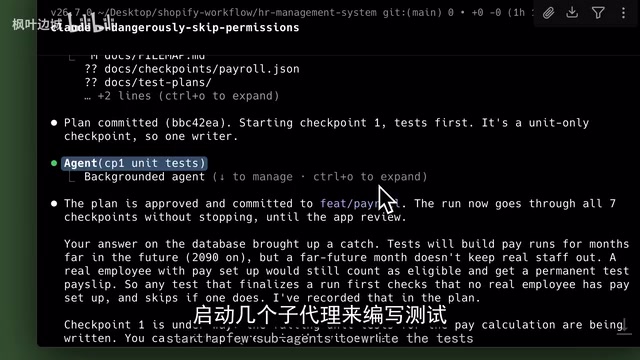
Sub-agents give each task its own isolated context window, eliminating this problem at the root. This is a recurring design principle throughout the replicated workflow — each stage is executed in a fresh, clean session wherever possible.
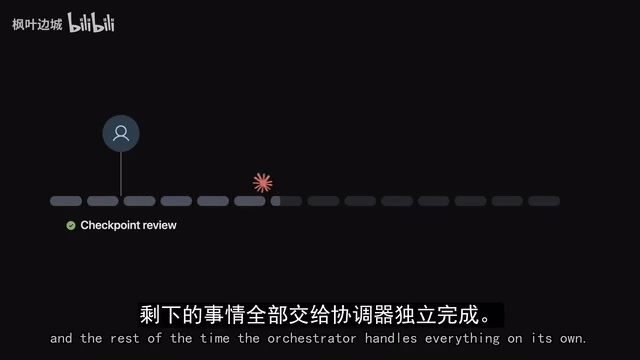
To minimize manual intervention, AI Labs created a skill called the orchestrator. It's the only skill you need to actively prompt; everything else is dispatched by it. Throughout the entire workflow, you only provide input twice — the orchestrator runs automatically the rest of the time.
A context window is the total amount of text a large language model can "see" in a single session, typically measured in tokens. As tasks grow longer, early inputs get diluted in the model's attention — a phenomenon known as "lost-in-the-middle," where the model handles content near the beginning and end of the context well, but processes content in the middle with noticeably lower quality. This is especially harmful for engineering-scale tasks involving hundreds of screens and tens of thousands of lines of code. Distributing work across multiple sub-agents — each holding a clean, focused context — is like giving every subtask a worker who just clocked in, fresh and sharp, rather than having one exhausted worker handle everything. This also explains why, even as models like Claude or Gemini have expanded their context windows to hundreds of thousands of tokens, the industry still prefers multi-agent architectures over single-agent ultra-long sessions for complex engineering tasks.
Checkpoints: Building from Simple to Complex
Checkpoints are small slices of a large feature. Shopify's rule: the next checkpoint can't begin until the previous one is correctly completed. And they're ordered by increasing complexity — the smallest tasks are built first, then progressively more complex ones.
The logic is straightforward: each checkpoint builds on the previous one, so if an early decision goes wrong, you catch it while it's still small and cheap to fix.
AI Labs built a Checkpoint Planner agent for this, which breaks the large feature given to the orchestrator into checkpoints and writes them to a JSON file — a structured format that's easy for agents to parse and retrieve. Since JSON isn't particularly human-readable, they also built a web viewer that displays each step, progress status, and completion criteria clearly.
At this stage, the orchestrator also spins up another sub-agent to plan testing, documenting in detail how each checkpoint will be tested upfront. Human review at this stage must be thorough — confirming the plan doesn't miss any functionality — otherwise all the time agents spend on implementation later goes to waste. Once approved, the orchestrator starts building from checkpoint 1.
Four Gates: No Escape for the Agent
What makes a checkpoint count as "done" are what Shopify calls gates. There's an important distinction here: gates are not rules. Rules are just suggestions — agents forget them mid-task and need constant reminders. Gates are different: nothing passes through until they're cleared.
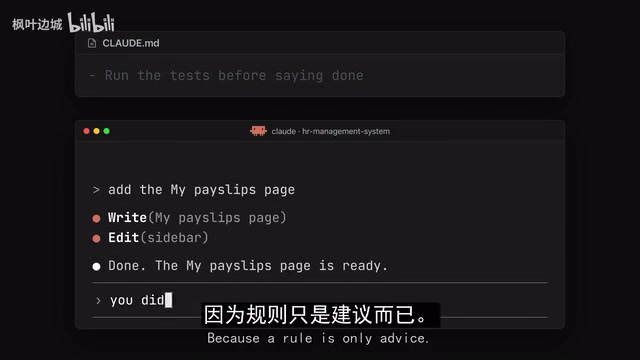
AI Labs implemented this with a hook that fires whenever an agent tries to stop, throwing exit code 2. This code doesn't signal an error — it signals the agent to keep working until all gates pass. The team acknowledges the concept was borrowed from the "Ralph loop." Shopify's workflow has four gates:
Behavioral Gate: Verify Without a Browser
The first is the behavioral gate, which checks whether the feature actually works. It covers all tests that can be completed without a browser — the agent doesn't click through the app; instead, it writes small pieces of code that use the feature the way a real user would. These code snippets are the tests, and they should cover as many input scenarios as possible.
For example, "does a manager have permission to approve someone's leave request" — logic like this can be verified directly in code without pressing a single button. AI Labs adapted their previous TDD Planner skill to fit this workflow: the orchestrator first launches a sub-agent to write the tests (which all fail at this point since the feature hasn't been written yet), then a sub-agent to write the code, and finally another sub-agent to run the tests. Only when all tests pass does gate 1 mark that checkpoint as cleared.
UI Gate: Visual and Interaction Double-Check
The second gate directly concerns user experience. Since Shopify was converting one app format to another, keeping the design identical was critical. They use Gemini as a "perfectionist design reviewer" — testing showed this type of model has strong spatial awareness and can detect subtle spacing and sizing differences between two screens.
But when you're building your own project or delivering for a client, you often don't have an existing design to compare against. AI Labs' approach: first use a "prototype" skill to create an HTML prototype — a clickable single-file prototype that follows the project's own design.md specification. Then a dedicated skill compares the built app against the prototype — not just visually, but also behaviorally, after ensuring both the prototype and app are in the same state (e.g., a form that's "unsubmitted" vs. "submitted" represents two different states).
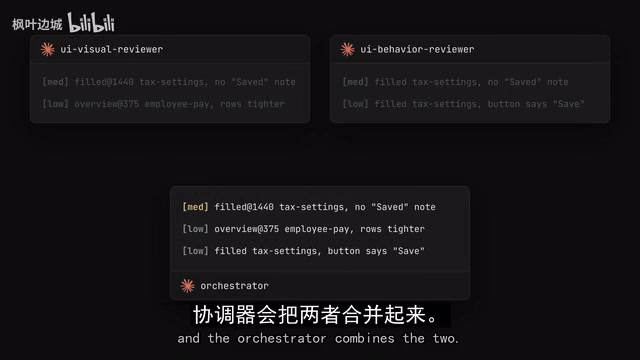
Interestingly, they didn't stick with Gemini here — instead they handed the comparison to Claude in a fresh session. When the orchestrator hits a checkpoint requiring a UI gate, it launches two Claude sub-agents in parallel: one reviews appearance, the other reviews behavior. Neither sees the project instructions — they judge only against the prototype and design.md. The orchestrator then merges both reviews and decides whether the gate passes.
Adversarial Review Gate: Make the Code Critique Itself
The third is the adversarial review gate. The feature works and looks right — but the underlying code could still be a mess. Shopify uses two adversarial agents to review code against team-written standards, and every issue must be fixed before both agents sign off.
AI Labs made a refinement: rather than having two agents both critique the code, they set it up as an adversarial loop — one agent is the critic (assumes the code is wrong and hunts for problems), the other is the fixer. An "adversarial loop" skill coordinates communication between them. The adversarial agent finds issues, the fixing agent makes changes, then it's reviewed again — this repeats until the adversarial agent accepts the code and the gate passes.
The adversarial review concept draws from "red teaming" in software security and peer review in academia. Red teaming originally referred to a dedicated security team simulating an attacker's perspective to find system vulnerabilities; it's since been widely adopted in AI safety research to uncover potential model flaws or harmful outputs. Applying it to code review means the reviewing agent's role is set up in direct opposition to the developing agent — its "goal" is to find problems, not find reasons to approve the code. This role separation effectively counters a common AI tendency: when the same model both writes and reviews code, it tends to be overly lenient with its own output. Having a critic and a fixer played by separate agents in independent sessions, with forced iteration until the critic has nothing left to say, is an engineering-level solution to this bias built into the workflow itself.
Human-in-the-Loop: The Final Gate Machines Can't Replace
The fourth and final gate is human review. Even with standards and reference points, agents simply cannot evaluate from a real user's perspective. Once all checkpoints are complete, you personally test the feature, judge what could be better, and suggest small changes.
When you submit feedback, the orchestrator converts it into new checkpoints that run through the full pipeline. The first step is writing the feedback into a "learnings" file that every agent reads before starting work.
The gate mechanism corresponds to a mature concept in software engineering — the "quality gate," common in CI/CD (continuous integration/continuous delivery) pipelines. In traditional CI/CD, code commits automatically trigger compilation, unit tests, static analysis, and other checks; any single failure prevents the code from merging into the main branch. Shopify's gate system is essentially that philosophy transplanted into an AI agent workflow: quality checks that were originally executed by humans or automation scripts become mandatory checkpoints that agents must pass before proceeding. The exit code 2 design also draws from Unix/Linux conventions — the number a process returns on exit communicates status to the caller, with 0 typically meaning success and non-zero indicating an issue. The Helix replication borrows this signaling mechanism to let the orchestrator "know" that a sub-agent hasn't finished its task and needs to keep running.
One Prompt, Two Pauses
The entire workflow is driven by the orchestrator skill mentioned above. You prompt it once, and it runs from breaking down checkpoints all the way to handing you the finished feature for review. The orchestrator pauses for you exactly twice: once after checkpoint planning to wait for your approval, and once at the end to wait for your sign-off.
Agents will inevitably make mistakes along the way — but gates never let unfinished work through. That's how Shopify's line lands in practice: an attempt can be wrong, but it can't ship until it's right.
For developers, the biggest takeaway from this reverse-engineered workflow may not be the specific tools — it's the idea of structured constraints: rather than hoping a single powerful agent gets everything right in one shot, chop tasks into checkpoints, establish non-bypassable quality gates, and use sub-agents to keep context clean. The combination of these three is what makes AI genuinely capable of handling engineering work at the scale of 300 screens.
Related articles

Chain of Thought Isn't Just for AI: How Humans Can Use CoT to Improve Thinking Quality
Chain of Thought isn't just a prompt trick for large models. Starting from a Hacker News discussion, this article analyzes why CoT works for human thinking too, breaks down actionable ways to transfer it, and highlights the key differences between human CoT and machine CoT.
Cloudflare Teams Up with OpenAI: Closi…
Cloudflare Teams Up with OpenAI: Closing the Loop from Vulnerability Discovery to Defense with AI
Cloudflare uses OpenAI Daybreak to investigate security vulnerabilities and generate reviewable remediation plans, while developers use Codex to boost coding efficiency and quality.

Orca Multi-Agent Orchestration in Practice: A Guide to Parallel Collaboration with Claude and Codex
Orca is Stable AI's free open-source agent workbench supporting 34 agents like Claude Code and Codex in parallel. Learn its Git worktree isolation, multi-model orchestration, and mobile management.