Replit Agent 4 Hands-On Review: Multi-Agent Collaboration + Canvas Variants, A New AI Coding Experience

Replit Agent 4 hands-on: multi-agent parallel building, canvas design variants, and more
Replit launches Agent 4 with three core features: canvas design variants, multi-agent parallel building, and code-generates-everything. Testing shows the canvas feature generates 4 UI design options simultaneously in 2 minutes. Multi-agent parallel building uses a Trello-style kanban for task management, completing collaborative development in 5 minutes and positioning AI as manageable team members—redefining AI-assisted software building.
Replit Agent 4 Deep Dive: Multi-Agent Parallel Building and Canvas Design Variants Explained
Replit just launched Agent 4, bringing major new features including multi-agent parallel collaboration, canvas design variants, and code-generates-everything capabilities. We put these new features through their paces with a complete habit tracker project to evaluate their real-world performance.
Three Core Features of Agent 4
Agent 4's upgrade focuses on three directions:
- Canvas Design Variants: Generate multiple UI design options simultaneously on a single canvas, eliminating the need to repeatedly revise prompts
- Multi-Agent Parallel Building: Multiple AI Agents handle different tasks concurrently, letting you manage AI like managing a team
- Code Generates Everything: Not limited to apps—it can also generate slideshows, animations, documents, and other content types
These three features combined are essentially redefining the question of "who can build software with AI."
Test 1: Canvas Design Variants—4 Options in 2 Minutes
The test project was a mobile habit tracker with two tabs: a calendar view and a habit management view. In our prompt, we asked Agent 4 to generate four design styles simultaneously:
- Glassmorphic Style: Apple-inspired frosted glass effects
- RPG Quest Style: Gamified design with skull icons for incomplete habits
- Plant Growth Style: Visualizing habit building through growing plants
- Surprise Variant: Letting the AI freestyle
About Glassmorphism: This is a UI design trend that emerged around 2020, characterized by semi-transparent backgrounds, blur effects (
backdrop-filter: blur), subtle borders, and multi-layered depth. Apple adopted this style extensively in macOS Big Sur and iOS 15, making it one of the mainstream design languages for modern mobile and desktop interfaces. From a technical implementation perspective, glassmorphism relies on CSS'sbackdrop-filterproperty and rgba transparency colors, which places certain demands on GPU rendering. Early implementations had performance issues on low-end Android devices.
After submitting the prompt, Agent 4 launched four independent design agents, each responsible for one variant. The entire process took approximately 2 minutes to complete.

Looking at the results, each variant had its own character. The glassmorphic style was clean and elegant, the RPG style was full of personality, and the plant variant was surprisingly bold. After selecting the RPG style, you can click the plus button to have the AI generate additional views (such as a task management view) within the same canvas.
However, there's one UX shortcoming: currently, modifying copy (like changing "Quest Log" to "Peter's Quests") requires submitting through chat rather than editing directly on the canvas. This direct editing capability should arrive soon.
Test 2: Multi-Agent Parallel Building—Managing AI Like Managing a Team
This is Agent 4's most groundbreaking feature. In the left panel, you can create multiple tasks via the plus button, with each task assigned to a different AI Agent.
Technical Background on Multi-Agent Systems: Multi-agent systems are a classic research area in artificial intelligence, referring to multiple autonomous agents collaborating or competing in a shared environment to accomplish tasks. In the large language model era, this concept has been revitalized: OpenAI's Swarm framework, Microsoft's AutoGen, and Anthropic's multi-role orchestration experiments with Claude are all exploring the possibility of having multiple LLM instances collaborate through division of labor. The core advantage lies in parallel processing and specialized division of labor—just like how frontend, backend, and testing roles each have their own responsibilities in a software engineering team, multi-agent systems can have different instances focus on different subtasks, theoretically breaking through the context window limitations and attention bottlenecks of a single model. Replit Agent 4 productizes this research paradigm, making it one of the most significant cases of this technology landing at scale in a consumer-grade product form.
We created two parallel tasks:
- Agent A: Build the calendar view tab
- Agent B: Build the habit management tab
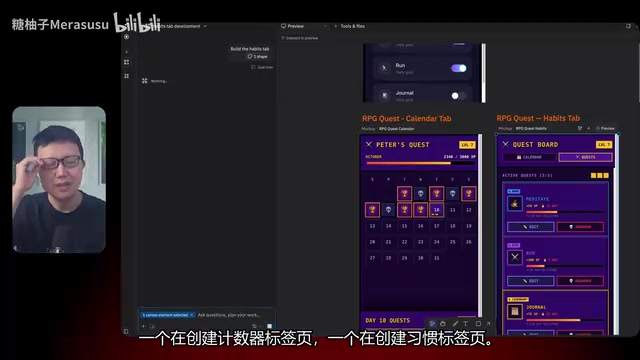
What's even more interesting is the task management interface. Agent 4 introduces a Trello-style kanban task board with status columns like "Draft," "In Progress," and "Completed." You can view each Agent's build plan and manually click "Start Building" to control progress.
The Deeper Logic of the Trello Kanban Paradigm: Trello's core design originates from the Kanban method in the Toyota Production System, which improves team efficiency through visualizing workflow and limiting work in progress. The three-column structure of "Draft → In Progress → Completed" is one of the most familiar workflow models for software development teams, and a simplified version of the Sprint Board in Scrum and Agile development. Replit's decision to bring this paradigm into AI Agent management is a noteworthy design choice: it not only lowers the cognitive barrier for non-technical users (since most knowledge workers have used similar tools), but more importantly, it metaphorically positions AI Agents as "manageable team members" rather than "black-box tools"—which is crucial for establishing user trust and a sense of control.
The entire build process took approximately 5 minutes to complete. After finishing the code, the Agent doesn't immediately mark the task as complete—instead, it waits for you to review and test before confirming. This design is very sensible, embodying the principle that "humans are the team leads, AI agents are the team members."
Related articles
 Product Reviews
The Programmer's Desk Setup Guide: Building a Workspace That Feels Like Home
Discover how programmers build productive, comfortable workspaces. From multi-monitor setups to ergonomic design, explore the desk philosophy that drives focus and flow.
 Product Reviews
Qoder vs Cursor Real-World Comparison: Which $20/Month AI IDE Is Better?
Hands-on comparison of Qoder vs Cursor AI IDEs: Agent autonomy, human interaction count, and architecture decisions. Qoder needed only 2 interactions vs Cursor's 8.
 Product Reviews
Cursor Cloud Agent Demo: Eliminating Bottlenecks Across the Entire Software Development Lifecycle
Deep analysis of Cursor's Cloud Agent demo showing how cloud VMs, automated test artifacts, and a full-chain control plane systematically eliminate human bottlenecks across the software development lifecycle.