Replit vs Cursor vs PageAgent: Which AI Agent Actually Gets Work Done?

2026 AI Agents specialize: Replit for prototyping, Cursor for maintenance, PageAgent for web operations.
In 2026, AI Agents are specializing by role: Replit Agent 4 leverages Infinite Canvas and Parallel Agent for rapid idea-to-prototype co-creation, ideal for indie developers; Cursor Automations integrates with DevOps toolchains via event-driven architecture as a 24/7 on-call colleague, suited for teams with mature codebases; PageAgent embeds with a single Script tag, enabling natural language web page operations. Each serves a distinct function, marking AI Agents' evolution from general assistants to specialized collaborative roles.
Article
A subtle but profound shift is happening in the AI Agent space in 2026 — they're no longer competing over "who's better at code completion." Instead, they're starting to specialize by role. Replit works alongside you to build projects from scratch, Cursor keeps watch in the background around the clock, and PageAgent takes direct action within web pages. These three approaches have matured almost simultaneously, signaling that AI Agents have officially evolved from "chatbox assistants" to "colleagues with distinct responsibilities."
Background: The Technical Evolution of AI Agents The concept of AI Agents (intelligent agents) originated from multi-agent system research in the 1990s, but didn't enter the practical engineering stage until 2023, when large language models (LLMs) achieved breakthrough capabilities. Early Agent experiments (like AutoGPT and BabyAGI) generated widespread attention but remained in the experimental phase due to high hallucination rates and low task completion rates. Between 2024 and 2025, as Function Calling, Code Interpreter, and structured output capabilities matured, Agents began demonstrating real productivity value in vertical scenarios. The 2026 "role specialization" phenomenon marks the point where this technology maturity curve enters the "productivity plateau" stage — from an economics perspective, this also reflects the principle of "comparative advantage" at the AI product level: each Agent focuses on what it does best, achieving higher overall efficiency than a single general-purpose Agent trying to cover every scenario.
This article systematically evaluates Replit Agent, Cursor Automations, and PageAgent across four dimensions — product positioning, core capabilities, pricing strategy, and use cases — to help you figure out which Agent best fits your workflow.
Replit Agent 4: Your Co-Creation Partner from Idea to Prototype
Replit made its direction clear in its March 11 official blog post: Infinite Canvas + Parallel Agent. This means it doesn't just hand you a snippet of code — it lets you simultaneously advance design, frontend, backend, database, and even landing pages and demo assets within the same project.
This "parallel progression" capability essentially upgrades AI from a "line-by-line coding tool" to a "project partner building alongside you." You describe an idea, and it simultaneously scaffolds your frontend framework, designs your database structure, and generates showcase pages — work that would traditionally require 2-3 roles collaborating.
Technical Deep Dive: Infinite Canvas & Parallel Agent Infinite Canvas is a non-linear project organization paradigm that first gained popularity in design collaboration tools like Figma and Miro. Bringing it into a code development environment means developers are no longer constrained by a single file or conversation thread — they can simultaneously manage frontend components, backend APIs, database schemas, and documentation within the same view. Parallel Agent refers to multiple AI subtasks executing concurrently rather than waiting in sequence, which technically relies on asynchronous task scheduling and multi-context window management. Combined, these enable Replit to simulate the collaboration model of a small development team — different Agent instances handle different technical layers simultaneously, ultimately converging into a complete runnable prototype, compressing work that traditionally requires 2-3 people into a single-person effort.
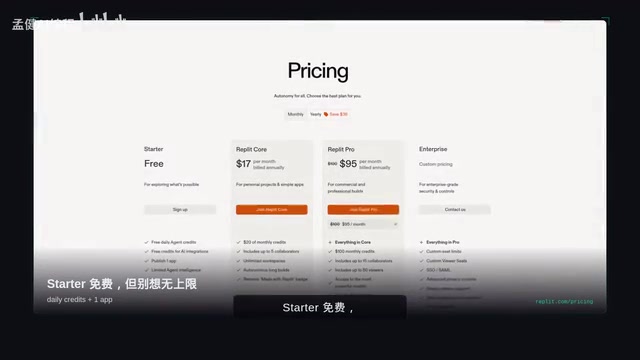
Replit Pricing Plans
The pricing page is straightforward:
- Starter: Free, but with daily Agent Credits limits and only one publishable App
- Core: $17/month (annual billing), with more Credits and unlimited Workspaces
The pricing logic is clear — Replit isn't targeting small bug fixes in legacy projects, but rather rapid validation from idea to prototype. For indie developers, $17/month for an AI partner that can push multiple modules forward in parallel offers excellent value.
Who Is Replit Best For?
If you're an indie developer whose top priority is "turning ideas into something shippable fast," Replit is your first choice. Its core value isn't about code quality — it's about speed from 0 to 1.
Cursor Automations: The Colleague Who Never Clocks Out
In its March 5 official blog post, Cursor used a remarkably precise term: Always-on Agents. This positioning is completely different from Replit — it's not about building projects from scratch with you, but about watching over your existing codebase and continuously executing repetitive "grunt work."

Cursor Automations Core Capabilities
Cursor Automations can run on a schedule or be triggered by various events:
- Slack messages
- Linear tasks
- GitHub PRs
- PagerDuty alerts
- Any arbitrary Webhook
This means it's not here to chat and write code with you — it's here to handle Code Reviews, scan code quality, and run maintenance tasks on your behalf. Essentially, Cursor is pushing AI from an editor assistant into a "on-call colleague" operating in the team's background.
Technical Background: Event-Driven Automation & DevOps Toolchain Integration The Event-Driven Architecture (EDA) adopted by Cursor Automations is a core design pattern in modern DevOps pipelines. The four trigger sources — Slack, Linear, GitHub PR, and PagerDuty — precisely cover four critical nodes in a software team's daily workflow: communication & collaboration, task management, code changes, and production alerts. This integration approach essentially embeds the AI Agent into existing toolchains rather than requiring teams to change their work habits. Webhooks as a universal trigger further enable connections with any third-party system. This design philosophy stands in stark contrast to the "invasive overhaul" approach of traditional RPA (Robotic Process Automation) tools, significantly reducing friction costs for enterprise adoption — and is the core reason Cursor can rapidly penetrate mature development teams.
Cursor Pricing Strategy
- Hobby: Free, but with limited Agent requests and Type Completions
- Pro: $20/month, unlocking Cloud Agents and maximum context window
- Teams: $40/person/month, designed for team collaboration scenarios
The tiered pricing from Hobby to Pro to Teams clearly reflects Cursor's target user profile — development teams with mature codebases. $20/month for a 24/7 review assistant that never takes a day off is a bargain for any team with ongoing maintenance needs.
Who Is Cursor Best For?
If you already have a mature codebase and want to offload repetitive work like reviews, maintenance, and monitoring, Cursor Automations is the direction most worth your attention.
PageAgent: The Employee Who Works Inside Your Webpage
The third approach is PageAgent — and it's the most eye-opening product in this comparison. The website headline says it all: "The GUI Agent Living in Your Webpage."

PageAgent's Core Philosophy
PageAgent's selling point isn't a bigger model or a longer context window — it's an extremely simple usage pattern: add one line of Script to your webpage, and users can operate the page directly using natural language.
The website's manifesto is refreshingly direct:
- No Python
- No Headless Browser
- No Server
The GitHub repository description is equally clear: "JavaScript In-Page GUI Agent — Control Web Interfaces with Natural Language"
Related articles
 Product Reviews
The Programmer's Desk Setup Guide: Building a Workspace That Feels Like Home
Discover how programmers build productive, comfortable workspaces. From multi-monitor setups to ergonomic design, explore the desk philosophy that drives focus and flow.
 Product Reviews
Qoder vs Cursor Real-World Comparison: Which $20/Month AI IDE Is Better?
Hands-on comparison of Qoder vs Cursor AI IDEs: Agent autonomy, human interaction count, and architecture decisions. Qoder needed only 2 interactions vs Cursor's 8.
 Product Reviews
Cursor Cloud Agent Demo: Eliminating Bottlenecks Across the Entire Software Development Lifecycle
Deep analysis of Cursor's Cloud Agent demo showing how cloud VMs, automated test artifacts, and a full-chain control plane systematically eliminate human bottlenecks across the software development lifecycle.