Roadie: A Menu Bar Tool That Automatically Manages Audio Device Switching on Mac
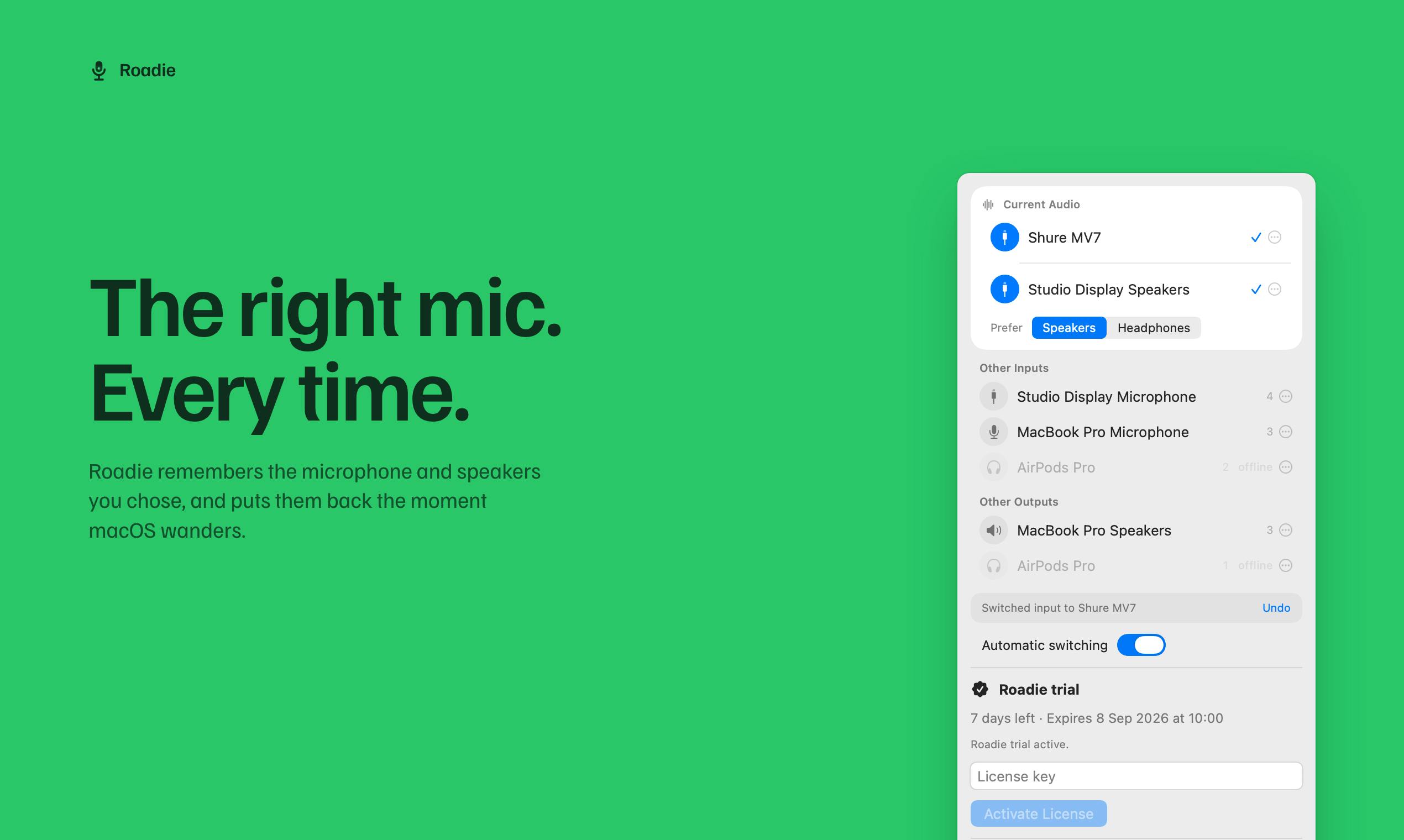
Roadie auto-manages Mac audio device switching with priority ranking from the menu bar.
Roadie is a menu bar tool for Mac that solves the frustration of macOS automatically switching to the wrong audio device. Users rank their microphones and speakers by priority once, and Roadie auto-recovers the correct device after reconnections, sleep, or system changes. It runs entirely locally and never captures audio, making it ideal for remote workers, podcasters, and privacy-conscious professionals.
For every professional Mac user, audio device management can be a tedious and frustrating issue. When you connect Bluetooth headphones, an external microphone, or wake your computer from sleep, macOS often takes it upon itself to switch audio input/output to a device you didn't want. Roadie, recently launched on Product Hunt, was built precisely to solve this pain point — a menu bar audio switching tool designed for seamless device management.
Audio Device Switching on Mac: A Long-Overlooked Daily Frustration
If you frequently attend online meetings, record podcasts, or create audio/video content, the following scenarios will sound all too familiar: you carefully set up your professional microphone before a meeting, only to find the computer defaulted back to the built-in mic after a restart; your Bluetooth headphones reconnect but sound blasts from the external speakers instead; after a system update, all your audio routing settings get reset to square one.
These seemingly trivial issues add up to seriously impact productivity and can even cause embarrassing moments during critical meetings or live streams. macOS's native audio switching logic doesn't always match users' actual expectations — especially in multi-device environments where devices are frequently connected/disconnected and the system frequently wakes from sleep.
The macOS Audio Subsystem: Why It "Takes Matters Into Its Own Hands"
To understand the root of this problem, you need to understand how the macOS audio subsystem works. macOS audio management is built on the Core Audio framework — a low-level audio architecture Apple has been developing since the Mac OS X era. Core Audio uses HAL (Hardware Abstraction Layer) to manage all audio devices, including built-in speakers, USB audio interfaces, Bluetooth devices, and more. When devices connect or disconnect, the system detects changes through callback mechanisms and automatically selects a default device based on its built-in priority logic. However, this logic was originally designed for simple consumer scenarios — it tends to automatically switch to Bluetooth when a Bluetooth device connects and fall back to built-in hardware when a device disconnects, but lacks the ability to let users customize their own priority sequences. This is precisely where third-party tools like Roadie come in: they listen for Core Audio device change notifications and immediately reset the default device according to user-defined rules after the system completes its default switch.
Bluetooth audio devices make things even more complicated. Traditional Bluetooth audio uses the A2DP (Advanced Audio Distribution Profile) protocol for high-quality music playback while using the HFP (Hands-Free Profile) protocol for calls. When a user joins a video conference, macOS may switch Bluetooth headphones from A2DP mode to HFP mode, causing a sudden drop in audio quality and changing how the device name appears in the system. Apple's AirPods lineup also introduces Automatic Switching, where devices automatically jump connections based on the currently active Apple device — further increasing the unpredictability of audio routing. These protocol-level complexities turn the seemingly simple task of "keeping the right audio device active" into something full of variables.
Roadie's positioning is crystal clear — it's a menu bar audio device management tool focused on "keeping your Mac on the right microphone and speakers at all times." This precise entry point addresses a long-standing implicit need among power Mac users.
Core Mechanism: Priority Ranking and Auto-Recovery
Roadie's working principle isn't complicated, but its design philosophy is quite clever. Its core mechanism can be summarized as "rank once, auto-recover."
Set It Once, Works Long-Term
Users simply need to rank their microphone and speaker devices by priority once in Roadie, and it remembers these preferences. From then on — whether a device reconnects, the computer wakes from sleep, you log back in, or macOS itself changes something — Roadie automatically restores audio routing to the best available device based on your priorities.
For example, if you rank your professional external microphone first, AirPods second, and built-in microphone last, then as long as the external mic is online, Roadie will always prioritize it. When the external mic disconnects, it automatically falls back to AirPods rather than inexplicably switching back to the built-in microphone.
Manual Selection Still Takes Priority
Notably, Roadie doesn't employ a heavy-handed "forced takeover" approach. The official documentation specifically states — Manual choices still win — until the device configuration changes. This means when you temporarily switch to a specific device manually, Roadie respects your immediate decision and won't force it back. This balanced design of "smart defaults + respect for manual choices" reflects thoughtful consideration for user experience.
Privacy-First Local Design
For audio tools, privacy is an unavoidable sensitive topic — after all, microphones deal with users' most private voice data. Roadie provides clear commitments on this front.
First, all of Roadie's routing logic runs locally without relying on cloud services. This not only means faster response times but fundamentally reduces the risk of data leaks.
Second, and most crucially — Roadie never captures audio. It only manages and switches device routing without reading, recording, or transmitting any actual audio content. For professionals who frequently handle sensitive meetings or private recordings, this design commitment is truly reassuring.
Architectural Isolation from Audio Data
The credibility of this privacy commitment can be verified at the technical architecture level. As a device management tool, Roadie technically only needs to call Core Audio's device management APIs (such as AudioHardwareSetProperty) to switch default devices — it has absolutely no need to touch audio stream processing interfaces like AudioUnit or AVAudioEngine. This architectural design inherently eliminates any possibility of accessing actual audio data. This aligns with the recent "Local-first" software design trend — after Apple, Google, and Amazon were successively exposed in 2019 for sending voice assistant audio snippets to human review teams for quality assessment, the industry raised the bar for privacy design in audio applications, making local processing a fundamental standard for such tools.
Additionally, Roadie offers a Pause anytime feature, allowing users to temporarily disable auto-switching in special scenarios, further enhancing flexibility and control.
Product Positioning and Market Reception
Based on Product Hunt data, Roadie received 95 upvotes after launch, ranking 17th for the day, and was categorized under Mac tools, productivity tools, and menu bar apps. For a single-purpose utility tool, this represents a solid debut.
The "Small but Beautiful" Tool Philosophy
Roadie was built by indie developer Yash Raj and is a classic example of a "small but beautiful" tool. Rather than pursuing feature bloat, it takes a specific pain point and perfects it. This product philosophy of focusing on a single point and deeply refining the experience has always had a stable audience in the Mac ecosystem's independent software market.
The Mac platform has long maintained an active and unique indie developer ecosystem. Unlike the red-ocean competition of the iOS App Store, the Mac software market has a smaller user base but one with stronger willingness to pay and higher quality expectations — providing indie developers with a sustainable business space. From early tools like TextExpander and Alfred to more recent ones like Raycast and CleanShot X, many iconic Mac tools have come from individual developers or small teams. These products typically follow the Unix philosophy of "do one thing and do it well," building reputation in niche markets through precise feature positioning and refined user experience. Product Hunt serves as an important platform for cold-starting such indie products — developers can gather feedback and gain traction from their first batch of seed users without investing heavily in marketing budgets.
Menu Bar Apps: A Unique macOS Design Paradigm
As a menu bar app, Roadie inherently possesses lightweight, low-interruption characteristics — it sits quietly in the menu bar, silently completing audio device switches only when needed, consuming virtually none of the user's attention. Menu bar apps are a unique software form within the macOS ecosystem: unlike traditional windowed applications, they have no Dock icon, don't occupy screen space, and reside only as a small icon in the top menu bar. Users click the icon to reveal a dropdown panel for interaction, which collapses once the operation is complete. This design paradigm stems from Apple's extension of the "focus on the current task" philosophy — background service tools shouldn't interrupt the user's primary workflow. In recent years, the popularity of menu bar tools like Bartender, iStat Menus, and Hidden Bar has made this form factor one of the mainstream choices for Mac utility software. This is exactly the stance an excellent utility tool should take: solving problems invisibly.
Who Needs Roadie the Most?
Overall, Roadie is particularly well-suited for the following types of users:
- Heavy remote work and meeting users: Those who frequently use different microphones and speakers for video conferences and need a stable, reliable audio device management solution.
- Podcast and audio/video creators: Those who depend on professional external audio equipment and can't afford unexpected interruptions caused by automatic system switching.
- Multi-device switchers: Those who frequently switch between wired headphones, Bluetooth earbuds, and external speakers throughout the day and want the system to automatically select the right device.
- Privacy-conscious professionals: Users with explicit requirements for local processing and zero audio capture.
Conclusion: A Lightweight Tool Focused on Solving a Specific Problem
Roadie may not be a groundbreaking innovation, but it precisely targets a "small but painful" daily frustration that Mac users have endured for years. Through its core mechanism of "priority ranking + auto-recovery," the human-centric design of "manual choices take priority," and the privacy commitment of "runs locally, never captures audio," it handles the seemingly simple task of Mac audio device switching with remarkable thoughtfulness.
In an era of increasingly bloated software, lightweight tools that focus on solving specific problems are especially valuable. If you've ever been frustrated by Mac's automatic audio device switching, Roadie is worth a try.
Related articles

Python 3.15 New Feature: Is the sentinel Type Better Than None?
Python 3.15 adds the sentinel type, using named unique sentinel objects to replace None and bare object(), resolving confusion among missing values, explicit emptiness, and invalid input while avoiding type hint failures.

Deep Learning's Three Architectures and the Universal Approximation Theorem: A Complete Guide to MLPs, CNNs, and Transformers
Explaining the inductive bias differences among MLP, CNN, and Transformer, the existence meaning of the Universal Approximation Theorem (UAT), and the role of Taylor expansion in approximation analysis, while clearing up common misconceptions.

GitLab Emergency Patch Release: Analysis of Critical Security Fixes
GitLab releases critical patch 19.5.1, sparking 355 points of discussion on Hacker News. This article analyzes the background, upgrade steps for self-hosted instances, and verification points to help DevOps teams respond quickly to security updates.