RTK Terminal Output Compression Tool: Save 80% of Token Consumption in Claude Code

RTK compresses terminal output for Claude Code, saving ~80% of Token consumption with zero workflow changes.
RTK (Rust Token Kompressor) is an open-source command-line proxy tool written in Rust that intercepts and compresses terminal output before it enters Claude Code's context window. By using predefined parsing rules for common commands like git, npm, and docker, RTK reduces Token consumption from 118K to 23.9K in a typical 30-minute session — an 80% savings. It runs completely offline, uploads no data, and installs in two minutes.
Your Tokens Are Being Silently Devoured by Terminal Output
If you're a heavy Claude Code user, you may have never noticed a hidden "money pit" — every time you run seemingly harmless terminal commands like git status, npm install, or ls, their output is consuming massive amounts of your Token quota.
Tokens are the basic unit of measurement for how large language models process text. For English text, one Token corresponds to roughly 4 characters or 0.75 words; for Chinese, a single character typically consumes 1.5-2 Tokens. Commercial AI models like Claude charge based on the total input and output Tokens, where input Tokens (everything in the context window) cost less than output Tokens per unit, but due to their massive cumulative volume, they often constitute the majority of total costs. Taking Claude 3.5 Sonnet as an example, input Tokens cost approximately $3 per million Tokens, meaning wasting 100K Tokens per day adds up to an extra $9 per month.
A typical 30-minute coding session can burn through 118,000 Tokens on terminal command output alone. And of that, the useful information that Claude Code actually needs to pay attention to is probably less than 20%.
Today we're introducing the open-source tool RTK (Rust Token Kompressor), which can slash terminal output Token consumption by 80% without changing any of your workflow habits.
Claude Code's Context Window Mechanism
What Is the Context Window
The context window can be understood as Claude Code's "working memory." Everything it has seen during the entire session is stacked here:
- Your prompt instructions
- Its previous responses to you
- Files you asked it to read
- The output of every terminal command you executed
This working memory has a capacity limit. The fuller it gets, the less space Claude Code has to "think." More critically, when the context window approaches capacity, earlier conversations get compressed or even discarded — the longer the session, the more "forgetful" the AI becomes.
Although the underlying model used by Claude Code has a large context window (such as 200K Tokens), this doesn't mean all information is "remembered" with equal weight. When session content approaches the window limit, the system triggers an automatic compression mechanism — typically summarizing earlier conversations, preserving key information but losing details. This is similar to how human working memory has limited capacity (the "magic number 7±2" in psychology): when new information keeps flowing in, old information must be compressed or forgotten. For coding scenarios, this means architectural decisions, variable naming conventions, and other important context discussed early in the session may be "forgotten" after extended work, causing the AI to give inconsistent suggestions.
The Real Token Cost of Terminal Output
According to data from RTK's official GitHub page, here's the Token breakdown for a typical 30-minute session:
| Command | Executions | Tokens per Run | Total Consumption |
|---|---|---|---|
| git status | 10 times | 300 | 3,000 |
| git diff | 5 times | 2,000 | 10,000 |
| npm install | Multiple | Hundreds of lines | Large amount |
| Other commands | - | - | - |
| Total | - | - | 118,000 |
It's like going to the supermarket to buy a bottle of water, but the cashier prints out the entire shelf inventory and charges you for it.
How RTK Works: Interception and Compression
Core Mechanism
RTK is a command-line proxy tool written in Rust that essentially does two things: intercept and compress.
The choice of Rust as the development language was no accident. As a command-line proxy tool, RTK needs to intervene during every terminal command execution and is extremely sensitive to latency — if the compression process itself takes too long, user experience noticeably degrades. Rust's zero-cost abstractions and lack of garbage collection make its compiled binaries execute at speeds approaching C/C++, while memory safety guarantees prevent security vulnerabilities like buffer overflows. Additionally, Rust's ability to compile into a single static binary means RTK requires no runtime environment (such as a Python interpreter or Node.js), making installation and deployment extremely clean. This is also why numerous developer tools in recent years (such as ripgrep, fd, bat, etc.) have been rewritten in Rust.
Normal flow:
Claude Code → Shell → Output returned unchanged → Everything enters the context window
Flow after installing RTK:
Claude Code → RTK takes over → Shell → RTK analyzes and compresses → Concise summary returned to Claude Code
RTK's interception mechanism is essentially implemented by modifying Claude Code's Shell configuration. When you run rtk init -g, RTK registers itself as the default shell wrapper in Claude Code's global configuration. After that, every time Claude Code calls the Shell to execute a command, it actually launches a sub-Shell through RTK's process. RTK captures the stdout and stderr output streams of the child process, performs parsing and compression in the pipeline, then returns the streamlined results to Claude Code. This design pattern is similar to the pipe-and-filter pattern in Unix philosophy — it doesn't modify the behavior of upstream (Claude Code) or downstream (Shell commands), only performing data transformation at the middle layer.
Take git status as an example: it might originally output dozens of lines (which files were modified, added, deleted), but after RTK processing, it becomes a three-line structured summary: "3 files changed: 1 modified, 1 added, 1 deleted." Zero information loss, 70-80% size reduction.
Intelligent Filtering Strategy
RTK does not use AI for compression — instead, it employs predefined filtering rules:
- Dedicated parsers: For common development commands like Git, NPM, Docker, LS, and Grep, RTK has specialized parsing logic. For example, it knows that in
npm installoutput, what you care about is which packages were installed, whether there were errors, and the final result — progress bars and redundant information in between can all be removed. - Generic compression strategy: For unrecognized commands, RTK preserves the head and tail while removing repetitive content in the middle.
RTK's choice of predefined rules over AI models for compression is a deliberate engineering decision. While using AI for compression is theoretically more flexible, it introduces three problems: First, latency — calling an AI model takes time and might be slower than the original command execution. Second, the cost paradox — using AI to compress Tokens to save Tokens becomes counterproductive if the compression itself consumes more Tokens than it saves. Third, determinism — AI compression might lose critical information or produce hallucinations. Predefined rules have limited coverage, but for supported commands they guarantee 100% information accuracy and millisecond-level processing speed. This "expert system" approach often outperforms general AI solutions in scenarios requiring high determinism.
Security and Privacy Guarantees
Three key characteristics:
- Runs completely offline, no internet connection required
- Uploads no data whatsoever, your code is never sent anywhere
- Fully open source, hosted on GitHub, anyone can audit the code
RTK Real-World Performance Comparison
According to RTK's official comparison tests, with the same 30-minute session and identical operations:
| Metric | Without RTK | With RTK | Savings |
|---|---|---|---|
| git status (10 times) | 3,000 Tokens | 600 Tokens | 80% |
| git diff (5 times) | 10,000 Tokens | 2,500 Tokens | 75% |
| Total terminal output | 118,000 Tokens | 23,900 Tokens | ~80% |
Let's do the math: if you use Claude Code for 3-4 hours daily, you can save about 100K Tokens per day, which adds up to 2 million Tokens per month. For users on per-Token billing models, this translates to real money saved.
RTK Installation Guide: Done in Two Minutes
Windows Installation Steps
Step 1: Download the installer
Go to RTK's GitHub Release page, expand the Assets list, download the rtk-x86_64-pc-windows-msvc archive, and extract it to a local directory.
Step 2: Configure environment variables
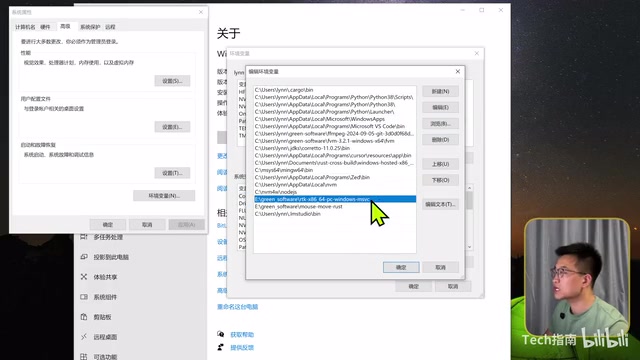
- Right-click "This PC" → Properties → Advanced system settings → Environment Variables
- Find
Pathin user variables (create it if it doesn't exist) - Click Edit → New → Paste the full path to the RTK extraction directory
- Click OK to save all the way through
Step 3: Verify and initialize
Open Command Prompt (press Win key and type cmd), then run:
rtk --version
If it outputs a version number, installation was successful. Then run initialization:
rtk init -g
This creates a global configuration file for Claude Code. Close the command prompt, reopen Claude Code, and it takes effect.
macOS Installation Steps
The simplest method — one command:
brew install rtk
After installation, run rtk init -g to initialize as well.
Checking Token Savings
After using it for a while, run:
rtk gain
This shows your cumulative Token savings and the corresponding ratio. In practice, a single git status command can save approximately 75.7% of Tokens.
Current Limitations and Future Outlook
RTK's Current Limitations
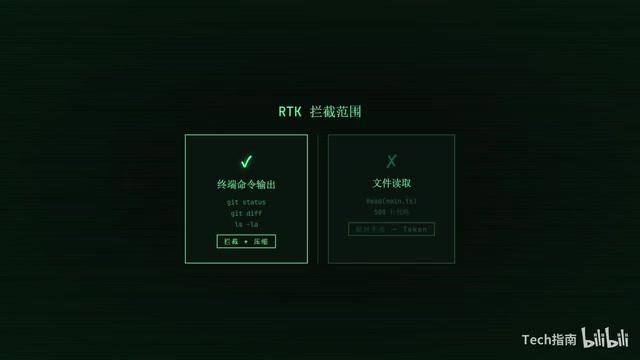
RTK only intercepts terminal command output — it does not handle file reads. If you ask Claude Code to read a 500-line code file, those 500 lines still become Tokens unchanged.
So if your workflow primarily involves reading and editing code with minimal terminal command usage, your actual savings might only be 10%-20% rather than 80%.
Developments Worth Watching
- The RTK development team is working on file read interception and compression functionality
- Claude Code itself is also enhancing its built-in context compression capabilities
When both of these directions materialize simultaneously, Token savings will enter an entirely new phase.
Summary
- Problem: Claude Code's context window is limited, and terminal output massively consumes Tokens (up to 118K in 30 minutes)
- Solution: RTK intercepts and compresses terminal output using predefined rules, reducing consumption from 118K to 23.9K
- Installation: Done in two minutes, runs completely transparently afterward — free, open source, offline
- Best for: Developers who frequently use terminal commands benefit the most
Once RTK is installed, you can forget it exists — it'll keep quietly saving you money in the background.
Related articles

Chain of Thought Isn't Just for AI: How Humans Can Use CoT to Improve Thinking Quality
Chain of Thought isn't just a prompt trick for large models. Starting from a Hacker News discussion, this article analyzes why CoT works for human thinking too, breaks down actionable ways to transfer it, and highlights the key differences between human CoT and machine CoT.
Cloudflare Teams Up with OpenAI: Closi…
Cloudflare Teams Up with OpenAI: Closing the Loop from Vulnerability Discovery to Defense with AI
Cloudflare uses OpenAI Daybreak to investigate security vulnerabilities and generate reviewable remediation plans, while developers use Codex to boost coding efficiency and quality.

Orca Multi-Agent Orchestration in Practice: A Guide to Parallel Collaboration with Claude and Codex
Orca is Stable AI's free open-source agent workbench supporting 34 agents like Claude Code and Codex in parallel. Learn its Git worktree isolation, multi-model orchestration, and mobile management.