RTX 3060 12G Runs Qwen3 27B: 22 t/s at 64K Context

RTX 3060 12G runs Qwen3 27B at 22 t/s with Q4 quantization and llama.cpp on Ubuntu.
A hands-on test shows an RTX 3060 12G can run Qwen3 27B at ~22 token/s on 64K context using Q4 quantization (~2% precision loss) and llama.cpp, reaching 26–28 t/s at 32K and 400+ t/s batch throughput. VRAM hits 96% utilization, power draw is ~170W, and CPU load is minimal. The Ubuntu-based setup supports 16GB RAM, includes one-click deployment scripts, and passes 25K–50K long-context stability tests.
Can a 12GB GPU Really Run a 27B Model?
For a long time, deploying large open-source models locally has been held back by one practical barrier: VRAM. A 27B-parameter model intuitively seems to require a 24GB or higher-end GPU. But a hands-on test by a Bilibili creator offers a different answer: a budget-friendly RTX 3060 12G, paired with the right quantization strategy, can run Qwen3 27B at genuinely usable production speeds.
In the test environment, the 3060 12G handled coding tasks smoothly enough to meet basic production requirements. The key numbers: a stable ~22 token/s at 64K context, climbing to 26–28 token/s when context is reduced to 32K. For an entry-level GPU, this performance is enough to shatter many assumptions about running large models on consumer hardware.
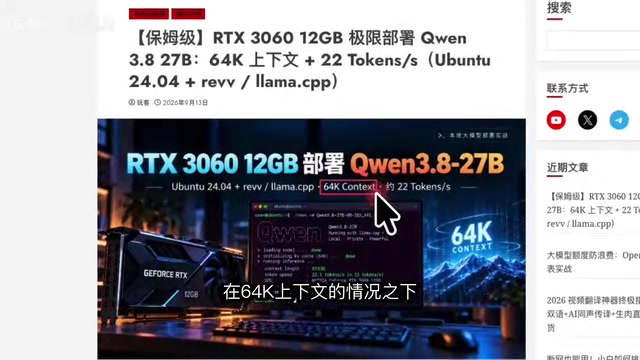
Hardware Performance: VRAM Maxed Out, Power Draw in Check
Hardware monitoring during the test shows this setup pushes the 3060's 12GB VRAM to its limits — 96% utilization, nearly full. This is actually the ideal state for local deployment: you want to pack as much of the model and context window into VRAM as possible without spilling into system memory, which would cause a dramatic speed drop.
Two other metrics stand out. CPU usage remains very low, meaning the inference workload is almost entirely handled by the GPU with no CPU-GPU hybrid slowdown. Power consumption sits at around 170W — near full load but not excessive — keeping demands on the power supply and cooling relatively modest. In short, this is a well-balanced local inference setup in terms of power and performance.
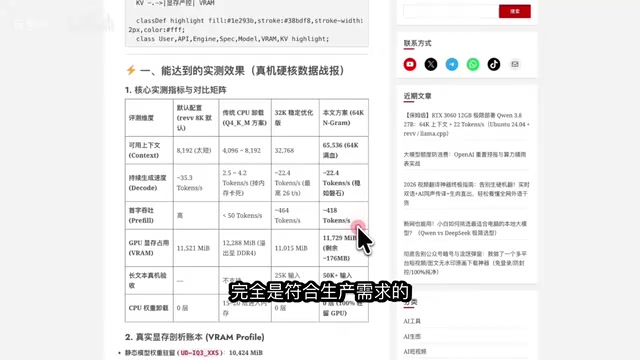
Quantization: Choosing Between Q4 and IQ3
Fitting a 27B model into 12GB of VRAM depends entirely on quantization. The creator covers the precision trade-offs of two approaches in detail:
- Q4 quantization: Precision loss of roughly 2% — negligible in practice, and the recommended choice for balancing quality with VRAM footprint.
- IQ3 quantization: Loss of around 5%, with more aggressive compression. Useful when you need a longer context window or extra headroom.
According to the author, both levels of loss are within acceptable bounds. In practice, Q4 suits tasks where output quality matters most, while IQ3 buys extra space when VRAM is tight. This trade-off — sacrificing a small amount of precision for deployability — is the core strategy behind running large models on consumer GPUs.
Quantization is the technique of compressing model weights from high-precision floating-point numbers (e.g., FP16, 2 bytes per parameter) into low-bit integer representations. Q4 stores each weight as a 4-bit integer, reducing model size by roughly 75% compared to FP16. IQ3 compresses further to 3 bits, but uses a non-uniform strategy called Importance-aware Quantization — it prioritizes preserving precision for weights that have the most impact on model output, minimizing quality degradation at more aggressive compression rates. A 27B-parameter model stored in FP16 requires roughly 54GB of VRAM; Q4 quantization brings that down to approximately 14–16GB, while IQ3 can reduce it further to under 10–12GB — which is precisely what makes a 12GB GPU viable for a 27B model. llama.cpp natively supports both formats and includes CUDA-accelerated optimization for NVIDIA GPUs.
Speed at Different Context Lengths
Context length directly affects inference speed, and the test results make this relationship clear. The creator provides a tiered breakdown:
| Context Length | Generation Speed (approx.) |
|---|---|
| 8K / 16K | 30+ token/s |
| 32K | 26–28 token/s |
| 64K (default) | 22 token/s |
Batch throughput in manual concurrency testing reached 400+ token/s, well within production requirements. Long-context tests with inputs of 25K and even 50K tokens completed without issues, confirming that this setup handles extended context windows reliably.
If raw output speed is your priority, use the 8K startup script. For everyday tasks, 32K is a solid middle ground. The default recommendation is 64K for the best balance of capacity and speed.
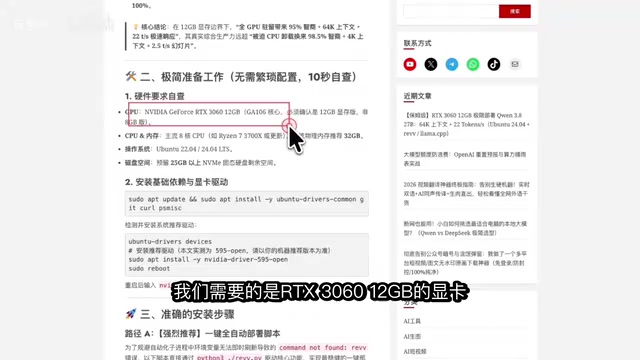
Deployment Overview
The entire setup runs on Ubuntu + llama.cpp, with modest hardware requirements:
- GPU: RTX 3060 12G
- RAM: 32GB (16GB also confirmed to work)
- OS: Ubuntu
- Disk space: Minimal
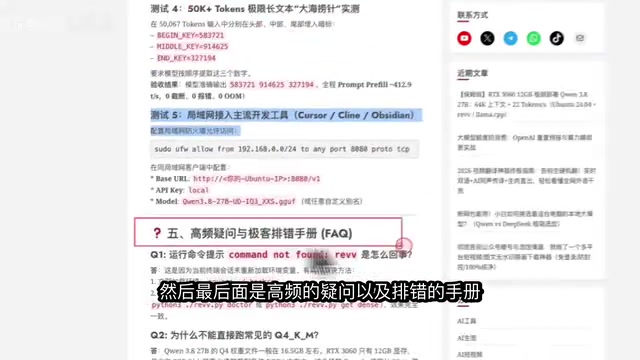
The creator breaks deployment into a few stages: installing the base (llama.cpp), downloading the quantized model, configuring startup scripts, and setting up a daemon service to keep the model running persistently. The process includes both a one-click fully automated script and step-by-step manual instructions — you can even hand the script directly to an agent to execute, skipping manual setup entirely.
The verification steps cover benchmark tests, context tests, long-text tests, and LAN access tests, along with a FAQ and troubleshooting guide. For newcomers, the combination of ready-made scripts and a troubleshooting document significantly lowers the barrier to entry.
llama.cpp is a lightweight inference framework developed by Georgi Gerganov, implemented in pure C/C++. Its core strengths are minimal runtime dependencies and native support for quantized formats (GGUF). It includes a local server mode (llama-server) with an OpenAI-compatible API, making it easy to connect with frontends like Open WebUI and Continue.dev, or to integrate with custom applications via HTTP. This makes the "persistent model + LAN access" setup straightforward to implement. The daemon service is typically configured via systemd, ensuring the server starts on boot and automatically restarts after crashes — a standard practice for production-grade local deployments.
Is This Worth the Effort?
Beyond the specific numbers, the real value of this test is validating a direction: consumer entry-level GPU + aggressive quantization + llama.cpp is continuously lowering the bar for local large model deployment. A ~$300 RTX 3060 running a 27B model at 22 t/s means individual developers and small teams can build private coding assistants or knowledge-processing tools at very low cost.
The caveats are clear: you need to accept the minor precision loss from quantization and have a realistic understanding of the trade-off between context length and speed. For users on a budget who still want to experience larger models, this is undeniably a high-value path.
Note: This article is based on a single Bilibili video. Actual speed figures may vary depending on the model version, quantization file, and driver environment. Always validate with your own deployment tests.
Related articles

Felix Rieseberg Personal Homepage
Felix Rieseberg's personal homepage sparks attention on Hacker News. This article covers the Slack engineer's technical background, the rise and fall of nativefier, and the value of a developer homepage as a tech calling card.

@ai-sdk/vue 3.0.306 Patch Release Syncs with [email protected] Update
@ai-sdk/vue 3.0.306 released, synced with [email protected]. A routine patch release for the Vercel AI SDK ecosystem with no public API changes; the Vue adapter layer stays version-aligned with the core package.

Gemini 4 Argon API Launches: The Era of Million-Token Output Begins
Google launches Gemini 4 Argon with sparse MoE architecture, up to 1M output tokens, and a 68.90% Vals Index score, available across API, AI Studio, and the Gemini app.