Run Official Claude Code from a $10 USB Drive: A Free Cross-Platform Solution Tested on All Three OS

Run official Claude Code from a USB drive across all three major OS with no subscription required.
Claude Code Portable is a free open-source project that packages the official Claude Code runtime into an exFAT-formatted USB drive for plug-and-play use on Windows, Mac, and Linux. Users can skip Anthropic's $20/month subscription and connect to providers like OpenRouter, DeepSeek, Gemini, and NVIDIA — including free-tier models. Config, chat history, and API keys migrate with the drive. It supports both terminal and browser-based interaction with multi-provider switching, ideal for developers and freelancers working across machines — though API key security on removable media and USB read/write speed are worth keeping in mind.
Fitting a complete official Claude Code runtime environment onto a $10 USB drive — plug it into any Windows, Mac, or Linux machine and it just works — sounds like a geek toy for tinkerers, but it actually points toward a lighter, more flexible way to use AI-assisted coding. That's exactly the problem the open-source project Claude Code Portable set out to solve.
One USB Drive, Three Operating Systems
The core selling point of this solution is portability and cross-platform compatibility. This isn't a clone or an unofficial fork — it lets you run the official Claude Code from a USB drive or any folder on your computer. The entire setup shares a single data store across Windows, Mac, and Linux, meaning you can plug the drive into any machine and pick up right where you left off. Your configuration, conversation history, and API keys all travel with it.
The key to cross-platform support is the file system format. The project explicitly recommends using a USB drive formatted as exFAT, which allows it to be read and written on all three operating systems. Two launcher files are included: Windows users run Start.bat, while Mac and Linux users run Start.sh (or execute bash start.sh in a terminal).
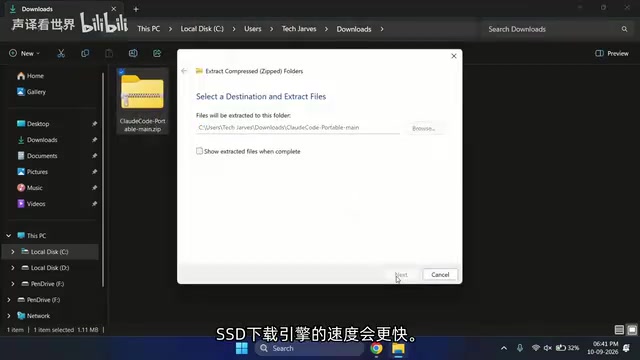
Performance is worth considering. USB drives have limited read/write speeds, so for a smoother experience, the author suggests using an external SSD or even an internal SSD to host the environment instead — the logic is identical, just with faster storage.
exFAT (Extended File Allocation Table) is a file system format introduced by Microsoft in 2006, designed specifically for flash memory and portable storage devices. It eliminates the 4GB single-file size limit of older FAT32 while offering better cross-platform compatibility than NTFS — macOS and Linux have historically required additional drivers for NTFS write support, whereas exFAT is natively readable and writable on all three major operating systems. For scenarios requiring a shared storage medium between Windows, Mac, and Linux, exFAT is almost always the only sensible choice. Note that exFAT does not support file permission management (Unix permission bits), so after mounting on Linux/macOS, script files may need to be manually granted execute permissions with
chmod +x.
No $20 Subscription Required — Connect to Multiple Model Providers
For many users, the most practical benefit of this solution is bypassing Anthropic's official $20/month subscription. Claude Code Portable lets you connect to multiple model providers including OpenRouter, Gemini, DeepSeekAd, and NVIDIA, with access to their free-tier models as well.
The configuration flow is straightforward: on first launch, Node.js runtime and the official Claude Code package are automatically downloaded to an Engine folder — this takes about 2 to 3 minutes. Once ready, pressing 1 and hitting Enter opens a web-based dashboard in your default browser. This UI was built by the project's author, who cites tools like Codex and DeepSeek Harness as inspiration.
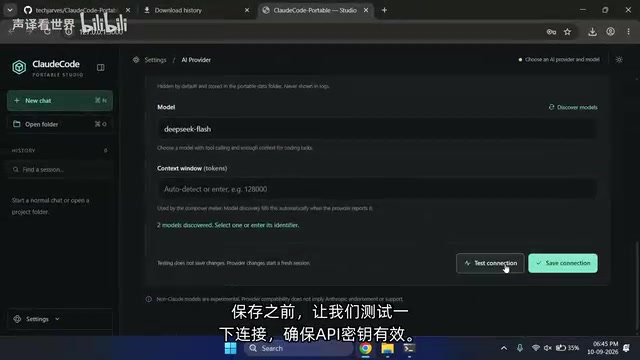
In the dashboard, select a provider, enter your API key, and click Discover Models to fetch the available models for that provider. In the demo, the author chose DeepSeek, citing it as "cheap, fast, and capable." It's recommended to test the connection before saving to confirm the key is valid, then click Save Connection to finalize the setup.
OpenRouter is an AI model aggregation and routing platform that provides a unified API interface, letting developers access models from dozens of providers — including Anthropic, Google, Meta, Mistral, and more — using the same call structure. Its core value is that developers don't need to register separately with each service or manage multiple SDKs; a single OpenRouter API key lets you switch between models on demand and pay only for what you use. The platform also periodically offers free quotas for select models. Since Claude Code Portable supports OpenRouter, users can theoretically access official Claude models through it — the difference is that billing shifts from a flat subscription to a pay-per-token model, which is often more economical for low-frequency users.
Two Usage Modes and a Walkthrough
The project offers two interaction modes: running Claude Code directly in the terminal, or using the built-in browser interface, which is visually cleaner.
On Windows, double-click Start.bat, confirm the prompt, and installation begins automatically. Once the environment is ready, you can start chatting. In the author's test, asking Claude Code to summarize the root folder prompted a confirmation request before running any commands — this is because "review mode" is enabled by default, a setting that can be changed as needed. It ultimately returned a complete summary of the project folder structure. To stop, simply press Ctrl+C to shut down the environment.
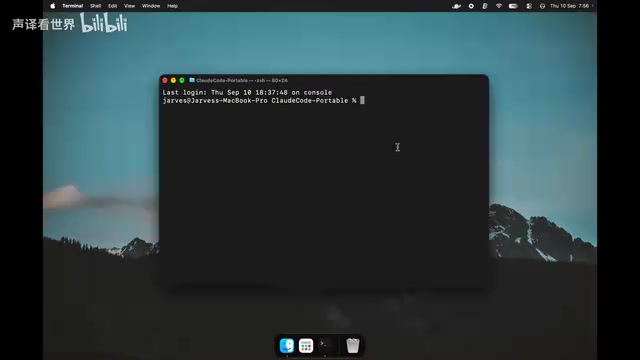
Cross-platform migration is arguably the most compelling part of this setup. The author zipped the entire folder, copied it back to the USB drive, ejected it, plugged it into a Mac, and ran bash start.sh. On first run, macOS-specific files are downloaded (a one-time process), after which the menu is identical to Windows. Previous conversation history and API keys carry over directly — no reconfiguration needed. The same workflow applies on Ubuntu: after the one-time Linux-specific file download, all chats, settings, and projects accumulated on Windows and Mac are right there.
Flexibility to Switch Between Multiple Providers
This setup doesn't lock you into a single AI provider. You can save multiple providers and switch between them at any time. During the Mac demo, the author quickly added NVIDIA's Nemotron model and, after saving, was able to freely switch between DeepSeek and NVIDIA within a new chat — both responded normally.
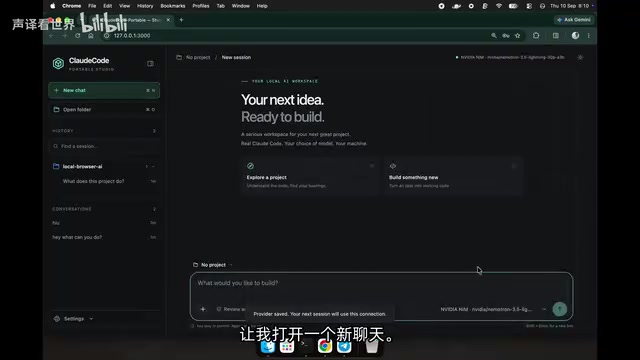
This design is friendly for cost-conscious developers or those who want to compare model performance: use cheaper models for routine tasks, switch to higher-end models when you need more capability — all within the same interface.
Who Should Use This — and Who Should Be Cautious
This solution suits three groups: developers who need to switch between multiple machines, users who want to avoid the official subscription and use third-party APIs instead, and freelancers or students who prefer to carry their entire work environment with them.
That said, a few things deserve honest consideration. First, storing API keys on removable media carries security and privacy risks — a lost USB drive could mean exposed credentials. Encryption and proper access controls are strongly recommended. Second, free-tier models from third-party providers are generally less capable than official Claude, so real-world coding experience may differ. Third, USB drive read/write performance is a natural bottleneck — if efficiency matters, an SSD is the better choice.
As a free, open-source project, Claude Code Portable offers a "travel light" approach to AI-assisted coding. Its value isn't in benchmark scores or capability ceilings, but in pushing setup friction and migration costs to near zero — which is exactly the dimension most tools tend to overlook.
Storing API keys on removable media carries a risk profile similar to writing passwords on a sticky note: physical loss equals credential exposure. Recommended mitigations include encrypting the USB drive or specific folders using tools like VeraCrypt with a decryption passphrase at mount time, or setting IP allowlists and usage caps for your keys in each provider's console — so that even if a key leaks, the blast radius is limited. Regularly rotating keys in the provider dashboard is also good practice: revoke the old key and update the config file on the drive. The operational overhead is low, but it significantly reduces long-term risk.
Related articles

JobRunner MCP Server: AI Agents Can Now Fix Failed Java Jobs
JobRunner launches an open-source MCP server enabling AI agents to view cluster status, diagnose failures, and recover Java jobs—incident response from any cloud coding environment or existing agent.

MLAI Digital Launches 9 Security Agents: MCP Server Safeguards the Full Lifecycle of Agentic AI
MLAI Digital launches Security MCP Server with nine built-in specialized security agents covering vulnerability discovery, attack simulation, prompt injection detection, API and infrastructure assessment, and accelerated remediation—embedding security validation across the full Agentic AI lifecycle from development to production.

Running Isaac Lab on H100 GPUs: Exploring Better Approaches
Exploring optimization methods for running Isaac Lab on NVIDIA H100 GPUs, including MIG configuration, mixed precision, TensorRT acceleration, and community experience to improve robotics simulation and reinforcement learning efficiency.