Running a 33B-Parameter Video Model on a 16GB Mac mini: Apple VPIPE Hands-On Test

VPIPE uses weight streaming to let a 16GB Mac mini run a 33B-parameter audio-video model.
The article covers a Bilibili creator's hands-on test: using Apple's native inference engine VPIPE and its weight streaming technology, an entry-level 16GB Mac mini successfully ran the MiniMax H3 multimodal video model—originally 115GB in size—and generated AI video with stereo audio. The core idea is to use the SSD as VRAM, loading the 50-layer model on demand like a tank tread, combined with staged teardown and adaptive residency to control memory peaks. The Mac mini's unified memory architecture and active cooling fan are prerequisites for efficiency. In practice, you first run about 15 minutes of 8-bit group quantization and registration, then load the text-to-video workflow and adjust three nodes; with Turbo LoRA, 4 to 8 steps suffice, and a roughly 5-second 480p video takes about 4 minutes in实测. VPIPE is under 30MB, with core computation compiled directly into native Metal kernels, outperforming bulky Python frameworks in efficiency.
Apple Silicon's unified memory architecture lets even an entry-level Mac mini take on a 33-billion-parameter multimodal video model. A Bilibili creator's hands-on test shows that, with the weight streaming technology of Apple's native inference engine VPIPE, a 16GB Mac mini successfully generated AI video with stereo audio. Behind this is an engineering approach completely different from conventional local inference.
Why can a 16GB machine run a model tens of GB in size?
The original MiniMax H3 BF16 model is a hefty 115GB, and even after conventional compression, loading it fully into memory requires at least tens of GB. Running it directly on a 16GB Mac mini would theoretically crash due to out-of-memory (OOM). VPIPE's solution comes down to one phrase: weight streaming.
The creator used an intuitive analogy: traditional local AI is like having to download an entire 60GB 4K movie into your phone's memory before you can play it; streaming is like watching it online—memory doesn't need to hold the whole movie, it reads as much as it computes from the drive. MiniMax H3 internally has 50 identically structured computation layers (Blocks), and data is processed sequentially from the first layer to the last. VPIPE exploits exactly this serial characteristic.
Three-stage memory management strategy
VPIPE does three key things. First, staged full teardown: after the 32-billion-parameter text encoder (Qwen VL 32B) responsible for understanding the prompt finishes its work, it is immediately and completely unloaded from memory, never allowed to compete with the video model for memory. Second, the model resides on disk and is dynamically moved on demand: tens of GB of weights sit quietly on the SSD, and when computation begins the current layer is read into memory first. Third, Adaptive Residency: if memory remains after a layer is computed, commonly used blocks are retained; when memory is tight, old layers are immediately released and the next layer swapped in, rolling through all 50 layers in turn like a tank tread.
BF16 and quantized formats: BF16 (Brain Floating Point 16) is a 16-bit floating-point format that, like FP16, occupies 2 bytes but retains the same 8-bit exponent as FP32, sacrificing only mantissa precision. This gives it a large dynamic range and stable training, making it a common default format for storing and inferring LLM weights. The trade-off is bulk—a 33-billion-parameter model stored in BF16 needs roughly 66GB of VRAM/memory, which is the source of the 115GB original model size mentioned here. Quantization compresses each weight from 16 bits to 8-bit or even 4-bit integers, halving or quartering the size, then dequantizes back to high precision during inference. 8-bit quantization usually incurs minimal quality loss; 4-bit saves more space but leaves less precision headroom—which is exactly why the article recommends "prefer 8-bit when you have the space."
OOM and out-of-memory: OOM (Out Of Memory) means a program requests more memory than the system's available limit, and the OS or runtime cannot satisfy the allocation request, typically terminating the process outright—manifesting as an app crash or error. In local LLM inference, model weights, activations, KV cache, and intermediate tensors all consume memory; once a single layer's computation exceeds the remaining capacity, OOM is triggered. The core value of weight streaming is that it breaks the peak demand of "all weights resident at once" into the low peak demand of "only one layer resident at a time," allowing small-memory devices like 16GB to theoretically run models far larger than their memory—at the cost of added disk read IO overhead.
The Mac mini's hardware advantages: unified memory and active cooling
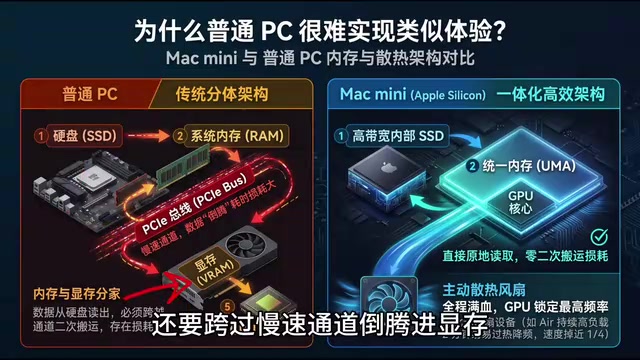
Ordinary Windows PCs struggle to do this because memory and VRAM are separate—after data is read from disk, it must cross a slow channel into VRAM. The Mac mini has two natural advantages.
First, the unified memory architecture, combined with a high-bandwidth internal SSD: after data is read from disk into unified memory, GPU cores read it directly in place with no second copy overhead. Second, the Mac mini has an active cooling fan—a fanless MacBook Air running this kind of high-load video generation overheats and throttles within two minutes, losing nearly a quarter of its speed; the fan-equipped Mac mini can lock the GPU at maximum frequency throughout, fully exploiting the efficiency of weight streaming.
Getting started: disk space is the easiest pitfall
Machine requirements: any Mac with an Apple Silicon M-series chip, with a minimum of 16GB memory; the more memory, the more layer blocks can reside and the faster it runs.
Disk space is the real focus. The creator demonstrated the higher-quality 8-bit quantization approach: during the conversion preparation stage, the original model and quantized output coexist, requiring about 180GB of peak disk reservation; once quantization is complete and the 115GB original file is deleted, only about 65GB needs to be retained. If disk space is tight, you can switch the workflow to the 4-bit approach, which needs only 155GB peak and about 45GB final retention. However, under streaming loading, 8-bit and 4-bit generate at similar speeds, and 8-bit quality is more stable—so prefer 8-bit when you have the space.
The creator mentioned an easily overlooked detail: the original model and output directory must be on the same disk partition, because VPIPE uses hard links for the audio/video decoder VAE (which doesn't need quantization) to save space. Hard links across partitions fail, doubling the space usage.
Two-step hands-on: quantization slimming and video output
The entire VPIPE installer is under 30MB and requires no Python environment setup. After installation, open VPipe Manager via Spotlight, set the working directory, add the workflow in the Pipelines tab, switch to Web UI and start the server—you can even scan a QR code on your phone to connect and control it.
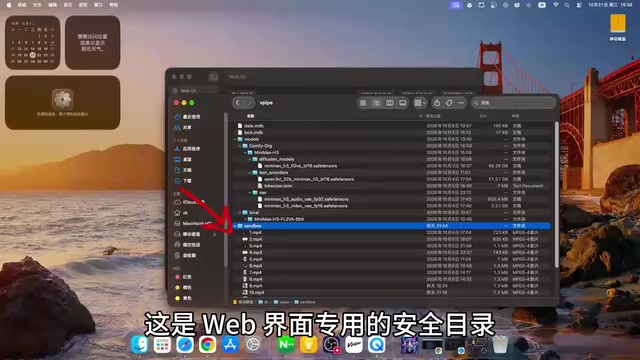
Step 1: One-time quantization and registration
Load the Prepare Minimax H3 8bit workflow in the console and click Run. On the creator's Mac mini, this process takes about 15 minutes and only needs to be run once on first use. The workflow does two things: registers the original MiniMax H3 into the database, and converts the BF16 model into an 8-bit affine group-quantized format optimized for Apple chips.
The logic of group quantization is to cut the weight matrix into small groups of 64 parameters each (Group Size = 64), with each group assigned its own scale and zero-point offset—halving the size with virtually no visible quality loss. Here's a hardcore detail specific to MiniMax H3: among the model's 13 billion parameters, the modulation layers responsible for per-step conditional control, the model body, and the 32-billion-parameter text encoder are all quantized to 8-bit, whereas many ordinary quantization tools miss the modulation layers entirely.
Group-wise and affine quantization: Group-wise quantization divides the weight matrix into fixed-size groups (here Group Size is 64), each independently computing its own set of quantization parameters rather than sharing one set across the entire matrix. Affine quantization stores a scale factor and a zero-point offset for each group, and dequantization reconstructs the approximate value using w ≈ scale × q + zero_point. Smaller groups yield lower quantization error and better precision, but also more scale/zero-point metadata. Compared with per-tensor quantization, group-wise affine quantization achieves a better balance between size and quality—this is the technical basis for the 8-bit approach's "half the size with virtually no visible quality loss."
Step 2: Load the text-to-video workflow and generate
After quantization completes, unload the workflow and load the MiniMax H3 text-to-video workflow. The graph is intuitive: the prompt goes through the encoder into the generate video core node, which splits into two branches on the right—video decoding on top, stereo audio decoding below—finally composited at the save video node. Three nodes need adjusting.
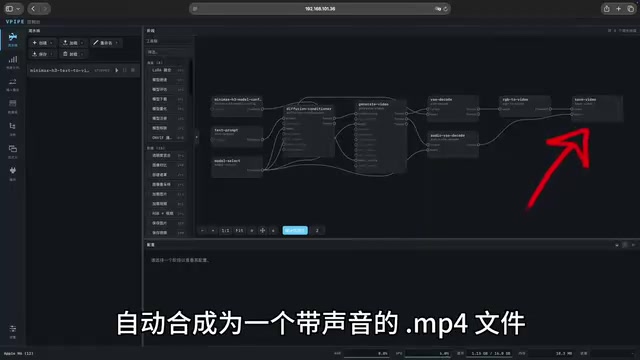
First is the model config node, where you mount the Turbo LoRA and select the ema-suffixed version. The original MiniMax H3 needs 16 steps; the community's distilled Turbo LoRA is only a few hundred MB, and mounting it lets the model converge in 4 to 8 steps—directly 3 to 4 times faster. ema stands for exponential moving average weights, the result of smoothing over the training history, giving more stable visual detail and motion under the extreme 4-step compression.
Second is the text prompt node. Because MiniMax H3's audio and visuals grow from the same text prompt—there's no separate audio input box—you need to write the sound-producing objects or ambient sounds into the prompt, e.g., "steady rhythmic footsteps on sand, sea breeze, and distant gentle ocean wave white noise," and the model will automatically generate wind sounds.
Third is the generate video node. Both width and height numbers must be multiples of 32, e.g., the default 960×544 or 480p's 832×480; if not a multiple of 32, the system rounds up automatically. The frame rate defaults to 24, and the underlying decoder chunks by 16n+5, so entering 120 frames aligns to 124 frames (about 5.17 seconds)—this is normal. With Turbo LoRA mounted, keep steps between 4 and 8, and do not exceed 8, or you may see over-sharpening or artifacts.
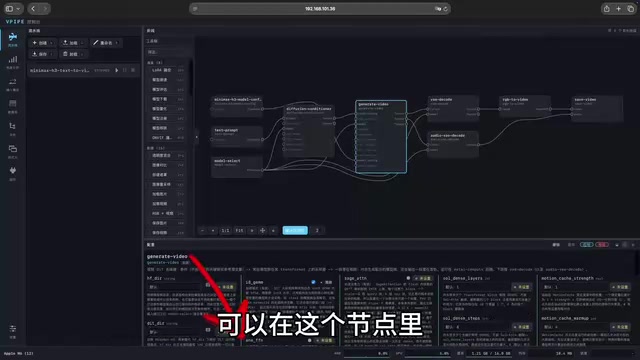
Mac minis with M4 or M6 chips can enable the relevant option in this node, letting Apple's Neural Engine (ANE) offload nearly half of the projection computation from the GPU, speeding things up by another 20%+. According to the creator's measurements, a roughly 5-second 480p video with audio at 4 steps takes about 4 minutes; a 960×544 configuration at 5 to 6 steps takes about 5 to 11 minutes. With a preview-enabled workflow and a lightweight setup of about 23MB, you can also watch the video evolve from noise to clarity in real time in the browser.
LoRA and distillation acceleration: LoRA (Low-Rank Adaptation) is a low-rank adaptation fine-tuning method that freezes the original model weights and only trains and mounts a small number of low-rank matrices to inject new capabilities, so files are often only a few hundred MB. The Turbo LoRA here doesn't teach the model new knowledge; it uses distillation training to compress a sampling process that originally needed 16 steps down to 4-8 steps for convergence—essentially installing a "speed patch" on the model. EMA (exponential moving average) applies a sliding average to weights during training and uses the smoothed version as the final weights, which typically reduces noise and improves stability—noticeably helping visual detail and motion coherence under extreme few-step compression, hence the recommendation to choose the ema-suffixed version.
Under 30MB, yet why does it outperform Python frameworks in efficiency?
Running local models on a Mac, VPIPE is under 30MB yet far more efficient than many Python frameworks that weigh in at a dozen-plus GB—the reason lies in engineering design. First, zero Python and zero third-party framework overhead: conventional MLX is like a high-level language toolbox, Metal is like assembly that directly controls hardware; VPIPE's inference doesn't go through the Python interpreter or link massive external runtime libraries—its core computation logic is compiled directly into embedded native Metal compute kernels, and it inlines and reuses MLX's Steel matrix operator templates. Second, a C++ thread pipeline drives the flow of video, audio, and text, working with Apple chips' matrix acceleration units to squeeze hardware performance to the limit.
The takeaway from this approach: the barrier to local large models depends not only on memory capacity, but even more on the engineering design of data movement. Weight streaming turns the SSD into an extension of VRAM, giving an entry-level 16GB Mac mini its own 33-billion-parameter audio-video workstation—no environment setup, no paid API calls.
(This article is based on a Bilibili creator's hands-on video; the toolkit and workflow are as released by the original author.)
Related articles

Prompt Engineering for Beginners: From Writing Prompts to Engineering Thinking
Starting from the essence and four functions of prompts, this article systematically explains the six-step process, four success criteria, learning value, and practical limitations of prompt engineering to help you build a complete understanding.

Anthropic Launches Nasdaq IPO: AI Giant's Listing and Risk Disclosures
Anthropic officially launches its Nasdaq IPO under ticker ANT, with market valuation expected to potentially exceed SpaceX's record. The prospectus devotes nearly 100 pages to AI risks, while first-half revenue grew over 14x but net losses widened sharply, reigniting the AI bubble debate.

Rust cURL Clone Uses 4,832 unsafe Blocks—Is the Memory Safety Myth Broken?
A Rust cURL clone uses 4,832 unsafe keywords, challenging Rust's memory safety narrative. We analyze what unsafe really means, compare Fil-C, and examine rewrite motives.