Running Local AI Agents on Mac: A Full Breakdown of the MLX Four-Layer Stack
Apple engineer shows a complete solution for running AI agents locally on Mac in a closed loop using the MLX four-layer stack.
The article introduces the local Mac AI agent solution shared by Apple engineer Joanna. What distinguishes an agent from one-way LLM conversation is that it brings execution into the loop: the model decides, calls tools, observes results, and re-plans until the task is done. The stack has four layers: MLX handles low-level computation and Metal acceleration, MLX LM handles model loading, quantization, and fine-tuning, MLX LM Server provides an OpenAI API-compatible local service with tool calling, and the top layer is any protocol-compatible agent framework. Setup takes only three steps: install, start the server, and point the Base URL to the local address. For the three bottlenecks of prompt processing, concurrency, and model size, MLX responds with the M5 neural network accelerator, continuous batching, and cross-machine distributed inference respectively.
Running AI agents on a Mac used to mean dealing with servers and API keys. Apple engineer Joanna shared a fully local solution on Bilibili: from the low-level array framework to the high-level agent framework, the entire pipeline runs in a closed loop on your own hardware. Data never leaves your machine, there are no API costs, and AI is available anytime — this stack's composition and optimization logic are worth breaking down.
From Conversation to Execution: What Agents Actually Change
Traditional LLM interaction is one-directional: you send a prompt, the model returns text; actually executing operations based on it — running commands, checking files, fixing errors — is entirely up to you. The difference with an agent is that it pulls "execution" inside the loop.
Specifically, the agent converses with the model and decides what to do, then invokes tools to perform actions, observes the results, and continues the conversation with the model to plan the next step. User → agent → model → agent → tool → observation, this loop keeps running until the task is complete. On Apple silicon, this loop can run entirely locally.
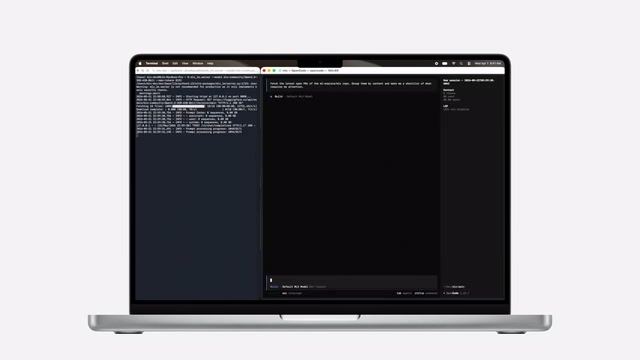
Joanna ran a real example in her demo: a local model running via MLX on the left, the OpenCode agent on the right. She asked the agent to fetch the most recent Port Request from the MLX code repository, summarize the changes, and identify noteworthy areas. The model reasons, then calls the GitHub CLI to pull PR data, compare diffs, and generate a summary — all locally, with only the Git commands touching the network.
Tool Calling is the key mechanism that makes the agent loop work. It means that when generating a response, the model doesn't directly output the final answer, but instead declares "I want to call a certain function with these parameters" in an agreed structured format (usually JSON). The host program parses this declaration and actually executes the function (such as running Git commands or reading/writing files), then feeds the return value back to the model as a new message. So the model itself doesn't directly operate the computer — it only makes decisions; actual execution is done by external tools. The OpenAI Chat Completion protocol standardizes the request and response formats for tool calls, which is why any agent framework and local server that both follow this protocol can connect seamlessly.
The Four-Layer Stack: From MLX to Agent Frameworks
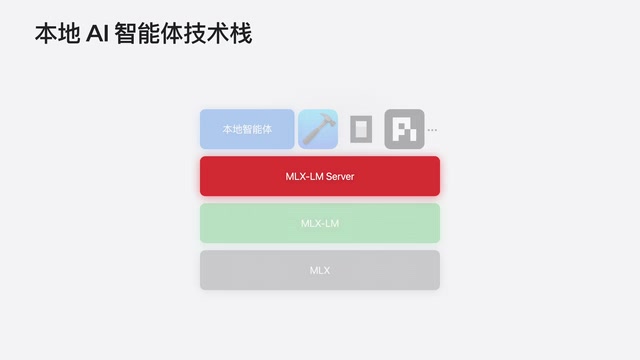
This solution is divided into four layers from bottom to top, each with clear responsibilities.
At the very bottom is MLX, an open-source array framework built specifically for Apple silicon, handling low-level computation, Metal acceleration, and memory management — the performance foundation of the entire stack. Above it is MLX LM, which provides everything needed to load, run, quantize, and fine-tune large language models, supports thousands of models on Hugging Face, and offers both a CLI tool and a Python API. Above that is MLX LM Server, an HTTP server compatible with the OpenAI API that serves local models through a standard API, supports structured tool calling so models can reliably invoke functions, and also supports reasoning models that analyze complex problems step by step before responding. At the very top is the agent itself — any framework or tool that supports the OpenAI Chat Completion protocol can connect, such as Xcode, OpenCode, PyAgent, or custom scripts.
The value of this layer is "out-of-the-box" usability: MLX LM Server provides a standard interface, so agent frameworks don't need any adaptation for local models. According to Joanna, popular tools like Ollama and LM Studio are built on top of MLX and MLX LM — if you're using these tools, you're likely already running MLX.
Quantization is the core technique for fitting large models onto personal devices. It compresses model weights from higher precision such as 16-bit floating point into lower-precision representations like 4-bit or 8-bit, dramatically reducing memory footprint and memory bandwidth requirements at the cost of slight accuracy loss. MLX LM supports multiple quantization schemes and can perform inference and even fine-tuning on quantized models. For local agents, quantization directly determines "how large a model you can run": with the same unified memory, quantization often allows you to carry a model with double the parameters, which is the prerequisite for consumer-grade Macs to run models with billions or even more parameters.
Building a Local Agent Workflow in Three Steps
The setup process is compressed into three steps. First, install MLX LM via pip install. Second, start MLX LM Server and load a model that supports tool calling — it's recommended to start with a small model to verify the setup is correct; once the server starts, it receives requests on localhost. Third, point the agent framework's Base URL to the local server address.
Taking OpenCode as an example, define a local Provider in the configuration, set the URL to localhost and specify the model on the server; from then on, every interaction goes through the local model. The agent doesn't know and doesn't need to care whether the model runs on a Mac or in the cloud — the same protocol means the same behavior.
How MLX Solves Three Bottlenecks of Local Agents
Running agents locally has three unavoidable challenges, and MLX addresses each at the hardware and engineering levels.
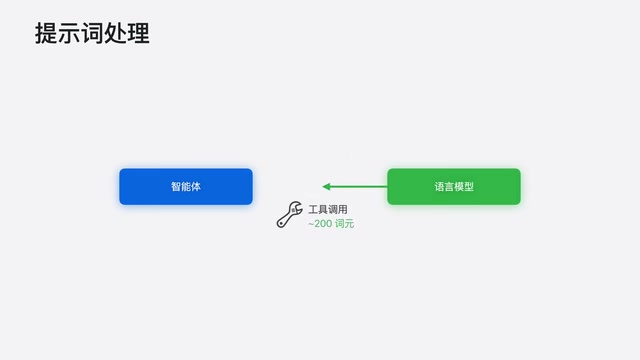
Prompt processing. Every time an agent receives a tool output, it must first process this new context before it can reason about the next step — an action that repeats and accumulates rapidly within the loop. Agent sessions typically contain hundreds of thousands of tokens, most of which are not generated but need to be read in. Joanna noted that the M5 chip introduces a dedicated neural network accelerator, and MLX can fully leverage it for this kind of task: compared with M4, the neural network accelerator makes M5's matrix multiplication 4 times faster, and combined with the specially optimized matrix multiplication and attention kernels in MLX, this improvement translates almost directly into faster prompt processing — agents can read codebases or process tool call results nearly 4 times faster, with no code changes needed, as MLX automatically selects the most suitable kernel on available hardware.
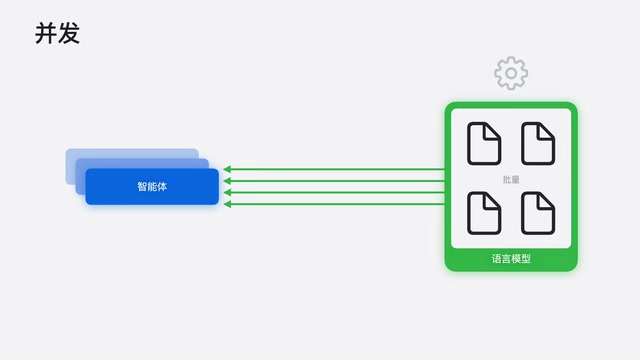
Concurrency. In practice, agents rarely work alone; a common pattern is one agent spawning multiple sub-agents to handle different parts of a problem in parallel — one reads documentation, one searches code, one writes tests. MLX LM Server handles this through continuous batching: dynamically grouping incoming requests into batches processed together on the GPU, with new requests able to join a batch already being processed at any time without waiting for the current batch to finish. Sub-agents don't have to queue up, and the entire workflow stays efficient.
Model size. Even a single machine with 512GB of memory may not fit an entire model — Joanna's example is the DeepSeekAd model with 1.6 trillion parameters, whose weights alone require over 800GB of memory. MLX's distributed computing support deploys models across multiple Macs connected via Thunderbolt or Ethernet, bringing two benefits: it can run large models that don't fit on a single machine, and multiple devices process prompts in parallel, directly accelerating the agent execution loop. Configuration is done by launching the server through MLX Launch and providing a host file containing each node's information and connection type, and the model is automatically sharded across all devices. Starting from macOS 26.2, Thunderbolt RDMA is supported, and low-latency, high-bandwidth communication significantly improves distributed inference performance — with four nodes, speed can be up to three times faster.
The difference between continuous batching and traditional static batching is worth explaining. Static batching waits for a batch of requests to be assembled before sending them to the GPU together, and must wait for the entire batch to finish generating before accepting the next batch, so short requests get held up by long ones. Continuous batching schedules at the sequence level: whenever a request in the batch finishes generating, a new request from the waiting queue immediately fills the slot, keeping the GPU highly utilized at all times. For LLM inference, the decoding phase generates token by token and takes a long time, so this dynamic slot-filling significantly improves throughput — and it's exactly why requests don't have to queue in multi-sub-agent concurrency scenarios.
Tensor parallelism and RDMA are the two pillars of distributed inference. Tensor parallelism means splitting a single model layer's weight matrices across multiple devices, with each device collaboratively computing the forward pass of the same layer, thereby breaking through single-machine memory limits to run very large models; the cost is that devices need to frequently exchange intermediate results, making communication bandwidth and latency the bottleneck. RDMA (Remote Direct Memory Access) allows one machine to directly read and write another machine's memory, bypassing the operating system's network stack and thereby greatly reducing latency. The Thunderbolt interface itself has high bandwidth and low latency characteristics, and with RDMA the communication overhead of multi-machine interconnection is brought down to a low level — this is what makes near-threefold speedup with four nodes possible.
The Practical Significance of Local Agents
The significance of this stack goes beyond "saving on API costs." Data staying only on the local machine means sensitive codebases and internal tools can be safely handed to agents; no API costs means high-frequency, long-loop agent tasks become economically viable; the standard API protocol means existing agent frameworks can migrate without modification. From MLX to MLX LM Server to any protocol-compatible agent framework, every layer is open source and usable right now. To learn more about multi-machine distributed inference configuration, check out the WWDC26 video Joanna mentioned.
Related articles
52KB Engine Runs 2B LLM in a Browser Tab
52KB Engine Runs 2B LLM in a Browser Tab
A 52KB WebAssembly engine on Hacker News claims to run Qwen3.5-2B in a browser tab. We analyze the engine-model separation, browser inference pros and cons, and the on-device AI runtime race.

MIT PhD Takes You from Scratch to Build DeepSeek: A 25-Hour Hardcore Course
MIT PhD Raj Dandekar launches a 25+ hour Bilibili course building DeepSeek from scratch—MoE, MLA, GRPO, hand-written code plus math derivations, aiming to reproduce mini R1.

DeepSeek Harness in Practice: From Installation to Plugin Ecosystem, Building a Fully Automated AI Workflow
Based on a hardcore Bilibili tutorial, this guide systematically covers DeepSeek Harness installation, three plugin installation methods, and real-world use cases to help developers quickly build customizable AI Agent workflows.