DeepSeek Harness in Practice: From Installation to Plugin Ecosystem, Building a Fully Automated AI Workflow
A reproducible getting-started path for DeepSeek Harness, from installation to plugin extension.
Based on a Bilibili tutorial, this article maps out the practical path for DeepSeek Harness, an open-source agent framework. Its core design is "Everything is a Plugin": model integration, tool invocation, and memory management can all be pluggably composed, and it is open-sourced under the MIT license. Installation has two steps: configure Node.js (version 22 or above recommended), then install the client, which unlike the web version can read and write local folders. Plugins can be installed in three ways: conversational (consumes credits), plugin marketplace (free and most recommended), and command line. With extensions like the vision plugin, users can combine plugins to define their own AI execution boundaries.
AI Agents are moving from concept to reality, and Harness, the open-source framework officially released by DeepSeek, provides a highly customizable agent runtime environment. A hardcore tutorial on Bilibili has already broken down the entire process from installation to advanced automation. Based on the core content of that tutorial, this article maps out a reproducible practical path to help you understand Harness's design logic and get started quickly.
Why DeepSeek Harness Is Worth Your Attention
DeepSeekAd Harness is not just another chat client—it is an agent framework that gives AI the ability to execute, extend, and collaborate. According to the tutorial, the project has already accumulated hundreds of thousands of stars and tens of thousands of forks on GitHub, placing it among the world's most-watched open-source AI Agent projects.
Its core design philosophy is Everything is a Plugin: from LLM integration, tool invocation, and memory management to the Agent's runtime logic, the entire system can be composed, replaced, and extended through plugins. This means you are no longer limited to fixed-function AI tools—you can assemble your own dedicated agent system based on your needs. The framework uses the MIT open-source license, allowing free use and extension, and supports flexible integration of different models.
AI Agent is a key concept in the current AI landscape, referring to AI systems that can perceive their environment, plan autonomously, and call tools to complete multi-step tasks—distinct from chatbots that only handle one question and one answer. Traditional chat models stop at generating text, whereas Agents turn text into real actions through "tool calling," such as reading and writing files, executing commands, and accessing the network. Harness's role is precisely to provide this runtime skeleton: it manages the scheduling between models and tools, the organization of context, and the plugin lifecycle, transforming models from "can talk" into "can do." Understanding the difference between an Agent and a traditional client is the prerequisite for understanding all the plugin use cases in this article.
The MIT open-source license is one of the most permissive mainstream open-source licenses, allowing users to freely copy, modify, commercialize, and redistribute code, requiring only that copyright and license notices be retained. Compared to "viral" licenses like GPL, MIT does not require derivative works to be open-sourced as well, making it more suitable for enterprise integration and secondary development. Harness adopting the MIT license means developers can embed it into their own products or customize private versions—this is also the institutional foundation for its ecosystem's rapid expansion.
Installation Preparation: Node.js Environment and Client
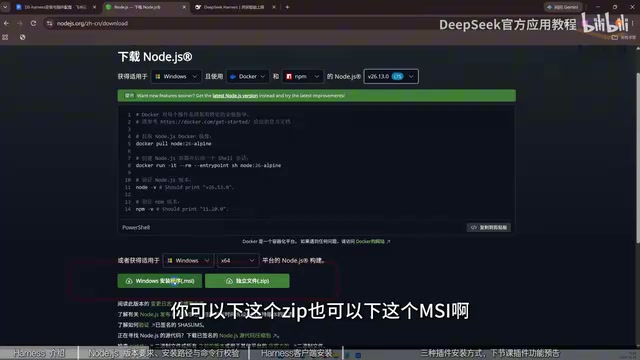
Installation consists of two main steps. The first step is installing the Node.js environment, since many AI tools (including Claude Codex and others) depend on it. The tutorial specifically reminds users that the Node.js version should preferably be 22 or above, and to avoid downloading versions below 22. It is recommended to change the installation path to the D drive to avoid taking up C drive space and having cache files fill up the system drive. After installation, enter node -v in the command line (note the space in between) to verify that the version number meets the requirement.
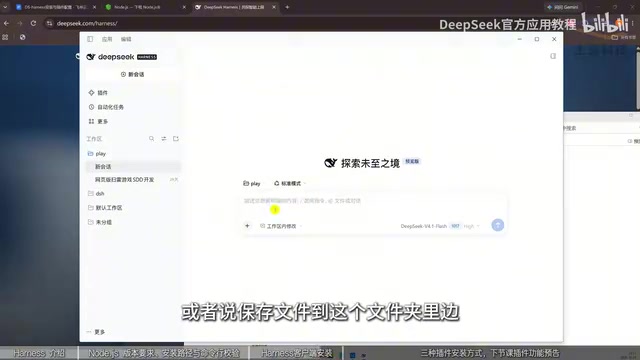
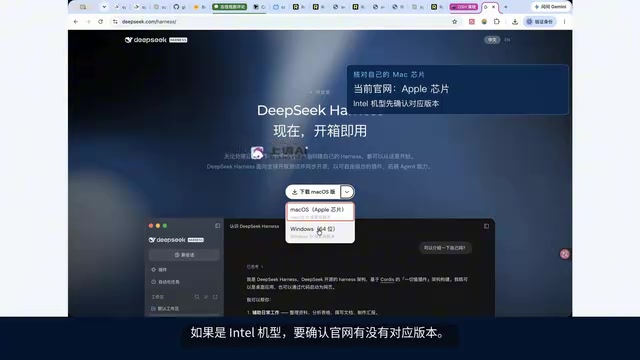
The second step is installing the Harness client. After downloading the installation package for your system from the official website, it is likewise recommended to install it to the D drive. Once installed, open the interface and you will find it similar to the web version of the DeepSeek chat window, but the key difference is that you can add a local folder—Harness can read, modify, and save files to that folder, which the online version cannot do. The model selection area also lists several DeepSeek models for easy switching.
Three Paths to Plugin Installation
Harness's true power lies in its plugin ecosystem. The tutorial lists three installation methods, covering users with different habits.
Method 1: Conversational Installation
If you already know the plugin name, you can send the GitHub link directly to the AI in the chat window and let it install itself. This is the most direct approach, but it consumes tokens and credits.
Method 2: Plugin Marketplace Installation
This is the most recommended method, and it does not consume credits. In the plugins tab, click "Add Plugin," enter the plugin marketplace name (such as DSH market), and after installing and launching it, you can access the plugin marketplace in settings. The marketplace brings together thousands of plugins with search and filtering support—fun plugins like goldfish pendants and desktop pets can be installed with a single click.
Method 3: Command-Line Installation
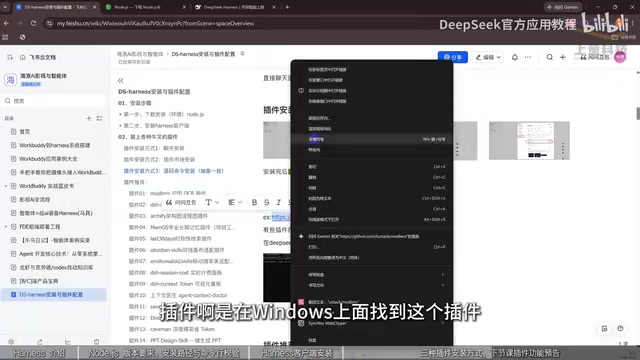
Some plugins provide installation commands on their GitHub pages. For example, the tutorial mentions "the most powerful DeepSeek Harness vision plugin on the internet," which gives DeepSeek—natively unable to recognize local images—the ability to read images, identifying details such as the people and clothing in a picture. Simply copy the installation code from the page and execute it in the command line. This method is somewhat abstract for beginners, but it suits batch or automated deployment.
If you are unsure what plugins are available, you can simply ask DeepSeek for a list of popular plugins and then pick the ones you need.
CLI (Command-Line Interface) is a way of interacting with an operating system or program through text commands, as opposed to a graphical interface. The third installation method in this article requires pasting installation code from GitHub into the command line—essentially calling a package manager or script to download and register the plugin. Before using the command line, you usually need to confirm two things: first, that the terminal is in the correct directory; second, that you have the appropriate permissions (some operations on Windows require administrator privileges). For batch deployment or integration into automation scripts, the command-line approach is more controllable than manual clicking and facilitates version management and rollback—which is why it is recommended for advanced users.
What Practical Capabilities Do Plugins Bring?
The tutorial demonstrates a variety of use cases: having Harness read Bilibili content and output it, then importing the content into a knowledge base for management; generating videos; organizing knowledge directories; and even connecting to chat software to converse with others. The so-called "AI fish farming" gameplay essentially means tuning agents with different personalities and abilities through plugins—from raising big fat fish to building a dedicated assistant, the room for expansion is quite rich.
The common logic behind these scenarios is: Harness provides the runtime skeleton, and plugins fill in specific capabilities. Once you understand this, you can draw inferences and combine a workflow that suits your own automation needs.
Getting-Started Tips and Next Steps
For absolute beginners, it is recommended to first complete the Node.js and client installation, then get familiar with a few high-frequency plugins (such as the vision plugin and knowledge base management plugin) through the plugin marketplace. Advanced users can try command-line installation and custom plugin development to dive deeper into the Agent's collaboration logic. The tutorial author says that follow-up content will specifically cover the installation and business applications of commonly used plugins, which is worth following.
Harness's value is not in replacing any particular tool, but in handing the boundaries of AI execution over to users to define for themselves. Spending time understanding its plugin architecture pays off more in the long run than simply learning how to install it.
One-line Summary
A reproducible getting-started path for DeepSeek Harness, from installation to plugin extension.
Paragraph Summary
Based on a Bilibili tutorial, this article maps out the practical path for DeepSeek Harness, an open-source agent framework. Harness's core design is "Everything is a Plugin": model integration, tool invocation, and memory management can all be pluggably composed, and it is open-sourced under the MIT license. Installation has two steps: first configure Node.js (version 22 or above recommended) and install it on a non-system drive if possible, then install the client. The key difference from the web version is that the client can read and write local folders. There are three ways to install plugins: conversational (consumes credits), plugin marketplace (free and most recommended), and command-line installation. With extensions like the vision plugin, Harness gains capabilities such as image recognition, knowledge base management, and content generation, and users define the boundaries of AI execution by combining plugins.
Related articles

MIT PhD Takes You from Scratch to Build DeepSeek: A 25-Hour Hardcore Course
MIT PhD Raj Dandekar launches a 25+ hour Bilibili course building DeepSeek from scratch—MoE, MLA, GRPO, hand-written code plus math derivations, aiming to reproduce mini R1.
DeepSeek Harness in Practice: From Installation to Automated Workflows
Hands-on DeepSeek Harness tutorial covering Mac/Windows installation, login, workspace binding, model & permission setup, and minimal closed-loop verification for AI automation workflows.
The AI-Led Testing Era: A Hands-On Introduction to DeepSeek Harness and Agents
An analysis of the paradigm shift toward AI-led testing: from AI-assisted to Agents autonomously driving tasks, how DeepSeek Harness serves as a testing workbench, and how testers can maintain their core competitiveness by controlling boundaries.