Running Qwen3 Flash Next Locally: How to Build a Private Coding Assistant at 142 tokens/s

How to build a local Qwen3 Flash Next coding assistant and hit 142 tokens/s with speculative decoding.
Using a real benchmark of 142.6 tokens/s as the starting point, this article walks through building a local Qwen3 Flash Next coding assistant end-to-end. It covers Unsloth installation, choosing quantization variants, using a checkout-function bug as a practical test case, and tuning MTP speculative decoding to boost generation speed by ~56%. For those chasing the exact speed figure, the article also details the advanced vLLM + NVFP4/FP8 mixed-precision recipe, while noting when DeepSeek V4.1 Flash may be a better fit for large-context, repository-level tasks.
A benchmark shared by an overseas developer sparked attention: Qwen3 Flash Next achieved 142.6 tokens/s during local inference — faster than most people can read. More importantly, this speed boost didn't come from throwing more hardware at the problem. It came from changing how the model runs. This article walks through the full setup for a local coding assistant: from installation and your first real task, to the specific settings behind that headline number.
Why Qwen3 Flash Next
Search for Qwen3 Flash Next — make sure to include the "Next" suffix, because Qwen also offers a hosted Flash service, and what we want here is the downloadable weights version.
This flagship model has roughly 125 billion total parameters, but only about 6 billion are activated per token. It routes each step to the right "experts" rather than running the entire model at full power — that's the MoE (Mixture of Experts) architecture. There's also a separate lookup table to supplement capacity, so activated parameter count doesn't equal download size.
The goal is clear: get stronger problem-solving capability without making every response a "grab a coffee and wait" situation. This matters especially when fixing one bug exposes a second one — which is basically what checkout pages do for a living.
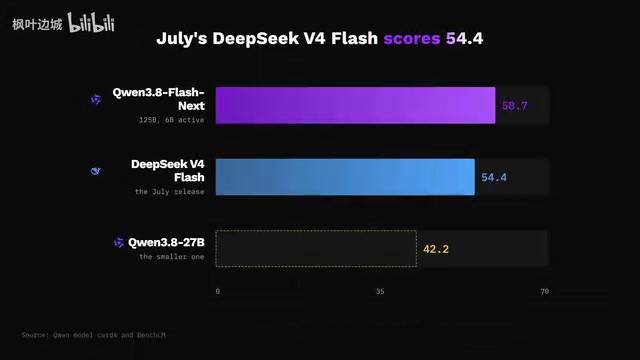
Looking at Qwen's published benchmarks: the smaller Qwen3 27B scores 61.7 on SWE-Bench Pro, while Flash Next scores 62.5 — close. But on the DeepSWE 1.1 coding benchmark, Flash Next's 58.7 significantly outpaces 27B's 42.2, a 16.5-point gap; in the same comparison, DeepSeekAd V4 Flash (July version) scores 54.4. These are published benchmark results — no guarantee that any particular compressed copy will fix your specific bug — but they give concrete reasons to try Flash Next on tasks that go beyond generating plausible-looking code.
MoE (Mixture of Experts) explained: The core idea is to split the model into multiple "expert" sub-networks, routing only a small subset of them during each inference pass rather than running all parameters. For Qwen3 Flash Next, this means that while total parameter count is ~125B, each inference step only activates ~6B parameters — computation comparable to a 6B dense model, but with the theoretical knowledge capacity of a much larger one, since different expert combinations can be called for different tasks. This also explains why MoE model download sizes are far larger than dense models with equivalent inference cost: you need to store all the expert weights locally, even if only a fraction are used at any given moment. In local deployment, the main hardware pressure falls on storage and memory bandwidth, not raw compute.
Installation and Your First Real Task
Go to the Unsloth website, download the Unsloth Desktop version for your operating system, install and launch it, then open the Model Hub and search for Qwen3 Flash Next. Find the GGUF version published by unsloth.
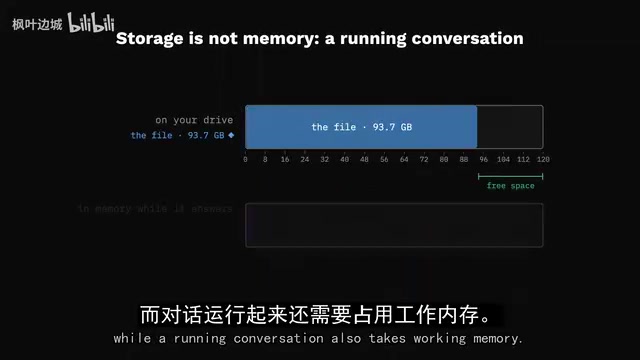
You'll see different compression variants (called quants), each trading off precision against file size. Pick the one that fits your machine based on the app's loading recommendations and the model download info. File size corresponds to storage space, but an active conversation also occupies working memory — which is why the app's loading recommendations matter more than simply checking whether your drive has enough free space.
Once the download completes, open a conversation, select the model, wait for it to load, then send your first request — keeping the default generation settings for now. Once the model responds correctly, you have a baseline worth improving.
Give It a More Challenging Task
Instead of asking it to autocomplete a function name, paste in the broken checkout function, the error message, and an example of how it should behave. Ask it to identify the cause, propose a minimal patch, and write a test that fails on the original code.
One important instruction: preserve the existing discount rules. This forces the assistant to fix the problem without silently changing your app's behavior. For example: two items in the cart, a discount that should apply to only one of them, but the total is wrong — give Qwen the item prices, discount rules, and expected total, and ask it to trace through the calculation before making any changes. Its explanation will be much clearer, and you can catch any misunderstanding before accepting the patch.
Run the original function with the suggested test first — it should expose the failure you're trying to fix. Apply the patch and run again, while also checking that existing tests still pass. Then ask for a short write-up that another developer could review. You've turned one bug into a fix, a regression test, and a useful handoff — exactly the workflow we want to accelerate.
The Speed Secret: Speculative Decoding and MTP
Open the model settings and look for speculative decoding or MTP (multi-token prediction). Unsloth supports automatic configuration for compatible models — start with the recommended settings.
Here's how it works: a draft mechanism proposes several upcoming tokens, the main model validates them together, and when guesses are accepted, generation advances multiple steps at once. Code tends to contain predictable patterns — especially in repetitive tests — and correctly anticipating those patterns saves a lot of work. Harder reasoning tasks may behave differently, so the benefit depends on the specific request.

Measure carefully: save your original checkout prompt, run it in a fresh conversation with speculation disabled, then run it again with speculation enabled. Keep the same thinking settings and response length limit, and repeat a few times to compare generation rates. Also pay attention to total time for the full response — shorter responses look faster, but the engine might not actually be generating faster.
Don't max out the draft length immediately. More guesses mean more validation, and rejected guesses eat into your gains. Start with automatic settings and only keep a change if it consistently helps on the same task. Once you find a good configuration, keep a quick-reference note: model version, compression choice, MTP settings, and the checkout prompt alongside it. Rerun the same request after any app update or model switch to verify the change actually helped your workflow.
Speculative Decoding explained: This is a technique for accelerating autoregressive generation by introducing a "draft" mechanism. Traditional large language models generate one token at a time, requiring N serial forward passes to generate N tokens. Speculative decoding works by using a smaller, faster draft mechanism (either a separate small model or a built-in MTP head) to propose several candidate tokens at once, which the main model then validates in parallel. If validation passes, multiple tokens are produced in one step; if a token is rejected, generation falls back to the main model from that position. Since the computational cost of validating multiple tokens is similar to validating a single one, overall throughput improves significantly when the acceptance rate is high enough. Code generation is particularly well-suited to this: indentation, brackets, repeated keywords, and other predictable patterns naturally lead to higher acceptance rates — which is why speculative decoding performs especially well in coding assistant scenarios.
Where Does 142 tokens/s Come From
Developer Primitive reported: 91.2 tokens/s with speculation disabled, 142.6 tokens/s with 3 speculative tokens enabled — roughly a 56% speedup on the same configuration. The comparison used a real prompt, thinking enabled, a single-request stream, calculated as output tokens divided by elapsed time (including generated reasoning content).
It's worth emphasizing: this result came from a tuned workstation. Treat it as a well-documented target, not an automatic promise for every machine.
To reproduce this specific configuration, open Primitive's mixed NVFP4 and FP8 Flash Next model page on Hugging Face and follow the author's deployment instructions — the matching Docker image and model are specified together. Docker handles the software environment packaging, and the inference engine inside this recipe is vLLM.
The process: set up the environment following the container instructions, use the author's full launch command with the startup fix linked in the notes, then add the documented speculative configuration with method set to MTP and speculative token count set to 3, and restart the server. Once the server is ready, open a compatible chat client, select custom local server, enter the address, and choose the model identifier the server exposes. Keep the server running while using the client.
The key distinction: the desktop app setup and this vLLM recipe are two separate paths. The MTP concept is the same, but the exact configuration and reported speed each belong to their respective engines. Primitive also provides a recipe for quantization lookup tables — treat that as a separate optimization after the base server is running. Change one thing at a time so you can tell which change actually made a difference.
vLLM, NVFP4, and FP8 explained: vLLM is one of the leading open-source LLM inference engines, designed for high-throughput, low-latency server-side deployment. Its core innovations include PagedAttention (paged KV cache management to reduce memory fragmentation) and continuous batching. NVFP4 is a 4-bit floating-point format introduced by NVIDIA for Blackwell architecture GPUs, offering more controlled precision loss compared to INT4 quantization; FP8 is an 8-bit floating-point format with hardware acceleration on Hopper/Blackwell architectures. Primitive's mixed NVFP4+FP8 recipe essentially applies different precision to different model layers to balance speed and quality. Docker's role here is to package vLLM, CUDA driver versions, Python dependencies, and everything else into a reproducible container image — eliminating environment-related inconsistencies. This is why the author emphasizes using the specified matching image rather than installing vLLM independently and applying the same launch command.
When to Keep Another Model
Once the checkout fix is working, expand the task: ask it to write tests covering an empty cart and a discount that expired today, providing the expected behavior so the model doesn't have to guess your business rules. For larger requests, include the relevant files with their filenames, and place the error and expected behavior somewhere easy to find — a large wall of unexplained paste gives the assistant more text, not a clearer task.
There are still reasons to keep another local model around. DeepSeek V4 Flash (July version) leads Flash Next in published repository-level generation comparisons; the newer V4.1 Flash natively supports million-token context for heavy-input processing — whole-repository builds are a completely different game from the focused checkout fix we've been working on. Older charts don't prove Qwen beats that newer DeepSeek version.
For a private "fix code, write tests" assistant, the recommendation is to start with Qwen3 Flash Next: get it running in Unsloth first, establish a repeatable task, enable MTP and keep whatever settings improve results. Switch to the documented vLLM recipe when you're chasing that specific speed target. Keep the smaller Qwen when it delivers equally good fixes more conveniently. Switch to DeepSeek when the task scales to an entire repository.
Ultimately, the goal is to make checkout work — and to have a test that keeps it working. A local model that gets you there quickly is worth far more than a speed number you never actually put to use.
Related articles

How Big Can Stars Really Get? The Physical Limits of the Largest Stars
Red supergiants are the largest stars by volume, with radii up to 2,000 times the Sun, engulfing the inner solar system. But there is no precise upper limit on stellar size—models predict up to 15,000 solar radii. The most massive blue stars are far smaller than red supergiants—biggest and heaviest are two different things.

Apple HomeView Smart Display Full Feature Breakdown: Wall-Mount or Desktop, $299
Apple launches HomeView, a $299 smart display with wall-mount and desktop options, 12MP camera for facial recognition, smart home control, music playback, and recipe step-by-step cooking. Full breakdown of watch faces, apps, privacy, and cooking integration.

Where Did the Promised New Studio Go? Craft Computing Answers After Five Years
Craft Computing's host responds to viewer questions: the new studio promised five years ago was shelved as construction costs soared from $30,000 to $75,000, and was replaced by a 168-square-foot garage conversion.