Running Qwen3 LLM on AMD 395 iGPU: Local Deployment Test on Windows

GFX1151 Engine lets AMD 395's iGPU run Qwen3 LLM on Windows with ~900 token prefill speed.
Bilibili creator "仿宝剪蛮" open-sourced GFX1151 Engine, enabling the AMD 395 (8060S iGPU) to run Qwen3 Flash-Next on Windows. The pre-compiled package is easy to deploy, but due to Windows resource contention and optimization limits, real-world prefill speed sits around 900 tokens/s with 30–40 tokens/s decode, consuming all 96 GB of unified memory. The author relied on AI assistants and reverse-engineered a closed-source Linux project to reach current performance — notably lower than the Linux baseline of 1,200–1,400 tokens. Best suited for Windows users learning local LLM inference, not recommended as a primary productivity tool.
One Open-Source Engine That Gets LLMs Running on AMD 395 in Windows
A Bilibili creator known as "仿宝剪蛮" recently pulled off something quite interesting: getting the AMD 395 (with its 8060S integrated GPU) to run the Qwen3 Flash-Next large language model on Windows. He had previously covered a solution called Hologen Flash Server, but that project only ran on Linux, was closed-source, and required Docker — a fairly high barrier to entry.
To make this accessible to Windows users, he built his own inference engine from scratch and gave it a straightforward name: GFX1151 Engine, which is now open-sourced on GitHub. The positioning is clear: it trades some performance for Windows compatibility, and it's aimed at developers and enthusiasts who want to tinker, modify, or learn how the system works.
This kind of effort — running local LLM inference on AMD APU integrated graphics — is a microcosm of the broader trend of running large models on consumer hardware. Custom kernels and specialized operators are critical to unlocking the potential of hardware like the AMD 395, and that's the biggest technical challenge in this whole endeavor.
The AMD 395 (Strix Halo) features the 8060S integrated GPU, one of the largest integrated GPUs in any consumer APU today. It packs 40 RDNA 3.5 compute units and — critically — up to 96 GB of unified memory (LPDDR5X) shared between CPU and GPU. This architecture makes it attractive for local LLM inference: model weights can reside directly in unified memory accessible to the GPU, with no PCIe bandwidth bottleneck like discrete GPU setups. The tradeoff is that memory bandwidth is shared and competed over between CPU and GPU, and ROCm (AMD's GPU compute platform) is far less mature on Windows than on Linux. Fully unlocking performance requires writing custom operator kernels specifically for the GFX1151 architecture (the GPU architecture codename for the 8060S).
Deployment: Download and Run, Just Put the Weights in the Right Place
The author made the setup process remarkably simple. The GitHub repo provides a pre-compiled package — just download, unzip, and launch. No complex build environment needed.
The one key step is placing the model weights: drop them into the Models folder inside the program directory. The author notes that his demo video uses weights he converted himself, which differ from the official release — regular users should just use the official weights, available on both Hugging Face and ModelScope. Users in China will find ModelScope significantly faster for downloading.

Once the model is ready, you can adjust a few parameters: port, context length, MTP draft tokens (default: 3), and others. The author candidly admits he doesn't know what some of the later parameters do himself, and recommends leaving them at their defaults. Double-click to launch — the barrier to entry is kept as low as possible.
Performance: All 96 GB of VRAM Gets Used, ~900 Tokens
Once running, something slightly surprising happens: all 96 GB of VRAM gets completely consumed, with SSD read/write speeds hovering around 4 GB/s.
The author explains why: the total model weight is around 116 GB, so a portion gets offloaded to SSD — but over 60 GB must stay in VRAM. To maximize inference performance, the engine aggressively occupies available VRAM. It's a classic performance-vs-space tradeoff: "there's no escaping it, and no good workaround."
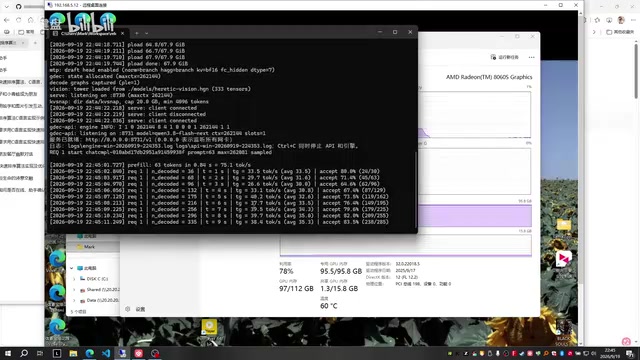
Real-world generation speed comes in at 30 to 40 tokens per second, depending on the speculative decoding acceptance rate. The author also demonstrated processing a system prompt in a Z.ai Code environment: with repetitive output, the acceptance rate is higher and speed can hit 40 tokens/s; processing a Z Code system prompt takes roughly 18 seconds to complete.
One notable caveat is the Windows platform's "resource contention" problem — if background apps consume memory bandwidth or CPU cycles, inference speed takes a visible hit. This is one of the reasons the author repeatedly mentioned not being a big fan of Windows.
Speculative Decoding is the technique behind the "acceptance rate" mentioned here. Traditional autoregressive inference generates one token per forward pass. Speculative decoding works differently: a small "draft model" quickly generates several candidate tokens (the MTP draft tokens, default: 3), then the main model verifies them all in a single forward pass. If the draft tokens are accepted, one forward pass effectively produces multiple generation steps — dramatically improving throughput. The higher the acceptance rate, the greater the speedup. This is why repetitive outputs (like code completion) run faster, while high-diversity content generation is slower. The "MTP draft token count" parameter is essentially a tradeoff between acceptance rate and compute overhead — setting it too high can backfire if drafts are frequently rejected.
Performance Ceiling: Hard to Optimize Even with Top-Tier AI Assistance
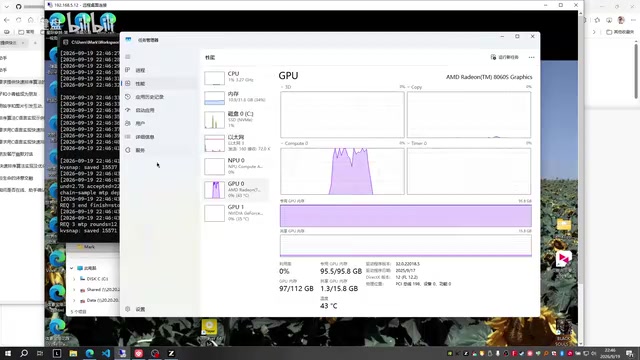
In a longer task test, prefill speed reached around 870 to 900 tokens. The author is upfront: the performance ceiling for this framework is roughly 900 to 1,000 tokens, and with Windows resource contention it typically hovers around 900 — "barely usable."
The most honest part of his write-up is his candid reflection on his own technical limits. He's not a professional engineer; the development process relied heavily on AI assistants like Kimi and ChatGPT — "when one ran out of quota, I'd switch to the next one." But he found that even these top-tier models struggled to push performance to its best:
When I got it to around 600 tokens on my own, pushing it further was incredibly, incredibly hard.
He ultimately got from 800 to 1,000 tokens by reverse-engineering the approach from Hologen Flash Server — something he openly calls "copying someone else's homework." The core ideas came from that original open-source project; his own work is meant for reference and learning. By comparison, the closed-source Linux project achieves 1,200 to 1,400 tokens — a significant gap.
Prefill speed and decode speed are two distinct dimensions of LLM inference performance. The prefill stage processes the entire input prompt in parallel — it's compute-bound, measured in tokens processed per second on the input side. The decode stage generates output one token at a time, limited by memory bandwidth — it's memory-bandwidth-bound. The "900 tokens" figure in this article refers to prefill speed; the "30–40 tokens/second" refers to decode speed. On an APU like the AMD 395, CPU and GPU share memory bandwidth, so background processes competing for bandwidth drag down both stages simultaneously — which is exactly why resource contention is such a pronounced issue on Windows.
Practical Advice: Use With Caution for Productivity Workloads
On how to actually use this project, the author gives some pragmatic guidance:
- Users who want maximum performance and run Linux: Stick with the original Hologen Flash Server — it's stronger (1,200–1,400 tokens).
- Users who want to DIY on Windows or learn how the system works: Fork GFX1151 Engine and modify it yourself.
For anyone hoping to use it as a daily productivity tool, the author is cautiously pessimistic. The extreme VRAM usage means: if you're expecting to run the model while also using this machine as a normal Windows workstation, performance will be significantly impacted. It's more of "a workaround for Windows users" — usable in a pinch.
Final Thoughts
The value of this project isn't just a working Windows inference engine — it's an honest, full-picture account of what it looks like for an everyday enthusiast to wrangle local LLMs on consumer AMD hardware: from hardware potential and deployment convenience, to performance ceilings and VRAM costs, to the real limits of "non-engineer builds software with AI assistance."
Custom operators and kernel optimization are genuinely critical to unlocking the AMD 395's performance, and that's exactly where open-source community collaboration can make the biggest difference. The author extended an open invitation: if there are developers with deep expertise in kernel algorithms who want to help push this further, they're more than welcome to join in.
Related articles

Felix Rieseberg Personal Homepage
Felix Rieseberg's personal homepage sparks attention on Hacker News. This article covers the Slack engineer's technical background, the rise and fall of nativefier, and the value of a developer homepage as a tech calling card.

@ai-sdk/vue 3.0.306 Patch Release Syncs with [email protected] Update
@ai-sdk/vue 3.0.306 released, synced with [email protected]. A routine patch release for the Vercel AI SDK ecosystem with no public API changes; the Vue adapter layer stays version-aligned with the core package.

Gemini 4 Argon API Launches: The Era of Million-Token Output Begins
Google launches Gemini 4 Argon with sparse MoE architecture, up to 1M output tokens, and a 68.90% Vals Index score, available across API, AI Studio, and the Gemini app.