Running Qwen3 Next 125B Locally with Strata: A Practical Guide for Consumer GPUs

Strata uses three-tier memory scheduling to run Qwen3 Next 125B on consumer GPUs with as little as 6GB VRAM.
Strata is an open-source project that quantizes Qwen3 Next 125B and distributes its MoE expert weights across SSD, RAM, and VRAM — keeping most weights in system RAM while VRAM holds only ~700 active experts, reducing the GPU requirement to 6–12GB. A guided install script auto-detects hardware, recommends quantization versions, and generates a launch config. The ~60GB model download is the slowest step. Real-world tests show ~90 tokens/sec at 64K context and ~60 tokens/sec at 256K. The main limitation is weak concurrency, making it best for single-user sessions. The project hit 10K GitHub stars within five days of launch.
Strata: Running a 125B Model on Consumer-Grade GPUs
Strata is an open-source project that's been making waves in the community. The core idea is straightforward: quantize the Qwen3 Next 125B model and use clever memory scheduling to run a hundred-billion-parameter model on ordinary consumer graphics cards. Within just five days of launch, the project's GitHub stars climbed from over eight thousand to more than ten thousand — a remarkable rise.
For most people, a 125B-parameter model means either renting expensive cloud compute or buying professional-grade GPUs that cost a fortune. Strata aims to solve exactly that pain point — getting close to frontier model capability without breaking the bank on hardware. The author ran the model locally at 127.0.0.1:8080 and had it generate Tetris and Snake games, both of which ran correctly — a hands-on validation of the project's real-world usability.

How It Works: RAM Over VRAM
Strata's key design philosophy is to fully leverage a three-tier storage hierarchy — SSD, RAM, and VRAM — with the emphasis placed on system RAM. Qwen3 Next 125B uses a MoE (Mixture of Experts) architecture with over 20,000 expert modules. Strata's approach is to keep the vast majority of expert weights in system RAM, while VRAM only needs to hold up to around 700 active experts (under 1GB).
This leads to a counterintuitive requirement: the project demands less from your GPU and more from your RAM. Because the weight data is large, insufficient RAM will cause loading failures or slow performance. Based on hands-on testing, a minimum of 12GB VRAM is recommended, with 32GB or more of system RAM; some community members have reported running it on 6GB VRAM (primarily for the lightweight code-focused version). More VRAM translates directly to faster inference and better long-context handling.
The engine is written in C++ and invoked via Python scripts. The project also integrates MTP speculative decoding to boost generation speed, with decoder weights of just over 800MB (~0.71GB, Q2 2-bit quantization) — a lightweight component trained separately by the author.
The MoE (Mixture of Experts) architecture is a sparse-activation design widely used in recent large models. The model contains a large number of "expert" sub-networks internally, but only a small subset is activated per inference pass — not all parameters participate in every computation. This means that while the total parameter count is enormous (125B), the actual parameters used in any single inference call are far fewer. Strata exploits this property: since only a handful of experts are needed at a time, the vast majority of expert weights can sit in RAM (or even on disk) and only be loaded into VRAM when required, dramatically reducing the GPU memory footprint.
MTP Speculative Decoding is an acceleration technique that uses a small draft model to quickly "guess" several upcoming tokens, which the main model then verifies in a single pass — accepting correct guesses in bulk. This reduces the number of main model calls and improves overall throughput. Strata's integrated MTP decoder weighs only ~0.71GB, serving as a lightweight auxiliary component that meaningfully improves generation speed with virtually no additional VRAM overhead.
Model Versions and Hardware Compatibility
Strata offers multiple quantized versions to choose from, including Q2, RQ2, RQ3SS, and a code-specialized variant. Which version to use depends primarily on your available RAM:
- ~36GB RAM: Recommended to use the Q2 version
- 64GB+ (weights larger than 43GB): Higher-precision versions are available
- Code-focused use cases: Use the code variant
One important note: if you're on a 32GB RAM system and downloading a larger model, you must expand your virtual memory. The author recommends setting it to 40GB or more (e.g., add an extra 4GB buffer), otherwise loading will fail with an error.
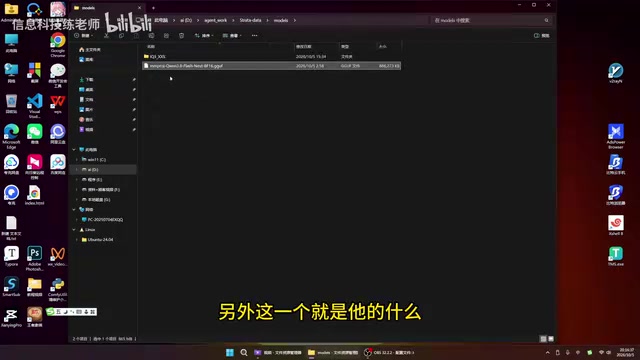
The model files themselves are approximately 60GB — the most time-consuming part of the entire setup. Some vision-capable versions require an additional vision model download and must be enabled during setup via the image reading option (disabled by default; enabling it consumes an additional ~1.4GB of VRAM).
Names like Q2, RQ2, and RQ3SS represent different quantization precision schemes. Quantization compresses model weights from original 16-bit or 32-bit floating-point representations down to lower-bit integers, drastically reducing model size and memory footprint. Q2 (2-bit quantization) offers the highest compression ratio but the greatest precision loss; RQ2 and RQ3SS are residual quantization variants that use multi-round residual compensation to preserve as much precision as possible at low bit widths — generally better quality than pure Q2, but slightly larger in size. Choosing a quantization version is fundamentally a trade-off between model size/memory usage and output quality. When RAM is plentiful, opting for a higher-precision version will yield answers closer to the original model's quality.
Installation: A Script-Guided Setup
Strata's installation experience is quite user-friendly, with the entire process guided step-by-step by an install script. Here's the full workflow:
Core Steps
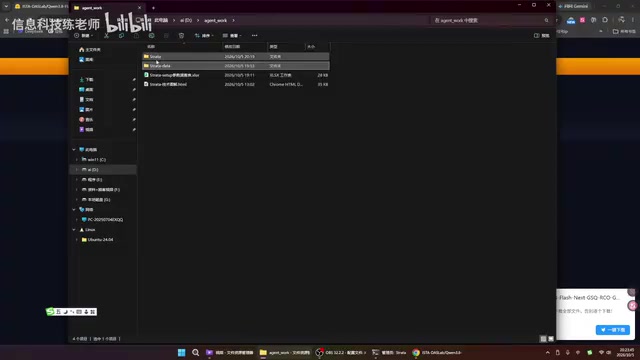
- Clone the repository: Go to the project page and clone or download the source code to a local folder
- Run the install script: Double-click the start script; it will check for a Python environment, install one automatically if needed, and create a virtual environment
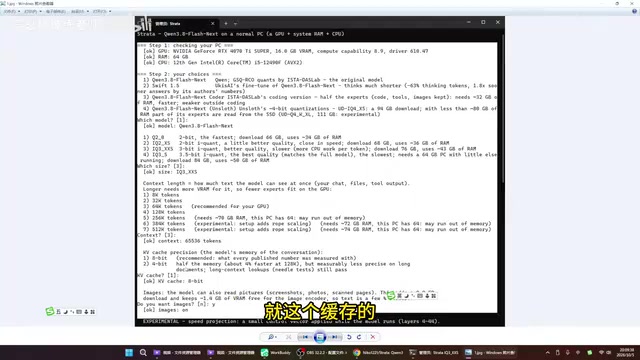
- Hardware detection: The script automatically reads your system specs (e.g., 16GB VRAM + CPU) and recommends a suitable model
- Select model and parameters: Choose in sequence — model type, quantization version, context length (e.g., 64K or 256K), KV cache precision (8-bit for speed, 4-bit to save VRAM), whether to enable image reading, and whether to force responses
- Install dependencies: Automatically installs llama, CUDA, and other required libraries into the virtual environment
- Download engine and model: Downloads the engine binary matching your GPU, then downloads the ~60GB model data (the slowest step)
- Generate startup script: Automatically writes a BAT batch file for launching the service and confirms completion
Context Length Trade-offs
Context length settings directly affect the experience. In testing: at 64K context, generation speed reaches over 90 tokens/second; bumping up to 256K drops it to around 60 tokens/second, but enables much longer tasks. 256K context requires approximately 70GB of VRAM, so users will need to balance "speed" against "capability for long tasks" based on their hardware.
Context length determines how much conversation history the model can "remember" in a single session, measured in tokens (roughly corresponding to words or characters — approximately 1–2 Chinese characters per token). A 64K context can hold tens of thousands of words of conversation or document content, while 256K can handle book-length text. Longer contexts require larger KV caches (Key-Value Cache) — the memory region where Transformer architectures store intermediate attention results during inference, which scales proportionally with context length. This is why 256K context requires ~70GB of VRAM: the KV cache itself occupies a large portion of that, not just the model weights. The KV cache precision option (8-bit or 4-bit) lets users further tune the speed-versus-VRAM trade-off.
Practical Tips and Gotchas
Don't close the terminal window: The command-line window that opens on startup is what keeps the engine running. Closing it stops the service immediately, breaking any active connections.
How to change the port: The service defaults to local port 8080. If that conflicts with an existing service, edit the generated startup script to use another port like 8081 or 8088.
Stick to single conversations: Strata supports multi-turn dialogue, but in practice it's best to keep only one conversation window open. Running multiple concurrent chats causes severe slowdowns — a notable limitation of this project.
Multi-GPU support: The script defaults to single-GPU mode, but dual-GPU operation can be enabled by adding parameters. The install files contain parameter configurations that can be appended to the run script for more flexible setups.
Speed up installation: Since model download and dependency installation are the two most time-consuming parts, you can save significant time by pre-preparing the virtual environment and pre-downloaded model files and placing them in the same directory before running the config script. The author plans to upload a complete ~80GB package to a file-sharing service; extracting it to the same directory would bypass the lengthy download entirely.
Summary
At its core, Strata is an intelligent configuration script tool that automatically generates a matching startup script based on your hardware, enabling quantized Qwen3 Next 125B to run on consumer-grade devices. Its greatest value lies in lowering the hardware barrier for local large model deployment — trading RAM for compute, with friendly GPU requirements. For users who want to experiment with large models locally without investing in high-end hardware, this is a worthwhile open-source option to try. That said, limited concurrency and peak throughput remain its constraints, making it best suited for single-user, single-conversation deep-use scenarios.
Related articles

Felix Rieseberg Personal Homepage
Felix Rieseberg's personal homepage sparks attention on Hacker News. This article covers the Slack engineer's technical background, the rise and fall of nativefier, and the value of a developer homepage as a tech calling card.

@ai-sdk/vue 3.0.306 Patch Release Syncs with [email protected] Update
@ai-sdk/vue 3.0.306 released, synced with [email protected]. A routine patch release for the Vercel AI SDK ecosystem with no public API changes; the Vue adapter layer stays version-aligned with the core package.

Gemini 4 Argon API Launches: The Era of Million-Token Output Begins
Google launches Gemini 4 Argon with sparse MoE architecture, up to 1M output tokens, and a 68.90% Vals Index score, available across API, AI Studio, and the Gemini app.