Runway Aleph 2.0: An AI Editing Powerhouse for Precisely Modifying Any Element in Your Video

Runway launches Aleph 2.0, enabling AI video editing to leap from global generation to precise local editing.
Runway released the Aleph 2.0 video editing model, whose core capability is precisely modifying specific elements while keeping the rest of the video unchanged. Through keyframe editing, natural language prompts, and motion prompts, users can control both "what to change" and "how to change it," with edits automatically propagating across the entire video. The model also supports iterative editing, version management, and multi-shot video processing, marking a new phase in AI video editing's evolution from "creating from nothing" to "improving what exists."
Runway Aleph 2.0: AI Video Editing Moves from Global Generation to Precise Local Editing
Runway recently released Aleph 2.0 (also known as Olive 2.0), an upgraded AI video editing model integrated into Edit Studio. Its core capability is: precisely modifying any element you want to change while keeping the rest of the video intact. This marks a new phase in AI video editing—shifting from "global generation" to "precise local editing."
Industry Context: This shift is backed by clear market logic. The Hollywood visual effects (VFX) industry is worth over $40 billion annually, and its core work is almost entirely post-processing of existing footage rather than generating from scratch. Traditional post-production software giants like Adobe and Blackmagic Design are also accelerating the integration of generative AI capabilities into existing toolchains (such as Adobe Firefly Video). The essence of this competition is capturing the workflow entry point for professional creators. First-generation AI video tools (2022-2023), represented by Runway Gen-1/Gen-2 and Pika Labs, addressed the barrier of creating "something from nothing." Second-generation tools (2024 onward) focus on "improving what exists"—precise intervention on existing footage. Aleph 2.0's technical approach is a direct response to this market reality.
Core Workflow: Keyframe Editing
Aleph 2.0's operational logic revolves around "keyframe editing." Users first upload a video to Edit Studio, then select a keyframe—a frame where the subject you want to modify is clearly visible. Here's an important tip: the best editing frame is often not the first frame of the video, but rather the frame where the subject is most fully presented.
Technical Origins: The keyframe concept originates from traditional animation production, initially referring to key action frames drawn by lead animators, with in-between frames filled in by assistants. In digital video, keyframes evolved into complete reference frames (I-frames) in video compression encoding, which together with predictive frames (P-frames/B-frames) form the modern video encoding system. Aleph 2.0 borrows this concept and redefines it as an "editing anchor"—a user-selected reference frame that carries the editing intent. This is consistent with the keyframe animation logic in traditional non-linear editing software (such as Premiere Pro and DaVinci Resolve), but the core difference is: traditional tools require manually setting keyframe interpolation for each property, while Aleph 2.0 uses the temporal understanding capability of Diffusion Models to automatically infer how edits propagate across the timeline.
After selecting a frame, users describe their desired modifications in natural language in the prompt box. For example, in the demo, the original video shows a truck driving along, and entering the prompt "add a giant hand grabbing the truck, picking it up like a toy" causes the model to understand and execute this edit.
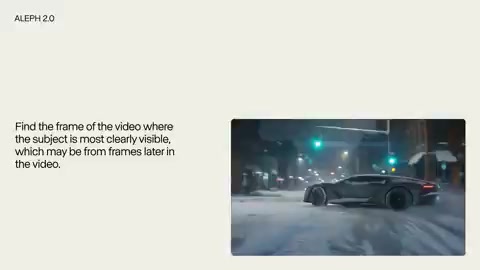
When generating keyframes, users can choose between multiple different models or upload their own reference images. The key is ensuring the edit precisely matches the selected frame for optimal results.
Full Video Propagation and Motion Prompts
This is one of Aleph 2.0's most impressive capabilities: edits on a keyframe automatically propagate across the entire video. You don't need to modify frame by frame—the model understands the editing intent and consistently applies it to all frames while maintaining temporal coherence.
Underlying Principles: This capability is built on the technical foundation of Video Diffusion Models. Diffusion models understand and generate content by gradually adding noise to data and then learning to denoise, with their core advantage being the ability to inject conditional constraints during the generation process—including text prompts, reference images, and original video frames. Key techniques for achieving local editing typically involve Attention Manipulation and Latent Space Interpolation: during the denoising process, the model aligns text descriptions with image regions through cross-attention layers while preserving the structural consistency of unmodified areas through self-attention layers. This is fundamentally different from earlier GAN (Generative Adversarial Network)-based image inpainting techniques—diffusion models can better understand semantic context rather than merely filling pixel gaps. On the video dimension, Temporal Attention modules further ensure coherent propagation of editing effects across frames.
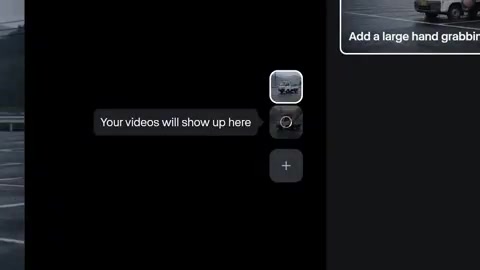
Furthermore, each video generation can include additional "Motion Prompts" for fine-grained control over dynamic effects. For example, in the giant hand grabbing the truck case, adding a motion prompt like "the giant hand reaches in from outside the frame, then grabs the truck" produces more customized, narrative-driven results than keyframe editing alone.
Evolution of Controllable Generation: The introduction of motion prompts reflects the latest advances in Controllable Video Generation. Early text-to-video models primarily controlled the overall scene through a single text prompt, with limited fine-grained control over motion trajectories and dynamic processes. Motion prompts are essentially structured temporal condition signals that decouple "spatial description" (what to change) from "temporal description" (how it changes over time), enabling the model to handle static appearance editing and dynamic behavior editing separately. This design philosophy echoes the motion module concepts in open-source frameworks like ControlNet and AnimateDiff—extending control dimensions over the generation process by introducing additional conditioning channels without compromising the base model's capabilities.
This means users can control not only "what to change" but also "how to change it."
Iterative Editing and Version Management
Aleph 2.0's workflow design fully accounts for the iterative nature of creative work. Each generated video version appears directly below the original video, with keyframes always bound to the video that created them. Users can reuse existing prompts or start secondary edits directly from a specific keyframe.
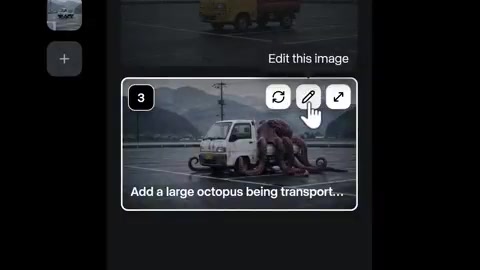
This design enables complex edits to be completed in stages—first modify the background, then the character, and finally adjust the details—without cramming all requirements into a single prompt. For professional creators, this progressive workflow is obviously more controllable. This design philosophy is highly aligned with the "version control" concept in software engineering, similar to Git's branch management logic: every editing node is traceable, reversible, and forkable, transforming the creative process from linear operations into an explorable tree structure.
Multi-Shot Video Support
Interestingly, Aleph 2.0 supports videos containing multiple shot transitions, as long as the total number of transitions doesn't exceed 10. In the demo, a multi-shot office dancing video was uploaded, and the user selected a frame showing the most body parts visible, converting the dancer into a completely different character—this character replacement automatically propagated to all shots in the video.
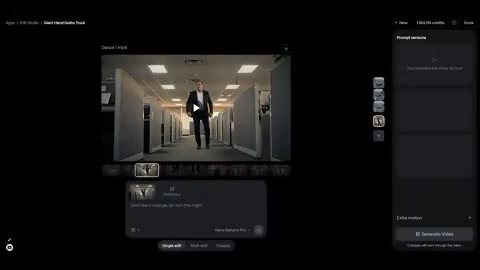
Cross-shot consistency propagation is a technical challenge: different shots involve perspective switches, lighting changes, and composition differences. The model needs to maintain character appearance consistency while adapting to the specific visual conditions of each shot. This is similar to "character consistency" in film production.
Related articles
 Product Reviews
The Programmer's Desk Setup Guide: Building a Workspace That Feels Like Home
Discover how programmers build productive, comfortable workspaces. From multi-monitor setups to ergonomic design, explore the desk philosophy that drives focus and flow.
 Product Reviews
Qoder vs Cursor Real-World Comparison: Which $20/Month AI IDE Is Better?
Hands-on comparison of Qoder vs Cursor AI IDEs: Agent autonomy, human interaction count, and architecture decisions. Qoder needed only 2 interactions vs Cursor's 8.
 Product Reviews
Cursor Cloud Agent Demo: Eliminating Bottlenecks Across the Entire Software Development Lifecycle
Deep analysis of Cursor's Cloud Agent demo showing how cloud VMs, automated test artifacts, and a full-chain control plane systematically eliminate human bottlenecks across the software development lifecycle.