SAP CAP Embraces AI: A Practical Analysis of MCP and Agent Plugins

CAP enables enterprise apps to integrate LLMs and agents with minimal code via MCP adapters and Agent plugins.
The SAP Devtoberfest session showcased CAP's AI-era plugin ecosystem. CAP continues its plugin-first philosophy, offering MCP adapters, Agent plugins, and n8n integration as independent npm packages, keeping the core clean and enabling on-demand capabilities. The MCP adapter exposes CDS services as MCP servers with just an @mcp annotation and deliberately limits to three generic tools to control context overhead; the Agent plugin embeds agents via @agent, reuses the MCP tool layer, and supports agent.md customization. Switching from CQN to SQL-like CQL significantly improved LLM query success rates. The n8n plugin triggers workflows via annotations with transactional Outbox for consistency. The overall signal: integrating AI into enterprise apps doesn't require starting over.
When CAP Meets AI: Evolving from Protocols to Agents
In a SAP Devtoberfest session, Simon and Stefan from the SAP Developers channel showcased CAP's (Cloud Application Programming Model) latest plugin ecosystem in the AI era. The core message of the livestream was clear: CAP is enabling enterprise applications to integrate large language models and agent capabilities with minimal code through MCP adapters and Agent plugins. According to the analysis in the "CAP in the Age of AI" series on the SAP Developers YouTube channel, these plugins are not lab toys but engineering practices that have reached a usable stage.
Plugin-Based Architecture: Keeping the Core Clean
The CAP team continues its plugin-first design philosophy. MCP adapters, Agent plugins, and AI Core service wrappers all exist as independent npm packages under the CAPJS namespace, which developers can install as needed. This "clean core, pluggable capabilities" strategy ensures that applications not needing AI capabilities are completely unaffected, while those that do need them only require adding an annotation. As mentioned in the livestream, even the SQLite adapter itself is a plugin—confirming the maturity of CAP's plugin system.
Two Core Plugins: MCP Adapter and Agent Plugin
MCP Adapter: Exposing Business Data with Four Characters
The usage of the MCP (Model Context Protocol) adapter is extremely simple: add the @mcp annotation to a CDS service to expose an existing service to external agents via the MCP protocol. In the livestream demo, the team used MCP Inspector to connect to a local CAP application and found that the service only exposed three generic tools: describe, query, and call. This is a deliberate design—avoiding blowing up the LLM's context window with a large number of tool definitions.
Notably, the tool descriptions come directly from doc comments in the CDS model. This leads to a counterintuitive recommendation: developers should carefully write doc comments in the CDS model, because these comments become key context for the LLM to understand business semantics. Regular comments are not injected, to avoid leaking internal technical details.
According to Simon and Stefan, community feedback also drove a detail improvement: the MCP specification requires JSON-RPC (POST requests only), so GET requests are rejected, but the page gives a clear message rather than failing silently.
MCP (Model Context Protocol) is a protocol standard proposed and open-sourced by Anthropic in late 2024, aiming to unify the interaction between large language models and external data sources and tools. It adopts a client-server architecture: MCP servers expose resources, tools, and prompt templates, while MCP clients (such as Claude Desktop, IDE plugins, or agent runtimes) invoke these capabilities according to the protocol. The protocol is based on JSON-RPC 2.0, and the current specification primarily uses POST requests for communication. The core value of MCP lies in decoupling—models don't need to write dedicated integration code for each data source; implementing the protocol once allows connection to any compatible MCP server. This is also why CAP chose MCP as the standard for exposing business data externally: adapt once, and it can be consumed by multiple agent clients.
Agent Plugin: Embedding Agents Inside the Application
Unlike the MCP adapter, which places AI outside the application, the Agent plugin embeds the agent directly into the CAP application. Again, with just an @agent annotation, the application gains an agent interface that can be conversed with via natural language. The livestream demonstrated highlights of the developer experience: the plugin detects existing local LLM credentials (such as an Anthropic configuration) and automatically completes model configuration, and the index page even includes a built-in chat preview interface.
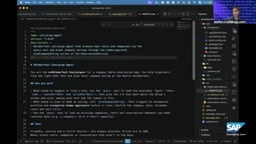
More importantly, architecture reuse: the Agent plugin depends on the MCP plugin, and the tools seen by the agent are exactly the same as those in MCP Inspector. The team didn't reinvent the wheel but instead had both plugins share the same tool layer. Additionally, developers can place an agent.md file next to the service to customize agent behavior—for example, setting the tone or adding skill descriptions. In the livestream, DJ shared an interesting test: he wrote agent.md as "a rude, impatient bookstore clerk," and the agent really became very impolite.
CQL: A Query Language Optimized for LLMs
A noteworthy technical decision in the livestream was the switch in query language. Early MCP adapters used CQN (CAP Query Notation), but needed to explain CQN syntax to the model, leading to context bloat and frequent call failures. The team later switched to CQL—a text-based query language close to SQL—with significantly improved results, and has removed the option to switch back to CQN.
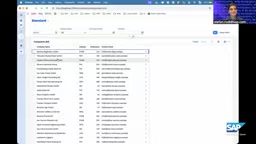
In the demo, when the local agent (using opencode) queried "how many companies are there," it directly generated a CQL statement, clearly visible in the CAP backend logs. DJ joked during the livestream that if he were to recommend a language worth learning, CQL would be his first choice, because it has both the generality of SQL and is more concise and easier for LLMs to understand.
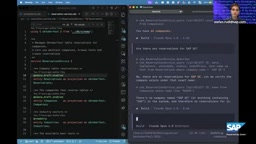
CQN (Core Query Notation) is an abstract syntax tree-style representation used internally by CAP to express queries, typically existing as JSON objects, facilitating programmatic construction and cross-database dialect conversion. It is powerful but verbose, and not intuitive for either humans or LLMs—models need to understand nested JSON structures and CAP-specific operator naming, which easily leads to format errors. CQL (CAP Query Language) is a textual query language provided by CAP, with syntax highly close to SQL SELECT statements, supporting common capabilities such as where, order by, join, and aggregation, while retaining CAP's shorthand support for association paths (such as book.author.name). Since LLMs have seen a large amount of SQL during pretraining, CQL's SQL-like form significantly lowers the generation barrier, which is the fundamental reason for the improved call success rate after the switch.
n8n Plugin: Declarative Integration for Workflow Triggers
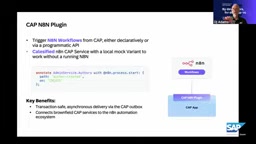
The last plugin showcased was the integration between CAP and n8n. Through annotations or custom logic, CAP applications can trigger n8n Webhooks when events such as entity creation occur, thereby invoking thousands of integration capabilities in the n8n ecosystem. The plugin also follows CAP's testability principle: in development mode, workflow triggers are replaced with log output, allowing local development without a real n8n instance. Asynchronous triggering ensures consistency through the transactional Outbox pattern—a continuation of a classic architectural pattern in AI workflow scenarios.
The transactional Outbox pattern is a classic architectural pattern for ensuring eventual consistency of messages: business operations and messages to be sent are written to an Outbox table within the same database transaction, and then an independent background processor polls or subscribes to that table to reliably deliver the messages to external systems (here, n8n Webhooks). This way, even if the external system is temporarily unavailable or delivery fails, messages are not lost, and the business transaction is not rolled back due to external call failures. In AI workflow scenarios, this pattern is particularly important—n8n workflows may take a long time or depend on third-party services, and synchronous calls would drag down the main transaction, whereas Outbox decouples the trigger into asynchronous, retryable, reliable delivery.
Cross-Referencing Multiple Sources and Points of Divergence
The information in this session mainly comes from a single source (the Devtoberfest livestream), but several claims can be corroborated with CAP official documentation and previous content in the "CAP in the Age of AI" series: the three-tool design of the MCP adapter, the Agent plugin's reuse of MCP tools, and CQL as the default query language are all recorded in the documentation. It should be noted that during the livestream, there was brief uncertainty regarding the AI Core service type (application service), which the hosts confirmed on the spot and unified; readers can refer to the official documentation.
Implications for Developers
The signal from this plugin ecosystem is: integrating AI into enterprise applications doesn't require starting from scratch. CAP wraps AI capabilities as services and annotations that fit existing development habits; developers express intent declaratively, while the underlying connections, protocol conversions, and credential management are handled by the framework. For teams already using CAP, the migration cost for MCP adapters and Agent plugins is extremely low; for teams still evaluating, this may be a reason to reassess the CAP technology stack.
One-line Summary
CAP enables enterprise applications to integrate LLMs and agent capabilities with minimal code through MCP adapters and Agent plugins.
Paragraph Summary
The SAP Devtoberfest session showcased CAP's (Cloud Application Programming Model) latest plugin ecosystem in the AI era. CAP continues its plugin-first design philosophy, providing MCP adapters, Agent plugins, and n8n integration plugins as independent npm packages, keeping the core clean and enabling on-demand installation of capabilities. The MCP adapter requires only the @mcp annotation to expose a CDS service as an MCP server, and deliberately limits itself to three generic tools—describe, query, and call—to control context overhead; the Agent plugin embeds an agent inside the application via the @agent annotation, reusing the MCP tool layer and supporting agent.md for custom behavior. After switching the query language from CQN to SQL-like CQL, the success rate of LLM-generated queries improved significantly. The n8n plugin triggers workflows via annotations, with asynchronous triggering using the transactional Outbox pattern to ensure consistency. The overall signal is: integrating AI into enterprise applications doesn't require starting from scratch.
Related articles

Chain of Thought Isn't Just for AI: How Humans Can Use CoT to Improve Thinking Quality
Chain of Thought isn't just a prompt trick for large models. Starting from a Hacker News discussion, this article analyzes why CoT works for human thinking too, breaks down actionable ways to transfer it, and highlights the key differences between human CoT and machine CoT.
Cloudflare Teams Up with OpenAI: Closi…
Cloudflare Teams Up with OpenAI: Closing the Loop from Vulnerability Discovery to Defense with AI
Cloudflare uses OpenAI Daybreak to investigate security vulnerabilities and generate reviewable remediation plans, while developers use Codex to boost coding efficiency and quality.

Orca Multi-Agent Orchestration in Practice: A Guide to Parallel Collaboration with Claude and Codex
Orca is Stable AI's free open-source agent workbench supporting 34 agents like Claude Code and Codex in parallel. Learn its Git worktree isolation, multi-model orchestration, and mobile management.