SAP Meets MCP: 5 Architecture Patterns for AI Agents Connecting to S/4HANA

Five MCP architecture patterns in the SAP ecosystem for securely connecting AI agents to S/4HANA.
This article systematically outlines five MCP (Model Context Protocol) integration architecture patterns that have taken shape in the SAP ecosystem, aimed at solving the integration complexity and governance challenges of AI agents accessing SAP systems like S/4HANA. MCP transforms the traditional M×N custom connector model into M+N standard interfaces, so agents need no connector code at runtime. The five patterns cover: the ABAP developer toolchain (official ADT MCP server), the governed enterprise path (Integration Suite MCP gateway), BTP zero-code OData proxy, Cloud Integration operations server, and in-stack ABAP MCP endpoints. The article emphasizes that the core production principle is that AI agents should not connect directly to SAP but should go through an MCP gateway for authentication, authorization, rate limiting, and auditing; principal propagation ensures the backend executes with the user's own permissions, and AI is not an authorization layer. It concludes with a scenario comparison table and a pre-launch checklist.
SAP Meets MCP: 5 Architecture Patterns for AI Agents Connecting to S/4HANA
When large language models try to read business data directly from S/4HANA, enterprises face a dilemma: either build a separate connector for every model and every tool, or give up control over the existing governance framework. The Model Context Protocol (MCP) is changing this — it turns the M×N integration nightmare into an M+N standard interface.
Based on an in-depth analysis of SAP MCP integration approaches, this article breaks down five architecture patterns that have already taken shape in the SAP ecosystem, along with the governance principles that cut across all of them.
Why MCP Matters for SAP Integration
In the traditional model, three language models connecting to three SAP tools means nine fragile custom connectors. MCP standardizes this: each model only needs to implement a client once, each tool only needs to expose a server once, and the two sides communicate through an open protocol.
The protocol mechanics themselves are not complicated. A host environment (such as Claude Desktop, Claude Code, Copilot Studio, or SAP Joule) runs an MCP client for each connected server. The server exposes three building blocks: tools that models can call, resources that can be read, and reusable prompt templates. Local servers communicate via standard input/output, while remote servers use streamable HTTP. Underneath is JSON-RPC: the agent discovers tools at runtime through tools/list and invokes them through tools/call — no connector code is needed inside the agent.
The real complexity lies in how to implement this protocol under SAP's enterprise-grade constraints.
MCP is built on JSON-RPC 2.0, a lightweight remote procedure call protocol that uses JSON as its data format. Unlike REST, JSON-RPC enforces a uniform request/response structure containing jsonrpc, method, params, and id fields, with native support for batch requests and notifications. MCP defines on top of JSON-RPC a session lifecycle (initialization, capability negotiation, shutdown) and three primitives (tools/resources/prompts), enabling clients and servers to dynamically discover each other's capabilities. For SAP integration, this means the agent needs no precompiled SAP-specific logic — implement an MCP client once, and it can interact with any protocol-compliant SAP MCP server.
Overview of the Five Architecture Patterns
Five distinct paths have already emerged in the SAP ecosystem, each corresponding to different use cases and governance requirements:
- Developer toolchain — the official MCP server based on the ABAP Development Tools API
- Governed enterprise path — through the MCP gateway in SAP Integration Suite
- BTP zero-code server — automatically generating MCP tools from OData description files
- Operations server — a lightweight Python service for Cloud Integration monitoring
- In-stack ABAP MCP — publishing MCP endpoints directly within the ABAP system
There is also a category of knowledge servers that do not perform actions but instead provide models with version-matched SAP documentation context.
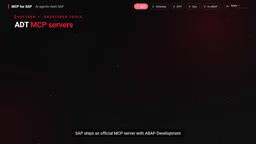
Pattern 1: ABAP Development Toolchain
SAP has released an official MCP server for ABAP Development Tools, supporting both Eclipse and VS Code. It reuses the mature ADT Java stack with its connectivity and caching mechanisms, supports multi-server landscapes, and is backend-compatible with NetWeaver 7.31.
The security design of this server is worth noting: it is disabled by default, only allows whitelisted systems to connect, editing is disabled by default (read-only mode), and write operations must be authorized package by package with a human in the loop.
Open-source community servers use the same ADT REST services. One provides read-only tools, while another adds full CRUD capabilities including locking, syntax checking, activation, and transport. Configuration takes just a few lines: register the server with claude mcp add, or add the system URL, client, and a dedicated user with developer permissions to the mcpServers block in the desktop configuration.
Then you can just ask. For example, "read this class, explain it, fix the SELECT statement, then activate it" — the agent automatically handles the entire process of searching, reading, locking, editing, syntax checking, activating, and unlocking. It is recommended to test write operations in a local package first and always review the generated code.
Pattern 2: The Governed Enterprise Path (MCP Gateway)
This is the most important pattern for production environments. The core principle comes down to one sentence: AI agents should not connect directly to SAP.
The right approach is to put MCP in front of the governed API layer you already have. The agent speaks MCP to the MCP gateway in SAP Integration Suite, and the gateway is the control plane — handling authentication, authorization, rate limiting, and payload protection, with full monitoring and tracing. The gateway runs on the integration cell runtime, not the runtime that processes integration flows. Behind the gateway, Cloud Integration remains the engine for mapping, routing, orchestration, and retries.
In one sentence, the division of labor is: AI reasons, MCP exposes, API governs, integration integrates, SAP executes.
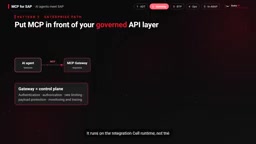
MCP server artifacts can be built from three sources: API artifacts deployed on the integration cell, HTTP endpoints described by OpenAPI 3.0 specifications, and RFCs (for example, a BAPI for creating purchase orders becomes an agent tool directly). Each source has a per-server tool count limit; consult the latest documentation. After that, you need to curate tool names and descriptions, add prompt templates, apply policies, deploy and publish in Developer Hub, and test with MCP Inspector.
Identity is the most critical design issue here. In principal propagation mode, the user logs in to the MCP client through SAP Cloud Identity Services, the JWT token reaches Integration Suite (the user needs the API Invoke role), Cloud Connector issues a short-lived X.509 certificate for that user, and S/4HANA maps the certificate to the real SAP user via certificate rules. This way, the backend executes with that user's own permissions. For S/4HANA public cloud, the destination uses OAuth to SAML bearer assertion and does not require Cloud Connector.
Remember: AI is never your authorization layer.
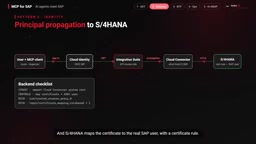
Principal propagation is the core security mechanism of SAP Cloud Connector, used to pass user identity from cloud applications to on-premise SAP systems. In the MCP scenario, the user completes OIDC login through SAP Cloud Identity Services, and the MCP client obtains a JWT token; this token travels with the request to SAP Integration Suite, Cloud Connector validates the token and issues a short-lived X.509 client certificate to the on-premise S/4HANA on behalf of that user; S/4HANA maps it to the real SAP user via certificate subject mapping rules (such as the CN field), thereby restoring the user context in the ABAP session. The entire process requires no user passwords stored in the SAP system, and backend authorization checks are entirely based on that user's SAP roles. For S/4HANA public cloud, since Cloud Connector cannot be used, an OAuth 2.0 to SAML 2.0 bearer assertion flow is used instead, with SAP Cloud Identity Services issuing the SAML assertion directly to S/4HANA to achieve the same effect.
Pattern 3: Zero-Code Server on BTP
The OData MCP proxy package lets you describe an API with a single JSON file, and it automatically generates tools. Each entity set becomes a set of tools: list, get, create, update, delete, plus navigation properties. The proxy automatically obtains OData v2 CSRF tokens, resolves BTP destinations through SAP Cloud SDK, and controls viewer/editor/admin roles using XSUAA scopes.
This pattern is already powering MCP servers for Cloud Integration, AI Core, BTP core services, audit log, and Cloud Foundry.
OData (Open Data Protocol) is a RESTful API standard widely adopted by SAP for exposing business data models. In OData v2, all modifying operations (POST/PUT/MERGE/DELETE) must carry a CSRF (Cross-Site Request Forgery) token, obtained by first sending a GET request and reading the x-csrf-token response header, then returned in the request header. The OData MCP proxy handles this flow automatically, caching the token per session and refreshing it on expiry. In addition, a BTP Destination is a configuration object in SAP BTP used to store backend system connection information (URL, authentication method, proxy settings); SAP Cloud SDK can automatically resolve destinations and inject the HTTP client, so the MCP server does not need to hardcode connection details. XSUAA (SAP Authorization and Trust Management Service) provides OAuth 2.0 scopes for fine-grained access control at the MCP tool level (e.g., viewer read-only, editor writable).
Patterns 4 and 5: Operations and In-Stack Embedding
The operations server is a lightweight Python MCP server that wraps the Cloud Integration OData API with a service key. The agent can list failed messages, read message processing logs, inspect packages and runtime artifacts, and then explain root causes in natural language. Credentials stay on the server side and never appear in prompts. It is recommended to start read-only, then add write tools and stronger controls later.
The in-stack ABAP MCP publishes MCP endpoints as ICF services through an ABAP add-on, just like OData or SOAP, and even supports very old releases. You specify tables, views, and CDS views, and each becomes a display tool. Create, update, and delete tools are ABAP classes, with one method per action and one for metadata. There is no middleware, and it inherits ICF security mechanisms (such as single sign-on). However, raw table reads bypass application-layer authorization checks, so row-level authorization and CDS access control are required — auditors will definitely ask this question.
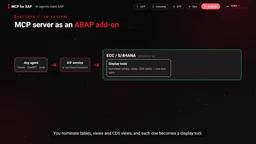
ICF (Internet Communication Framework) is the runtime framework in the ABAP application server that handles HTTP requests; all inbound HTTP/HTTPS requests (including OData, SOAP, and UI5 applications) are processed through ICF services. ICF services are configured in transaction SICF and can inherit SAP login/SSO, SSL, session management, and other security mechanisms. Publishing MCP endpoints as ICF services means reusing the existing SAP authentication stack (such as SAML, Kerberos, X.509) without an additional gateway. However, ICF itself does not perform ABAP application-layer authorization checks (such as SAP authorization objects S_TABU_DIS, S_PROGRAM), so reading database tables directly bypasses business permissions. CDS access control (CDS DCL) defines row-level and column-level permissions through the @AccessControl.authorizationCheck annotation, enforced by the ABAP runtime when the CDS view is accessed, which can fill this gap. During audits, clearly distinguish: ICF-layer authentication proves "who is calling," while CDS DCL proves "which rows that user can see."
How to Choose: Scenario Comparison Table
- ABAP developer productivity → ADT MCP server
- Business users and production agents → Integration Suite MCP gateway + principal propagation
- BTP and management APIs → configuration-driven OData proxy
- Cloud Integration operations support → operations server
- ECC systems without middleware → in-system add-on + strict authorization
Pre-Launch Checklist
Use a least-privilege technical user or propagated user; start read-only and whitelist systems and packages; never commit credentials, and never disable TLS verification outside development environments; keep a human in the loop for every write operation; apply rate limiting and audit logging at the gateway layer; review third-party servers before installing them; check your company's AI policy before sending code or data to external models.
The essence of the architecture has not changed — the chain of systems, APIs, integration, and systems still exists. What has changed is the consumer: from a human to an agent. The chain becomes Agent → MCP → API → Integration → SAP. AI makes decisions, integration governs, SAP executes.
Related articles

A Single Prompt Triggers a Global PHP Security Storm: Is AI a Savior or a Hidden Risk?
A single AI prompt triggered a global PHP security crisis affecting Wikipedia and the Internet Archive. This article reviews the incident, analyzes the OpenAI-Amazon controversy, and explores the security paradox of lowered vulnerability discovery barriers in the AI era and developer response strategies.

When AI Is Taken Away: How Reliance on Shortcuts Undermines Your Problem-Solving Resilience
A study of 1,222 people found that after using AI to answer questions, once AI was removed, people gave up on more problems than a control group that never used AI. The article analyzes the impact of AI reliance on learning resilience and metacognition, and explores design implications for AI learning tools.

Carta and NewView Partner to Let Startup Employees Cash Out Equity Early
Carta and NewView Capital partner to simplify startup tender offers, helping employees sell equity early. Analysis of the mechanism, liquidity pain points, and impact.