Scrapboard Cloud 4: A Digital Clipboard That Brings the Family Fridge Door into iCloud

Scrapboard Cloud 4 recreates the family fridge door experience as a digital bulletin board synced via iCloud.
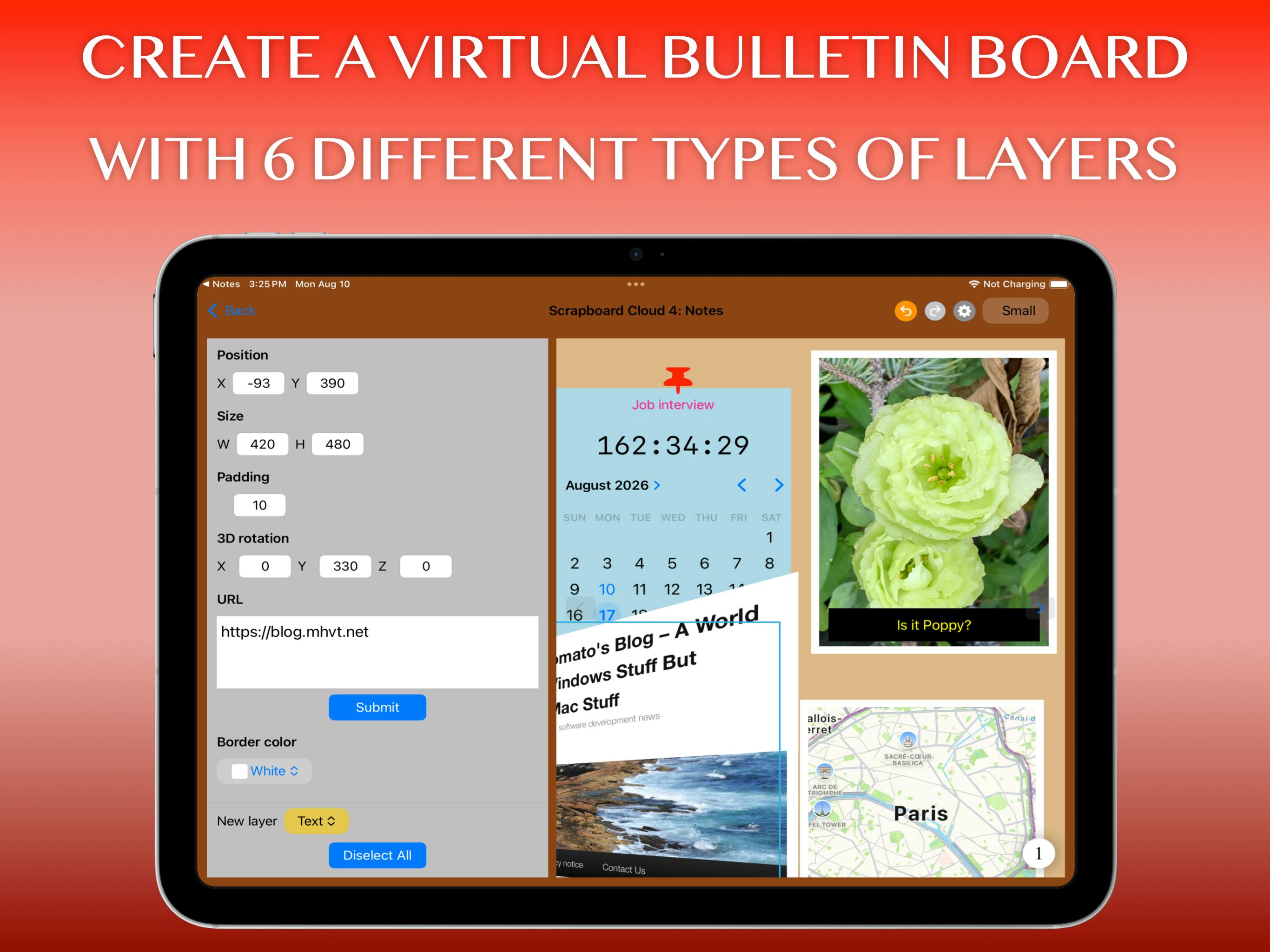
Scrapboard Cloud 4 is a 12-year-old digital bulletin board iOS app by indie developer Señor Tomato, reaching #14 on Product Hunt. Built around the concept of a "pocket-sized digital refrigerator door," it lets users freely collage photos, sticky notes, and sketches, filling the emotional gap between basic note apps and professional whiteboards. Its core feature is seamless sync across iPhone, iPad, and Mac via the user's own iCloud account — no extra sign-up required. Targeting personal and family use, it exemplifies an indie developer's long-term commitment to perfecting a single, emotionally resonant experience.
In an era where digital tools increasingly emphasize productivity and collaboration, one app takes a different approach — it wants to recreate the warm, casual feeling of sticking notes, photos, and kids' drawings on a family refrigerator door. That app is Scrapboard Cloud 4, which reached #14 on Product Hunt and carries 12 years of product development behind it.
A Digital Bulletin Board with 12 Years of History
Scrapboard isn't a newcomer. According to its Product Hunt listing, the series has been in development for 12 years — a remarkable feat in a mobile app market defined by rapid iteration and fleeting trends. That kind of long-term commitment signals a product that has been refined through multiple rounds of design and UX improvements, rather than a hastily assembled concept.
Scrapboard Cloud 4 centers on bringing the classic idea of a "digital bulletin board" to iOS devices. The developer uses a vivid metaphor: a "pocket-sized digital refrigerator door." The fridge door is one of the most natural information-sharing spaces in many households — grocery lists, schedule reminders, kids' artwork, and memorable photos all find their way there. Scrapboard aims to recreate that loose, warm, expressive experience in the digital world.
Cross-Device Sync Is the Core Selling Point
Scrapboard Cloud 4 isn't designed to work in isolation — it's built to pair with Scrapboard 4 on macOS. Using the user's own iCloud account, boards created in the app sync seamlessly across iPad, iPhone, and Mac.
This iCloud-based sync mechanism has several practical implications:
- Clear data ownership: Content is stored in the user's own iCloud storage, not on third-party servers, which makes the privacy story much cleaner.
- No extra account needed: No new registration required — Apple ecosystem users are ready to go out of the box.
- Consistent multi-screen experience: Boards organized on Mac can be instantly viewed and edited on iPhone.
For users deeply invested in the Apple ecosystem, this kind of "native sync" experience tends to feel far smoother than relying on cross-platform cloud services.
iCloud Drive is Apple's native cloud storage and sync framework for developers, allowing apps to store data directly in a user's iCloud account without requiring developers to build and maintain their own backend servers. For users, this means data is protected under Apple's privacy policies and inaccessible to the developer. For indie developers, it eliminates the substantial cost of server infrastructure, freeing them to focus on the product experience itself. This makes it a common technical choice among indie developers in the Apple ecosystem — particularly well-suited for personal or family-focused utility apps that don't handle massive volumes of data. That said, the approach has clear limitations: it only works on Apple devices and cannot extend to Android or Windows, meaning the target audience is locked into the Apple ecosystem from the start.
Who Would Actually Use This?
From a positioning standpoint, Scrapboard Cloud 4 targets lightweight personal and family information organization — not enterprise project management. Its value isn't in a long list of powerful features, but in atmosphere — presenting fragmented life information, ideas, and images in a free-form, collage-like way.
This type of app fills a gap between "sticky note tools" and "professional whiteboard software." Sticky notes are too plain; professional whiteboards are too heavy and too formal. A digital bulletin board in the style of a refrigerator door hits a sweet spot — preserving spontaneity and emotional warmth.
Worth noting: the app is listed under iOS, iPad, and Maps on Product Hunt, developed by independent developer Señor Tomato, and earned 60 upvotes after launch. For a niche indie product focused on a specific experience, that response reflects genuine market demand for tools that carry a human touch.
The "digital bulletin board" category has a long history. Early examples like Pinterest focused on image collection and inspiration archiving, while Miro and FigJam evolved it into professional collaborative whiteboards. What Scrapboard pursues is closer to the analog experience of a personal corkboard and pushpins — not public sharing or team collaboration, but the casual pinning of memories between individuals or family members. This "personal scrapbook" positioning is genuinely underserved in the mainstream app market. Most users resort to Notes, photo albums, or group chat messages as awkward substitutes, resulting in a noticeably patched-together experience.
An Indie Developer's Path to Differentiation
Scrapboard Cloud 4 represents a survival strategy for indie developers in a productivity tool market dominated by giants: don't try to do everything — instead, take one specific, emotionally resonant scenario and execute it to perfection. Spending 12 years focused solely on "digital bulletin boards" reflects a commitment to long-term thinking that stands out in an app ecosystem perpetually chasing the next trend.
For everyday users already deeply integrated into Apple's device ecosystem, if you want something more engaging than Notes but more relaxed than a collaborative whiteboard — a space to capture life's little moments — Scrapboard Cloud 4 is worth trying. It doesn't solve any grand productivity challenge, but it just might bring back the small joy of sticking a note on the fridge door.
Related articles

Kimi K3.1 Hands-On Test: Open-Source Model Nears Opus, Video Generation Steals the Show
Kimi K3.1 completed motion graphics, 3D rendering, mini-games, and video generation in a live test. Analysis of its 2.8T MoE architecture, gap vs Opus/GPT, and hidden video generation.

Sam Altman: Why Life's Biggest Advice Should Still Come from Humans
OpenAI CEO Sam Altman on the limits of AI advice: AI can talk you out of an impulsive email, but life's biggest advice should still come from humans.

"Black October": Did AI Uncover 3% of All Critical Vulnerabilities Ever?
A Reddit post claims 3% of all critical software vulnerabilities ever were found in the past month, dubbed 'Black October.' We break down the statistical issues, how AI-assisted code auditing accelerates discovery, and how developers should respond.