ScreenGo: A Mac Auto-Zoom Screen Recording Tool That Runs Locally Without an Account

ScreenGo integrates auto-zoom, virtual webcam, and local editing into the Mac screen recording workflow.
ScreenGo is a Mac screen recording app launched on Product Hunt that compresses recording and post-production editing into one workflow. It offers automated editing like auto-zoom, cursor handling, subtitles, and audio polish, plus a built-in teleprompter and camera bubble for solo presentation content. The product emphasizes no account required and all-local processing, and supports a virtual webcam to feed screen content into meeting or live streaming software in real time. Currently, its Product Hunt traction is limited, and the actual accuracy of auto-zoom and editor usability still lack independent review corroboration. It's better suited for tutorial creators, privacy-sensitive users, and remote presentation scenarios.
Mac users have always had specific demands for screen recording tools: they want clean visuals and clear audio, without spending too much time on editing. ScreenGo is a newly launched Mac screen recording app on Product Hunt, featuring auto-zoom, a virtual webcam, and local processing, aiming to compress "recording" and "post-production" into a single workflow.
Core Features: Integrated Recording and Editing
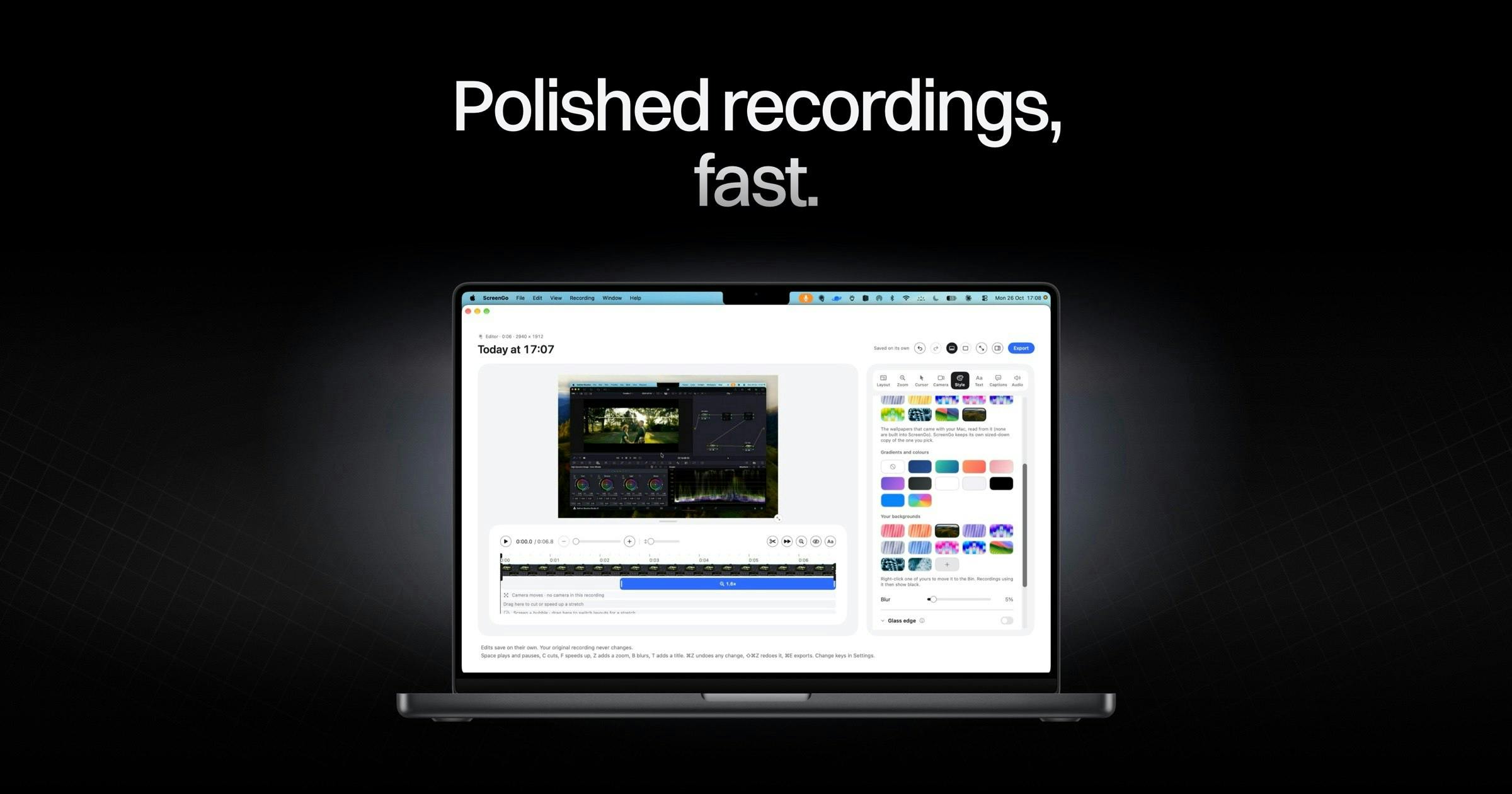
ScreenGo isn't positioned as a simple screen capture tool—it bundles recording, presentation, and editing together. According to its Product Hunt page description, it offers a camera bubble, a teleprompter, and an editor that automatically handles "polish"—including zoom, cursor handling, subtitles, and clean audio.
This means after recording the screen, users don't need to export to another editing app to manually add zoom keyframes or time subtitles. For those who frequently create tutorials, product demos, or remote presentations, this kind of automated processing can significantly shorten the path from recording to final cut.
Auto-Zoom and Cursor Following
Auto-zoom is one of ScreenGo's most differentiating features. In traditional screen recordings, viewers often struggle to focus on the key actions, whereas auto-zoom dynamically adjusts the frame scale based on the mouse or operation area, magnifying key steps. The cursor is also incorporated into the editing process, reducing visual distractions.
The technical challenge of auto-zoom lies in accurately identifying the "focus of action." Common approaches combine mouse trajectories, click hotspots, and UI element recognition to infer user intent, then apply smooth zoom and pan transformations to the frame. If the algorithm is too sensitive, the frame shakes frequently; if too conservative, key steps remain insufficiently highlighted. Therefore, the actual experience of such features depends heavily on parameter tuning and scenario adaptation, and performance may vary noticeably across different interfaces like documents, code editors, and design software. This is also why it's hard to judge its maturity from official demos alone.
Teleprompter and Camera Bubble
The camera bubble places the presenter's face in a corner of the frame, suitable for demos that require on-camera presence. The teleprompter is built directly into the recording workflow, so presenters don't need to open another window or split the screen, reducing operational burden during recording. Combined, these two features are closer to a lightweight "one-person show" production scenario.
Privacy and Local Processing: No Sign-Up, No Uploads
ScreenGo emphasizes no account required and that "nothing leaves your Mac"—all processing is done locally. In a landscape where most screen recording and editing tools lean toward cloud sync and subscription accounts, this choice has real appeal for users who value privacy or handle sensitive content.
Local processing also means no dependence on network connectivity, making recording and processing more controllable. However, this may also impose functional boundaries: for example, cross-device collaboration or cloud sharing capabilities may be less robust than competitors with integrated account systems.
Local processing typically relies on on-device compute, such as the neural engine in Apple Silicon chips for subtitle recognition, speech transcription, and frame analysis. Compared to cloud solutions, on-device processing avoids the latency and leak risks of uploading footage, but it's also constrained by Mac hardware performance—long recordings or automatic processing of high-resolution footage may be more power-hungry and memory-intensive. Additionally, on-device speech recognition models usually have less language coverage and accuracy than large cloud models, so the practical usability of subtitle features needs to be evaluated based on the specific languages supported.
Virtual Webcam: Use Cases Beyond Screen Recording
The virtual webcam is another noteworthy feature of ScreenGo. It can feed Mac screen content as a camera signal into video conferencing or live streaming software, suitable for scenarios requiring demonstration of operations, software demos, or online teaching.
Compared to simple screen recording, the virtual webcam extends the tool's boundaries—from "post-event sharing" to "real-time presentation." For remote workers and online educators, this reduces the cost of switching between multiple tools.
At the system level, virtual webcam implementation relies on macOS's Core Media I/O framework. The app registers a virtual device so that software like Zoom, OBS, and Tencent Meeting can see it in their camera lists. Unlike physical cameras, the virtual device's output is synthesized by software, allowing overlays of screen capture, camera bubbles, or custom layouts. Note that macOS has strict controls over camera permissions; first-time use of a virtual webcam usually requires authorization in System Settings, and some apps also require installing a system extension or restarting. This also explains why virtual webcam functionality may have varying compatibility across different conferencing software.
Market Positioning and Competitive Landscape
On Product Hunt, ScreenGo received 63 votes, ranked 20th, with only 1 comment. The data indicates it's still in an early exposure stage with limited community discussion. The Mac screen recording space already has many mature products, and ScreenGo's differentiation centers on three points: editing automation like auto-zoom, virtual webcam, and account-free local processing.
Whether these selling points can translate into sustained word-of-mouth depends on the accuracy of auto-zoom and the actual usability of the editor—which currently only have official descriptions and lack independent review corroboration. The maker is Ben White, and the product is built by a small team; the pace of future updates and feature completeness are worth watching.
Who It's For
ScreenGo is best suited for three types of users: content creators who need to quickly produce tutorials or demo videos, professionals who value privacy and don't want to upload footage, and remote workers who need to show their screen in real time during meetings or live streams. If the need is just to simply record a screen for archival purposes, built-in system tools may suffice; but if you want to save the repetitive labor of post-production editing, automated editing is its main appeal.
One-line Summary
ScreenGo integrates auto-zoom, virtual webcam, and local editing into the Mac screen recording workflow.
Paragraph Summary
ScreenGo is a Mac screen recording app launched on Product Hunt, with the core idea of compressing recording and post-production editing into a single workflow. It offers automated editing capabilities like auto-zoom, cursor handling, subtitles, and audio polish, plus a built-in teleprompter and camera bubble to help one person complete presentation content. The product emphasizes no account required and all-local processing, and also supports a virtual webcam that can feed screen content in real time into meeting or live streaming software. Currently, its popularity on Product Hunt is limited, and the actual accuracy of auto-zoom and editor usability still lack independent review corroboration. It's better suited for tutorial creators, privacy-sensitive users, and remote presentation scenarios.
Related articles

Anthropic's IPO: Is a $1.4 Trillion Valuation AI's Future or the Peak of a Bubble?
Anthropic is about to list on Nasdaq with a valuation of up to $1.4 trillion, potentially raising over $60 billion to become the second-largest IPO in history. This article breaks down its revenue, the truth behind its hundred-billion-dollar book loss, compute costs, control design, and lock-up pressure, and analyzes the IPO's chain effects on the AI sector.

Anthropic Races Toward Nasdaq: Ticker ANT, Can a Trillion-Dollar Valuation Hold?
Anthropic files its S1 for a Nasdaq IPO under ticker ANT, led by Goldman Sachs and Morgan Stanley. We break down revenue, massive compute lease commitments, founder voting control, and the valuation debate.

How Anthropic Uses a Four-Layer Narrative to Prop Up a $2 Trillion Valuation
Anthropic's estimated $2 trillion valuation: a breakdown of its positioning theory and four-layer narrative — civilization-level fear, identity, product, and business — and how founder essays, technical docs, and opinion leaders support the AI safety guardian valuation story.