Screenodon: AI Helps You Create High-Converting App Store Screenshots

Screenodon uses AI to generate conversion-focused multilingual screenshot sets from raw screenshots and supports direct publishing to app stores.
Screenodon is a tool that uses AI to quickly turn raw screenshots into conversion-focused visual assets, aiming to solve the pain point that users only spend a few seconds scanning screenshots. Its workflow is: upload screenshots, AI generates design drafts, manually adjust art direction, localize into 39 languages, and finally publish directly to App Store Connect or Google Play. It recently added support for all four iPhone Duo sizes and offers an account-free trial editor. The tool's positioning sits between a design tool and a marketing tool, suitable for indie developers, small teams, and apps going global, but community discussion is low and actual effectiveness remains to be verified. The article also reminds readers that AI solves the efficiency problem, conversion strategy still needs to be grasped by yourself, and third-party publishing requires attention to permission security.
App Store screenshots are key to whether users decide to download—most people only spend a few seconds scanning them and won't read the description carefully at all. Screenodon aims to solve this pain point: using AI to quickly turn raw screenshots into a set of conversion-focused visual assets.
Core Features: From Raw Screenshots to Multilingual Publishing
Screenodon's workflow is straightforward: you upload raw screenshots, and AI generates a set of design drafts optimized for conversion. After that, you can manually adjust the art direction, localize it into 39 languages, and finally publish directly to App Store Connect or Google Play.
This workflow connects design, localization, and publishing into one line, reducing the hassle of switching between multiple tools. For indie developers and small teams, this all-in-one solution can save a lot of time.
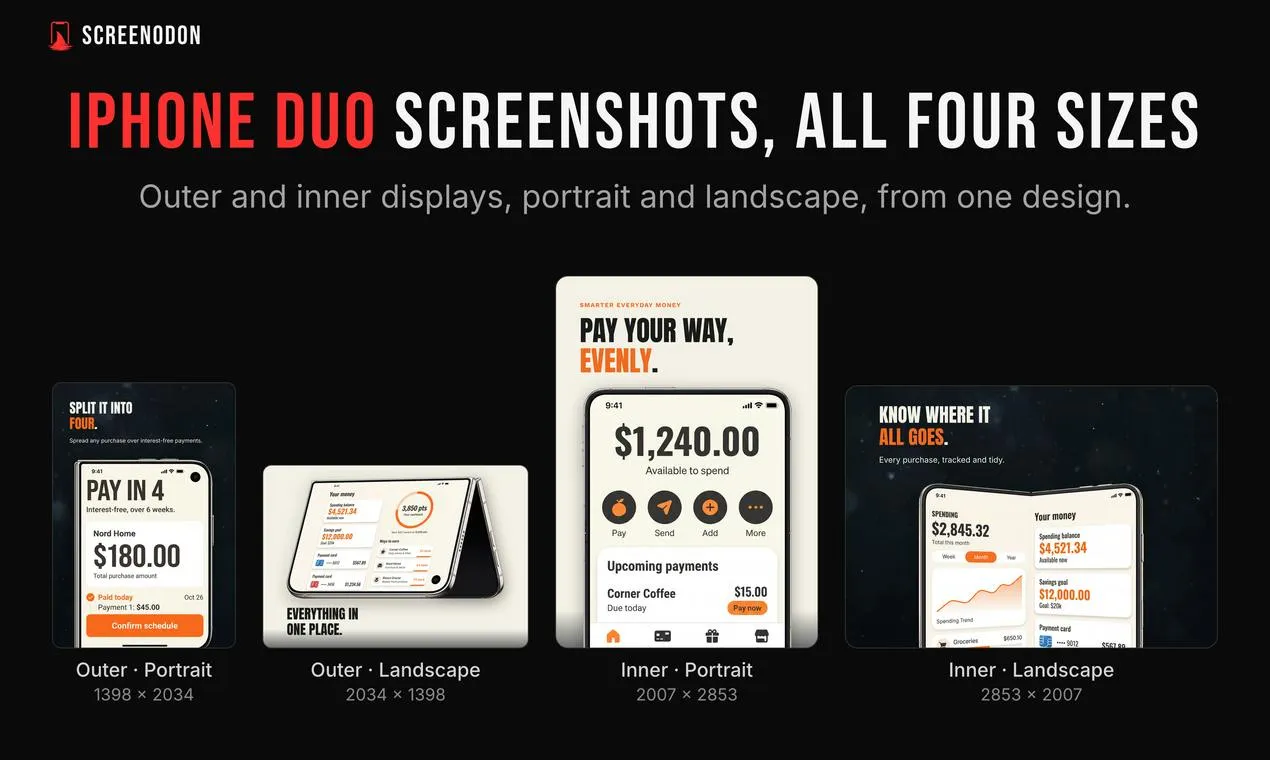
Latest Support: All Four iPhone Duo Sizes
Screenodon recently added support for all four iPhone Duo sizes, which means the generated screenshots can adapt to the latest device specifications without separate adjustments for size issues.
App Store has strict specifications for screenshot sizes. Developers need to upload images with corresponding resolutions for different devices (such as iPhone 6.7-inch, 6.5-inch, 5.5-inch, iPad, etc.), otherwise they may be rejected or displayed incorrectly. iPhone Duo sizes usually refer to the screenshot specifications defined by Apple for specific screen ratios (such as the Duo combination of 6.1-inch and 6.7-inch). Covering these sizes means the tool can automatically output images that pass App Store Connect validation, reducing the developer's manual resizing and cropping work.
App Store Connect is the app management backend provided by Apple for developers, used to submit apps, manage versions, view analytics data, and more; Google Play provides similar functionality through Google Play Console. Screenodon connects directly to these two platforms, meaning users don't need to export images first and then upload them manually—they can complete the publishing process within the tool. However, this also requires the tool to obtain the corresponding API permissions or account authorization.
Design Tool or Marketing Tool?
Screenodon is categorized as a design tool on Product Hunt, but its positioning clearly leans toward marketing—emphasizing "make every impression count, turn page views into installs." This ambiguity in positioning actually reflects a reality of current app marketing: screenshots are both a design output and part of the conversion funnel.
The tool provides an account-free trial editor, lowering the barrier to trying it out. However, community discussion is currently low (6 votes, 3 comments), and the product's maturity and actual effectiveness still need verification from more users.
In the app store context, the core goal of conversion rate optimization (CRO) is to get more viewers to complete a download. As the main visual element of the store page, screenshots' order, copy, colors, and composition all influence user decisions. Common optimization methods include: highlighting the core value proposition in the first image, using social proof (such as ratings and media references), showing key feature interfaces, and comparing different versions through A/B testing. Screenodon's emphasis on "turning page views into installs" is exactly bringing CRO thinking into screenshot design, but AI-generated drafts are usually based on generic templates and best practices. The actual effect still needs to be verified through App Store's Product Page Optimization or Google Play's store listing experiments.
Who Is Screenodon For
- Indie developers: No dedicated designer, need to quickly produce usable store screenshots.
- Small teams: Want to standardize the screenshot production and localization process.
- Apps going global: Need to cover multilingual markets; support for 39 languages is a clear advantage.
If you're already using Figma or other design tools to manually assemble screenshots, Screenodon's AI drafts and direct publishing features may be worth a try. But if your screenshot style is highly customized, the AI-generated parts may still require considerable manual adjustment.
A Bit of Sober Reflection
AI-generated screenshots sound great, but conversion rate improvement can't rely on templates alone. The persuasiveness of screenshots ultimately depends on whether they accurately convey the product's value and whether they match the aesthetics of the target users. Screenodon solves the efficiency problem; the strategy problem still needs to be figured out on your own.
In addition, although direct publishing to App Store Connect and Google Play is convenient, it also means you're handing part of the publishing process to a third-party tool. Permission management and security need attention.
One-line Summary
Screenodon uses AI to generate conversion-focused multilingual screenshot sets from raw screenshots and supports direct publishing to app stores.
Paragraph Summary
Screenodon is a tool that uses AI to quickly turn raw screenshots into conversion-focused visual assets, aiming to solve the pain point that users only spend a few seconds scanning screenshots. Its workflow is: upload screenshots, AI generates design drafts, manually adjust art direction, localize into 39 languages, and finally publish directly to App Store Connect or Google Play. It recently added support for all four iPhone Duo sizes and offers an account-free trial editor. The tool's positioning sits between a design tool and a marketing tool, suitable for indie developers, small teams, and apps going global, but community discussion is low and actual effectiveness remains to be verified. The article also reminds readers that AI solves the efficiency problem, conversion strategy still needs to be grasped by yourself, and third-party publishing requires attention to permission security.
Related articles

WorkBuddy In-Depth: The Leap from Conversational AI to Office Automation
What is WorkBuddy? Tencent's AI agent desktop tool understands Chinese commands and directly operates computer files, handling office automation from resume sorting to scheduled reports. This article analyzes its fundamental differences from conversational AI like ChatGPT, its core capabilities, and applicable scenarios.

WorkBuddy for Absolute Beginners: From Web Chat to AI Agent Productivity in Practice
Still using web-based AI chat and feeling more exhausted? This article breaks down the essential difference between chat and AI Agents, and explains how WorkBuddy, as a ready-to-use desktop tool, helps beginners turn AI from an advisor into an executor for real productivity gains.

DeepSeek Harness Penetration Mode: A Practical Guide to Automated Vulnerability Discovery with AI Agents
A breakdown of DeepSeek Harness penetration mode based on a Bilibili tutorial: Agent tool selection, desktop installation, mounting penetration mode, and automated vulnerability discovery on a teaching range, plus safety boundary constraints and FAQs for newcomers.