WorkBuddy for Absolute Beginners: From Web Chat to AI Agent Productivity in Practice

Web chat AI only generates, never delivers—manual rework is the productivity black hole; Agents are the real divide.
The article points out that many people feel more tired after using AI, because the tool form is stuck at web chat: AI generates content in 30 seconds, but users spend hours verifying, cleaning, formatting, and pasting, creating "fake productivity." The real divide is upgrading from chat models to AI Agents—chat is process guidance, while an Agent is result delivery, able to decompose goals, call tools, correct errors, and deliver finished files. But open-source Agents on the market have high barriers, requiring Python knowledge, API Key setup, and logic node wiring, which office novices struggle to get running. WorkBuddy enters with a ready-to-use, desktop-level form, preloading role-based experts and skills, able to read local documents and connect with the office ecosystem, positioned as an execution tool for office scenarios.
Why Does Using AI Make You More Tired?
Over the past few years, almost every professional has been talking about large models and AI-driven productivity. But there's a harsh truth: after all that fussing around, many people find their daily workload hasn't shrunk—it's actually gotten heavier. If you've felt that same sense of powerless "fake productivity," don't doubt your learning ability just yet—the problem most likely lies in the form of the tool itself.
The video depicts the real daily scenario most people face: you arrive at your desk in the morning, open a web-based AI, write and rewrite prompts three times, and finally get a long block of text that sounds professional but is really just circular filler; the data may be fabricated, and you have to verify every bit of it; and the most torturous part is the frantic screen-switching, copy-pasting, cleaning up extra blank lines, adjusting font styles, and then stuffing everything line by line into Excel or manually aligning it in a PPT template.

The result: AI generation took 30 seconds, but your manual post-processing dragged on for two or three hours. The AI just "talks" inside a web box while you're "running your legs off" in front of the screen. The root of this inefficiency is that the tool form is still stuck in the previous generation—web chat is essentially one-way answers. It's like a strategist: it only moves when you push it, and if you veer slightly off course, it goes completely off the rails.
From Chat Models to AI Agents: The Divide in Efficiency
What truly separates people in terms of efficiency is the upgrade from chat models to AI Agents. The video sums up the difference in one sentence: chat is process guidance; an Agent is result delivery.
You don't need to teach it step by step—you just give it a final goal. A qualified Agent will break down the goal itself, call search engines on its own, write code to verify things itself, correct itself when it hits errors, and finally hand you a usable deliverable file. It's not a strategist offering you ideas; it's an execution lead who can directly do the work and deliver the finished product for you.

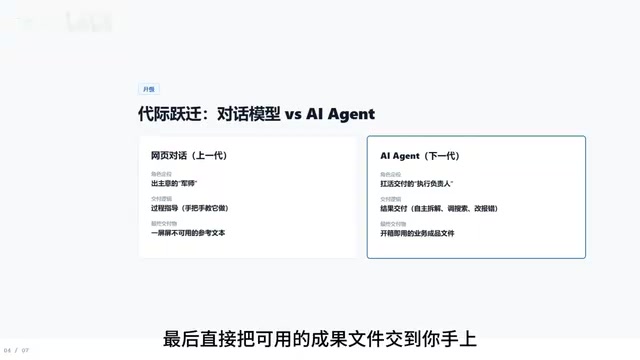
This distinction highlights the common mistake most people make with AI: using an Agent as a chatbot naturally only gets you chatbot output. Goal decomposition, tool invocation, error self-correction, and result delivery—these four steps are the core capabilities that set an Agent apart from a chat model. Understanding this is more important than learning any prompting trick.
MCP (Model Context Protocol) is a key term for understanding the boundaries of an Agent's capabilities. Proposed by Anthropic, it is essentially an open protocol for standardized communication between large models and external tools and data sources: the model is no longer limited to outputting text "by mouth" but can, through a unified interface, read local files, query databases, and call third-party services. Think of it as the "USB port" of the AI world—with a unified socket, all kinds of tools can be plugged into the model and used immediately. The article's mention of "no need to download MCP" means WorkBuddyAd has already built in this kind of tool-access capability in advance, so users don't have to set up the protocol environment themselves. For ordinary office users, the existence of MCP means an Agent can truly reach local documents and business systems instead of just talking in a chat box.
API Key is the "pass" for calling large model services. Developers first need to register an account on the model vendor's platform and generate a key, so that a program can use that key to send requests to the model and be billed by usage. The reason the article cites open-source Agents "configuring overseas API Keys yourself" as a barrier is that domestic users often face restricted registration, inconvenient payment, and limited network access, which has spawned "relay" services—third parties forwarding requests on their behalf, but with uneven stability and security. For professionals who just want to get the work done, the point of understanding API Keys is to realize that "building your own Agent" actually involves a whole engineering stack of accounts, billing, and network environments—far from just clicking a few buttons.
Why Can't Ordinary People Use Open-Source Agents?
There are plenty of Agent tools on the market, but ordinary people simply can't use them. The video points out several real barriers: the vast majority of open-source Agents are "bare shell" projects that require you to know Python code, configure overseas API Keys yourself, and even wire up dozens of logic nodes on a complex flowchart.
Many office novices eagerly go to explore, spend two hours configuring the environment, run it for five minutes, and get nothing but red error text—laughable and frustrating: they hit a breakdown before ever seeing the person. These barriers may be nothing to technical folks, but for professionals who just want to get the work done, every step is a reason to give up. The first principle of tool selection should be "it can run," not "it's theoretically the strongest."
WorkBuddy: Cutting Out Meaningless Barriers for Beginners
From a "beginner's perspective," WorkBuddy's design philosophy is to completely cut out all meaningless barriers.
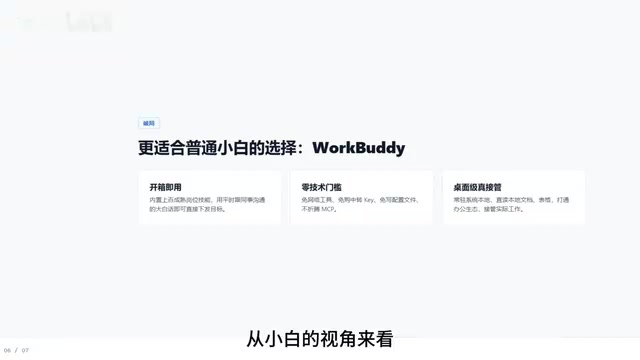
Ready out of the box: The backend comes preloaded with hundreds of mature role-based experts and common skills. You just need to explain the task clearly in plain language, the way you'd talk to a colleague—no VPN, no need to buy relay services yourself, no config files to write, and no MCP to download.
Desktop-level tool: It's not a web tab floating in your browser; it resides on your computer, can directly read local documents and spreadsheets, and even connects with the office ecosystem to truly take over the actual work on your machine. This is something web-based AI struggles to do—permission to read local files determines whether an Agent can turn "result delivery" into a real workflow.
The video's author says the next lesson will walk through actually using WorkBuddy. Based on the information so far, its positioning is clear: it's not a toy for tech tinkerers but an execution tool built for office scenarios. If you're troubled by "fake productivity," start by understanding the essential difference between an Agent and chat, then pick a tool with a low enough barrier to get started.
Note: The above content is compiled from an explanation in a Bilibili tutorial video. Please refer to actual experience for WorkBuddy's specific features and results.
Related articles

A New Paradigm for Text Editing in Compose: TextFieldState Replaces the Old API
Jetpack Compose introduces the TextFieldState API to fix dropped characters and cursor jumps from async input. The old value/onValueChange callbacks will be deprecated in 1.13. This article covers InputTransformation, OutputTransformation, four state hoisting patterns, and new formatted text editing capabilities.

Remote Compose: A New Document-Driven Paradigm for Cross-Platform UI on Android
Remote Compose transmits compact binary documents instead of screen pixels, enabling efficient UI rendering on remote surfaces like Wear OS and widgets. This article covers its document creation API, expression animations, size optimization techniques, and Wear OS progress.

How Crashlytics Eliminates Android Memory and Responsiveness Issues
Through the Chroma Clip case study, this article explains how Firebase Crashlytics uses Application Exit Info, Profiling Manager, GWP ASAN, and ARM MTE to pinpoint ANRs, OOMs, memory limit terminations, and native memory corruption—solving the challenge of stack traces that don't point to the real culprit.