screenpipe: 24/7 Screen Recording That Gives AI Agents Long-Term Memory

screenpipe records your screen 24/7 to give AI Agents long-term memory with local-first privacy.
screenpipe is a new AI tool that continuously captures your screen, audio, and computer activity to build a comprehensive work history archive. Through the MCP protocol, AI Agents like Claude can access this data to answer context-rich questions about your past work. With a local-first architecture that keeps all data on your device, source-available code, and support for Mac, Windows, and Linux, it aims to transform AI assistants from reactive tools into proactive memory-equipped agents.
When AI Needs to "Remember" Your Entire Day
In the age of AI Agents, there's a problem that remains largely unsolved: how can AI understand what you're currently doing — and what you've already done? Most AI assistants can only react to the prompt you type right now, completely blind to the work you've been doing over the past few hours or even days. You're forced to repeatedly explain context to the AI — which window that bug appeared in, what the key takeaway from that meeting was, or where that document you read last week is stored.
Newly launched on Product Hunt, screenpipe aims to solve this pain point once and for all. Its positioning is clean and direct: "AI that records your computer work to power agents." Riding on this concept, screenpipe hit #9 on Product Hunt on its launch day, earning 127 upvotes and 17 comments across three categories: Productivity, Developer Tools, and Artificial Intelligence.
Core Functionality: Screen + Audio + Activity — All Recorded
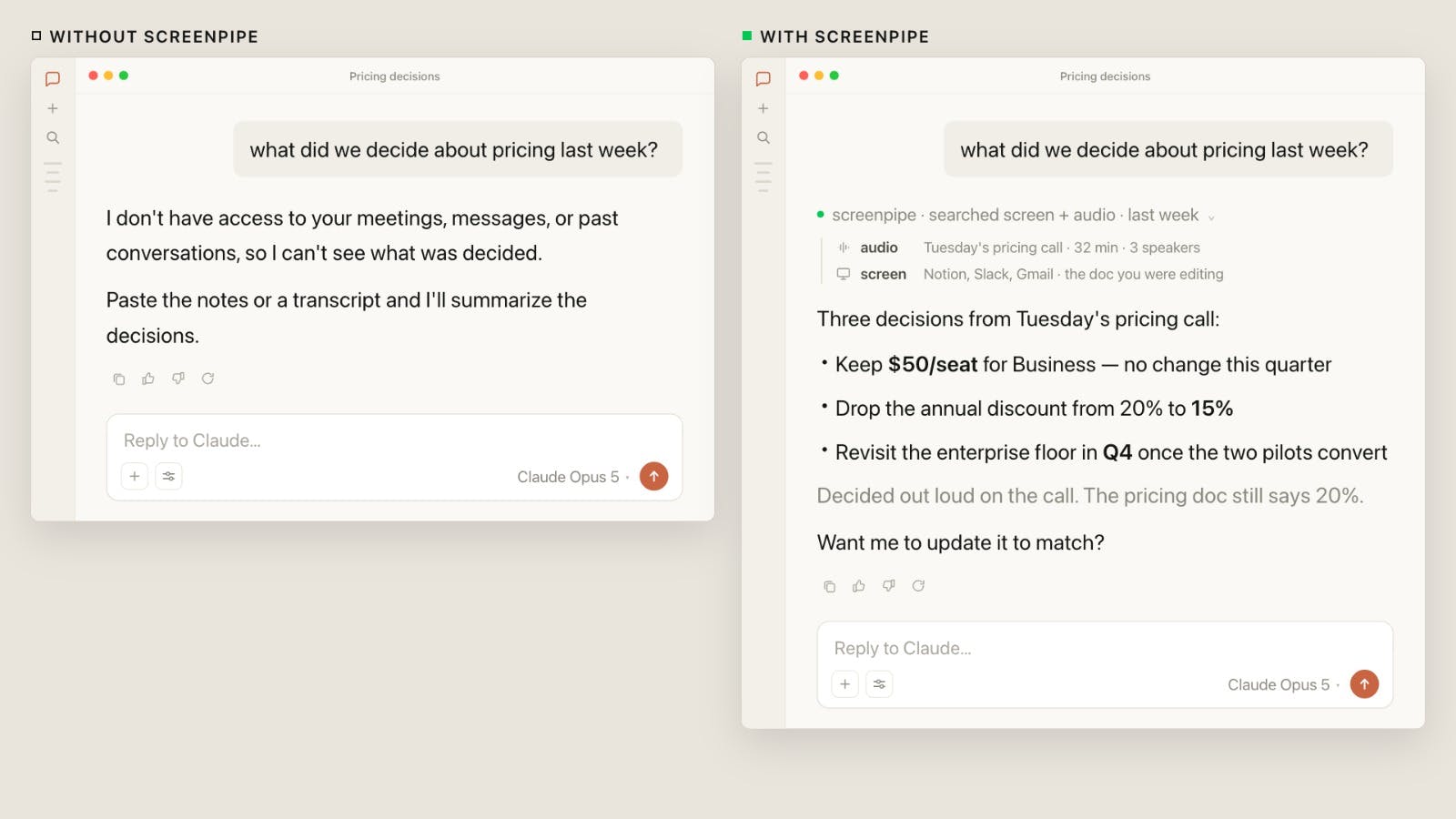
In simple terms, screenpipe continuously records your screen, audio, and computer activity in the background, building a comprehensive archive of your work history. AI Agents can then access this history through the MCP (Model Context Protocol).
What does this mean in practice? You can ask AI questions like:
- "What did we finally decide on during that phone call this morning?"
- "How do I reproduce that error I ran into yesterday?"
- "What did the payment terms section say in that contract document from last week?"
No more struggling to recall and piece together fragmented information from your day. The AI can provide evidence-based answers grounded in your actual operations and conversations. This essentially gives AI Agents a layer of "long-term memory," transforming them from instant-response tools into assistants that truly understand the arc of your work.
MCP Protocol: The Bridge Between Memory and Intelligence
screenpipe's decision to expose data through the MCP protocol is a noteworthy technical choice. Championed by Anthropic, MCP is rapidly becoming the standardized protocol for connecting AI applications with external data sources and tools. By integrating via MCP, the work history captured by screenpipe can be directly accessed by any AI client that supports the protocol (such as Claude Desktop), rather than being locked into a closed ecosystem. This openness significantly enhances the tool's practical value and extensibility.
Local-First Architecture: Privacy as the Biggest Selling Point
Recording screens, audio, and activity — for many people, the first reaction to hearing this is probably a privacy concern. After all, screen recording captures nearly all of a user's sensitive information: passwords, private conversations, financial data, work secrets…
screenpipe's answer to this is Local-first. All recorded data is stored on the user's local device by default, not uploaded to cloud servers. This architectural decision fundamentally reduces the risk of data leaks and third-party misuse, making it far more suitable for privacy-conscious enterprises and developers.
Additionally, screenpipe adopts a source-available model, meaning the code is open for inspection. While this differs from a fully open-source license, compared to black-box proprietary software, source availability at least allows technical users to verify the program's actual behavior and confirm whether its data handling matches its promises. In an era where user data collection is rampant, this level of transparency is itself a competitive advantage.
Cross-Platform Coverage and Business Strategy
screenpipe supports all three major desktop platforms: Mac, Windows, and Linux. This is uncommon among similar AI screen recording tools — Linux support, in particular, is often overlooked by consumer-facing software. Full cross-platform coverage means that whether you're a developer, designer, or knowledge worker, you can integrate it into your daily workflow.
On the business side, screenpipe uses an annual subscription model. As a launch promotion, the team is offering a limited-time discount: use the code BUSINESS20 for a discount on the annual plan. This "launch-day discount" strategy is common on Product Hunt — it leverages listing traffic to quickly convert early paying users while building initial word-of-mouth.
Promising Value, Lingering Concerns
The scenario screenpipe paints is genuinely compelling: an AI Agent that truly "sees" your work and can seamlessly retrieve any past detail. For modern professionals who constantly switch between multiple apps, sit through endless meetings, and have their context interrupted repeatedly, the value of such an AI "second brain" is obvious.
But we should also stay clear-eyed. Continuous full-screen recording is a double-edged sword no matter how you look at it:
- Storage costs: Continuously recording screen and audio generates significant local storage usage. Long-term use requires a sensible data cleanup strategy.
- Performance overhead: Whether the background capture's CPU and memory consumption affects your primary work still needs real-world testing to verify.
- Trust boundaries: Even with a local-first approach, once an AI Agent gains access through MCP, defining which data can be read and which should be blocked is something the product must carefully refine.
Conclusion: A New Direction for AI Tools — From Passive Response to Active Memory
screenpipe represents an important direction in the evolution of AI tools — from passive response to active memory. Instead of requiring users to constantly "feed" context to the AI, it lets AI automatically gain the ability to understand the user's work. This "memory as infrastructure" approach may well become standard for the next generation of personal AI Agents.
Of course, whether it can strike a balance between convenience and privacy that users truly accept remains to be proven by the market. But at the very least, screenpipe — with its local-first architecture, source-available code, and full cross-platform support — offers a responsible and noteworthy answer. For users who want AI to truly integrate into their workflow, this is a screen recording AI tool well worth trying out.
Related articles

Chain of Thought Isn't Just for AI: How Humans Can Use CoT to Improve Thinking Quality
Chain of Thought isn't just a prompt trick for large models. Starting from a Hacker News discussion, this article analyzes why CoT works for human thinking too, breaks down actionable ways to transfer it, and highlights the key differences between human CoT and machine CoT.
Cloudflare Teams Up with OpenAI: Closi…
Cloudflare Teams Up with OpenAI: Closing the Loop from Vulnerability Discovery to Defense with AI
Cloudflare uses OpenAI Daybreak to investigate security vulnerabilities and generate reviewable remediation plans, while developers use Codex to boost coding efficiency and quality.

Orca Multi-Agent Orchestration in Practice: A Guide to Parallel Collaboration with Claude and Codex
Orca is Stable AI's free open-source agent workbench supporting 34 agents like Claude Code and Codex in parallel. Learn its Git worktree isolation, multi-model orchestration, and mobile management.