seshka: The Open-Source Mac Tool That Kills Claude Code's Leftover Processes in One Click
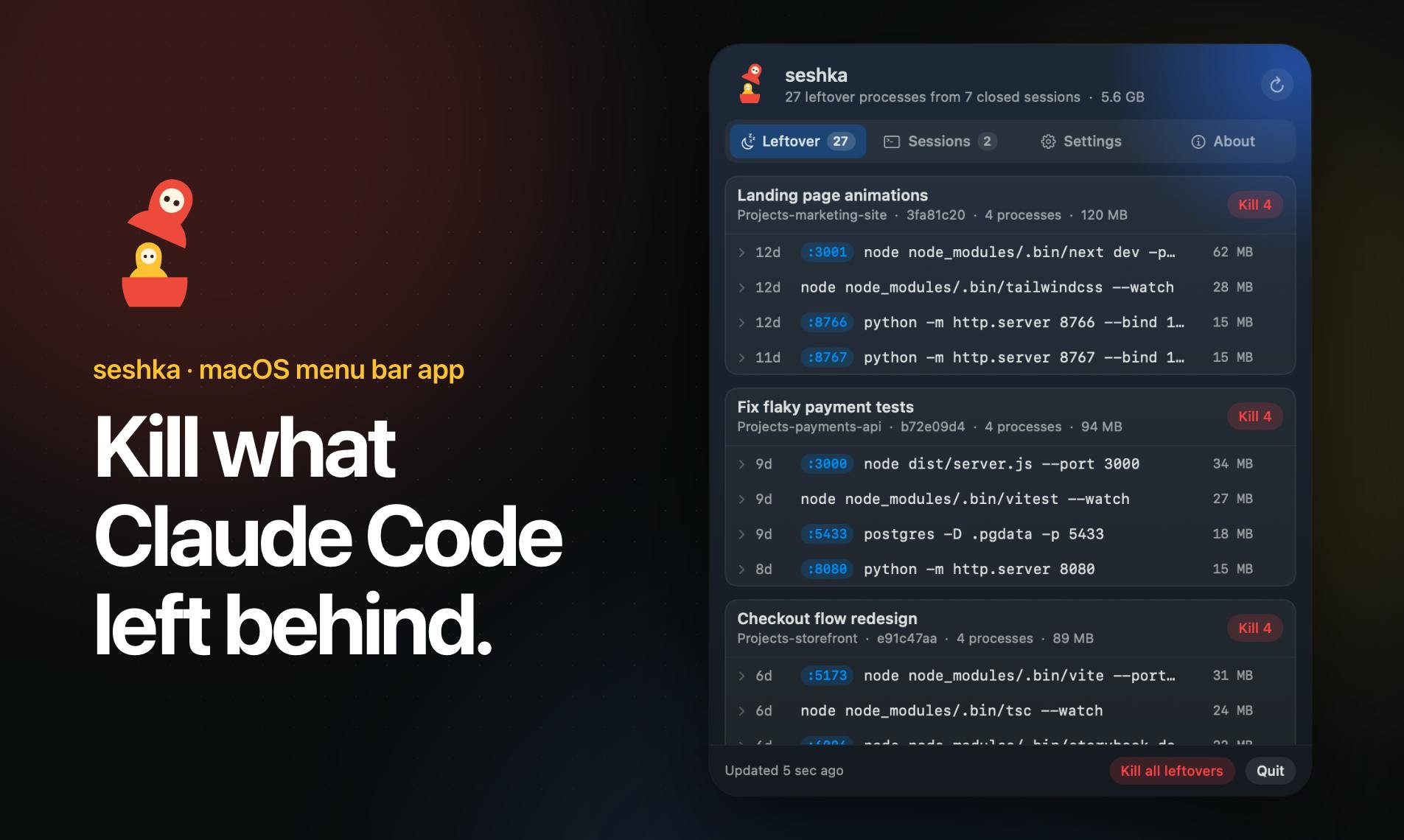
Open-source tool seshka cleans up Claude Code's orphan processes by session.
seshka is an open-source Mac tool for AI coding assistants like Claude Code, addressing the problem of dev servers, file watchers, and scripts running as orphan processes after sessions end. It lives in the menu bar, groups processes by session with memory and port info, supports one-click termination and auto/manual cleanup of idle sessions. Restrained in scope (Mac and Claude Code only), it's free and open source. Its 81 upvotes, 14 comments, and 8th-place daily ranking on Product Hunt show the pain point is real. The article notes this reflects a broader management gap from decoupled session and process lifecycles as AI agents spread, with AI coding tool competition extending from capabilities to cleanup.
AI coding assistants like Claude Code have dramatically boosted developer productivity, but they come with a side effect: after a session ends, the dev servers, file watchers, and scripts it launched keep running in the background as unmanaged "orphan processes." An open-source tool called seshka, launched by a developer on Product Hunt, is designed to solve exactly this overlooked problem.
The Problem: The "Leftover Mess" of AI Coding Sessions
Most developers who have used Claude Code have been through a similar scenario: you ask the AI assistant to spin up a local dev server for testing, the session ends or moves on to another task, but that Node process holding a port and the file-change watcher are still alive. They quietly eat memory, occupy ports, and over time your machine slows down and port conflicts pile up.
The traditional approach is to open Activity Monitor and dig around manually, or use command-line tools like lsof to hunt down processes one by one—time-consuming and prone to killing the wrong thing. seshka's angle is direct: group these processes by the session that spawned them, so cleanup becomes a single click.
Orphan Process is a classic concept in operating systems: when a parent process ends (or is terminated) but the child processes it created are still running, those children are called orphan processes. On Unix/Linux/macOS systems, orphan processes are usually adopted by init (or launchd), so they don't disappear automatically—they keep consuming system resources. AI coding assistants like Claude Code tend to spawn a large number of child processes while executing tasks: dev servers started via npm run dev, file watchers like nodemon or tsc --watch, and various one-off scripts. When the AI session ends (whether the user exits, it times out, or it crashes), these child processes have no awareness that the parent session has terminated, making them typical orphan processes. Traditional process management tools organize by process name or PID, making it hard to tell which AI session launched a given Node process—exactly the gap seshka tries to fill.
What seshka Does: Process Management from a Session Perspective
According to its Product Hunt page, seshka lives in the menu bar and displays the child processes launched by Claude Code grouped by the session they belong to, along with memory usage and port information. Developers can see at a glance which session left behind what burden, then terminate with one click.
It also supports manually ending idle sessions, or can be configured to handle them automatically. For developers juggling multiple AI coding tasks at once, organizing by "session" rather than "process name" is closer to the actual mental model—what you remember is what that session just did, not the PID of some node process.
Process grouping and port-usage troubleshooting is key context for understanding the value of seshka's features. On macOS, checking port usage typically involves lsof -i :<port>, and viewing the process tree uses ps -ef or pstree, but these commands output a flat process list, and developers have to infer ownership from start times, parent PIDs, and command-line arguments themselves. seshka essentially builds a "session" abstraction on top of this low-level information: it likely clusters processes spawned by the same Claude Code session by tracking the parent process chain (PPID), start-time windows, or environment variables. Each group shows memory usage (obtainable via the RSS field from ps) and listening ports (obtainable via lsof or netstat), letting developers identify at a glance which session left behind what burden. This session-based view is closer to how developers remember "what I just asked the AI to do" than aggregating by process name.
Design Trade-offs: A Small, Focused Open-Source Tool
Judging from the product information, seshka's positioning is very restrained: Mac-only, solving only Claude Code-related process leftovers, with core functionality built around three things—display, grouping, and termination. The upside of this narrow focus is fast execution and low cognitive overhead; the downside is that coverage is limited to a specific toolchain and operating system.
It's free and open source, with code hosted on GitHub, making it friendlier to developers who want to audit or modify it themselves. On Product Hunt, the product received 81 upvotes and 14 comments, ranking 8th for the day—showing that the "AI session leftovers" pain point genuinely resonates with some developers.
Menu Bar App is a lightweight application form on macOS, typically without a Dock icon or main window, offering interaction solely through an icon in the system menu bar. This type of app suits always-on, low-frequency tool scenarios such as system monitoring, clipboard management, or process cleanup. By choosing the menu bar form, seshka avoids interfering with developers' primary workflow—you only open it when you need to clean up. From a technical standpoint, menu bar apps are usually built with Swift or Objective-C and AppKit, packaged as a .app for direct distribution; being open source means developers can compile it themselves and audit its process-scanning logic, avoiding granting unnecessary system permissions. This form also brings limitations: menu bar space is limited, making complex grouping and filtering interactions hard to fully express, so the product's functionality must stay restrained.
Worth Pondering: The Cleanup Problem of AI Workflows
seshka's value isn't just as a cleanup tool—it reveals an easily overlooked dimension of the AI coding boom: when AI agents are allowed to execute arbitrary commands and start arbitrary services, the management costs arising from the decoupling of session lifecycle and process lifecycle will gradually become apparent.
Similar gaps exist in other scenarios, such as long-running unattended automation scripts and background task queues. What developers need isn't just stronger AI capabilities, but also accompanying "cleanup" mechanisms. seshka is a lightweight but clearly directed attempt.
For Mac developers who use Claude Code daily, this is a small open-source tool worth installing and trying; for those focused on AI engineering, it's more of a signal: competition in the AI coding tool experience is extending from "what it can do" to "how you wrap things up afterward."
The decoupling of session lifecycle and process lifecycle is a systemic problem in AI agent engineering. In traditional development, a developer manually starts a server in the terminal; closing the terminal window usually sends SIGHUP to child processes, which then terminate—lifecycles are naturally bound. But AI coding assistants often execute commands in the background or in separate sessions, and the end of a session (closing the chat window, timeout, switching tasks) doesn't trigger cleanup signals for child processes, so the two lifecycles become decoupled. More broadly, containerization, systemd user services, and process supervisors (like supervisord, pm2) all try to solve the question of "who's responsible for cleanup," but no standard solution has emerged for AI agent scenarios. seshka's exploration hints at a possible direction: introducing session-level process ownership tracking and automatic reclamation at the AI tool layer, rather than relying on developers to manually investigate after the fact.
One-line Summary
Open-source tool seshka cleans up orphan processes left behind by Claude Code, organized by session.
Paragraph Summary
seshka is an open-source Mac tool for AI coding assistants like Claude Code, designed to solve the problem of dev servers, file watchers, and scripts continuing to run as orphan processes after a session ends. It lives in the menu bar, displays child processes launched by AI sessions grouped by session, includes memory and port information, supports one-click termination, and can end idle sessions manually or automatically. Its positioning is restrained—covering only Mac and Claude Code scenarios—and it's free and open source. It received 81 upvotes, 14 comments, and 8th place for the day on Product Hunt, showing the "AI session leftovers" pain point is real. The article further notes that this reflects a management gap in the decoupling of session and process lifecycles as AI agents become widespread, and that competition among AI coding tools is extending from capabilities to cleanup.
Related articles

Michael Nielsen Takes Down His Classic Neural Network Textbook, Sparking Community Discussion
Michael Nielsen's classic free textbook Neural Networks and Deep Learning has been taken offline, sparking discussion on Hacker News about the reasons and impact.

Inside the AI Training Data Market: The Trade-off Between Exclusivity and Discounts
G2i founder Gabe Greenberg reveals the dual-track pricing of the AI training data market: labs pay a premium for exclusive data or accept discounts that allow others to buy it.

SessionGraph: Unifying All Coding Agent Sessions in One Interactive Graph
SessionGraph aggregates coding agent sessions into an interactive graph, helping developers review, debug, and manage AI coding workflows across sessions. This article examines its positioning, value, and open questions.