Sidebranch: Review Visual Git Diffs Directly Inside Your Running Application
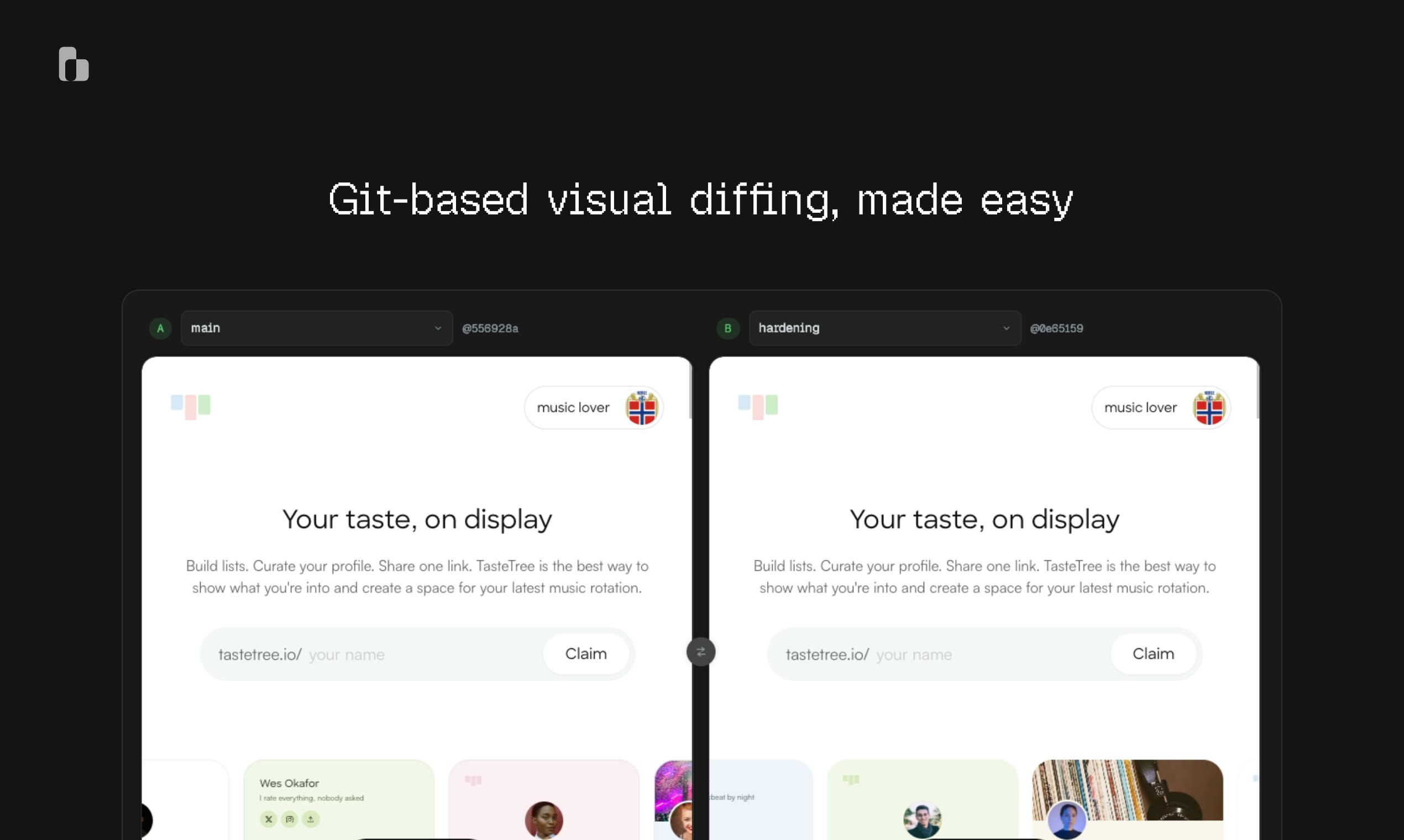
Sidebranch uses Git Worktree to enable in-app visual branch diffing with zero dependencies.
Sidebranch is a local development tool that leverages Git Worktree to run two branches of your application in parallel and embed an in-page widget for instant visual comparison. Designed as loopback-only with zero dependencies, it eliminates context switching for frontend teams reviewing UI changes, offering a secure and lightweight alternative to cloud-based visual regression platforms.
The Pain Point of Code Review: The Cost of Context Switching
Pull Requests (PRs) are the core collaboration mechanism for code merging in modern distributed software development, popularized by GitHub in 2008. After completing changes on an independent branch, developers initiate a code review request through a PR, where team members can comment line by line, discuss design decisions, and decide whether to merge into the main branch. However, the PR review workflow has an inherent flaw when it comes to frontend visual changes: platforms like GitHub and GitLab display text-level diffs. For CSS property changes or React component tree modifications, reviewers see character differences rather than actual pixel changes. This forces frontend developers to constantly switch between code hosting platforms, local development environments, and browsers — cognitive science research shows that task switching incurs an average attention recovery cost of 15-20 minutes, which accumulates into significant efficiency losses in high-frequency review scenarios.
This is exactly the pain point Sidebranch targets. Its core idea is: bring branch switching and visual comparison directly into the running application itself, rather than forcing developers to adapt to external tool workflows.
Core Mechanism: Worktree + In-Page Controls
Parallel Execution Based on Git Worktree
Sidebranch's technical foundation is Git's worktree feature. Git Worktree was introduced in Git 2.5 (released in 2015) and allows multiple independent working directories to be derived from the same Git repository (the same .git directory), with each working directory able to check out a different branch, completely isolated and independent from one another. Compared to the traditional switching approach of git stash + git checkout, Worktree's core advantage lies in persistent coexistence of states: the filesystem states of two branches exist simultaneously on disk, and their respective development servers can start independently and listen on different ports. Technically, multiple Worktrees share the same .git object database (objects, refs), so they don't duplicate all history records like a full clone would — disk overhead comes only from actual file differences in the working directories. Leveraging this mechanism, Sidebranch enables application instances from two branches to run in parallel, allowing developers to see the state of another branch without interrupting their current work.
This is fundamentally different from traditional branch switching. In the traditional approach, you need to save your current work, switch branches, restart the development server, and only then can you see the result — the entire process is both time-consuming and disruptive to your train of thought. The Worktree approach lets both states exist simultaneously, ready for comparison at any time.
In-Page Widget: A Zero-Navigation Switching Experience
Sidebranch embeds a lightweight control within the application page, allowing developers to switch branch views and perform side-by-side comparisons directly in the browser. The value of this design lies in maintaining spatial continuity of operations — your eyes stay fixed on the same interface, changes happen right in front of you, rather than requiring you to "imagine" the differences in another tab.
For visual modifications like UI component changes, layout adjustments, and style updates, the efficiency gains of this review approach are self-evident. Reviewers can immediately see the actual rendered results of "before" and "after," rather than trying to infer visual outcomes from code diffs.
Design Philosophy: Loopback-Only, Zero Dependencies
Sidebranch's security and deployment design deserves attention. The tool is explicitly marked as Loopback-only — Loopback refers to the 127.0.0.1 / localhost address range in the TCP/IP protocol stack, where traffic never leaves the local machine's network stack; the operating system intercepts and loops it back at the kernel level. This means all operations are confined to the local development environment, and no code or data is ever sent to external services. This is particularly critical in enterprise and financial-grade codebases: many companies' security compliance policies (SOC 2, ISO 27001) explicitly restrict data egress paths after development tools access source code. In recent years, AI code completion tools have sparked multiple data controversies due to implicit uploading of code snippets, making the developer community especially sensitive to how tools handle data. By adopting Loopback-only as a design constraint rather than an optional configuration, Sidebranch takes a harder stance on building trust.
Zero dependencies also carries special weight in the frontend toolchain context. The Node.js ecosystem's node_modules is notorious for dependency tree explosions — a medium-sized project can easily accumulate hundreds of direct and indirect dependencies, introducing supply chain attack risks, version conflicts, and CI cache invalidation issues. A zero-dependency tool means its behavior is entirely determined by its own code. It won't suddenly break because an upstream package publishes a breaking update, and it eliminates concerns like "will this tool conflict with our existing vite / tailwind versions?" Together, these two characteristics form a tool promise of "can be removed at any time with no side effects," making it extremely friendly for experimental adoption.
Use Cases and Limitations
Scenarios Where It Delivers the Most Value
Sidebranch is best suited for the following types of work:
- Visual regression checks for frontend UI component libraries: Quickly compare rendering differences of components across different branches
- Design fidelity reviews: Switch branches to compare design mockups against actual implementation
- Asynchronous visual change reviews in team collaboration: Reviewers can see the effects without locally switching branches
For the types of changes where "a picture is worth a thousand lines of code," Sidebranch can significantly shorten the review cycle.
Boundaries to Consider
Of course, Sidebranch is not a universal solution. For purely logical changes (algorithm optimizations, API interface modifications, data processing logic), the value of visual comparison is limited, and traditional code diff review remains the primary approach. Additionally, the Worktree approach requires two separate sets of dependency installations and build artifacts, which may introduce additional disk and memory overhead in large projects — a practical cost that needs to be evaluated before adoption. It's worth noting that this differs from the positioning of cloud-based visual regression testing platforms like Chromatic and Percy: the latter targets automated screenshot comparison in CI/CD pipelines, while Sidebranch focuses on the instant interactive experience during local development. They address different stages of the same problem.
The Philosophy of Small, Focused Tools
Sidebranch represents a trend worth watching in the developer tools space: small, focused developer tools that solve a single pain point are regaining attention.
This "small tools renaissance" has its own historical context. In the early 2020s, the rise of the VS Code extension ecosystem and AI coding assistants put "all-in-one" tools at the center of the mainstream narrative. But at the same time, single-responsibility tools driven by the Unix philosophy have been quietly making a comeback: esbuild only does bundling, biome only does formatting and linting. These tools share common traits: ready to use upon installation, removable independently, and not tied to any specific framework or workflow — composition over integration. In an era dominated by AI coding assistants and large IDE extension ecosystems, a tool that only does "visual diff" well without introducing additional complexity actually embodies a restrained engineering aesthetic. It doesn't try to become your entire workflow — it just quietly eliminates friction at the exact point where it's needed most.
For frontend teams whose core product is visual, Sidebranch is worth trying once in your local development environment — after all, zero dependencies means the cost of trying is virtually zero.
Key Takeaways
Related articles

Deep Learning's Three Architectures and the Universal Approximation Theorem: A Complete Guide to MLPs, CNNs, and Transformers
Explaining the inductive bias differences among MLP, CNN, and Transformer, the existence meaning of the Universal Approximation Theorem (UAT), and the role of Taylor expansion in approximation analysis, while clearing up common misconceptions.

GitLab Emergency Patch Release: Analysis of Critical Security Fixes
GitLab releases critical patch 19.5.1, sparking 355 points of discussion on Hacker News. This article analyzes the background, upgrade steps for self-hosted instances, and verification points to help DevOps teams respond quickly to security updates.

Switch 2 Jailbreak: Hackers' Challenges and Security Considerations
Explore the possibility and technical difficulties of Switch 2 jailbreaking, analyzing hacker community dynamics, Nintendo's security measures, and legal and ethical controversies.