Sim Studio: Deep Dive into the Open-Source AI Agent Workflow Platform with Nearly 10K Stars

Open-source Sim Studio enables no-code drag-and-drop building of locally deployed AI Agent workflows
Sim Studio is an emerging open-source AI workflow platform that has rapidly approached 10K GitHub Stars since launch. Licensed under Apache 2.0, it supports fully local deployment and native Ollama local LLM integration for end-to-end localization. Through its minimalist drag-and-drop interface, users can build AI Agent workflows in minutes without coding, differentiating itself from Dify and n8n — especially suited for enterprises with strict data compliance needs or those lacking dedicated AI teams.
A New Contender in the Open-Source AI Workflow Space
In the AI Agent and automation workflow domain, Dify and n8n have long been popular choices among developers. An AI Agent refers to an AI system capable of autonomously perceiving its environment, making decisions, and executing tasks — unlike simple chatbots, Agents can invoke tools, access databases, execute code, and even coordinate multiple subtasks to accomplish complex objectives. When AI Agents are combined with automation workflows, a powerful paradigm emerges: users can orchestrate multiple AI capability nodes to collaborate like an assembly line, handling everything from information gathering and analytical reasoning to result output.
Recently, however, an open-source project called Sim Studio has been gaining traction at a remarkable pace — shortly after launch, its GitHub Star count approached 10K, generating significant buzz in tech communities.
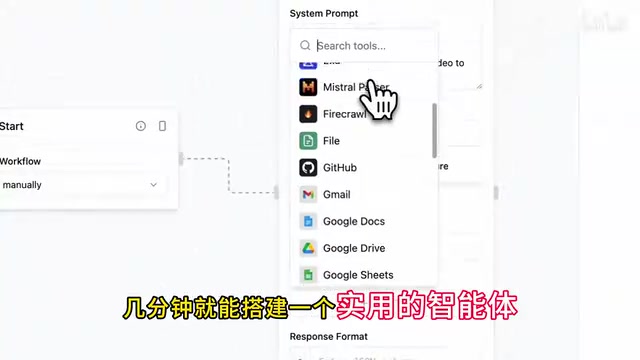
Sim Studio's mission is clear: enable users to build AI Agent workflows without writing code. Through an intuitive drag-and-drop interface, you can get an intelligent agent application up and running in just minutes.

Core Features of Sim Studio Explained
Lightweight and Intuitive Visual Interface
Sim Studio takes a minimalist approach — the entire interface is clean and streamlined. Compared to some feature-heavy workflow platforms with steep learning curves, Sim Studio keeps operational complexity remarkably low. Each functional module is presented as a node, and you can string different nodes together into a complete AI workflow simply by dragging and connecting them.
This drag-and-drop visual programming is the core interaction pattern of the low-code/no-code movement. Users build complete application logic by placing pre-built functional modules on a canvas and defining data flow and execution order through connections. Each node typically encapsulates a specific capability — such as calling a large language model, performing conditional logic, or reading/writing databases — so users don't need to understand underlying API calls or code implementation. They only need to focus on the business logic itself. This paradigm was first widely adopted in ETL tools and process automation; now that it's been brought into the AI domain, it has dramatically lowered the technical barrier to building intelligent applications.

This design is particularly friendly to two groups: business professionals without programming backgrounds who want to leverage AI for productivity, and developers who need to quickly validate ideas and build prototypes. Going from zero to a functional intelligent agent might take just a few minutes — that kind of efficiency is highly competitive among similar products.
Apache 2.0 Open-Source License: No Commercial Lock-in Risk
Sim Studio is open-sourced under the Apache 2.0 license, allowing users to freely use, modify, and distribute it with no risk of commercial lock-in. This is crucial for enterprise users — no worrying about sudden paywalls or restrictive license terms.
Apache 2.0 is a permissive open-source license published by the Apache Software Foundation and one of the most commercially friendly mainstream open-source licenses available. It allows users to freely use, copy, modify, and distribute software — even in closed-source commercial products — with the only core requirement being retention of the original copyright notice and license text. By comparison, the GPL license requires derivative works to also be open-sourced (the "copyleft" clause), while some projects use BSL (Business Source License) or SSPL, which impose additional restrictions on cloud service providers. Apache 2.0 also explicitly includes patent grant provisions, automatically giving users patent licenses from contributors — particularly important for enterprise adoption as it eliminates potential patent litigation risks. Notable projects like Kubernetes and TensorFlow use this license.

Fully Local Deployment: Data Never Leaves Your Servers
Data security is always an unavoidable concern when enterprises adopt AI tools. Sim Studio supports fully local deployment — all data stays on your own servers without passing through any third-party platforms, eliminating data leakage risks at the source.
In industries like finance, healthcare, and government, data compliance isn't just a voluntary choice — it's a hard legal requirement. China's Data Security Law, Personal Information Protection Law, and the EU's GDPR all impose strict regulations on data storage location, cross-border transfer, and processing methods. For example, patient medical records in healthcare and transaction records and customer identity information in finance are explicitly prohibited from being transmitted to overseas servers in many jurisdictions. When enterprises use cloud-based AI API services, user-submitted prompts and returned results pass through third-party servers, which often constitutes a risk point in compliance audits. Therefore, solutions that achieve end-to-end localization hold irreplaceable value in these industries.
Native Support for Ollama and Other Local LLMs
This point deserves special attention: Sim Studio can directly connect to locally running large language models, such as open-source models deployed via Ollama, with absolutely no dependency on external APIs. Even in air-gapped environments, AI Agent workflows can still run, achieving true end-to-end localization.
Ollama is an open-source tool specifically designed for running large language models on local machines, greatly simplifying the model download, configuration, and inference process. Users can pull and run mainstream open-source models like Llama 3, Mistral, and Qwen with a single command, while Ollama automatically handles model quantization, GPU acceleration, memory management, and other low-level details. Its operating principle is similar to how Docker manages containers — packaging models as standardized runnable units and exposing them via local API interfaces. This means all inference computation happens on the user's own hardware, with no data sent to external servers like OpenAI or Anthropic. Current consumer-grade GPUs (such as the NVIDIA RTX 4090) can already smoothly run quantized models with 7 to 13 billion parameters, making local deployment practically viable in terms of performance.
For industries with strict data compliance requirements like finance, healthcare, and government, this combination of "Apache license + local deployment + local models" is extremely attractive.
Sim Studio vs. Dify vs. n8n: A Side-by-Side Comparison
The AI workflow platform space is already quite crowded. Let's put three mainstream tools side by side for an intuitive comparison:
| Dimension | Sim Studio | Dify | n8n |
|---|---|---|---|
| Open-Source License | Apache 2.0 (fully open) | Partially open-source | Commercial restrictions exist |
| Local Deployment | ✅ Fully supported | ✅ Supported | ✅ Supported |
| Local LLM Integration | ✅ Native Ollama support | ✅ Supported | Requires additional configuration |
| Learning Curve | Low (no-code drag-and-drop) | Medium | Medium-High |
| Ecosystem Maturity | Rapid growth phase | Mature | Mature |
| Core Positioning | Lightweight AI Agent building | Full-stack AI app development | General-purpose automation workflows |
About Dify: Dify positions itself as a full-stack development platform for AI applications, covering the complete pipeline from Prompt orchestration, RAG (Retrieval-Augmented Generation) knowledge base management, and Agent strategy configuration to application monitoring and data analytics. RAG is one of the most critical technical architectures in enterprise AI applications today — it works by chunking private documents, vectorizing them into a vector database, and retrieving relevant segments to inject into context during inference, enabling LLMs to answer based on enterprise-specific knowledge and effectively mitigating model "hallucination" issues. Dify provides mature pipeline support in this area, including document parsing, chunking strategies, embedding model selection, and retrieval ranking, while also supporting multiple Agent reasoning frameworks (such as ReAct and Function Calling) with rich built-in tool integration capabilities.
About n8n: n8n originated in the general-purpose automation workflow space, initially competing with SaaS automation platforms like Zapier and Make (formerly Integromat). Its core advantage lies in its massive integration ecosystem — supporting connectors to hundreds of third-party services (such as Slack, Google Sheets, GitHub, databases, etc.). n8n uses a fair-code model where source code is visible but commercial use comes with certain restrictions, which is fundamentally different from Apache 2.0's complete openness. As the AI wave has risen, n8n has been actively integrating AI capabilities, adding LLM nodes, vector storage nodes, and more. However, its underlying architecture still centers on general-purpose automation, with AI features serving more as components called within workflows rather than the entire product experience being designed around AI Agents as Sim Studio does.
Sim Studio has chosen minimalism, lightweight design, and zero barriers as its differentiation strategy. If you find existing tools too heavy and just want to get an AI Agent running quickly, Sim Studio offers a more streamlined option.
To be fair, as a newer project, Sim Studio still needs time to mature in areas like plugin ecosystem, integration count, and community documentation. But the growth rate approaching 10K Stars already demonstrates strong market demand for this type of lightweight AI workflow tool.
Which Teams Should Consider Sim Studio
Based on Sim Studio's product characteristics, the following types of teams should pay close attention:
- Enterprises with strict data security requirements: End-to-end local deployment keeps data within the intranet, meeting compliance requirements of the Data Security Law, Personal Information Protection Law, GDPR, and other regulations
- Small and medium businesses without dedicated AI development teams: No-code drag-and-drop that business staff can handle, with no need to master Python, API calls, or other technical skills
- Technical teams needing to quickly validate AI application ideas: Build prototypes in minutes, iterate rapidly, and avoid spending excessive time on infrastructure setup
- Teams with limited budgets who want AI-powered efficiency gains: Apache 2.0 license means no commercial licensing fees, and pairing with Ollama to run open-source models also saves API call costs
Summary: The Democratization Trend of AI Workflow Tools
Sim Studio's rapid rise validates an unmistakable trend: the barrier to using AI tools is dropping fast. From complex systems that once required professional development teams to build, to intelligent agents that anyone can get running with a few drag-and-drop actions, AI Agents are becoming increasingly accessible. This aligns with the broader software industry's shift from code-first to low-code/no-code — when the underlying technology is mature enough, competition at the tools layer shifts toward usability and accessibility.
For developers and enterprise decision-makers doing technology evaluation, Sim Studio deserves a spot on your shortlist. Especially for teams with hard compliance requirements who want end-to-end local deployment, Sim Studio's trinity of open-source license, local deployment, and local models might be exactly what solves your pain points.
Related articles
 Product Reviews
The Programmer's Desk Setup Guide: Building a Workspace That Feels Like Home
Discover how programmers build productive, comfortable workspaces. From multi-monitor setups to ergonomic design, explore the desk philosophy that drives focus and flow.
 Product Reviews
Qoder vs Cursor Real-World Comparison: Which $20/Month AI IDE Is Better?
Hands-on comparison of Qoder vs Cursor AI IDEs: Agent autonomy, human interaction count, and architecture decisions. Qoder needed only 2 interactions vs Cursor's 8.
 Product Reviews
Cursor Cloud Agent Demo: Eliminating Bottlenecks Across the Entire Software Development Lifecycle
Deep analysis of Cursor's Cloud Agent demo showing how cloud VMs, automated test artifacts, and a full-chain control plane systematically eliminate human bottlenecks across the software development lifecycle.