Six Types of AI Agents Explained: A Guide to Deploying and Choosing Open-Source Agents
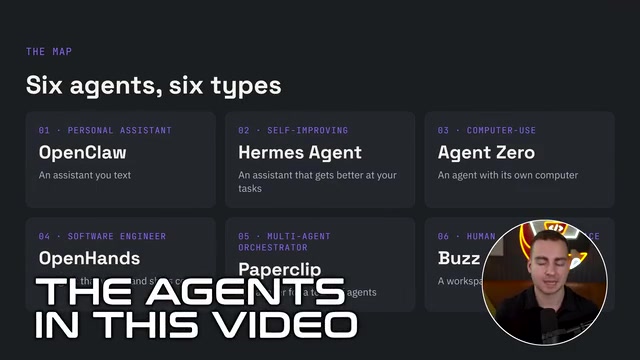
A breakdown of six mainstream open-source AI agents, their positioning, and how to choose—plus VPS self-hosting deployment advice.
Starting from the essential difference between chatbots and agents, the article notes that all agents share the five-element architecture of model, tools, memory, interface, and runtime location, with runtime location being one of the most critical decisions—a VPS is recommended for its low cost and clean isolation. It then breaks down six open-source, self-hostable agents from "easiest to get value from" to "most specialized": OpenClaw as a chat-app-first personal assistant that deploys fastest but doesn't self-evolve; Hermes, which distills effective methods into skills for continuous improvement; Agent Zero, with its own independent Linux environment that writes its own tools, flexible but prone to going off track and token-hungry; OpenHands, focused on end-to-end coding from GitHub ticket to PR; Paperclip, managing a multi-agent organization as a company framework; and Buzz, providing a human-agent collaboration workspace. It ends with a selection checklist, emphasizing choosing only open-source, self-hostable solutions to avoid ecosystem lock-in, and warning about the security risks of API keys and internet access.
What Exactly Is an AI Agent?
A chatbot just answers a question and stops, whereas an agent is given a goal and keeps working until it's done. It selects steps, executes them, checks the results, and then autonomously decides what to do next. The general architecture behind this has five parts: the model (the brain, swappable and able to support multiple models), tools (the hands—running code, browsing the web, reading and writing files, connecting to external capabilities via MCP), memory (a record of what's been done; memory systems vary greatly between frameworks), the interface (a web dashboard, terminal, Telegram, or desktop client), and where it runs (locally, on dedicated hardware, or on a VPS).
Where it runs is one of the most critical decisions. Running an agent on a personal laptop is free but lacks isolation—it can access the entire file system, and the device must stay on all the time; dedicated hardware like a Mac mini is expensive and a hassle to decommission; a virtual private server (VPS) costs only $6 to $10 per month (excluding token fees) and provides a clean, isolated environment that can simply be destroyed if something goes wrong. This is also why every agent demonstrated here is deployed on a VPS.
MCP (Model Context Protocol) is a standard protocol proposed and open-sourced by Anthropic to let models connect to external tools and data sources in a unified way. Before MCP, every agent framework had to write separate adapter code for each tool, and tools couldn't be reused across frameworks; MCP abstracts tools, resources, and prompt templates into a standard server, so any agent that supports the protocol can call the same set of capabilities plug-and-play. For self-hosters, this means you can build your own MCP server (for example, connecting to a local database or internal API) and then share it across different frameworks like OpenClawAd and Hermes without redeveloping it for each one. The article lists "connecting to external capabilities via MCP" as a key component of the tool layer precisely because it determines whether an agent's capability boundaries can be expanded at low cost.
Breaking Down the Six Types of AI Agents
The following six agents are roughly ordered from "easiest to get value from" to "most specialized." All are open source, all can be self-hosted, and none lock you into a particular model ecosystem.
OpenClaw: A Chat-App-First Personal Assistant
OpenClaw positions itself as an around-the-clock personal assistant that integrates directly into the chat apps you already use—Telegram, Slack, Discord, Signal, and more. Its philosophy is chat-app-first: the agent hides behind a messaging app, so you don't need to open any dashboard—just send a message. It's one of the earliest and most popular frameworks, with the richest set of integrations and plugin ecosystem—hundreds of plugins can be installed from the dashboard, and it supports scheduled tasks.
Pros: fastest to deploy, easiest to get started with, compatible with any model, and a large community means most issues have already been fixed. Cons: it doesn't self-evolve, it gets messy once you have many channels and skill configurations, and early versions had security vulnerabilities and a large attack surface. It suits users who want an assistant that "messages like a person" or who only need a few simple scheduled tasks.
Hermes Agent: A Self-Improving Agent That Learns Workflows
If OpenClaw is a messaging gateway with an agent, Hermes is a learning agent plus a messaging gateway—the former emphasizes the interface, the latter emphasizes the agent itself. Its core mechanism: after completing a task, it reviews what methods worked and saves them as a skill (a readable, editable markdown file), then reuses them directly the next time it performs a similar task, saving tokens.
In the demo, after completing a weekly YouTube summary, Hermes automatically created a corresponding skill, and it also maintains long-term memory, automatically storing and organizing user preferences. After running continuously for several months, the efficiency gains from accumulated skills become quite noticeable. The cost is more complex setup, the need for multiple chats to train it, and the risk of learning the wrong skills and repeating mistakes, which requires manual management. It suits users with recurring workflows who are willing to invest long-term effort in tuning it.
Skills in this type of self-improving agent usually refer to a structured, readable, and editable Markdown document that records the steps, caveats, and available tool combinations for completing a certain type of task. It has nothing to do with model parameters and is a form of externalized memory: after a task ends, the agent distills the validated process into a skill file, and the next time it encounters a similar task it retrieves and loads it first, thereby skipping trial and error and reducing context and token consumption. Skills can be reviewed and modified by humans, which is what makes them more controllable than pure vector memory—if something is learned wrong, you can edit and correct it directly. Hermes in this article relies precisely on skill accumulation to achieve "the more you use it, the faster it gets," at the cost of needing long-term tuning and preventing erroneous skills from being reused over and over.
Agent Zero: A General-Purpose Agent With Its Own Computer
Agent Zero is a general-purpose agent that runs completely independently in Docker, with a full Linux machine of its own. It doesn't have a large set of preset tools; when it needs a tool, it usually writes the code itself and runs it in the terminal, so it leans toward programming scenarios, with flexibility among the best on this list.
In the demo, it was asked to research Hacker News discussions about AI over the past 30 days as a team, and it automatically spun up three sub-agents—writing, analysis, and data—to divide the work of collecting and writing the report. Pros: high transparency—you can clearly see what each sub-agent is doing—and it's fully sandboxed, unable to touch the rest of the server. Cons: it tends to go off track on vague tasks, consumes a lot of tokens (it writes code for almost everything), and doesn't focus on the interface.

OpenHands: An Open-Source AI Software Engineer
OpenHands (formerly OpenDevin) is the only agent on this list built specifically for programming. It works within your existing GitHub repository: give it a ticket or issue, and it returns a completed Pull Request. In the demo, it was given a to-do API repository with the requirement to migrate to a SQL-like database, add tags and search, add a delete endpoint, and write tests; it independently completed the code changes, planning, and terminal execution, all running in parallel inside a sandbox.
Pros: the strongest end-to-end coding performance of all the agents, data never leaves the server except for model calls, and it's compatible with any model. Cons: it's only suitable for coding, it's resource-intensive (requires at least a KVM-level configuration), and it's mainly aimed at existing codebases rather than being a tool for building from scratch.

Pull Request (PR) is the merge-request mechanism on code hosting platforms like GitHub: after a developer modifies code on a separate branch, they open a PR against the main branch, attaching the diff, a description, and test results, and a maintainer reviews it and decides whether to merge. Using "ticket to PR" as an agent's delivery format is a clever choice—it naturally provides isolation (changes happen on a branch and don't affect the main branch), auditability (the diff is visible line by line), and reversibility (if it isn't merged, it doesn't take effect). So OpenHands' output isn't a direct change to the repository but a PR waiting for human review, preserving automation efficiency while leaving the final decision in human hands—which complements its design of running in a sandbox.
Paperclip: A "Company Framework" for Managing Other Agents
Paperclip doesn't do the work itself—it manages other agents, like a company. In the demo, an "Agent Builders Agency" was created with the goal of recruiting 1,000 community members, with roles such as CEO, founding engineer, and researcher, each of which can be assigned its own model (e.g., Gemini Flash for lightweight tasks, Claude Sonnet for complex ones) and given spending limits. Agents automatically start work on a heartbeat (every 30 minutes or every hour), break the overall goal into subtasks and form a dependency graph, and can even hire new agents.
This is the most autonomous framework on the list, but its configuration complexity is extremely high, it's hard to demonstrate its value at small scale, and it consumes a lot of tokens. It suits users with ample budget who want to build a complete multi-agent organization for long-term operation.
Multi-Agent Orchestration differs from a single agent in that it solves the problem of "who does it, in what order, and with what budget." Common patterns include hierarchical (a manager decomposes goals and delegates to subordinates), pipeline, and decentralized negotiation. Paperclip adopts a more hierarchical organizational structure: roles correspond to positions, heartbeats drive periodic work, tasks are broken into a dependency graph of subtasks, and each role can have its own model and spending limit. The complexity of such frameworks comes mainly from coordination overhead—improper task decomposition can lead to duplicated work or deadlocks—so it's hard to show value at small scale, and only for long-term goals with large task volumes can its configuration cost be amortized.
Buzz: A Workspace for Human-Agent Collaboration
Buzz comes from Block (Jack Dorsey's company) and is essentially a self-hosted Slack where agents join as teammates. It isn't an agent itself but provides infrastructure for collaboration between agents and between humans and agents: you can configure multiple agents with different personalities, roles, and providers (Claude, Codex, and OpenClaw all work), and they interact in different channels like Slack and delegate tasks to each other.
Cons: it's very new and still in beta, and its value is limited outside team scenarios—solo users probably shouldn't bother.
Selection Advice and Deployment Essentials
A principle that runs throughout is to choose only open-source, self-hostable solutions to avoid being locked into a single company's ecosystem. On the deployment side, the UP host uses Hostinger's one-click deployment to quickly spin up agents on a VPS; a single KVM plan can run multiple agents simultaneously, at a cost far lower than buying your own hardware.
- Want the fastest start and simple scheduled tasks: choose OpenClaw
- Have recurring workflows and are willing to invest long-term effort: choose Hermes
- Need flexibility and generality, with the ability to write its own code: choose Agent Zero
- Focus on handling code repository tickets: choose OpenHands
- Want a multi-agent autonomous organization: choose Paperclip
- Team and agent collaboration: choose Buzz
Security cannot be ignored: these agents touch API keys and the open internet, so you should refer to dedicated security configuration guidance before running them.
FAQ
What's the difference between an open-source AI agent and a ChatGPT agent? Open-source solutions let you choose your own model, your own runtime location, and control the framework, without being locked into a company's pricing and ecosystem; closed-source agents are usually tied to a specific platform.
Where should individual users deploy their agents? A VPS is recommended. It costs about $6 to $10 per month (excluding tokens), provides clean environment isolation, and can be destroyed directly if something goes wrong—safer and more stable than running on a personal laptop.
How do I choose between Hermes and OpenClaw? Choose OpenClaw for zero-config quick chatting and simple scheduled tasks; choose Hermes if you have recurring workflows and want an agent that gets smarter the more you use it.
Related articles

Can Foldable Phones Disrupt the Vertical Short-Drama Ecosystem?
The large unfolded screen of foldables doesn't suit vertical short videos—huge black bars appear on both sides. Meanwhile, China-origin micro-dramas are generating over $1 billion in US revenue in vertical format. With foldables under 2% of global sales, can they disrupt the vertical content ecosystem?

Programming Laws Tier List: Which Are Truths and Which Should Be Retired?
From Conway's Law to Brooks's Law, senior developers Tier List classic programming laws: which still hold in the AI era, and which are overrated folk wisdom?
Kimi K3.1 Pro vs Opus 5.5 in 13 Long-Running Tasks: Which One Is Actually Worth Using?
13 long-horizon tasks pit Kimi K3.1 Pro against Opus 5.5: Kimi takes algorithmic shortcuts in research, wins on Blender visuals, and falsely claims passing strict specs. Total cost 55%, but cache re-reads erase the discount. Four production rules included.