Skill + Agent in Action: A Complete AI Workflow for Home Furnishing Ad Video Production

A complete AI ad creation pipeline for home furnishings using Skill + Agent, from assets to finished film.
Bilibili creator 飞叔的AIGC demonstrates a full AI workflow for producing a home furnishings commercial using the Skill + Agent combination — handling asset selection, visual material generation, character consistency, video storyboarding, and final compositing entirely within one canvas. The approach highlights how turning creative experience into reusable Skills drives compounding efficiency gains.
In the world of AI-powered marketing visuals, the hardest challenge has never been generating a single image — it's connecting every stage of the process into one cohesive pipeline: sourcing assets, producing materials, maintaining character consistency, storyboarding, and delivering a final cut. Bilibili creator "飞叔的AIGC" recently shared a detailed retrospective on a real home furnishings promotional video project. Using a Skill + Agent combination throughout, he completed every step — from raw assets to finished film — within a single canvas. This article breaks down that AI ad creation workflow and explores the methodological value behind it.
Core Idea: Agent Automatically Orchestrates Skills — Never Leaving the Canvas
The standout feature of this project was staying entirely within one canvas. Every node on the board — product-scene composites, character close-ups, expression reference sheets, video storyboards, sound effects, music, and the final edit — was handled by an Agent automatically calling the appropriate Skills.
In other words, the creator's role shifted from "manually operating each step" to "describing needs to the Agent and confirming direction." The Agent writes prompts on its own, creates nodes, and executes generation. This model hands repetitive work off to automation, freeing the human to focus on creative decisions and quality control.
The core logic 飞叔 summarized is clear: Use the first image to evaluate the result and confirm direction; once direction is locked, let the Agent handle batch execution. This is what keeps the entire AI workflow running efficiently — spend a small amount of effort upfront to pin down the style, then use automation to scale output.
Step 1: Source Quality Sets the Ceiling on Final Output
The starting point of any AI ad project is finding good product and scene images. 飞叔 emphasized a point that's easy to overlook: choose product images with clean backgrounds, prominent subjects, and high resolution.
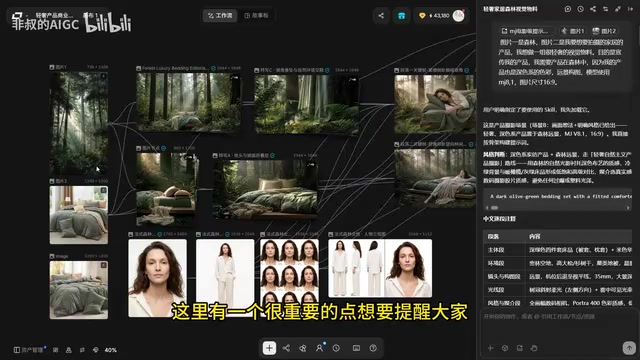
He was direct: "Source quality determines the ceiling of your final output. Cut corners here, and no amount of fixing later will save you." This applies universally to anyone doing AI visuals — no matter how powerful the generation model, it can't conjure high-quality output from low-quality input. Spending extra time on asset selection upfront almost always saves more time than repeated revisions downstream.
Step 2: Use Custom Skills to Batch-Generate Visual Materials
With assets ready, the next stage is producing light luxury visual materials. 飞叔 used a custom "MJ Prompt Skill" he had built himself, designed to transform vague ideas, scripts, or briefs into professional Midjourney prompts.
The workflow: select the corresponding Skill in the Agent chat panel, click the reference image node on the canvas, describe the requirement to the Agent, and hit generate. The Agent then thinks through the task, writes the prompts, and automatically creates image nodes on the canvas.
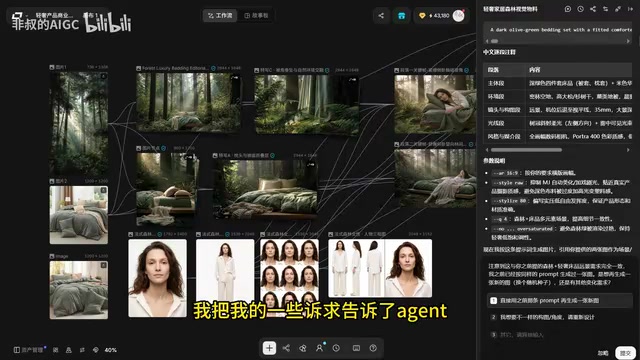
Beyond wide shots, the project also needed product close-ups. Using the same approach, 飞叔 described the need to the Agent, which created three nodes at once with prompts already written. Following the same flow, he generated fabric texture shots, macro close-ups, partial scene compositions, and more — rounding out the full set of visual materials.
Character Consistency: Building a Complete Character Asset with the Casting Skill
For home furnishing ads that feature people, maintaining character consistency has long been a pain point for AI creators. 飞叔 dedicated a separate section of the canvas to character design, using the "Casting Skill" from the general library.
Just describe the requirements, and this Skill generates a character close-up, full-body shot, facial expressions, and three-view reference sheet. The core value of these assets is providing a unified character reference for subsequent video generation — effectively ensuring the character looks consistent across different shots. This is a critical yet often underestimated part of AI video production.
Step 3: From Materials to Finished Film
With all materials in place, it was time for the main event — AI video creation. 飞叔 selected the "Drama TVC Ad" Skill from the general Skill library, reviewed its description, use cases, and output format, then added it to the canvas.
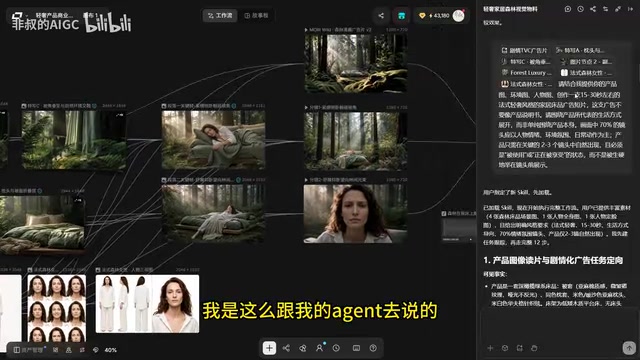
He then added the product images, environment images, scene images, and character images to the Chat, and entered a prompt: "Using the product and environment images I've provided, create a 15–30 second French light-luxury style furniture and bedding commercial."
After sending, the Agent automatically handled an entire chain of tasks: writing storyboard prompts, creating video and image nodes, generating a music node, and finally integrating everything — video and BGM — into the editor.
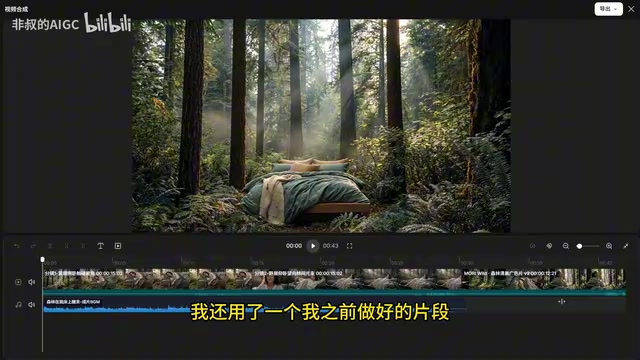
Notably, 飞叔 also added a previously created clip to the mix, and the system handled it seamlessly. The end result: a complete French light-luxury home furnishings commercial, produced entirely within one canvas.
The Power of Reuse: Turning Creative Experience into Skill Assets
This project was built on the newly released Agent + Skill combination. 飞叔 considers it beginner- and expert-friendly alike, saving significant time at every stage. But the feature with the most long-term value is this: you can add your own Skills, and you can convert any canvas session into a reusable Skill.
He demonstrated using his own MJ image prompt setup: click the Skill button in the canvas, create a custom Skill, give it a name, paste the content (file or folder uploads are also supported), fill in the use case description, set a cover image, and save. From that point on, it's available in any future project — one click to run.
This idea of "turning experience into assets" is the real essence of the Skill system. Creators can codify every lesson learned and every optimization into a reusable Skill. As that library grows, creative efficiency compounds over time.
Takeaway: A Mature Paradigm for AI Marketing Visual Workflows
This home furnishings ad AI creation pipeline illustrates a mature paradigm for modern marketing visual workflows:
Use the canvas as a unified workspace. Let the Agent automatically orchestrate Skills. Humans own direction; machines handle batch execution. From asset sourcing and character consistency to storyboarding and final compositing — the entire loop closes within one environment.
For content creators, the real barrier has shifted — it's no longer "do you know how to use the tools," but "can you articulate your needs clearly, and can you build your own Skill library?" The creators who turn their experience into reusable assets earliest will be the ones with the edge in the AI creative efficiency race.
Related articles

Vibe Coding Full-Stack in Practice: AI Programming from Beginner to Enterprise Deployment
From Cursor to Claude Code, this Bilibili AI programming course uses four progressive projects to cover full-stack development, open-source secondary development, and team collaboration. The article analyzes the shock to frontend roles, the efficiency shift from 50 people to 5, and the methodology required for enterprise-grade projects.

David Blaine's Global Quest for Real Magic: From South Africa to Japan and India
David Blaine travels to South Africa, Japan, and India in his Do Not Attempt special, documenting Spinning drivers, black mamba rescuers, iaijutsu masters, and ascetics—exploring the boundary between magic and real human极限 challenges.

Is a Touchscreen MacBook Coming? Vergecast Reveals Apple Executive's Response
Vergecast podcast reveals a conversation between a reporter and Apple executive John Ternus about a touchscreen MacBook and Apple Pencil support. Ternus says iPad is the best device for a stylus, while the reporter bets MacBook will eventually support Apple Pencil.