Skills and MCP Local Deployment in Practice: Let Your AI Coding Tool Handle the Setup

Let AI auto-configure Skills and MCP locally in OpenCode — no manual file editing needed.
Aimed at beginners stuck on environment setup for AI reverse engineering, this guide uses OpenCode to explain how to deploy Skills and MCP locally. Skills are standardized workflow documents for the AI; MCP is the protocol that gives AI real execution capabilities. Both can be configured by simply giving the AI a directory path and a single instruction — no manual debugging required. Integration can be conservative (external path reference) or aggressive (copy to local directory). The method works across AI coding tools by just swapping the tool name.
After the AI reverse engineering tutorial series launched, many people wanted to try things hands-on — only to get stuck at the very first step: setting up the environment. Case studies are for learning concepts; your local environment is the foundation for actually doing anything. Without it, every example stays theoretical. This tutorial uses OpenCode as a reference to walk through the local deployment of Skills and MCP, with one core principle: let the AI handle the configuration itself.
What Exactly Are Skills
A lot of beginners have a fuzzy understanding of what Skills actually are. In one sentence: Skills are a combination of "task boundaries + tool habits + output templates + acceptance criteria" — essentially a written instruction manual for your AI.
You take someone else's experience — or your own — and organize it into a standardized workflow document. Whenever the AI encounters a similar problem in the future, it follows that manual. This is the greatest value of Skills: many of them are written by seasoned practitioners who've distilled real-world experience into them. Using these Skills is like getting a copy of an expert's working methodology. You can follow the documented process for everything from project scoping to feature implementation.
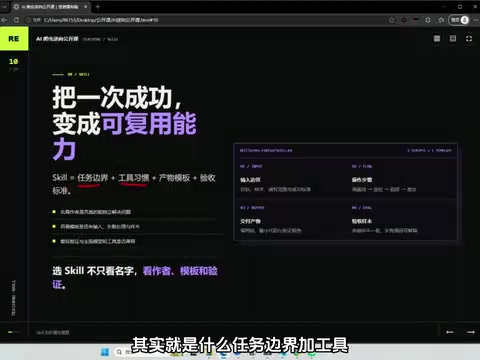
Simply put, Skills answer the question "how should the AI do this?" — they standardize the AI's behavioral path and output standards, turning what would otherwise be scattered capability into something controllable and reusable.
Let AI Configure Skills — It's More Reliable Than Doing It Manually
A lot of people hear "configure Skills and MCP" and immediately feel intimidated, worried they'll have to manually edit a bunch of files. But with AI coding tools in the picture, this step can be fully delegated to the AI.
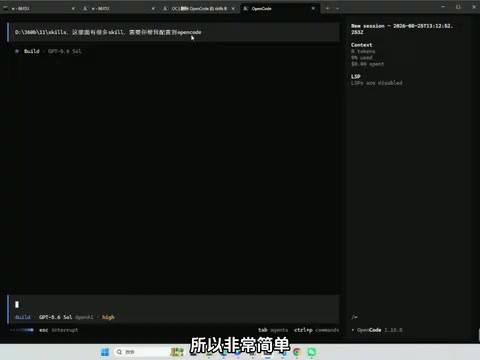
The approach is straightforward: prepare a Skills directory, give the AI the path, and tell it to "configure these Skills into OpenCode." If you're using Codex, Claude Code, or another tool, the configuration logic is almost identical — just swap the tool name in your prompt and nothing else needs to change.
Why let the AI do it? When you configure manually, you're often staring at files you don't fully understand, which makes errors likely. The AI can scan a directory structure, identify each file's purpose, and write the configuration directly. Its accuracy is actually higher than manual debugging.
During configuration, the AI first checks the current OpenCode config location and existing settings, determines how the Skills should be integrated, and avoids overwriting anything existing. It preserves current model permissions and agent settings, appending only the Skill search path, then verifies that each directory meets the Skill.md structural requirements. The whole process takes about two and a half minutes.
Conservative vs. Aggressive Integration
There are two ways to integrate. The conservative approach has the AI add an external path reference in opencode.json pointing to your Skills directory, without copying any files. The aggressive approach physically copies the entire Skills set into OpenCode's local config directory for the tool to scan directly.
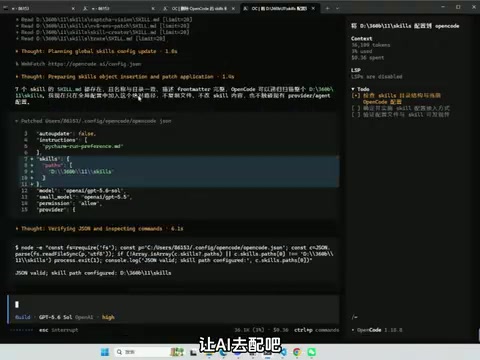
Both work fine. The tutorial uses the external path approach — the advantage is that your original files stay decoupled from the tool's configuration, making everything cleaner to manage. After restarting OpenCode, the newly added Skills appear in the Skill selection list and are immediately usable.
opencode.json is OpenCode's core configuration file, typically located in the .opencode/ folder under your home directory. It stores global tool settings in JSON format, including model permissions, Agent behavior policies, Skills search paths, and MCP service registrations. With the external path approach, the AI only writes a path declaration pointing to your Skills directory into this file — the original Skill files stay where they are. The aggressive approach physically copies files into a default scan directory like .opencode/skills/. The advantage of the external path method is that when you update or maintain your Skills content, you only need to modify the original directory — no need to sync multiple copies, which reduces the risk of version inconsistencies.
What Is MCP, and How Is It Different from Skills
MCP and Skills operate at entirely different levels. If Skills help the AI "know how to do something," MCP is what transforms the AI from "knowing" to "actually executing" — it provides the AI with a set of tools it can use to take real actions.
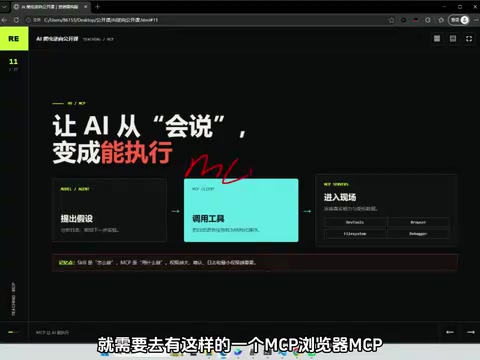
Here's an example: if the AI needs to interact with a browser — capturing mouse movement traces, call stacks, or handling instrumentation — all of that requires a browser MCP. Once configured, the AI can operate the browser directly through MCP to fulfill those requirements. Beyond browsers, there are also dedicated MCP tool sets for Android environments.
One-line summary of the division of labor: Skills are the process manual; MCP is the toolkit for gathering evidence on-site and actually executing actions.
MCP stands for Model Context Protocol, an open-source standardized interface specification proposed by Anthropic in late 2024. Its core idea is to define a unified "plugin interface" for AI models, so that different external tools, data sources, and services can all be invoked by the AI in the same way — without writing separate adapter code for each one. Think of it as the USB port of the AI world: as long as a tool follows the protocol, it's plug-and-play. MCP services typically run as local processes or remote services, and AI coding tools communicate with them via the standard JSON-RPC protocol to gain capabilities like controlling browsers, reading and writing the file system, and calling external APIs. Major AI coding tools including Claude Code, Cursor, and OpenCode already support MCP, and the ecosystem is expanding rapidly.
MCP Configuration Is Handled the Same Way
Configuring MCP works exactly like configuring Skills: give the AI the MCP directory path and tell it to "configure this into OpenCode." When switching to another AI coding tool, you again only need to change the tool name.
The example in the tutorial has four directories containing five configurable services in total, covering project-scoping tools and mini-program scenario support. After the AI completes configuration, it runs a real handshake verification — the setup only counts as active once it shows "passed."
One small detail worth noting: after restarting OpenCode, the MCPs may not immediately appear at the top of the interface list. However, running a verification command confirms that all four services are properly connected and fully functional. This is a display lag in the UI, not a configuration failure.
Summary
Local deployment of Skills and MCP used to feel like a high barrier for beginners, but the core logic is actually simple: both types of configuration can be completed by giving the AI a path and a single instruction — no manual debugging required.
- Skills standardize the AI's behavioral workflow — a reusable experience manual;
- MCP gives the AI real operational capabilities — an execution-layer toolkit;
- Both can be fully configured by the AI, and cross-tool migration only requires changing the tool name.
Getting this environment set up properly is what it actually means to be ready to independently reproduce reverse engineering case studies. For anyone serious about hands-on AI coding practice, getting your environment running is more important than watching cases over and over.
Related articles

Chain of Thought Isn't Just for AI: How Humans Can Use CoT to Improve Thinking Quality
Chain of Thought isn't just a prompt trick for large models. Starting from a Hacker News discussion, this article analyzes why CoT works for human thinking too, breaks down actionable ways to transfer it, and highlights the key differences between human CoT and machine CoT.
Cloudflare Teams Up with OpenAI: Closi…
Cloudflare Teams Up with OpenAI: Closing the Loop from Vulnerability Discovery to Defense with AI
Cloudflare uses OpenAI Daybreak to investigate security vulnerabilities and generate reviewable remediation plans, while developers use Codex to boost coding efficiency and quality.

Orca Multi-Agent Orchestration in Practice: A Guide to Parallel Collaboration with Claude and Codex
Orca is Stable AI's free open-source agent workbench supporting 34 agents like Claude Code and Codex in parallel. Learn its Git worktree isolation, multi-model orchestration, and mobile management.