Skreno: An All-in-One Video Tool for Recording, Editing, and Sharing — All in Your Browser

Skreno is a Chrome extension that combines screen recording, editing, sharing, and async collaboration in one browser-native tool.
Skreno is a Chrome extension positioning itself as a "video studio in the browser," integrating screen recording, editing, and collaborative sharing into a single workflow. Key features include separate screen and camera track recording, automatic silence cutting, animated captions, and share links with transcripts, AI summaries, and timestamped comments. Its "request recording" feature lets anyone submit a video without an account, and bug reports automatically include browser console logs — extending its utility into QA workflows. Aimed at remote teams, tutorial creators, and product testers, it's a potential competitor to Loom and Vidyard, though real-world performance remains to be verified.
Your Browser Is Now a Video Studio
Video production has long been seen as something that requires professional software and a complicated workflow: one tool for screen recording, another for editing, and yet another platform for sharing. Skreno's approach is to compress this entire chain into a single entry point — with everything done right inside the browser.
As a Chrome extension that launched on Product Hunt (ranking #8 on its debut day with 78 upvotes and 17 comments), Skreno positions itself as a "video studio in the browser." It covers the complete workflow from recording and editing to sharing, targeting users who need to quickly produce demo videos, tutorials, or async communication content.
Recording & Editing: Separate Tracks + Smart Processing
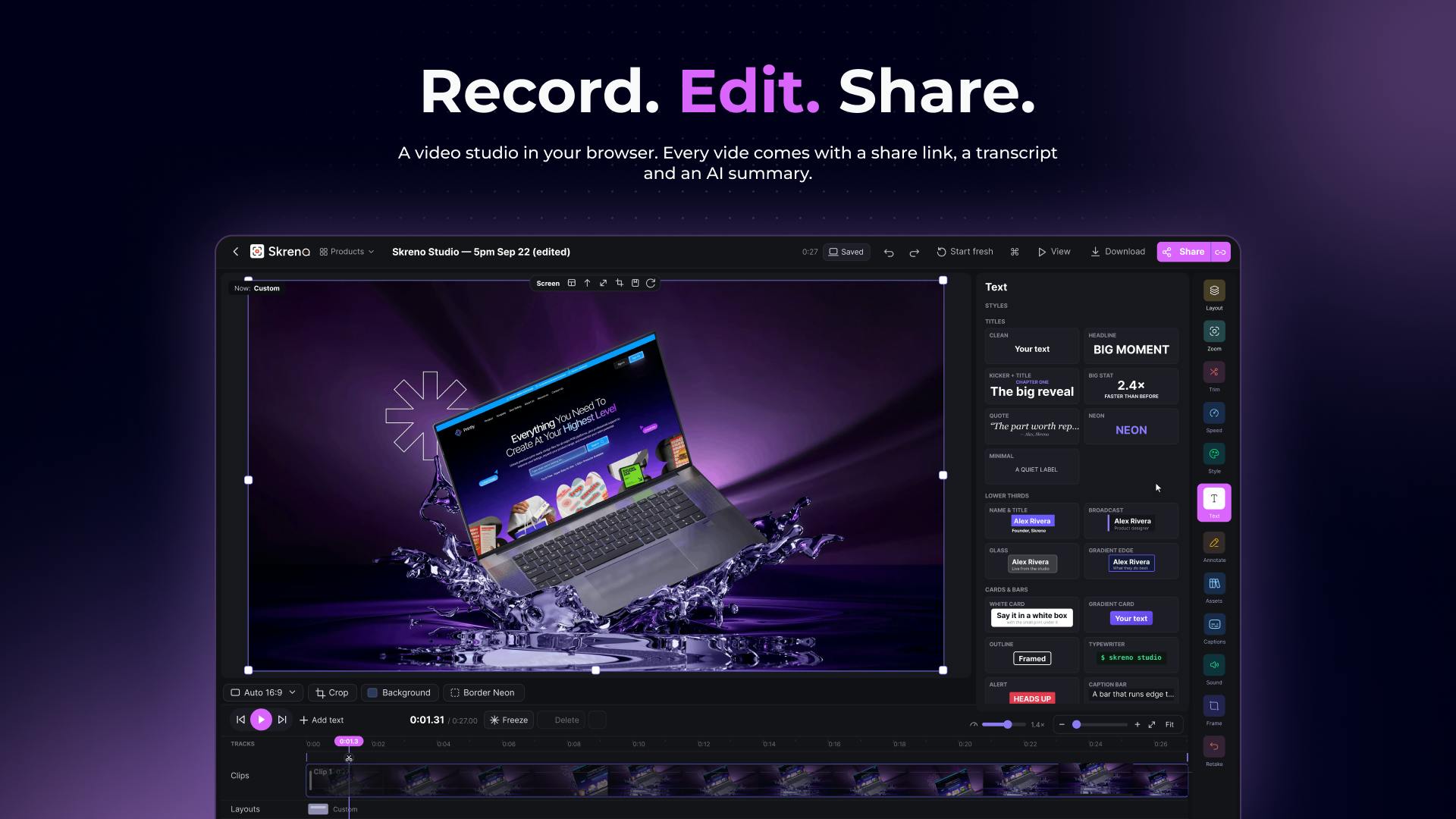
One key design decision in Skreno's recording workflow is capturing the screen and camera as independent tracks. This means each feed can be adjusted separately in post-production, rather than being baked into a single composite — offering significantly more flexibility than traditional one-click screen recorders.
After recording, the Studio editing module provides several efficiency-focused features:
- Layout switching: Quickly change how the screen and camera feeds are arranged
- Cut silences: Automatically detects and removes silent or paused segments, saving you the effort of manually hunting down dead air
- Animated captions and titles: Add animated text overlays to your video
This combination of features is designed for a "record and it's ready" workflow. For tutorial recordings and product demos, silence cutting and auto-captions can dramatically reduce the time spent on post-production.
Sharing: A Link That's Also a Collaboration Space
Where Skreno truly differentiates itself from ordinary screen recorders is in the sharing experience. The generated share link isn't just a video playback page — it bundles several layers of supporting information:
- Transcript: Automatically generates a text version of the video
- AI summary: Distills and summarizes the video content
- Timestamped comments: Viewers can leave feedback tied to a specific second in the video
Timestamped comments are especially useful for team collaboration. Rather than vaguely saying "there's an issue in the video," being able to pinpoint feedback to an exact moment significantly reduces communication overhead — a clear win for scenarios like product reviews and design walkthroughs.
Timestamped comments aren't a Skreno invention, but integrating them into a browser-based screen recording tool is still relatively uncommon. The underlying logic is to use the video timeline as a coordinate axis for comments, with each comment bound to a precise playback position — clicking a comment jumps directly to that moment. This is similar to YouTube's timestamp links, but the key difference is that comments here serve as a two-way collaboration interface rather than a one-way annotation. For content that requires multiple rounds of review (such as training videos or product demos), this mechanism can detach the "feedback → revision → approval" communication loop from email or messaging apps and anchor it directly to the video itself.
Request Recording: A No-Account Collaboration Entry Point
Another noteworthy feature is the "request recording" link. Users can send a link that allows anyone to record a video for you without signing up for an account. This lowers the collaboration barrier significantly — for example, asking a customer to record a bug reproduction, or having an external team member quickly submit a demo without going through a registration process.
A complementary detail: Bug reports automatically include console logs. This shows that Skreno has made specific considerations for development and QA scenarios. Bug reproduction videos can carry technical information directly, making it easier to pinpoint issues.
Console logs are runtime information recorded by the browser's developer tools, including JavaScript errors, network request statuses, and custom debug output. In bug reproduction scenarios, video footage alone is often insufficient to identify the root cause — users see an interface anomaly, but developers need the underlying error data that triggered it. By automatically bundling console logs into bug reports, Skreno means that while the recorder is reproducing the issue, the technical context is being silently captured in the background. Developers receive not just a screenshot saying "something went wrong," but raw data they can directly use for debugging. This extends Skreno's use case from pure content creation into software quality assurance (QA) workflows.
Who Is It For?
Looking at the feature set, Skreno's target audience is fairly clear:
- Remote teams that need to create async communication videos
- Creators recording product demos and tutorials
- Product and QA teams that need to collect external screen recording feedback
Consolidating recording, editing, sharing, and collaborative feedback in the browser — and layering on AI transcription and summarization — is Skreno's core value proposition. This category of "browser-native" video tools is becoming a competitive arena alongside products like Loom and Vidyard, and Skreno is trying to carve out differentiated space through details like separate track recording, timestamped comments, and no-account request recording.
It's worth noting that the publicly available information is primarily from the product's own description pages. Actual recording quality, editing smoothness, and AI summary accuracy still need to be validated through real-world use. For users looking for a lightweight, install-free video collaboration tool, it's worth adding to the shortlist.
Loom and Vidyard are the primary reference points in the browser-native async video space today. Loom is known for its extremely streamlined recording experience and enterprise-grade shared workspaces, and has been acquired by Atlassian and deeply integrated into its collaboration toolchain. Vidyard leans more toward sales use cases, offering video tracking and viewer identification features. Skreno's emphasis on separate track recording and no-account request recording aren't standard features in either of those products — which is the differentiated space it's trying to enter. However, the competitive threshold in this category isn't just about feature lists; it also comes down to recording stability, video processing speed, and enterprise-level permission management — capabilities that typically take sustained iteration to build, and remain areas that early-stage products need to continuously prove out.
Related articles

Is the Agent Harness Dead? Cursor's Early Engineer Breaks Down the Real Architecture of AI Coding Agents
Cursor early engineer Jediah breaks down the real architecture of the agent harness: why "the harness is dead" is only half right, how the data flywheel lets the harness obsolete itself, and how Grokbot, software factories, and primitive design open new frontiers for agents.
Python Visitor Pattern and Better Alternatives Explained
A deep dive into Python's visitor pattern and four alternatives: method pattern, pattern matching, dictionary mapping, and functools.singledispatch. Choose the best decoupling design by change frequency.

357 Days of Deep Experience: Why Omarchy Made Me Stop Distro-Hopping
A 357-day deep dive into Omarchy: 59-second install, out-of-the-box audio and GPU support, the Quattro QuickShell rewrite migration pains, and why Arch users should try it.