Skud: Branded File Delivery Tool Built for Designers — Just Drag and Drop

Skud lets designers deliver files via branded links straight from the Mac menu bar, with access tracking and security controls.
Skud is a macOS menu bar app built for designers and creative studios. Drag a file onto the icon and it instantly uploads and generates a branded share link. Its key differentiators are customizable delivery pages (logo, colors, cover image), client access tracking, and security features like password protection and link expiration. With a free 1 GB tier, it targets the niche of branded file delivery — though it faces challenges around storage limits and competition from tools like WeTransfer.
File delivery is one of those everyday tasks in creative work that looks simple on the surface but hides real friction underneath. Designers and studios send massive amounts of mockups, assets, and final files to clients every day — yet traditional transfer methods often lack any sense of brand identity and offer no way to know if a client actually looked at what you sent. Skud, a macOS tool that recently launched on Product Hunt, is aiming to fix exactly that.
Skud's Core Experience: Minimal Delivery, Straight from the Menu Bar
Skud lives in the Mac menu bar as a lightweight app. Its core workflow is refreshingly simple: drag any file onto the menu bar icon, and Skud automatically uploads it and copies a branded share link to your clipboard. No opening a web dashboard, no logging into a third-party cloud client.

For creative professionals who deliver files constantly, this "drag-to-share" simplicity hits right at the efficiency pain point. Compared to email attachments, messaging apps, or generic cloud storage links, Skud compresses a high-frequency task into just a few seconds — while staying true to the low-interruption nature of menu bar tools. It doesn't take up space in your Dock, and it doesn't break your flow.
Skud has received 70 upvotes on Product Hunt, landing at #16 on the day's leaderboard, and is listed under three categories: Productivity, Storage, and Menu Bar Apps.
Branded Customization: Making Every Delivery Feel Professional
Skud's most distinctive selling point is its brand customization capability. Users can personalize the share link page with their own logo, primary color, and cover image. That means when a client opens the link, they're not greeted by some generic third-party platform — they see a page that looks like it belongs to the designer or studio who sent it.
Why Brand Identity Matters for Designers
For independent designers and small studios, every client interaction is a chance to reinforce your professional image. A delivery page with your own logo and color palette strengthens brand recall in the details and signals that you care about the experience. This sense of "ownership" is exactly what Skud's team emphasizes in their product positioning — it's "built for designers and studios who want to own the experience."
By contrast, sending files via a generic cloud link often exposes clients to another company's branding — sometimes even ads — which quietly undermines the professionalism of your delivery.
File Access Tracking and Security Controls: Own Every Delivery
Beyond branding, Skud offers two features that carry real value for professional users: access tracking and security controls.
Access Tracking
Skud logs who opened your shared files. In a business context, this is significant — designers can confirm whether a client has actually reviewed a design, enabling more precise project follow-ups and eliminating the all-too-familiar "I didn't receive it" or "I haven't had a chance to look" communication gaps.
Password Protection and Link Expiration
On the security side, Skud supports password protection and link expiration controls. For files containing sensitive commercial work or unreleased projects, password protection adds an extra layer of security. Link expiration ensures files don't stay exposed on the internet indefinitely, reducing the risk of sensitive assets leaking. Together, these two features give you fine-grained control over your files' entire lifecycle.
Pricing and Target Users
Skud currently offers a free tier that covers 1 GB of file delivery — enough for most image- and document-heavy workflows. Larger storage and delivery needs are expected to be covered by paid plans.
In terms of positioning, Skud clearly targets designers and creative studios as its primary audience. It's not trying to be a general-purpose file storage or large-file transfer tool. Instead, it focuses narrowly on the niche of "branded file delivery." That precision is key to standing out in the crowded file transfer space.
Skud vs. Traditional File Transfer Tools
Skud's product philosophy reflects a broader trend in vertical tools: layering deep, audience-specific needs on top of general functionality. File transfer itself isn't new — Dropbox, WeTransfer, and others have long been mature solutions. But Skud's combination of branding, access tracking, and menu bar interaction gives designers a workflow that's far better suited to how they actually work.
That said, as a newly launched product, Skud does face some real challenges. The 1 GB free tier feels tight for heavier use cases like video files or large project archives. It also needs to compete against established tools like WeTransfer that already have strong brand recognition. Continuing to demonstrate the unique value of its branded delivery and tracking features will be critical to long-term user retention.
For independent designers and small studios who care about their professional image and need to deliver files to clients regularly, Skud is an efficiency tool worth trying. With minimal operational overhead, it transforms file delivery from a purely functional chore into a meaningful part of the brand experience.
Related articles

DeepSeek Harness: A Beginner's Installation and Testing Guide
A DeepSeek Harness tutorial for test engineers: set up Node.js, launch with one NPX command, configure official and third-party models, and explore web search, file I/O, and trace-view agent observability.
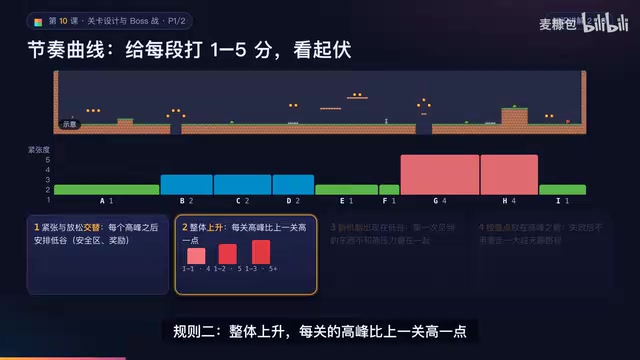
AI Game Development in Practice: Designing Levels with the Four-Step Method and Pacing Curves
AI game development lesson 10: design levels with the four-step method (teach, practice, combine, test) and a 1-5 pacing curve, plus sightline guidance and safety zones—implement Animatable Body 2D moving platforms and generate ASCII sketches for 1-2 Underground Cavern and 1-3 Guard Hall.

AI Game Development in Practice: Two-Phase Boss State Machines and Death Heatmap Tuning
AI game development lesson 10: implement a two-phase Boss with a state machine, guarantee fairness with color signals and a 0.4-second warning floor, locate difficulty cliffs with a death heatmap, and apply lightest-to-heaviest fixes one at a time, with an acceptance checklist and common pitfalls.