Skymir: A Two-Way Google Drive Sync Tool for Linux
Skymir fills Linux's long-standing Google Drive client gap with native GTK sync for $19 one-time.
Skymir is a Google Drive two-way sync tool built specifically for Linux by developer David Avellan. It runs as a native GTK tray application requiring no command-line setup, supports near-real-time sync (local changes upload in seconds, cloud changes arrive in ~1 minute), generates clickable shortcuts for Google Docs, and includes two-layer deletion protection — trashing deleted files and blocking operations that would remove over half your files. Priced at a one-time $19 with a 14-day free trial, it offers Linux desktop users a ready-to-use alternative to rclone and other command-line tools.
For years, Linux users have faced an awkward reality with Google Drive: Google has never released an official Linux client. Users were left to make do with browser uploads, third-party command-line tools, or various mounting solutions — all far inferior to the native experience on Windows and macOS. Skymir was built specifically to address this pain point.
What Is Skymir
Skymir is a Google Drive sync tool for Linux, built by developer David Avellan. It recently launched on Product Hunt, landing at #7 for the day with 79 upvotes. Its core proposition is straightforward: mirror your Google Drive folder to your local Linux system with true two-way sync.
Unlike clunky web-based or command-line approaches, Skymir provides a native GTK tray application that integrates deeply with mainstream Linux desktop environments. This means users can run sync silently in the background and check status via the system tray icon — just like on Windows or macOS — without typing commands in a terminal or triggering syncs manually.
GTK (GIMP Toolkit) is the graphical framework used by the GNOME desktop environment and one of the most widely adopted UI toolkits in the Linux desktop ecosystem. It's used by GNOME, Xfce, Cinnamon, and many others. Applications built on GTK blend naturally into these environments' visual styles and interaction patterns without requiring extra compatibility layers. By contrast, cross-platform tools (such as Electron-based apps) can run on Linux but often feel visually out of place and carry heavier resource overhead. Skymir's choice of GTK signals a commitment to native Linux experience — theoretically offering better visual integration and performance than cross-platform alternatives on mainstream Linux desktops.
Core Features
Two-Way Sync and Speed
Skymir's most important feature is genuine two-way sync. Files saved locally upload to the cloud within seconds, while changes made on Drive sync back to your local machine in about a minute. This near-real-time local upload speed is particularly useful for users who edit documents frequently or switch between devices.
Google Docs Shortcuts
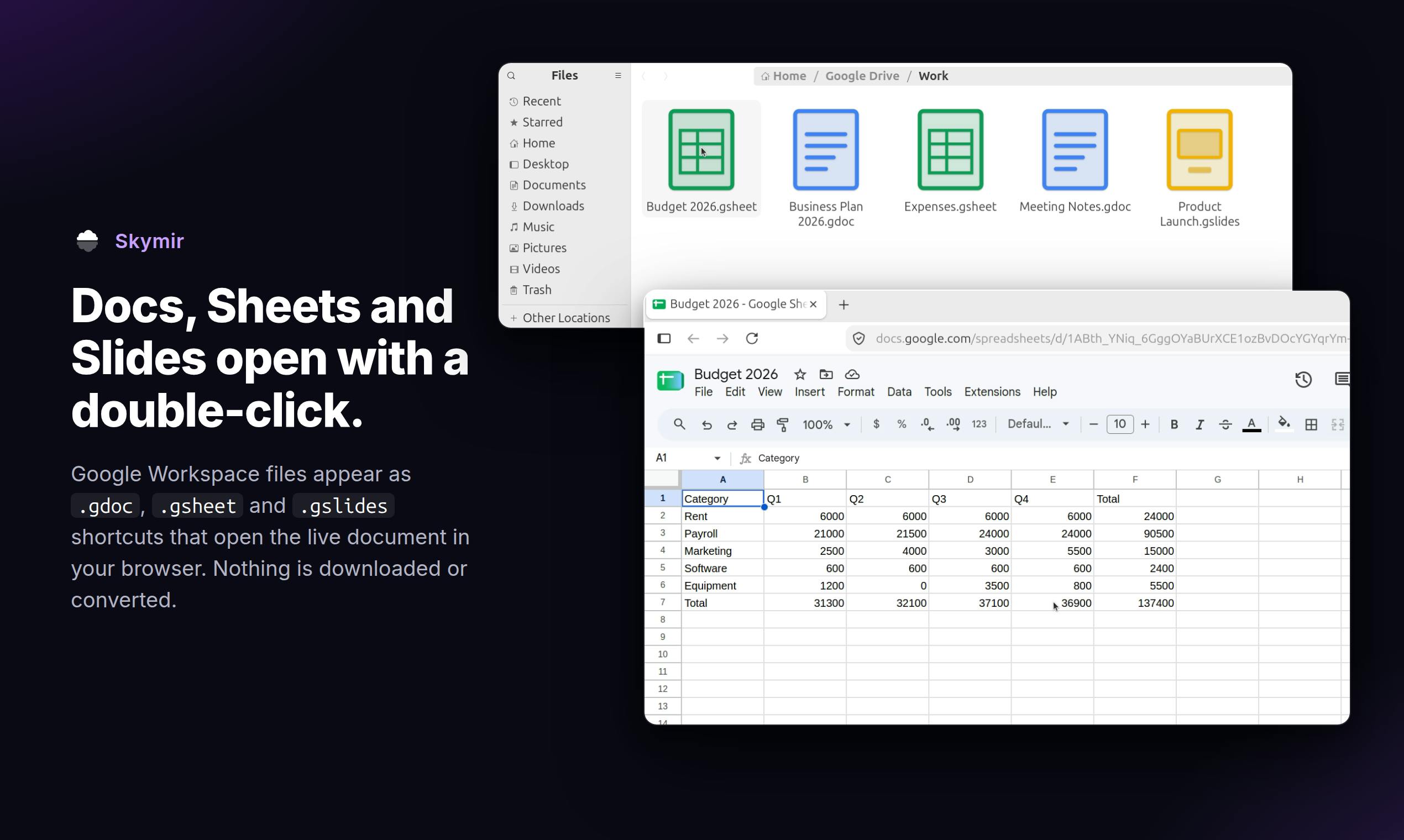
One notably clever design choice is how Skymir handles Google Docs files. Native Google documents aren't standard file formats and can't simply be downloaded as local files. Skymir generates double-click-to-open shortcuts for these documents, letting users access their online docs directly from the file manager — filling a gap that most sync tools leave wide open.
Deletion Protection
Skymir implements two layers of data safety. First, deleting files — whether locally or in the cloud — sends them to the trash rather than permanently erasing them, leaving room to recover from mistakes. More notably, if a sync operation would delete more than half of your files, Skymir refuses to proceed. This "circuit breaker" design guards against large-scale data loss caused by misconfiguration, sync conflicts, or malicious activity — precisely the scenario where many sync tools cause the most damage.
Pricing: One-Time Purchase, Not a Subscription
In an era of subscription-everything software, Skymir opts for a one-time purchase at $19 with a 14-day free trial and no recurring fees. For Linux users tired of stacking monthly charges and looking for a "pay once, own it" tool, this pricing model holds obvious appeal. The $19 price point is also relatively accessible, and the trial period gives users enough time to evaluate whether it fits their workflow.
Why Linux Users Should Pay Attention
Skymir fills a real gap that has existed for years. Linux holds a significant place among servers and developer communities, yet the desktop cloud storage sync experience has always lacked the smoothness of an official client. Open-source tools like rclone are powerful but unfriendly to everyday users, while the web interface is simply inefficient.
Skymir's value is in bringing an out-of-the-box experience to Linux desktop users: a native tray app, automatic two-way sync, document shortcuts, and deletion protection — all bundled into a solution that doesn't require fiddling with configuration. Its target audience is clear: people who rely on Google Drive and refuse to give up Linux.
The 79 upvotes on Product Hunt suggest that niche tools focused on solving a specific platform problem can still find their audience. Of course, as a relatively new commercial release, its long-term stability, compatibility across Linux distributions, and community support still need more real-world validation. But in terms of design philosophy, Skymir demonstrates a genuine understanding of what Linux users actually need.
rclone is the most widely used open-source command-line cloud storage tool on Linux (and other platforms), supporting dozens of services including Google Drive. It's extremely capable — supporting mounting, sync, encrypted transfers, and more — but carries a steep learning curve. Users must complete OAuth authorization in the terminal, write sync commands manually, or set up scheduled tasks via tools like systemd for automation. Another common approach is mounting Google Drive as a local directory via FUSE (Filesystem in Userspace), with tools like google-drive-ocamlfuse — but these solutions depend heavily on network quality, offer limited offline access, and involve a complex setup process. This is exactly where Skymir differentiates itself: replacing these command-line workflows, which are unfriendly to general users, with a graphical interface and automated sync.
Related articles

Felix Rieseberg Personal Homepage
Felix Rieseberg's personal homepage sparks attention on Hacker News. This article covers the Slack engineer's technical background, the rise and fall of nativefier, and the value of a developer homepage as a tech calling card.

@ai-sdk/vue 3.0.306 Patch Release Syncs with [email protected] Update
@ai-sdk/vue 3.0.306 released, synced with [email protected]. A routine patch release for the Vercel AI SDK ecosystem with no public API changes; the Vue adapter layer stays version-aligned with the core package.

Gemini 4 Argon API Launches: The Era of Million-Token Output Begins
Google launches Gemini 4 Argon with sparse MoE architecture, up to 1M output tokens, and a 68.90% Vals Index score, available across API, AI Studio, and the Gemini app.