Small Parameters, Big Capabilities: A Guide to Flux.3 Klein and MOSS Image on Draw Things

5B-class lightweight flagships Flux.3 Klein and MOSS Image tested: licenses, parameters, and local deployment fully explained.
Based on the hands-on tutorial by Bilibili creator "工具狂," the article introduces two 5B-class image models that run locally on Apple's Draw Things: Flux.3 Klein (5.6B) and MOSS Image (5B). Both support JSON-structured prompts and Bbox layout control, but their rules are incompatible with Ideogram 4. MOSS Image uses Apache 2.0, while Flux.3 Klein uses a community license with a commercial exemption for annual revenue under $5M. Tests show Flux.3 Klein markedly improves human anatomy over the previous generation and natively supports editing, with Bbox position editing changing only element positions without affecting other features, generating in just over 10 seconds on an M5 iPad; MOSS Image performs well on text and design tasks but tends toward "influencer faces" for human generation. The author's conclusion: use existing models thoroughly and accumulate tool skills.
Open-source image models are rapidly evolving toward "smaller parameter counts, stronger capabilities." Recently, two 5B-class lightweight flagship models—Flux.3 Klein and MOSS Image—became available on Apple's Draw Things, making it possible for consumer-grade hardware to achieve top-tier image generation and editing. Based on the hands-on tutorial by Bilibili creator "工具狂" (Tool Maniac), this article outlines the licensing differences, capability characteristics, and practical parameter configurations of these two models to help you get started quickly on Mac and iPad.
Two Lightweight Flagships in the Small-Parameter Trend
Flux.3 Klein has 5.6B parameters, and MOSS Image has 5B—both fall in the 5B range. The significance of this tier is that ordinary consumer devices can handle them, while model capabilities have not noticeably shrunk due to the reduced parameters. Flux.3 Klein continues the previous generation's dual-mode capability, able to both generate and edit; MOSS Image officially does not support native image editing, but performs well on prompt understanding, text generation (including Chinese), and design-oriented tasks.
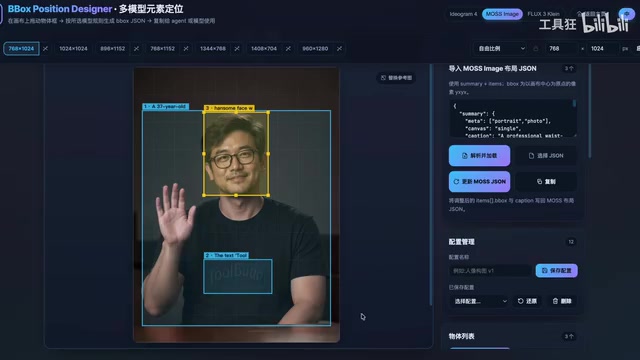
Both models support JSON-structured prompts for precise Bbox position control in generation—a capability previously seen mainly in Ideogram 4. However, the JSON layout rules of the three are not interchangeable—the origin position, value ranges, and coordinate ordering are completely different, so prompts cannot be copied directly. The creator has updated a self-made Bbox element positioning layout tool page for this purpose and will share the corresponding rule files and prompt scripts.

Bbox (Bounding Box) is a foundational concept in computer vision, referring to a rectangular coordinate frame that marks a target region in an image. In text-to-image models, putting a Bbox in a prompt is equivalent to telling the model "where in the image an element should appear," enabling precise layout control rather than letting the model compose freely. Common coordinate formats include [x1, y1, x2, y2] (top-left and bottom-right corners) and [x, y, w, h] (top-left coordinate plus width and height), and the origin may be the top-left corner or the center. Precisely because these conventions have no unified standard, different vendors' JSON layout rules are inherently incompatible, and copying prompts across models often produces completely misaligned images.
LoRA (Low-Rank Adaptation) is a lightweight model fine-tuning technique: it does not modify the original model weights but attaches a pair of small low-rank matrices alongside the attention layers, updating only these parameters during training. For text-to-image models, the community most commonly trains two types of LoRA—style/character LoRAs teach the model a specific art style or person, while acceleration LoRAs use distillation to let the model complete in 4–8 steps the sampling that originally required dozens of steps, compressing generation time to just over ten seconds. LoRA files are extremely small (typically tens to hundreds of MB), plug-and-play, and can be loaded and switched directly in local clients like Draw Things.
Licensing and Versions: Commercial Thresholds and Selection Advice
Regarding usage licensing, MOSS Image uses the permissive Apache License 2.0, which is friendly to both commercial applications and academic research; Flux.3 Klein uses the Flux Community License, which generally permits non-commercial use but grants a commercial output exemption to qualifying users with annual revenue below $5 million—larger-scale commercialization requires separate licensing inquiries. In other words, individuals and small-to-medium teams with annual revenue under $5 million can commercialize worry-free, while large companies need to purchase a license separately.
On version selection, MOSS Image offers Base and SFT versions. SFT is the supervised fine-tuned version, ready out of the box and generally recommended; the Base version is more for secondary development or training fine-tunes. Even for the SFT version, normal generation is recommended at 30+ steps, and several acceleration LoRAs are already available. Flux.3 Klein offers a Base version and a distilled acceleration version: Base recommends 50 steps, while the distilled version recommends 16 steps by default.
Apache License 2.0 is one of the most permissive open-source licenses in the industry, allowing free use, modification, and redistribution—including commercial use—requiring only that copyright and license notices be retained, and it includes a patent grant clause, making it very friendly to enterprises and academic teams. In contrast, a Community License is a "conditional open-weights license," typically drawing a line based on revenue or user scale: small-scale users can commercialize for free, while those exceeding the threshold must purchase a commercial license from the copyright holder. The Flux series adopts exactly this model, so be sure to check whether your annual revenue falls within the exemption range before use—otherwise compliance risk falls on the user.
SFT (Supervised Fine-Tuning) means continuing to train on top of a base model using manually labeled, high-quality "instruction–output" paired data, making the model better understand human intent and usable out of the box; the cost is that it may narrow the output distribution, leading to stylistic homogenization. The Base version is the original base model without instruction alignment—more controllable and diverse, but requiring users to write more refined prompts themselves, and better suited as a starting point for secondary training and fine-tuning. Choosing SFT versus Base is essentially a trade-off between "ease of use" and "diversity/malleability."
Flux.3 Klein in Practice: Anatomical Improvements and Editing Capabilities
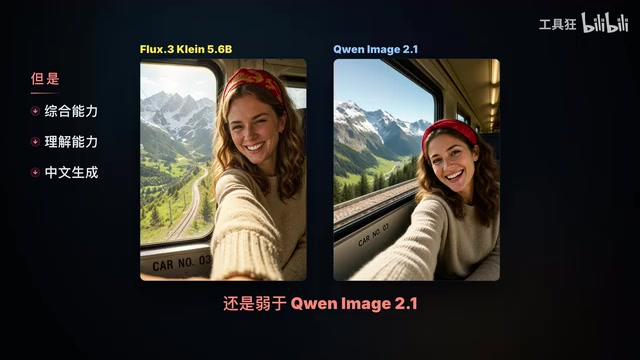
The first thing the creator did after downloading the model was test its understanding of human anatomy, because the previous generation performed poorly here, directly affecting the usability of generation tasks. After testing multiple images, Flux.3 Klein with only 5.6B parameters performed generally well on human generation—fingers, limbs, and faces are all handled in typically complex scenes. The texture and detail of its output are considered above a certain 2.1 version model, but comprehensive understanding, especially Chinese generation capability, still lags behind.
On parameters, the creator shared three sets of high-quality generation presets: one for the 16-step distilled version, and two paired with 4-step acceleration LoRAs, which can be downloaded and imported directly. Editing capability is Flux.3 Klein's strength—face swapping and outpainting can be done with the native model, with the key lying in prompt formulation. Using the tool website to first generate an outpainting base plate and then pasting it into Draw Things for generation, or using a dedicated OutPaint LoRA, can make outpainting tasks more stable.
The most interesting part is Bbox element position editing: the earlier Ideogram 4 had no editing capability—once element positions changed and the image was regenerated, all elements would change. With Flux.3 Klein in editing mode, after changing element positions and regenerating, only the position changes while all other element features remain completely unchanged. The creator demonstrated this with position adjustments of a billboard and lightning.
On speed, Flux.3 Klein Base with a 4-step LoRA takes just over 10 seconds to generate an image on an M5 iPad. The creator said outright, "This speed makes it hard not to love," and except for poor Chinese rendering, it will be the preferred choice in many cases.

MOSS Image in Practice: Strong at Text, Characters Need Polish
MOSS Image comes from the OpenMOSS team, jointly founded by the Shanghai Innovation Institute, Fudan University's Natural Language Processing Lab, and MOSS.ai, led by Professor Qiu Xipeng of Fudan University, focusing on industry-academia-research integration and open-source innovation in frontier fields such as large models, multimodal generation, and agents. Users generally download the version with the SFT suffix.
In practice: the model performs well on prompt understanding and generation completeness when generating text (including Chinese) and doing design-oriented tasks; but human generation, especially Asian faces, tends toward "handsome guy faces and pretty girl faces" in most cases—obviously AI at a glance, somewhat like an earlier 1.0 version model. The creator speculates this is related to SFT, and that characters generated by the Base version are much better in detail and diversity. This judgment is a single-source subjective experience, for reference only.
MOSS Image likewise supports JSON and Bbox prompts for precise layout control, with rules different from Ideogram 4—prompts are not interchangeable. The creator currently uses three acceleration LoRAs and considers the best results to come from the SFT version plus an 8-step Chroma D-MDR LoRA, and encourages everyone to share their own conclusions. There is no official editing version; although the open-source community has modded editing versions, they cannot be used in Draw Things—and given that existing models' native editing capabilities are powerful enough, there is no need to tinker with modded versions.
Tool Skills Need to Accumulate
Beyond these two models, the open-source community soon released another new flagship model, and the creator admits to feeling somewhat tired. His conclusion is worth noting: using existing models well and thoroughly, with proper combinations in Draw Things, is entirely sufficient for various image generation and editing tasks; the worst thing is dabbling in each new model as it arrives—getting a quick thrill and then nothing more. Models keep iterating, but tool skills need to accumulate.
Related articles

Why Microsoft CEO Nadella Still Backs Nvidia After Jensen Huang's Departure
Microsoft CEO Nadella publicly expresses confidence in Nvidia interim CEO Colette Kress. This article analyzes Nvidia's power transition after Jensen Huang's departure, Microsoft's compute dependency, and the trust logic of the AI supply chain.

Nadella: Critical Infrastructure Is 'Unpatchable' as AI Cybersecurity Arms Race Escalates
Microsoft CEO Nadella addresses AI cyberattack fears, saying much critical infrastructure is unpatchable, downplaying the Outlook outage, and analyzing AI's dual role in cybersecurity.

Musk Backs Jensen Huang: Firing Him Is Like Cutting Jordan
Musk says Jensen Huang is loyal to the U.S. and likens firing him to cutting Michael Jordan—highlighting politicization anxieties in the AI chip industry and defending talent value.